

第9周作业
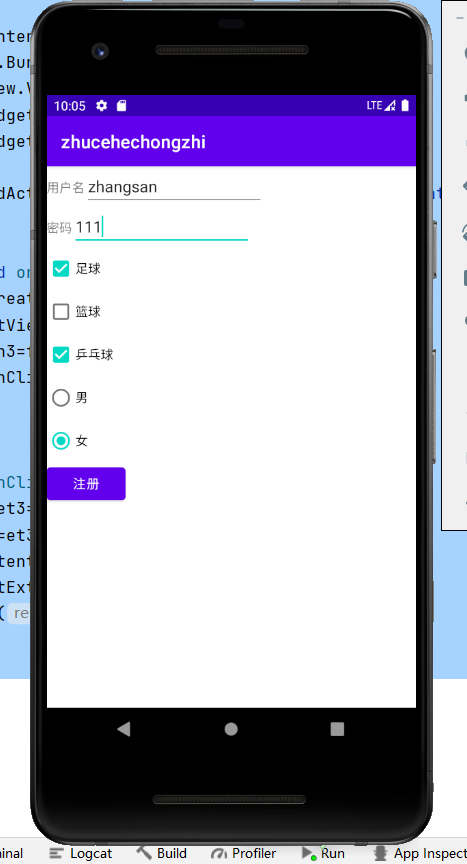
<?xml version="1.0" encoding="utf-8"?>
<LinearLayout xmlns:android="http://schemas.android.com/apk/res/android"
    xmlns:app="http://schemas.android.com/apk/res-auto"
    xmlns:tools="http://schemas.android.com/tools"
    android:layout_width="match_parent"
    android:layout_height="match_parent"
    tools:context=".MainActivity"
    android:orientation="vertical">

    <LinearLayout
        android:layout_width="wrap_content"
        android:layout_height="wrap_content"
        android:orientation="horizontal">

        <TextView
            android:layout_width="wrap_content"
            android:layout_height="wrap_content"
            android:text="用户名"/>
        <EditText
            android:id="@+id/et_1"
            android:layout_width="200dp"
            android:layout_height="wrap_content"/>

    </LinearLayout>
    <LinearLayout
        android:layout_width="wrap_content"
        android:layout_height="wrap_content"
        android:orientation="horizontal">

        <TextView
            android:layout_width="wrap_content"
            android:layout_height="wrap_content"
            android:text="密码"/>
            <EditText
                android:id="@+id/et_2"
                android:layout_width="200dp"
                android:layout_height="wrap_content" />
    </LinearLayout>
    <CheckBox
        android:id="@+id/cb_1"
        android:layout_width="wrap_content"
        android:layout_height="wrap_content"
        android:text="足球"/>
    <CheckBox
        android:id="@+id/cb_2"
        android:layout_width="wrap_content"
        android:layout_height="wrap_content"
        android:text="篮球"/>
    <CheckBox
        android:id="@+id/cb_3"
        android:layout_width="wrap_content"
        android:layout_height="wrap_content"
        android:text="乒乓球"/>
    <RadioGroup
        android:id="@+id/rg_1"
        android:layout_width="wrap_content"
        android:layout_height="wrap_content">
        <RadioButton
            android:id="@+id/rb_1"
            android:layout_width="wrap_content"
            android:layout_height="wrap_content"
            android:text="男"/>
        <RadioButton
            android:id="@+id/rb_2"
            android:layout_width="wrap_content"
            android:layout_height="wrap_content"
            android:text="女"/>
    </RadioGroup>
    <Button
        android:id="@+id/btn_1"
        android:layout_width="wrap_content"
        android:layout_height="wrap_content"
        android:text="注册"/>

</LinearLayout>

<?xml version="1.0" encoding="utf-8"?>
<LinearLayout xmlns:android="http://schemas.android.com/apk/res/android"
    xmlns:app="http://schemas.android.com/apk/res-auto"
    xmlns:tools="http://schemas.android.com/tools"
    android:layout_width="match_parent"
    android:layout_height="match_parent"
    tools:context=".SecondActivity"
    android:orientation="vertical">
    <TextView
        android:id="@+id/tv_1"
        android:layout_width="wrap_content"
        android:layout_height="wrap_content"
        android:text="111"/>
    <TextView
        android:id="@+id/tv_2"
        android:layout_width="wrap_content"
        android:layout_height="wrap_content"
        android:text="222"/>
    <Button
        android:id="@+id/btn_2"
        android:layout_width="wrap_content"
        android:layout_height="wrap_content"
        android:text="充值"/>
    <TextView
        android:id="@+id/tv_3"
        android:layout_width="wrap_content"
        android:layout_height="wrap_content"
        android:text="充值金额为"/>


</LinearLayout>
<?xml version="1.0" encoding="utf-8"?>
<RelativeLayout xmlns:android="http://schemas.android.com/apk/res/android"
    xmlns:app="http://schemas.android.com/apk/res-auto"
    xmlns:tools="http://schemas.android.com/tools"
    android:layout_width="match_parent"
    android:layout_height="match_parent"
    tools:context=".ThirdActivity">

    <EditText
        android:id="@+id/et_3"
        android:layout_width="wrap_content"
        android:layout_height="wrap_content"
        android:hint="输入要充值的金额"/>
    <Button
        android:id="@+id/btn_3"
        android:layout_toRightOf="@id/et_3"
        android:layout_width="wrap_content"
        android:layout_height="wrap_content"
        android:text="充值"/>

</RelativeLayout>
package com.example.zhucehechongzhi;

import androidx.appcompat.app.AppCompatActivity;

import android.content.Intent;
import android.os.Bundle;
import android.view.View;
import android.widget.Button;
import android.widget.CheckBox;
import android.widget.CompoundButton;
import android.widget.EditText;
import android.widget.RadioGroup;

public class MainActivity extends AppCompatActivity implements CompoundButton.OnCheckedChangeListener,
        RadioGroup.OnCheckedChangeListener, View.OnClickListener {
    String s1="",s2="",s3="",sex="";

    @Override
    protected void onCreate(Bundle savedInstanceState) {
        super.onCreate(savedInstanceState);
        setContentView(R.layout.activity_main);
        Button btn=findViewById(R.id.btn_1);
        btn.setOnClickListener(this);

        CheckBox cb1=findViewById(R.id.cb_1);
        cb1.setOnCheckedChangeListener(this);
        CheckBox cb2=findViewById(R.id.cb_2);
        cb2.setOnCheckedChangeListener(this);
        CheckBox cb3=findViewById(R.id.cb_3);
        cb3.setOnCheckedChangeListener(this);

        RadioGroup rg=findViewById(R.id.rg_1);
        rg.setOnCheckedChangeListener(this);
    }

    @Override
    public void onClick(View view) {
        Intent intent=new Intent(this,SecondActivity.class);
        String uname=((EditText)findViewById(R.id.et_1)).getText().toString();
        String upwd=((EditText)findViewById(R.id.et_2)).getText().toString();
        String hobby=s1+s2+s3;
        intent.putExtra("yhm",uname);
        intent.putExtra("mm",upwd);
        intent.putExtra("ah",hobby);
        intent.putExtra("xb",sex);
        startActivity(intent);
    }

    @Override
    public void onCheckedChanged(CompoundButton buttonView, boolean isChecked) {
        switch (buttonView.getId()){
            case R.id.cb_1:
                if(isChecked)
                    s1="足球";
                else
                    s1="";
                break;
            case R.id.cb_2:
                if(isChecked)
                    s2="篮球";
                else
                    s2="";
                break;
            case R.id.cb_3:
                if(isChecked)
                    s3="乒乓球";
                else
                    s3="";
                break;
        }
    }

    @Override
    public void onCheckedChanged(RadioGroup group, int checkedId){
        switch (checkedId){
            case R.id.rb_1:
                sex="男";
                break;
            case R.id.rb_2:
                sex="女";
                break;
        }
    }
}
package com.example.zhucehechongzhi;

import androidx.annotation.Nullable;
import androidx.appcompat.app.AppCompatActivity;

import android.content.Intent;
import android.os.Bundle;
import android.view.View;
import android.widget.Button;
import android.widget.TextView;

public class SecondActivity extends AppCompatActivity implements View.OnClickListener {

    @Override
    protected void onCreate(Bundle savedInstanceState) {
        super.onCreate(savedInstanceState);
        setContentView(R.layout.activity_second);

        Intent intent=getIntent();
        String uname=intent.getStringExtra("yhm");
        String upwd=intent.getStringExtra("mm");
        String hobby=intent.getStringExtra("ah");
        String sex=intent.getStringExtra("xb");

        TextView tv1=findViewById(R.id.tv_1);
        tv1.setText("用户名为:"+uname+",密码为:"+upwd);
        TextView tv2=findViewById(R.id.tv_2);
        tv2.setText("爱好为:"+hobby+",性别为:"+sex);

        Button btn2=findViewById(R.id.btn_2);
        btn2.setOnClickListener(this);
    }

    @Override
    public void onClick(View view) {
        Intent intent=new Intent(this,ThirdActivity.class);
        startActivityForResult(intent,1);
    }

    @Override
    protected void onActivityResult(int r1, int r2, @Nullable Intent intent) {
        super.onActivityResult(r1, r2, intent);
        if(r1==1&&r2==1){
            String je=intent.getStringExtra("金额");
            TextView tv3=findViewById(R.id.tv_3);
            tv3.setText("您的充值金额是:"+je);
        }
    }
}
package com.example.zhucehechongzhi;


import androidx.appcompat.app.AppCompatActivity;

import android.content.Intent;
import android.os.Bundle;
import android.view.View;
import android.widget.Button;
import android.widget.EditText;

public class ThirdActivity extends AppCompatActivity implements View.OnClickListener {

    @Override
    protected void onCreate(Bundle savedInstanceState) {
        super.onCreate(savedInstanceState);
        setContentView(R.layout.activity_third);
        Button btn3=findViewById(R.id.btn_3);
        btn3.setOnClickListener(this);
    }

    @Override
    public void onClick(View view) {
        EditText et3=findViewById(R.id.et_3);
        String je=et3.getText().toString();
        Intent intent=new Intent();
        intent.putExtra("金额",je);
        setResult(1,intent);
        finish();
    }
}


 浙公网安备 33010602011771号