
使用Vue3集成Element-Plus快速搭建一个管理系统的页面框架
Element-Plus简介
Element-Plus是一套前端UI框架,通过它可以快速实现精美的页面样式
官网:https://element-plus.org
国内镜像网站(访问速度快):https://cn.element-plus.org
Vue3集成Element-Plus
安装依赖
npm i element-plus -S
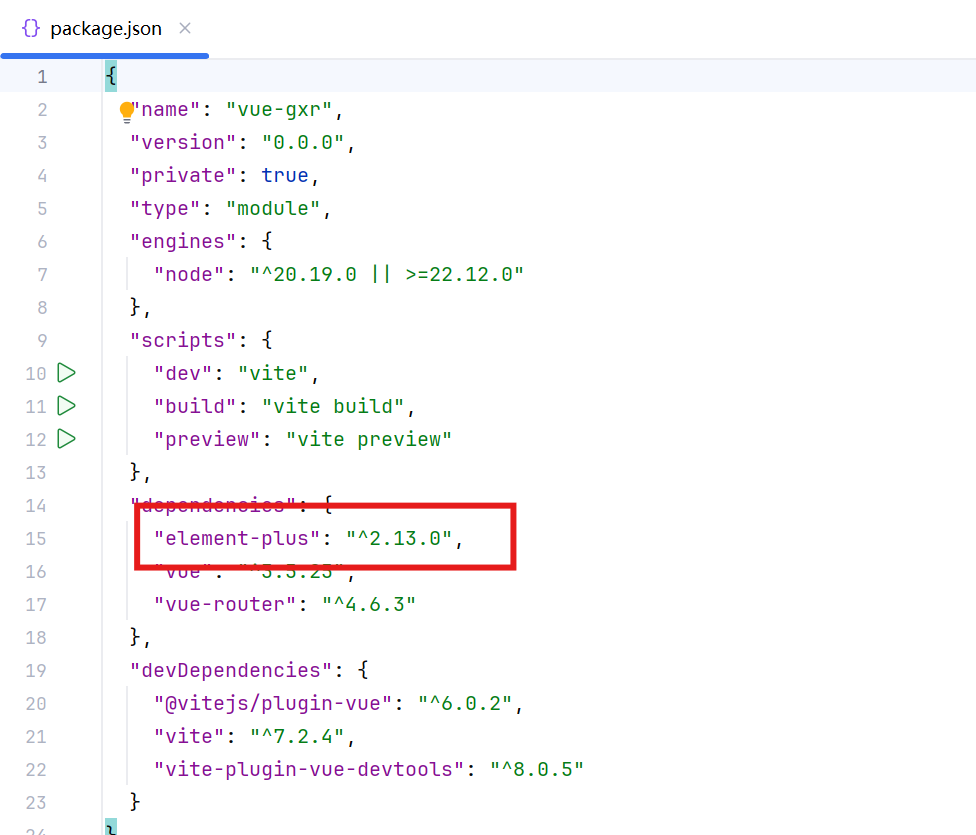
在package.json文件中出现element-plus代表安装成功。
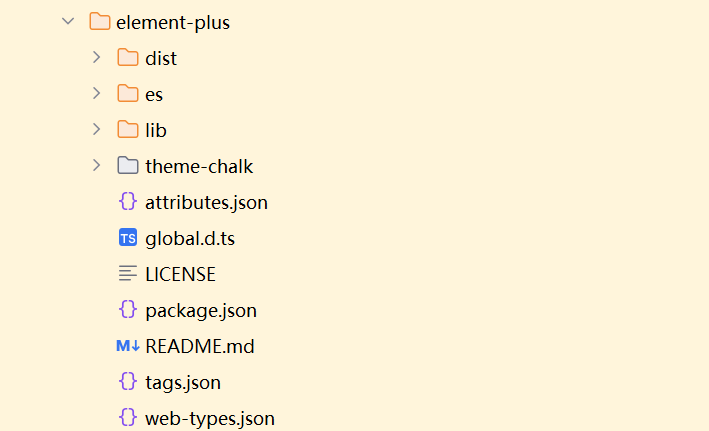
同时node_modules中会生成element-plus的包。
卸载element-plus
npm uninstall element-plus
在main.js里面引入
import ElementPlus from 'element-plus'
import 'element-plus/dist/index.css'
import zhCn from 'element-plus/es/locale/lang/zh-cn'

app.use(ElementPlus,{
    locale:zhCn,
})
测试使用Element-Plus组件
使用官方的按钮组件
   <el-button>Default</el-button>
   <el-button type="primary">A</el-button>
   <el-button type="success">B</el-button>
   <el-button type="info">C</el-button>
   <el-button type="warning">D</el-button>
   <el-button type="danger">F</el-button>
Home.vue测试内容
<template>
 <div>
   <el-button>Default</el-button>
   <el-button type="primary">A</el-button>
   <el-button type="success">B</el-button>
   <el-button type="info">C</el-button>
   <el-button type="warning">D</el-button>
   <el-button type="danger">F</el-button>

   <div style="padding: 50px">
     <el-icon size="25" color="red"><ChatLineRound /></el-icon>
     <el-input placeholder="Pick a date" :suffix-icon="Calendar" :prefix-icon="Search"/>
     <el-button type="primary" icon="Search">A</el-button>
   </div>

 </div>

</template>
<script setup>

import {Calendar, Search} from "@element-plus/icons-vue";
</script>
全局使用icon
安装icon组件
npm install @element-plus/icons-vue
在package.json文件中出现@element-plus/icons-vue代表安装成功。
Vue3的scricp后面必须加set up
<script setup>

</script>
``

在main.js中引入
```java
import * as ElementPlusIconsVue from '@element-plus/icons-vue'

for (const [key, component] of Object.entries(ElementPlusIconsVue)) {
    app.component(key, component)
}
使用图标:el-icon、el-input、el-button
el-input:当在输入框组件里面使用图标时,需要单独导入图标
el-icon、el-button:按钮或者图标组件里面,不需要单独导入图标
Element-Plus主题色设置
安装依赖sass、unplugin-vue-components、unplugin-auto-import
npm install -D sass unplugin-vue-components unplugin-auto-import
配置 index.css 放在 src/assets/css 目录下
@forward 'element-plus/theme-chalk/src/common/var.scss' with (
  $colors: (
    "primary":("base":#2c82ff),
    "success":("base":#31bf00),
    "warning":("base":#ffad00),
    "danger":("base":#e52f2f),
    "info":("base":#8055ff),
  )
);
配置vite.config.js
import AutoImport from 'unplugin-auto-import/vite'//自动导入Vue中的组件
import Components from 'unplugin-vue-components/vite'//自动导入ui-组件 比如 element-plus等
import {ElementPlusResolver} from "unplugin-vue-components/resolvers";//对应组件库引入,AntDesignVueResolver

export default defineConfig({
  plugins: [
    vue(),
    //elements-plus按需导入
    AutoImport({
        resolvers:[ElementPlusResolver()],
      }),
    Components({
        resolvers:[
            //配置elementPlus采用sass样式配置系统
            ElementPlusResolver({importStyle:"sass"})
        ],
      }),
  ],
  css:{
    preprocessorOptions:{
      scss:{
        additionalData:'@use "@/assets/css/index.scss" as *;',
      },
    },
  },
搭建后台的基本框架
配置导航菜单
菜单主题颜色:#3a456b
高亮颜色:#537bee
点击 menu 里面的某一项跳转页面怎么做
router 是否启用 Vue-router 模式,启用该模式会在激活导航时以 index 作为 path 进行路由跳转,使用 default-active 来设置加载时的激活项。
高亮显示当前路由
可以通过 router.currentRouter.value.path 获取当前展示的路由
:default-active="router.currentRoute.value.path"
菜单区域
 <!-- 菜单区域开始 -->
      <div style="width: 240px;">
        <el-menu router :default-openeds="['1']" default-active="/manager/home" style="min-height: calc(100vh - 60px)">
          <el-menu-item index="/manager/home">
            <el-icon><House /></el-icon>
            <span>首页</span>
          </el-menu-item>
          <el-sub-menu index="1">
            <template #title>
              <el-icon><location /></el-icon>
              <span>数据管理</span>
            </template>
            <el-menu-item index="1-1">二级菜单</el-menu-item>
          </el-sub-menu>
        </el-menu>
      </div>
      <!-- 菜单区域结束 -->
头部区域
 <!-- 头部区域开始 -->
    <div style="height: 60px;display: flex">
      <div style="width: 240px; display: flex;align-items: center;padding-left: 20px;background-color: #3a456b">
        <img style="width: 40px;height: 40px;border-radius: 50%" src="@/assets/imgs/logo.png" alt="">
        <span style="font-size: 20px;font-weight: bold;color: #f8fff8;margin-left: 5px">GXR毕设</span>
      </div>
      <div style="flex: 1;display:flex;align-items:center;padding-left:20px;border-bottom: 1px solid #ddd">
        首页 / 数据分析
      </div>
      <div style="width: fit-content;padding-right: 20px;display: flex;align-items: center;border-bottom: 1px solid #ddd">
        <el-dropdown>
          <div style="display: flex;align-items: center">
            <img style="width: 40px;height: 40px;border-radius: 50%" src="https://cube.elemecdn.com/3/7c/3ea6beec64369c2642b92c6726f1epng.png" alt="">
            <span style="margin-left: 5px">管理员</span>
          </div>
          <template #dropdown>
            <el-dropdown-menu>
              <el-dropdown-item>个人信息</el-dropdown-item>
              <el-dropdown-item>修改密码</el-dropdown-item>
              <el-dropdown-item>退出登录</el-dropdown-item>
            </el-dropdown-menu>
          </template>
        </el-dropdown>
      </div>
    </div>
    <!-- 头部区域结束 -->
主体区域
配置一个card卡片样式
.card{
    background-color: white;
    padding: 10px;
    border-radius: 5px;
    box-shadow: 0 0 8px rgba(0,0,0, .12);
}
card应用
<template>
  <div>
   <div class="card" style="margin-bottom: 5px">
     <el-input style="width: 260px;margin-right: 5px" v-model="data.name" placeholder="请输入名称查询" :prefix-icon="Search"></el-input>
     <el-button type="primary">查询</el-button>
   </div>
    <div class="card" style="margin-bottom: 5px">
      <el-input style="width: 260px;margin-right: 5px" v-model="data.name" placeholder="请输入名称查询" :prefix-icon="Search"></el-input>
      <el-button type="danger">批量删除</el-button>
      <el-button type="primary">新 增</el-button>
      <el-button type="success">批量导入</el-button>
      <el-button type="info">批量导出</el-button>
    </div>
    <div class="card" style="margin-bottom: 5px">
      <el-table :data="data.tableData" style="width: 100%" :header-cell-style="{color:'#333',backgroundColor:'#eaf4ff'}">
        <el-table-column prop="name" label="名称" width="180" />
        <el-table-column prop="phone" label="电话" />
        <el-table-column prop="address" label="地址" />
      </el-table>
      <div class="card">
        <el-pagination
            v-model:current-page="data.pageNum"
            :page-size="data.pageSize"
            layout="total, prev, pager, next"
            :total="data.total"
        />
      </div>
    </div>
  </div>

</template>
<script setup>

import {reactive} from "vue";
import {Search} from "@element-plus/icons-vue";

const data = reactive({
  name:null,
  pageNum:1,
  pageSize:5,
  total:3,
  tableData:[
    {name:'心水',phone:'13177778888',address:'黑龙江省哈尔滨市'},
    {name:'三心',phone:'13122223333',address:'黑龙江省哈尔滨市'},
    {name:'二意',phone:'13211112222',address:'黑龙江省哈尔滨市'}
  ]
})
</script>
笔记
Manager.vue
<template>
  <div>
    <!---->
    <!-- 头部区域开始 -->
    <div style="height: 60px;display: flex">
      <div style="width: 240px; display: flex;align-items: center;padding-left: 20px;background-color: #3a456b">
        <img style="width: 40px;height: 40px;border-radius: 50%" src="@/assets/imgs/logo.png" alt="">
        <span style="font-size: 20px;font-weight: bold;color: #f8fff8;margin-left: 5px">GXR毕设</span>
      </div>
      <div style="flex: 1;display:flex;align-items:center;padding-left:20px;border-bottom: 1px solid #ddd">
        首页 / 数据分析
      </div>
      <div style="width: fit-content;padding-right: 20px;display: flex;align-items: center;border-bottom: 1px solid #ddd">
        <el-dropdown>
          <div style="display: flex;align-items: center">
            <img style="width: 40px;height: 40px;border-radius: 50%" src="https://cube.elemecdn.com/3/7c/3ea6beec64369c2642b92c6726f1epng.png" alt="">
            <span style="margin-left: 5px">管理员</span>
          </div>
          <template #dropdown>
            <el-dropdown-menu>
              <el-dropdown-item>个人信息</el-dropdown-item>
              <el-dropdown-item>修改密码</el-dropdown-item>
              <el-dropdown-item>退出登录</el-dropdown-item>
            </el-dropdown-menu>
          </template>
        </el-dropdown>
      </div>
    </div>
    <!-- 头部区域结束 -->

    <!-- 下方区域开始 -->
    <div style="display: flex">
      <!-- 菜单区域开始 -->
      <div style="width: 240px;">
        <el-menu router :default-openeds="['1']" default-active="/manager/home" style="min-height: calc(100vh - 60px)">
          <el-menu-item index="/manager/home">
            <el-icon><House /></el-icon>
            <span>首页</span>
          </el-menu-item>
          <el-sub-menu index="1">
            <template #title>
              <el-icon><location /></el-icon>
              <span>数据管理</span>
            </template>
            <el-menu-item index="/manager/about">关于数据</el-menu-item>
          </el-sub-menu>
        </el-menu>
      </div>
      <!-- 菜单区域结束 -->

      <!-- 数据渲染区域开始 -->
      <div style="flex: 1;width: 0; padding: 10px;background-color: #f4f2f8">
        <RouterView />
      </div>
      <!-- 数据渲染区域结束 -->

    </div>
    <!-- 下方区域结束 -->


  </div>
</template>
<script setup>

</script>
<style>
.el-menu{
  background-color: #3a456b;
  border:none;
}
.el-sub-menu__title{
  color: #ddd;
  background-color: #3a456b;
}
.el-menu-item{
  height: 50px;
  color: #ddd;
}
.el-menu .is-active{
  background-color: #537bee;
  color: #fff;
}
.el-sub-menu__title:hover{
  background-color: #3a456b;
}
.el-menu-item:not(.is-active):hover{
  background-color: #a4bdf3;
  color: #333;
}
.el-dropdown{
  cursor: pointer;
}
.el-tooltip__trigger{
  outline: none;
}
.el-menu--inline .el-menu-item{
  padding-left: 48px !important;
}
</style>
Home.vue
<template>
  <div>
   <div class="card" style="margin-bottom: 5px">
     <el-input style="width: 260px;margin-right: 5px" v-model="data.name" placeholder="请输入名称查询" :prefix-icon="Search"></el-input>
     <el-button type="primary">查询</el-button>
   </div>
    <div class="card" style="margin-bottom: 5px">
      <el-input style="width: 260px;margin-right: 5px" v-model="data.name" placeholder="请输入名称查询" :prefix-icon="Search"></el-input>
      <el-button type="danger">批量删除</el-button>
      <el-button type="primary">新 增</el-button>
      <el-button type="success">批量导入</el-button>
      <el-button type="info">批量导出</el-button>
    </div>
    <div class="card" style="margin-bottom: 5px">
      <el-table :data="data.tableData" style="width: 100%" :header-cell-style="{color:'#333',backgroundColor:'#eaf4ff'}">
        <el-table-column type="selection" width="55" />
        <el-table-column prop="name" label="名称" width="180" />
        <el-table-column prop="phone" label="电话" />
        <el-table-column prop="address" label="地址" />
      </el-table>
      <div class="card">
        <el-pagination
            v-model:current-page="data.pageNum"
            :page-size="data.pageSize"
            layout="total, prev, pager, next"
            :total="data.total"
        />
      </div>
    </div>
  </div>

</template>
<script setup>

import {reactive} from "vue";
import {Search} from "@element-plus/icons-vue";

const data = reactive({
  name:null,
  pageNum:1,
  pageSize:5,
  total:3,
  tableData:[
    {name:'心水',phone:'13177778888',address:'黑龙江省哈尔滨市'},
    {name:'三心',phone:'13122223333',address:'黑龙江省哈尔滨市'},
    {name:'二意',phone:'13211112222',address:'黑龙江省哈尔滨市'}
  ]
})
</script>
global.css
*{
    box-sizing: border-box;
}

body{
    margin: 0;
    padding: 0;
    color: #333;
    font-size: 14px;
}

a{
    text-decoration: none;
}
.card{
    background-color: white;
    padding: 10px;
    border-radius: 5px;
    box-shadow: 0 0 8px rgba(0,0,0, .12);
}

 浙公网安备 33010602011771号