
约束布局ConstraintLayout 左侧排版...右侧优先显示
问题
有时候我们在开发中,两个并行的Textview,当左侧文本在较短时候,View2能紧贴View1,当View1文本较长的时候,能够保证View2能完整显示基础上,View1不把View2挤出屏幕 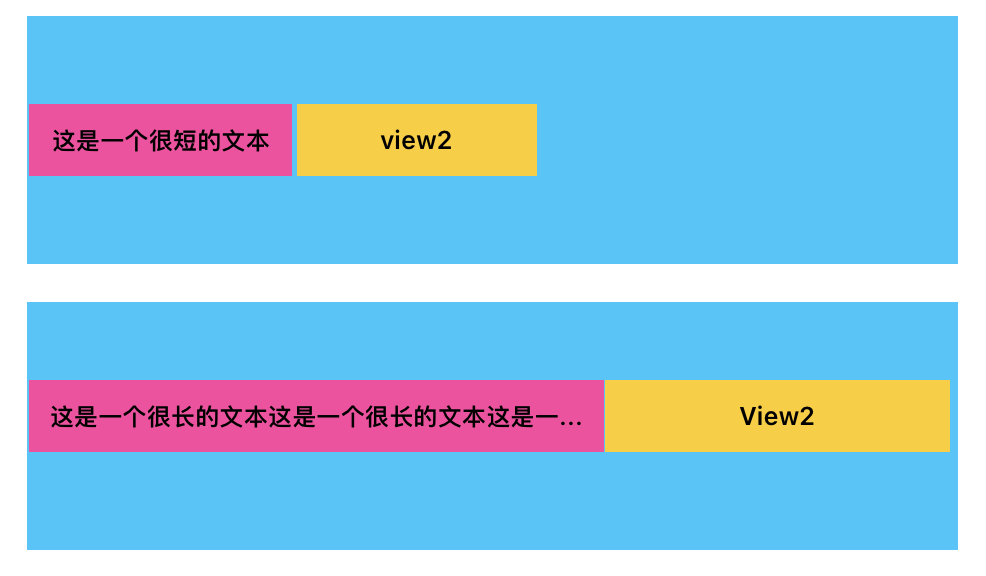
解决
在左边的View1中添加以下代码
app:layout_constrainedWidth="true"
app:layout_constraintHorizontal_chainStyle="packed"
app:layout_constraintHorizontal_bias="0"
完整代码
<androidx.constraintlayout.widget.ConstraintLayout xmlns:android="http://schemas.android.com/apk/res/android"
    android:layout_width="match_parent"
    android:layout_height="wrap_content"
    xmlns:app="http://schemas.android.com/apk/res-auto">

    <TextView
        android:id="@+id/view1"
        android:layout_width="wrap_content"
        android:layout_height="100dp"
        android:background="#E44000"
        android:text="左侧文本左侧文本左侧文本左侧文本左侧文本左侧文本左侧文本左侧文本左侧文本左侧文本文本左侧文本左侧文本左侧文本左侧文本文本左侧文本左侧文本左侧文本左侧文本文本左侧文本左侧文本左侧文本左侧文本文本左侧文本左侧文本左侧文本左侧文本文本左侧文本左侧文本左侧文本左侧文本文本左侧文本左侧文本左侧文本左侧文本文本左侧文本左侧文本左侧文本左侧文本"
        android:gravity="center"
        app:layout_constraintTop_toTopOf="parent"
        app:layout_constraintStart_toStartOf="parent"
        app:layout_constraintEnd_toStartOf="@id/view2"
        app:layout_constrainedWidth="true"
        app:layout_constraintHorizontal_chainStyle="packed"
        app:layout_costraintHorizontal_bias="0"
        >

    </TextView>

    <TextView
        android:id="@+id/view2"
        android:layout_width="wrap_content"
        android:layout_height="100dp"
        android:text="右侧文本"
        android:gravity="center"
        android:background="#ff0"
        app:layout_constraintTop_toTopOf="parent"
        app:layout_constraintStart_toEndOf="@id/view1"
        app:layout_constraintEnd_toEndOf="parent">

    </TextView>
</androidx.constraintlayout.widget.ConstraintLayout>
分析
1、文本长还是文本短,两个布局都是紧贴着一起,使用链条样式packed
app:layout_constraintHorizontal_chainStyle="packed"
- 所有视图会紧密排列在一起,没有间隙。
- 整个链条可以根据 bias 属性在可用空间中调整位置,支持左侧、右侧或居中对齐。
- 默认样式
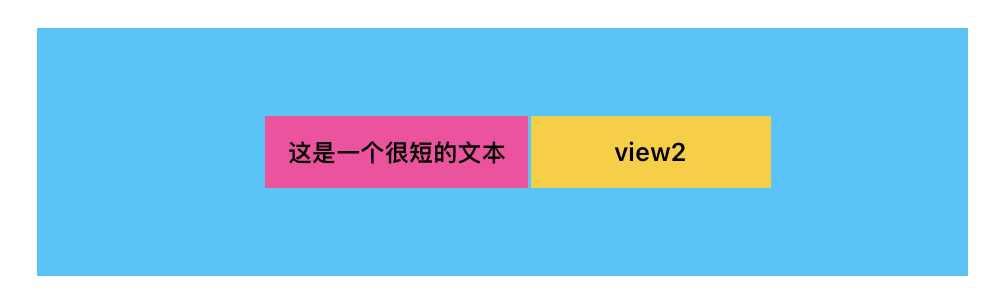
2、紧贴着默认往左边靠,使用bias="0"
app:layout_costraintHorizontal_bias="0"
app:layout_constraintHorizontal_bias 】主要用于在水平布局中动态偏移控件的位置:
- 当值为 0.0~0.5:向左靠近 Start。
- 当值为 0.5~1.0:向右靠近 End。
- 配合 layout_constraintVertical_bias 和其他属性,适合复杂界面布局管理
3、当文本较长时,不能把View2挤出屏幕,优先内容后约束关系
app:layout_constrainedWidth="true"
- 默认情况下(layout_constrainedWidth="false"),一个视图的宽度会根据其内容或约束关系完全展开,可能导致超出父布局的尺寸。
- 当设置为 layout_constrainedWidth="true" 时:
- 它会优先满足内容和约束关系,但限制宽度不超出剩余可用的布局空间。
- 控件的宽度会动态调整以适应约束约定和屏幕布局范围,而不会破坏整体约束结构。

 浙公网安备 33010602011771号