
实战读取excel测试用例--pytest集成
读取测试用例
import pandas as pd

# 读取.xlsx文件(指定openpyxl引擎)
test_cases = pd.read_excel('test_cases.xlsx', sheet_name='login', engine='openpyxl')

# 遍历用例
for idx, case in test_cases.iterrows():
    case_id = case['用例ID']
    url = case['接口地址']
    params = eval(case['请求参数'])
    expected = case['预期结果']
    print(f"执行用例{case_id}:{url} -> {expected}")
报错
Traceback (most recent call last):
File "d:\testproject_python\read_excel.py", line 3, in
test_case=pd.read_excel('test_case.xlsx',sheet_name='login')
File "D:\testproject_python.venv\Lib\site-packages\pandas\io\excel_base.py", line 495, in read_excel
io = ExcelFile(
io,
Traceback (most recent call last):
File "d:\testproject_python\read_excel.py", line 3, in
test_case=pd.read_excel('test_case.xlsx',sheet_name='login')
File "D:\testproject_python.venv\Lib\site-packages\pandas\io\excel_base.py", line 495, in read_excel
io = ExcelFile(
io,
io = ExcelFile(
io,
...<2 lines>...
engine_kwargs=engine_kwargs,
)
File "D:\testproject_python.venv\Lib\site-packages\pandas\io\excel_base.py", line 1554, in init
raise ValueError(
...<2 lines>...
)
ValueError: Excel file format cannot be determined, you must specify an engine manually.
报错2
File "D:\testproject_python.venv\Lib\site-packages\openpyxl\reader\excel.py", line 95, in validate_archive
archive = ZipFile(filename, 'r')
File "C:\Program Files\WindowsApps\PythonSoftwareFoundation.Python.3.13_3.13.2544.0_x64__qbz5n2kfra8p0\Lib\zipfile_init.py", line 1385, in init
self.RealGetContents()
~~~~~~~~~~~~~~~~~~~~~^^
File "C:\Program Files\WindowsApps\PythonSoftwareFoundation.Python.3.13_3.13.2544.0_x64__qbz5n2kfra8p0\Lib\zipfile_init.py", line 1452, in _RealGetContents
raise BadZipFile("File is not a zip file")
zipfile.BadZipFile: File is not a zip file
报错3
Traceback (most recent call last):
File "d:\testproject_python\read_excel.py", line 5, in
for idx,case in test_case:
^^^^^^^^
ValueError: too many values to unpack (expected 2)
报错4
Traceback (most recent call last):
File "D:\testproject_python.venv\Lib\site-packages\pandas\core\indexes\base.py", line 3812, in get_loc
return self._engine.get_loc(casted_key)
~~~~~~~~~~~~~~~~~~~~^^^^^^^^^^^^
File "pandas/_libs/index.pyx", line 167, in pandas._libs.index.IndexEngine.get_loc
File "pandas/_libs/index.pyx", line 196, in pandas._libs.index.IndexEngine.get_loc
File "pandas/_libs/hashtable_class_helper.pxi", line 7088, in pandas._libs.hashtable.PyObjectHashTable.get_item
File "pandas/_libs/hashtable_class_helper.pxi", line 7096, in pandas._libs.hashtable.PyObjectHashTable.get_item
KeyError: '用例ID'
The above exception was the direct cause of the following exception:
Traceback (most recent call last):
File "d:\testproject_python\read_excel.py", line 6, in
case_id=case['用例ID']
~~~~^^^^^^^^^^
File "D:\testproject_python.venv\Lib\site-packages\pandas\core\series.py", line 1133, in getitem
return self._get_value(key)
~~~~~~~~~~~~~~~^^^^^
File "D:\testproject_python.venv\Lib\site-packages\pandas\core\series.py", line 1249, in _get_value
loc = self.index.get_loc(label)
File "D:\testproject_python.venv\Lib\site-packages\pandas\core\indexes\base.py", line 3819, in get_loc
raise KeyError(key) from err
KeyError: '用例ID'
分析:
vscode写文件修改后缀→文件格式与扩展名不符→代码未指定引擎→格式识别失败;
遍历逻辑错误→无法正确读取行数据→测试用例参数提取失败;
另存为路径变更→代码读取原路径无效文件→隐性的文件找不到或格式错误。
修改后的代码
#修改后的代码
import pandas as pd

test_case=pd.read_excel('test_case.xlsx',sheet_name='login',engine='openpyxl')

for idx,case in test_case.iterrows():
    case_id=case['用例ID']
    url=case['接口地址']
    params=eval(case['请求参数'])
    expected=case['预期结果']
    print(f'执行用例{case_id} : {url} -> {expected}')
test_case.py
迭代优化版本1-封装读取excel文件测试用例并执行
import pandas as pd
import json
import requests
from pathlib import Path
from typing import Dict, List

class ExcelTestCaseReader:
    """Excel测试用例读取器,适配接口测试场景"""

    def __init__(self, file_path: str, sheet_name: str = "login"):
        self.file_path = Path(file_path)
        self.sheet_name = sheet_name
        self.test_cases: List[Dict] = []
        self._validate_file()

    def _validate_file(self):
        """验证文件存在性和格式"""
        if not self.file_path.exists():
            raise FileNotFoundError(f"测试用例文件不存在:{self.file_path.absolute()}")
        if self.file_path.suffix not in [".xlsx", ".xls"]:
            raise ValueError(f"不支持的文件格式:{self.file_path.suffix},仅支持.xlsx/.xls")

    def read_cases(self) -> List[Dict]:
        """读取Excel测试用例并转为字典列表"""
        # 根据文件后缀自动选择引擎
        engine = "openpyxl" if self.file_path.suffix == ".xlsx" else "xlrd"

        try:
            df = pd.read_excel(
                self.file_path,
                sheet_name=self.sheet_name,
                engine=engine,
                dtype={"用例ID": str}  # 确保用例ID为字符串类型
            )
        except Exception as e:
            raise RuntimeError(f"读取Excel失败:{str(e)}")

        # 验证必要列存在
        required_columns = {"用例ID", "接口地址", "请求参数", "预期结果"}
        missing_cols = required_columns - set(df.columns)
        if missing_cols:
            raise KeyError(f"Excel缺少必要列:{missing_cols}")

        # 解析用例(改用json.loads更安全)
        for _, row in df.iterrows():
            try:
                params = json.loads(row["请求参数"]) if row["请求参数"] else {}
                expected = json.loads(row["预期结果"]) if row["预期结果"] else {}
            except json.JSONDecodeError as e:
                raise ValueError(f"用例{row['用例ID']}的JSON格式错误:{str(e)}")

            self.test_cases.append({
                "case_id": row["用例ID"],
                "url": row["接口地址"],
                "params": params,
                "expected": expected
            })
        return self.test_cases

    def run_tests(self):
        """执行接口测试(示例)"""
        for case in self.test_cases:
            print(f"\n===== 执行用例:{case['case_id']} =====")
            try:
                # 根据接口类型发送请求(示例:GET/POST)
                if case["url"].endswith("posts"):
                    response = requests.post(case["url"], json=case["params"])
                else:
                    response = requests.get(case["url"], params=case["params"])

                actual = response.json()
                # 简单断言(对比预期字段)
                passed = all(actual.get(k) == v for k, v in case["expected"].items())
                print(f"请求URL:{case['url']}")
                print(f"请求参数:{case['params']}")
                print(f"预期结果:{case['expected']}")
                print(f"实际结果:{actual}")
                print(f"测试结果:{'PASS' if passed else 'FAIL'}")

            except Exception as e:
                print(f"用例执行失败:{str(e)}")


if __name__ == "__main__":
    # 使用示例
    try:
        reader = ExcelTestCaseReader("test_cases.xlsx", sheet_name="login")
        cases = reader.read_cases()
        reader.run_tests()
    except Exception as e:
        print(f"程序异常:{str(e)}")
迭代优化版本2-版本1集成到pytest并且生成测试报告
修改文件名为test_api_demo.py
import pytest
import pandas as pd
import json
import requests
from pathlib import Path
import allure

# 读取Excel测试用例
def read_test_cases(file_path: str = "test_cases.xlsx", sheet_name: str = "login") -> list:
    """读取Excel测试用例并返回参数化数据"""
    file = Path(file_path)
    if not file.exists():
        raise FileNotFoundError(f"测试用例文件不存在:{file.absolute()}")

    # 自动选择引擎
    engine = "openpyxl" if file.suffix == ".xlsx" else "xlrd"
    df = pd.read_excel(file, sheet_name=sheet_name, engine=engine)

    # 验证必要列
    required_cols = {"用例ID", "接口地址", "请求方法", "请求参数", "预期结果", "用例描述"}
    missing_cols = required_cols - set(df.columns)
    if missing_cols:
        raise KeyError(f"Excel缺少必要列:{missing_cols}")

    # 解析用例数据
    test_data = []
    for _, row in df.iterrows():
        try:
            params = json.loads(row["请求参数"]) if row["请求参数"] else {}
            expected = json.loads(row["预期结果"]) if row["预期结果"] else {}
            test_data.append({
                "case_id": row["用例ID"],
                "url": row["接口地址"],
                "method": row["请求方法"],
                "params": params,
                "expected": expected,
                "description": row["用例描述"]
            })
        except json.JSONDecodeError as e:
            raise ValueError(f"用例{row['用例ID']}的JSON格式错误:{str(e)}")
    return test_data

# 获取测试数据
test_cases = read_test_cases()

# 参数化测试用例
@pytest.mark.parametrize("case", test_cases)
def test_api(case):
    """接口测试用例"""
    # 添加allure报告标签和描述
    allure.dynamic.feature("接口测试")
    allure.dynamic.story(case["description"])
    allure.dynamic.title(f"用例{case['case_id']}: {case['description']}")
    allure.dynamic.link(case["url"], name="接口地址")

    # 发送请求
    with allure.step("发送HTTP请求"):
        allure.attach(str(case["params"]), name="请求参数", attachment_type=allure.attachment_type.JSON)
        allure.attach(case["method"], name="请求方法")

        if case["method"].upper() == "GET":
            response = requests.get(case["url"], params=case["params"])
        elif case["method"].upper() == "POST":
            response = requests.post(case["url"], json=case["params"])
        else:
            raise ValueError(f"不支持的请求方法:{case['method']}")

    # 响应结果断言
    with allure.step("验证响应结果"):
        allure.attach(response.text, name="响应数据", attachment_type=allure.attachment_type.JSON)
        actual = response.json()

        # 对比预期结果的所有字段
        for key, value in case["expected"].items():
            assert actual.get(key) == value, f"字段{key}不匹配:预期{value},实际{actual.get(key)}"
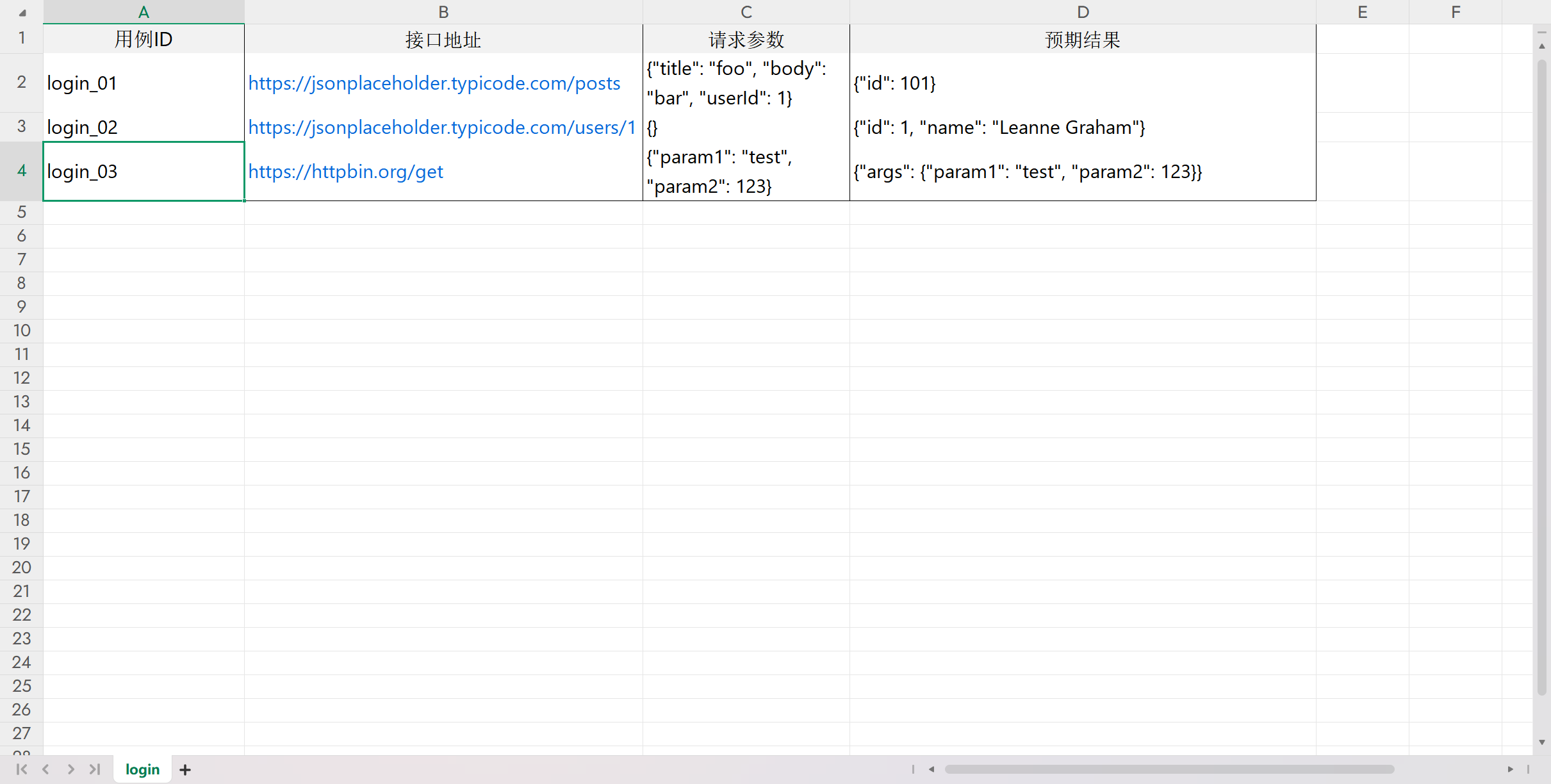
文件testcase02.xlsx

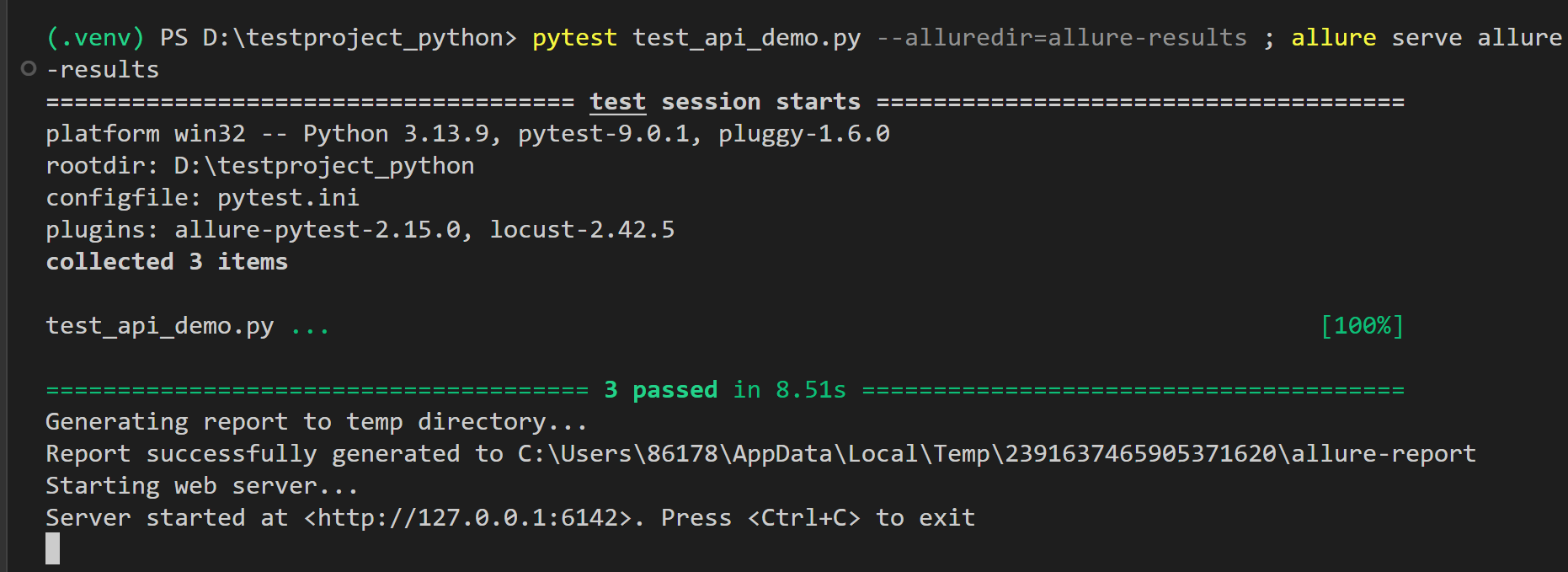
命令行中执行(allure pytest 都要安装好)
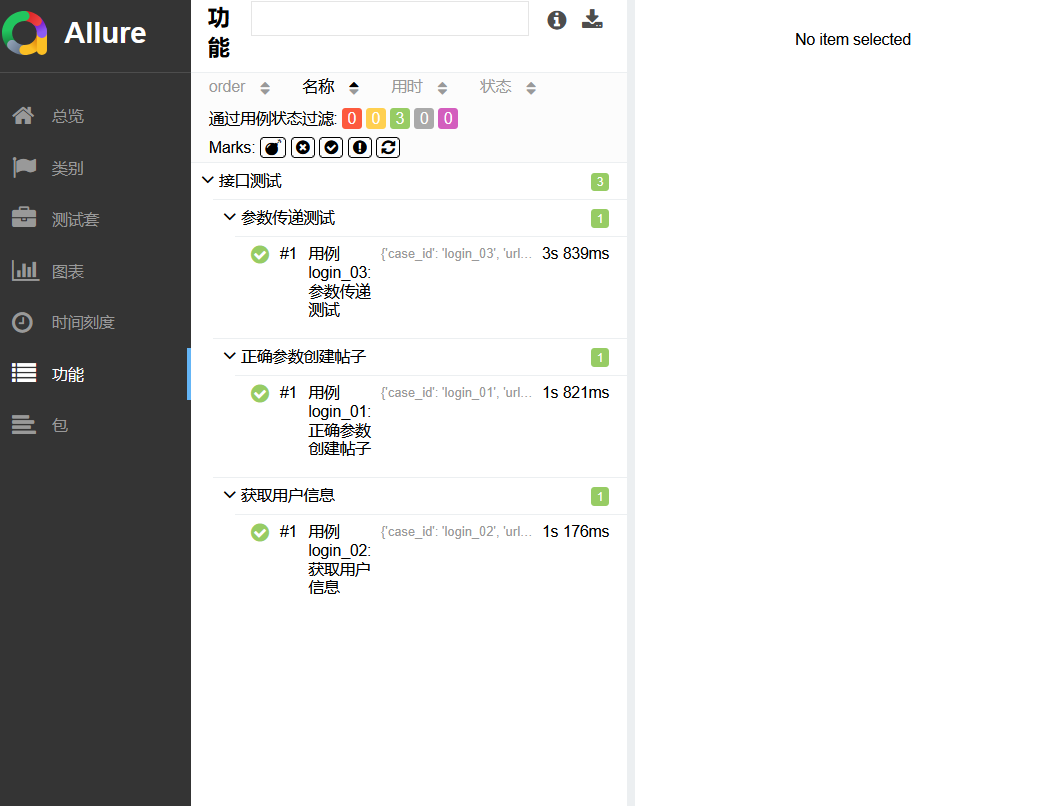
pytest test_api_demo.py --alluredir=allure-results ; allure serve allure-results

 浙公网安备 33010602011771号