
小白学习django第二站-模版配置
上一站说道app创建,接下来我们来配置app的url路由
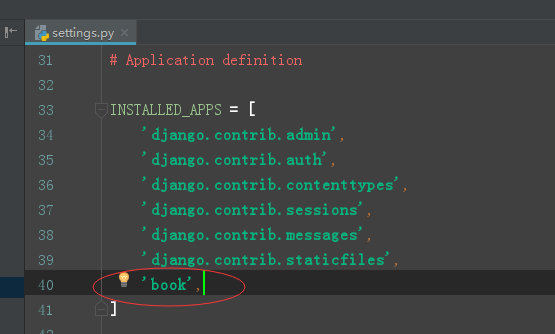
首先需要到setting.py中添加book这个app,
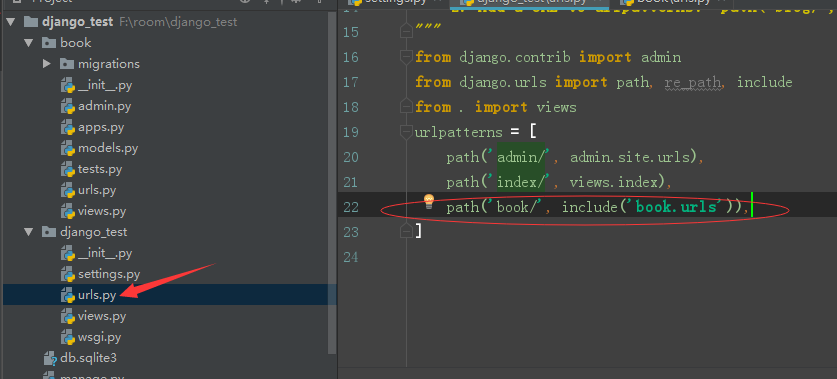
再到django_test文件里的urls添加路由
include() : 这个函数是用来在project的urls.py文件进行注册的,简单来说对app分路由进行url分配
之后我们就可以在book这个app中配置页面了
对转换器进行使用
在views.py中编写
from django.http import HttpResponse
def index(request, str, int):
    return HttpResponse(f'str转化器:{str};int转换器:{int}')
在urls.py中添加路由
from django.urls import path
from . import views
urlpatterns = [
    path('index/<str:str>&<int:int>/', views.index),
]
网页显示

使用reverse, redirect实现页面跳转(重定向)
在views.py中编写
from django.http import redirect, reverse
from django.http import HttpResponse
def index_old(request,  **kwargs):
    if kwargs['name'] == 'true':
        # return redirect('/book/index_new/')     # 第一种跳转方式,
        return redirect(reverse('new_html'))    # 第二种跳转方式
def index_new(request):
    return HttpResponse('这是跳转过来的页面')
在urls.py中编写
from django.urls import path
from . import views
urlpatterns = [
    path('index_old/', views.index_old, {'name': 'true'}),      # 传递参数
    path('index_new/', views.index_new, name='new_html')
]
浏览器输入127.0.0.1:8000/book/index_old/

使用render渲染模版
setting.py中设置模版路径

在根目录下创建templates文件夹

在views.py中编写
from django.http import HttpResponse
from django.shortcuts import render
def index(request):
    # 第一种
    # temp = get_template('index_inner.html')   # 内部html文件
    # # temp = get_template('book/index_outer.html')  # 外部html文件
    # html = temp.render()
    # return HttpResponse(html)

    # 第二种
    return render(request, 'index_inner.html')
在urls.py 中编写
from django.urls import path, re_path
from . import views
urlpatterns = [
    path('index/', views.index)
]
页面显示

模版变量和模版过滤器的使用
views.py中编写
from django.shortcuts import render, redirect, reverse
from django.template.loader import get_template
from django.http import HttpResponse
from datetime import datetime
# Create your views here.
def func():
    return '这是函数'
class Class:
    def __init__(self, name):
        self.name = name

    def say(self):
        return '这是类'
Cls = Class('类').say
list = [1, 2, 3, 4, 5, 6]
dict = {'a': 1, 'b': 2}
def index(request):
    return render(request, 'book/index_outer.html',
                  context={
                      'string': 'this is string',
                      'func': func,
                      'class': Cls,
                      'list': list,
                      'dict': dict,
                      'default1': '',
                      'default2': None,
                      'time': datetime.now(),
                      'num1': 1,
                      'num2': 2,
                      'float': 3.1415926,
                      'html': '<h1>我是h1标签</h1>',
                  })
html文件中编写
{% load static %}
{#引入外部css,js,image等#}
<!DOCTYPE html>
<html lang="en">
<head>
    <meta charset="UTF-8">
    <title>index_outer</title>
    <link rel="stylesheet" href="{% static 'css/index.css' %}">
</head>
<body>
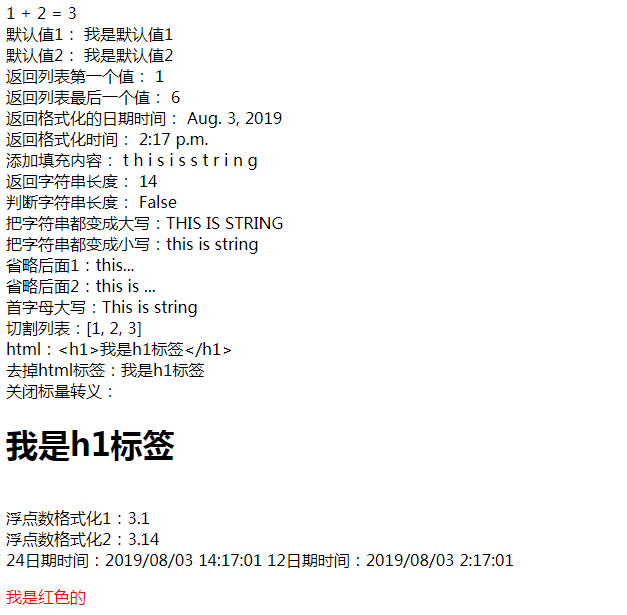
{{ num1 }} + {{ num2 }} = {{ num1|add:num2 }} <br>
默认值1: {{ default1|default:'我是默认值1' }} <br>
默认值2: {{ default2|default_if_none:'我是默认值2' }} <br>
返回列表第一个值: {{ list|first }} <br>
返回列表最后一个值: {{ list|last }} <br>
返回格式化的日期时间: {{ time|date }} <br>
返回格式化时间: {{ time|time }} <br>
添加填充内容: {{ string|join:' ' }} <br>
返回字符串长度: {{ string|length }} <br>
判断字符串长度: {{ string|length_is:10 }} <br>
把字符串都变成大写:{{ string|upper }} <br>
把字符串都变成小写:{{ string|upper|lower }} <br>
省略后面1:{{ string|truncatechars:7 }} <br>
省略后面2:{{ string|truncatewords:2 }} <br>
首字母大写:{{ string|capfirst }} <br>
切割列表:{{ list|slice:'0:3' }} <br>
html:{{ html }} <br>
去掉html标签:{{ html|striptags }} <br>
关闭标量转义:{{ html|safe }} <br>
浮点数格式化1:{{ float|floatformat }} <br>
浮点数格式化2:{{ float|floatformat:2 }} <br>

24日期时间:{{ time|date:'Y/m/d G:i:s' }}
12日期时间:{{ time|date:'Y/m/d g:i:s' }}
<> <br>
大于号:> <br>
小于号:< <br>
单引号:' <br>
双引号:" <br>
&符号:& <br>
<p>我是红色的</p>
<img src="{% static 'image/index.jpg' %}" alt="">
    <script src="{% static 'js/index.js' %}"></script>
  </body>
</html>
浏览器中显示
模版标签
views.py中编写
from django.shortcuts import render, redirect, reverse
from django.template.loader import get_template
from django.http import HttpResponse
from datetime import datetime
# Create your views here.


def func():
    return '这是函数'


class Class:
    def __init__(self, name):
        self.name = name

    def say(self):
        return '这是类'


Cls = Class('类').say
list = [1, 2, 3, 4]
dict = {'a': 1, 'b': 2}
list0 = []

def index(request):
    return render(request, 'book/index_outer.html',
                  context={
                      'string': 'this is string',
                      'func': func,
                      'class': Cls,
                      'list': list,
                      'dict': dict,
                      'default1': '',
                      'default2': None,
                      'time': datetime.now(),
                      'num1': 1,
                      'num2': 2,
                      'float': 3.1415926,
                      'html': '<h1>我是h1标签</h1>',
                      'list0': list0,

                  })
html中编写
<!DOCTYPE html>
<html lang="en">
<head>
    <meta charset="UTF-8">
    <title>index_outer</title>
</head>
<body>
{% if num1 == 1 %}
    {{ list }}
{% elif num1 == 2 %}
    {{ num2 }}
{% else %}
    {{ string }}
{% endif %} <br>
{% ifequal num1 num2 %}
    {{ num1 }}
{% else %}
    {{ num2 }}
{% endifequal %} <br>
{% for i in list %}
    {% if forloop.counter == 1 %}
        下标从1开始,索引为1的i为:{{ i }}
        <br>
    {% elif forloop.counter0 == 1 %}
        下标从0开始,索引为1的i为:{{ i }}
        <br>
    {% elif forloop.revcounter == 1 %}
        下标从1开始,索引为-1的i为:{{ i }}
        <br>
    {% elif forloop.revcounter0 == 1 %}
        下标从0开始,索引为-1的i为:{{ i }}
        <br>
    {% endif %}
{% endfor %}
<br>
{% for i in list %}
    {% if forloop.first %}
        第一次迭代的i为:{{ i }}
        <br>
    {% elif forloop.last %}
        最后一次迭代的i为:{{ i }}
        <br>
    {% else %}
        第{{ i }}次迭代的值为:{{ i }}
        <br>
    {% endif %}
{% endfor %}
<br>

{% for i in list %}
    {% for j in list %}
        {% if forloop.parentloop.counter == 1 %}
            i的索引为{{ i }}时: i:{{ i }} | j: {{ j }} <br>
        {% else %}
            i的索引为{{ i }}时: i: {{ i }} | j: {{ j }} <br>
        {% endif %}
    {% endfor %}
{% endfor %}
<br>

{% with list as i %}
    i为:{{ i }}
{% endwith %}
<br>

{% autoescape on %}
开启自动转义
    <h1>我是h1标签</h1>
    {{ html }} <br>
    {{ html }} <br>
    {{ html }} <br>
{% endautoescape %}
<br>

{% for i in list0 %}
    {{ string }}
{% empty %}
    如果li没有数据 <br>
    {{ list }}
{% endfor %}
<br>
<a href="/book/index/">跳转一</a>
<a href="{% url 'index' %}">跳转</a>

</body>
</html>
浏览器显示

模版继承与引用
base模版
<!DOCTYPE html>
<html lang="en">
<head>
    <meta charset="UTF-8">
    <title>{% block title %}模版页面 {% endblock %}</title>
    <style>
        {% block p %}
        p{
            color: red;
        }
        {% endblock %}
    </style>
</head>
<body>
{% block top %}
    这是模版头部
{% endblock %}
<br>

{% block center %}
    这是模版中间
{% endblock %}
<br>

{% block bottom %}
    这是模版尾部
    <p>dfhsjkadfs</p>
{% endblock %}
</body>
</html>
引用模版
{% extends 'base.html' %}

{% block title %}
    修改页面
{% endblock %}

{% block center %}
    我自己添加的 <br>
    {{ block.super }} <br>
    我自己添加的
    <br>
{% endblock %}

{% block bottom %}
    <br>
    {% include 'base.html' %}
{% endblock %}

 浙公网安备 33010602011771号