
数据采集与融合作业2
第二次作业
作业①:
要求:在中国气象网( http://www.weather.com.cn )给定城市集的7日天气预报,并保存在数据库。
1.代码如下
点击查看代码
from bs4 import BeautifulSoup
from bs4 import UnicodeDammit
import urllib.request
import sqlite3


class WeatherDB:
    def openDB(self):
        self.con = sqlite3.connect("weathers.db")
        self.cursor = self.con.cursor()
        try:
            self.cursor.execute(
                "CREATE TABLE IF NOT EXISTS weathers (wCity VARCHAR(16), wDate VARCHAR(16), wWeather VARCHAR(64), wTemp VARCHAR(32), PRIMARY KEY (wCity, wDate))")
        except Exception:
            pass

    def closeDB(self):
        self.con.commit()
        self.con.close()

    def insert(self, city, date, weather, temp):
        try:
            self.cursor.execute("INSERT INTO weathers (wCity, wDate, wWeather, wTemp) VALUES (?, ?, ?, ?)",
                                (city, date, weather, temp))
        except sqlite3.IntegrityError:
            pass
        except Exception:
            pass


class WeatherForecast:
    def __init__(self, db):
        self.db = db
        self.headers = {
            "User-Agent": "Mozilla/5.0 (Windows; U; Windows NT 6.0 x64; en-US; rv:1.9pre) Gecko/2008072421 Minefield/3.0.2pre"}
        self.cityCode = {"北京": "101010100", "上海": "101020100", "广州": "101280101", "深圳": "101280601", "福州": "101230101"}

    def forecastCity(self, city):
        if city not in self.cityCode.keys():
            print(city + " code cannot be found")
            return

        url = "http://www.weather.com.cn/weather/" + self.cityCode[city] + ".shtml"
        try:
            req = urllib.request.Request(url, headers=self.headers)
            data = urllib.request.urlopen(req)
            data = data.read()
            dammit = UnicodeDammit(data, ["utf-8", "gbk"])
            data = dammit.unicode_markup
            soup = BeautifulSoup(data, "lxml")
            lis = soup.select("ul[class='t clearfix'] li")

            print(f"天气信息 for {city}:")
            print("序号\t地区\t日期\t天气信息\t温度")
            for i, li in enumerate(lis, start=1):
                try:
                    date = li.select('h1')[0].text
                    weather = li.select('p[class="wea"]')[0].text
                    temp = li.select('p[class="tem"] span')[0].text + "/" + li.select('p[class="tem"] i')[0].text
                    print(f"{i}\t{city}\t{date}\t{weather}\t{temp}")
                    self.db.insert(city, date, weather, temp)
                except Exception:
                    pass
        except Exception:
            pass


db = WeatherDB()
db.openDB()

ws = WeatherForecast(db)
ws.forecastCity("北京")
ws.forecastCity("上海")
ws.forecastCity("广州")
ws.forecastCity("深圳")
ws.forecastCity("福州")

db.closeDB()
print("completed")
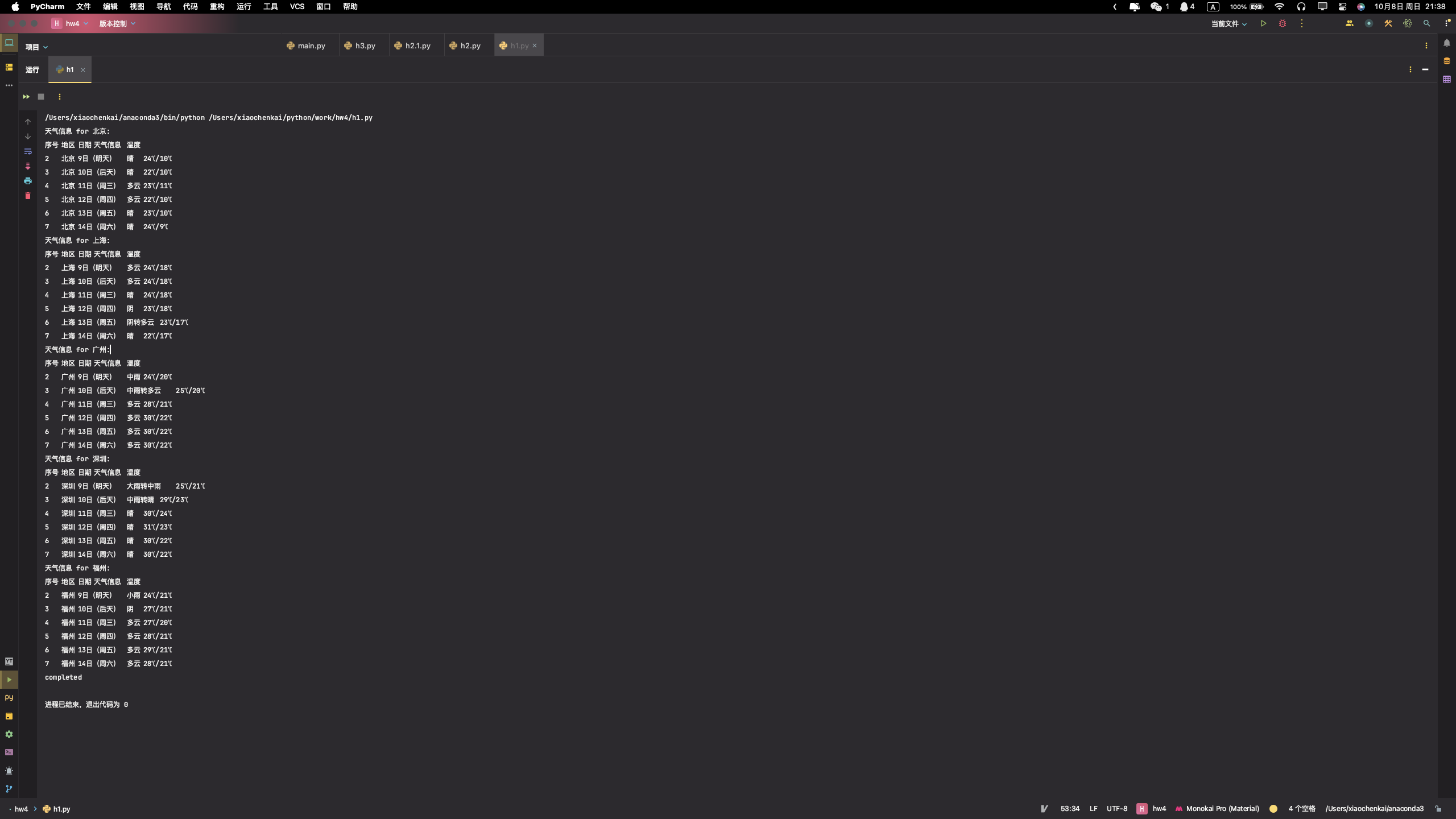
输出图片如下:
Gitee文件夹链接
2.心得体会
该代码通过Python实现了一个简单的天气预报抓取及数据库存储功能。首先,它定义了两个类,WeatherDB和WeatherForecast。WeatherDB类负责数据库的连接、关闭和数据插入。它在openDB方法中创建了一个名为weathers的表,并在insert方法中向该表插入数据。WeatherForecast类负责从中国天气网站抓取天气预报数据。它在forecastCity方法中构建了一个URL,然后发送HTTP请求来获取天气数据。利用BeautifulSoup库解析HTML内容,提取所需的天气信息,并通过WeatherDB类的实例将这些信息插入到数据库中。最后,主程序实例化了WeatherDB和WeatherForecast类,并调用forecastCity方法来抓取指定城市的天气预报,然后关闭数据库连接。
Gitee文件夹链接
https://gitee.com/xmxck/datafusion/tree/master/作业2
作业②
要求:用requests和BeautifulSoup库方法定向爬取股票相关信息,并存储在数据库中。
候选网站:东方财富网:https://www.eastmoney.com/
新浪股票:http://finance.sina.com.cn/stock/
技巧:在谷歌浏览器中进入F12调试模式进行抓包,查找股票列表加载使用的url,并分析api返回的值,并根据所要求的参数可适当更改api的请求参数。根据URL可观察请求的参数f1、f2可获取不同的数值,根据情况可删减请求的参数。
参考链接:https://zhuanlan.zhihu.com/p/50099084
代码如下
点击查看代码
from selenium import webdriver
import requests
from bs4 import BeautifulSoup
import time
import pandas as pd

def fetch_stock_data():
    print("开始运行脚本...")

    chrome_driver_path = '/Users/xiaochenkai/python/work/hw4/chromedriver'
    driver = webdriver.Chrome(executable_path=chrome_driver_path)

    print("打开网页...")

    url = 'http://quote.eastmoney.com/center/gridlist.html#sz_a_board'
    driver.get(url)

    # 等待页面加载
    time.sleep(5)

    print("获取表格数据...")

    # 存储所有页的股票数据
    all_data = pd.DataFrame()

    # 爬取前 n 页的数据
    num_pages_to_scrape = 5

    for _ in range(num_pages_to_scrape):
        try:
            # 获取表格数据
            table = driver.find_element_by_xpath('/html/body/div[1]/div[2]/div[2]/div[5]/div/table')
            table_html = table.get_attribute('outerHTML')

            # 使用 pandas 读取表格数据
            df = pd.read_html(table_html, header=0, converters={'代码': str})[0]  # 添加 converters 参数

            # 删除 "相关链接" 和 "加自选" 列
            df = df.drop(columns=['相关链接', '加自选'])

            # 确保股票代码是6位数,填充前导0
            df['代码'] = df['代码'].apply(lambda x: "'" + str(x).zfill(6))  # 在每个代码前添加单引号

            # 添加数据到总的 DataFrame 中
            all_data = pd.concat([all_data, df], ignore_index=True)

            # 点击 "下一页" 按钮
            next_button = driver.find_element_by_xpath('//a[text()="下一页"]')
            next_button.click()

            # 等待页面加载
            time.sleep(5)

        except Exception as e:
            print("获取数据时出错:", e)
            break  # 如果出错,停止爬取

    print(all_data)

    # 保存数据到 CSV 文件
    all_data.to_csv('stocks.csv', index=False, encoding='utf-8-sig')

    print("数据保存成功。")

    # 关闭浏览器
    driver.quit()

# 运行函数
fetch_stock_data()
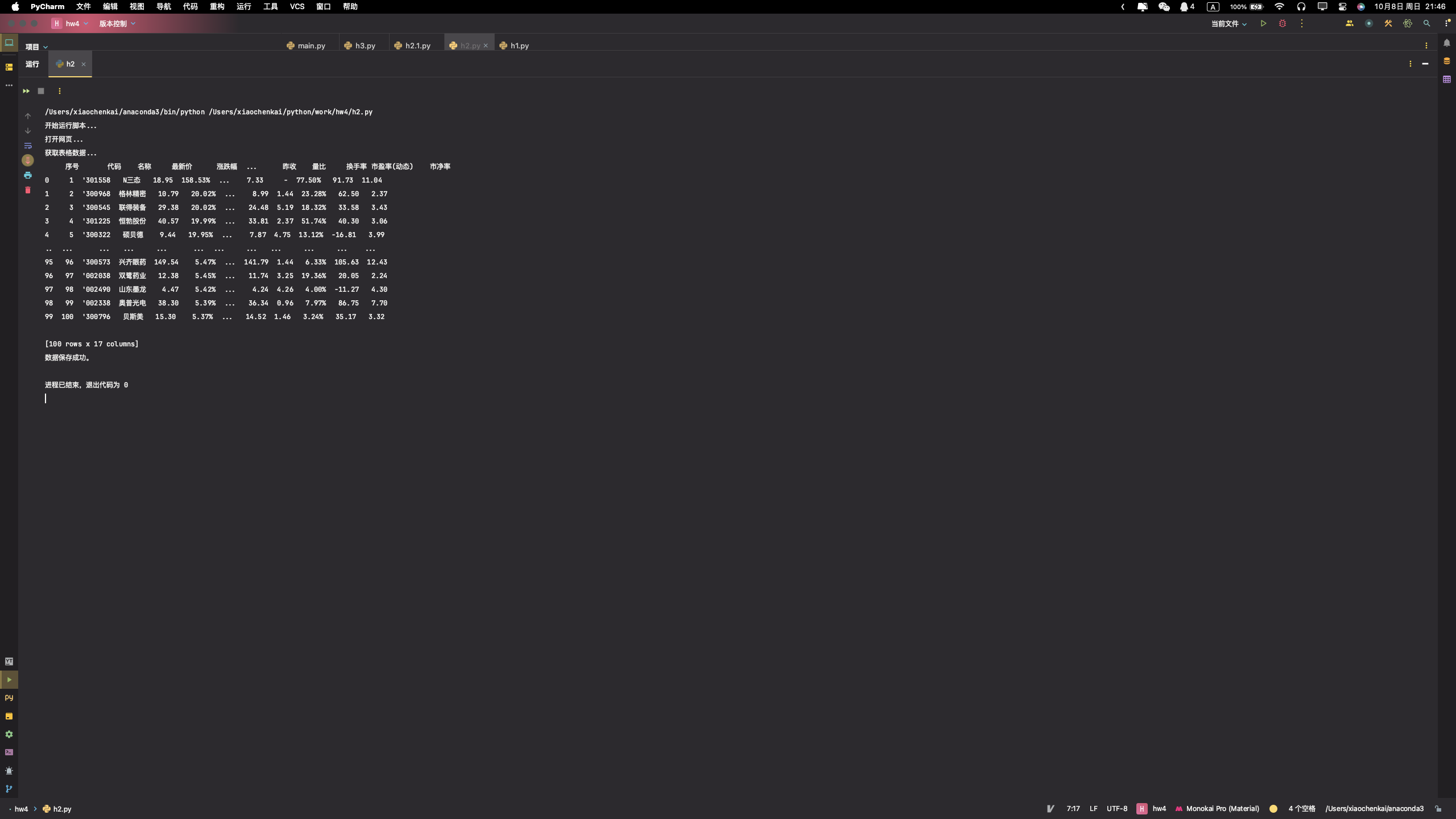
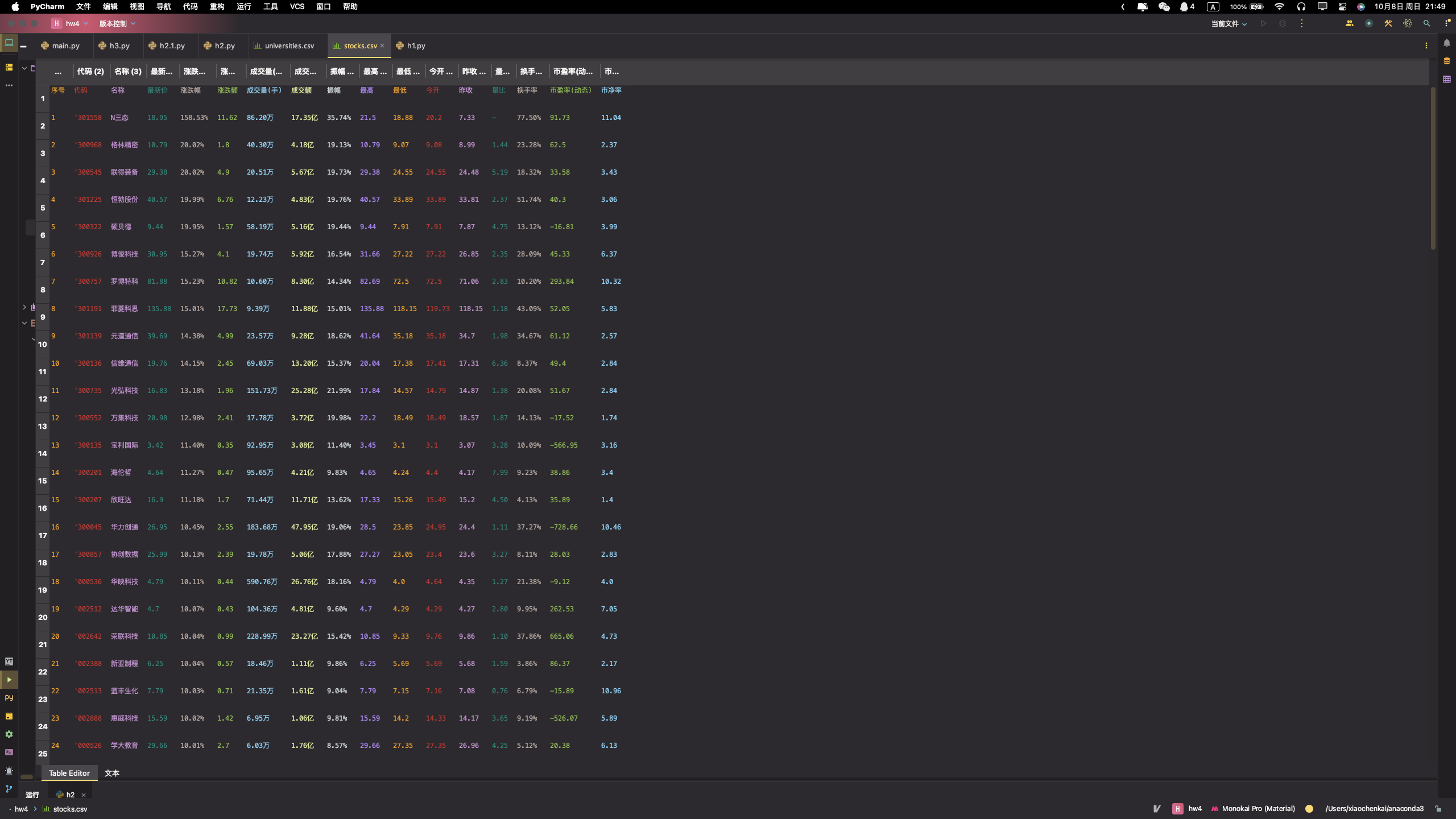
输出结果如下:
2.心得体会
这份程序抓取股票数据,并将其保存到本地的CSV文件中。使用了requests库来发起HTTP请求,BeautifulSoup库来解析HTML内容,以及pandas库来处理和保存数据。
- 定义了一个名为
fetch_stock_data的函数,其中开始时初始化了一个空的pandasDataFrame来存储所有页面的股票数据。 - 设置了一个变量
num_pages_to_scrape来指定要抓取的页面数量(在这里是5页),并使用了一个for循环来遍历这些页面。 - 在循环内,构建了目标URL(虽然该URL是示例,并非实际的API URL),并使用
requests.get方法发起HTTP请求。 - 通过
response.raise_for_status()检查请求是否成功,使用BeautifulSoup解析HTML响应,并尝试找到包含股票数据的表格。 - 如果找到表格,使用
pandas.read_html方法读取表格数据,然后将该数据添加到总的DataFrame中。 - 如果在某个页面上没有找到表格或者在请求过程中发生错误,脚本将打印错误消息,并在遇到异常时终止抓取过程。
- 最后,使用
DataFrame.to_csv方法将所有抓取的数据保存到名为stocks.csv的文件中,并打印消息表示数据已成功保存。
Gitee文件夹链接
https://gitee.com/xmxck/datafusion/tree/master/作业2
作业③:
要求:爬取中国大学2021主榜( https://www.shanghairanking.cn/rankings/bcur/2021 )所有院校信息,并存储在数据库中,同时将浏览器F12调试分析的过程录制Gif加入至博客中。
技巧:分析该网站的发包情况,分析获取数据的api
代码如下:
点击查看代码
from selenium import webdriver
import pandas as pd
import time

# 启动 Chrome 浏览器
driver = webdriver.Chrome()

# 请求网页
driver.get("https://www.shanghairanking.cn/rankings/bcur/2021")

# 准备数据列表
data_list = []

# 定义获取表格数据的函数
def get_table_data():
    rows = driver.find_elements_by_xpath('//tbody/tr')
    for row in rows:
        columns = row.find_elements_by_tag_name('td')
        ranking = int(columns[0].text)
        university = columns[1].text
        province = columns[2].text
        type_ = columns[3].text
        score = float(columns[4].text)
        data_list.append([ranking, university, province, type_, score])

# 获取第一页的数据
get_table_data()

# 点击19次下一页并获取数据
for _ in range(19):
    next_page_button = driver.find_element_by_css_selector('[title="下一页"]')
    next_page_button.click()
    time.sleep(5)  # 增加等待时间以确保页面完全加载
    get_table_data()

# 将数据存储到 DataFrame
df = pd.DataFrame(data_list, columns=['排名', '学校', '省市', '类型', '总分'])

# 将 DataFrame 保存为 Excel 文件
with pd.ExcelWriter('universities.xlsx', engine='xlsxwriter') as writer:
    df.to_excel(writer, index=False, sheet_name='Sheet1')

# 关闭浏览器
driver.quit()

print("数据已保存到 'universities.xlsx' 文件。")
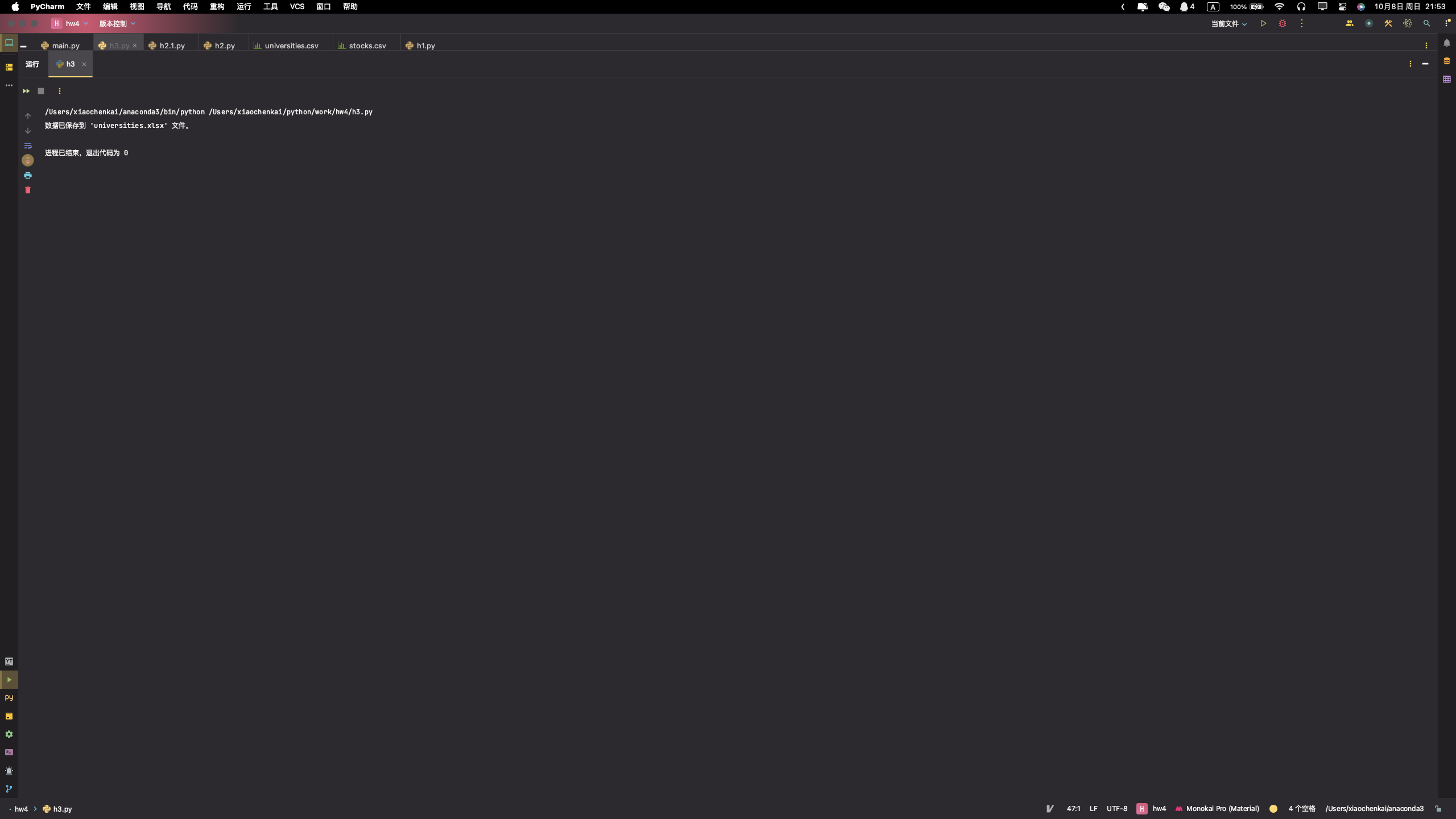
输出图片如下:
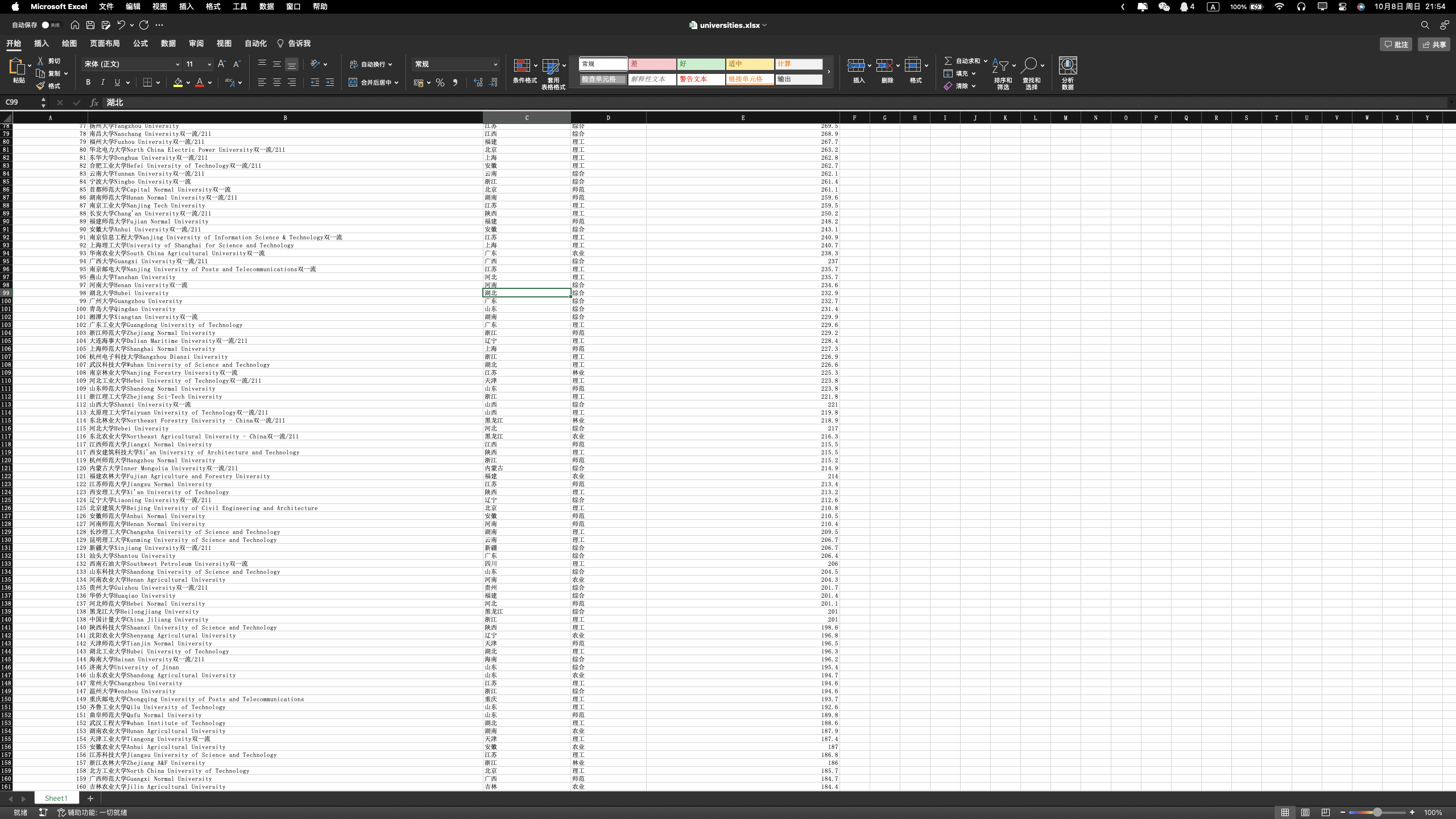

2.心得体会
这份代码通过Selenium和Pandas库,自动获取排名数据,并将其保存到Excel文件中。首先,启动Chrome浏览器并打开页面。接着,定义了一个函数get_table_data来从页面上的表格中提取数据,将每一行的数据作为一个列表,再将这些列表收集到data_list中。初次运行此函数以获取第一页的数据。然后,进入一个循环,每次循环点击“下一页”按钮以浏览所有的20页,每次点击后都会暂停5秒以确保页面完全加载,再次调用get_table_data函数收集新页面上的数据。最后,所有收集到的数据被转换为一个Pandas DataFrame,并通过xlsxwriter引擎保存到一个名为'universities.xlsx'的Excel文件中。在保存完数据后,关闭浏览器并打印出数据保存成功的消息。
Gitee文件夹链接
https://gitee.com/xmxck/datafusion/tree/master/作业2

 浙公网安备 33010602011771号