
vue使用EasyPlayer.js显示H.265/HEVC格式的监控视频
背景
最近在写关于在pc页面上显示hls的m3u8格式的监控视频,vue常用的播放插件如vue-video-player或者videojs,只支持h264编码的视频,项目中返回的监控地址,显示的是h265编码的格式,为此头秃了两天……
解决问题
EasyPlayer.js
(1)在线演示,查看是否能展示你要展示的视频,再决定是否使用。(http://www.easydarwin.org/easyplayer/)
(2)要是之前下载了vedio.js,请先删除安装包
vue3项目引入
1.npm install @easydarwin/easyplayer --save
2.粘贴node包里面的EasyPlayer.wasm和EasyPlayer-element.min.js
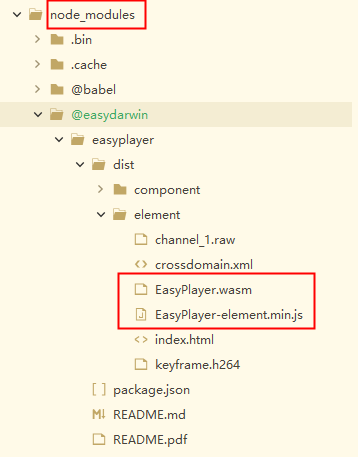
3.复制到public文件下,与index。html同级。自己找个jquery.min.js

4.在index.html引入
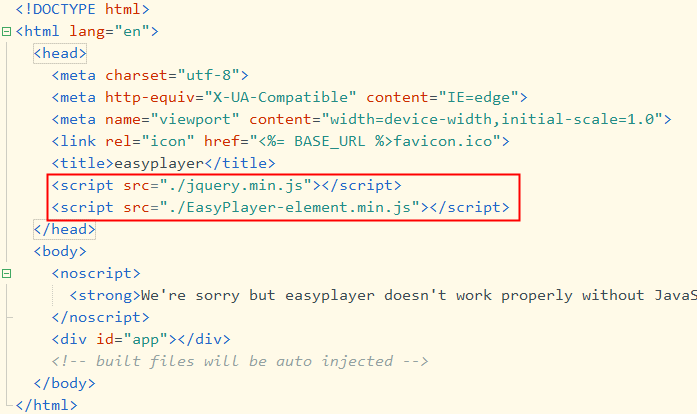
5.在页面中使用EasyPlayer
<template>
    <div id="app">
        <el-row>
            <el-col :span="24">
                <EasyPlayer :videoUrl="videoUrl" fluent autoplay live stretch></EasyPlayer>
                <el-input v-model="input" placeholder="请输入播放地址" size="mini"></el-input>
                <p>
                    列如:http://127.0.0.1:10800/test.flv
                    <a href="http://www.easydarwin.org/easyplayer/" target="_blank">在线演示</a>
                </p>
                <el-button class="player-button" size="mini" type="success" @click="player">播放</el-button>
            </el-col>
        </el-row>
    </div>
</template>

<script>
import EasyPlayer from '@easydarwin/easyplayer';
export default {
    data() {
        return {
            videoUrl: '',
            input: ''
        };
    },
    components: {
        EasyPlayer
    },
    mounted() {},
    methods: {
        player() {
            if (!this.input) {
                this.$message.error('请输入播放地址地址!');
            } else {
                this.videoUrl = this.input;
            }
        }
    }
};
</script>

<style lang="scss">
#app {
    font-family: 'Avenir', Helvetica, Arial, sans-serif;
    -webkit-font-smoothing: antialiased;
    -moz-osx-font-smoothing: grayscale;
    // text-align: center;
    color: #2c3e50;
}
.el-row,
.div-btn {
    max-width: 800px;
    margin: auto;
}
.div-btn {
    padding: 5px 0;
}
.el-col {
    min-height: 300px;
    // border: 1px pink solid
    .easy-player {
        height: 500px !important;
    }
}
.el-input {
    padding: 5px;
    box-sizing: border-box;
}

.player-button {
    margin: 5px;
    width: 100%;
}
p {
    font-size: 12px;
    color: #67c23a;
}
.el-input__inner:focus {
    border-color: #67c23a !important;
}
</style>
vue2项目引用
1.npm install @easydarwin/easyplayer --save
2.复制EasyPlayer-lib.min.js文件

3.随便找个地方放都行,只要index.hrml加载正确就行
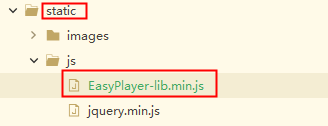
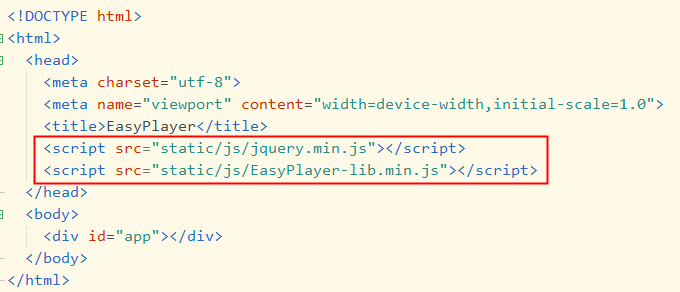
4.在index.html加载,对了,记得自己再找个jquery.min.js
5.修改webpack.dev.conf.js,找到CopyWebpackPlugin,里面写上EasyPlayer.wasm,crossdomain.xml和EasyPlayer-lib.min.js,目的是运行时和index.html同级,加上时记得重新运行,否则会报错,显示video.js找不到
new CopyWebpackPlugin([{
        from: 'node_modules/@easydarwin/easyplayer/dist/component/EasyPlayer.wasm'
      },
      {
        from: 'node_modules/@easydarwin/easyplayer/dist/component/crossdomain.xml'
      },
      {
        from: 'node_modules/@easydarwin/easyplayer/dist/component/EasyPlayer-lib.min.js'
      },
      {
        from: path.resolve(__dirname, '../static'),
        to: config.dev.assetsSubDirectory,
        ignore: ['.*']
      }
    ])
6.使用
<easy-player :videoUrl="videoUrl" fluent autoplay live stretch style="width: 100%;height: 100%;"></easy-player>
import EasyPlayer from "@easydarwin/easyplayer"
components: { EasyPlayer }
把接口获取到的视频地址赋给videoUrl就行

 浙公网安备 33010602011771号