vue3中的 Composition API 、新特性
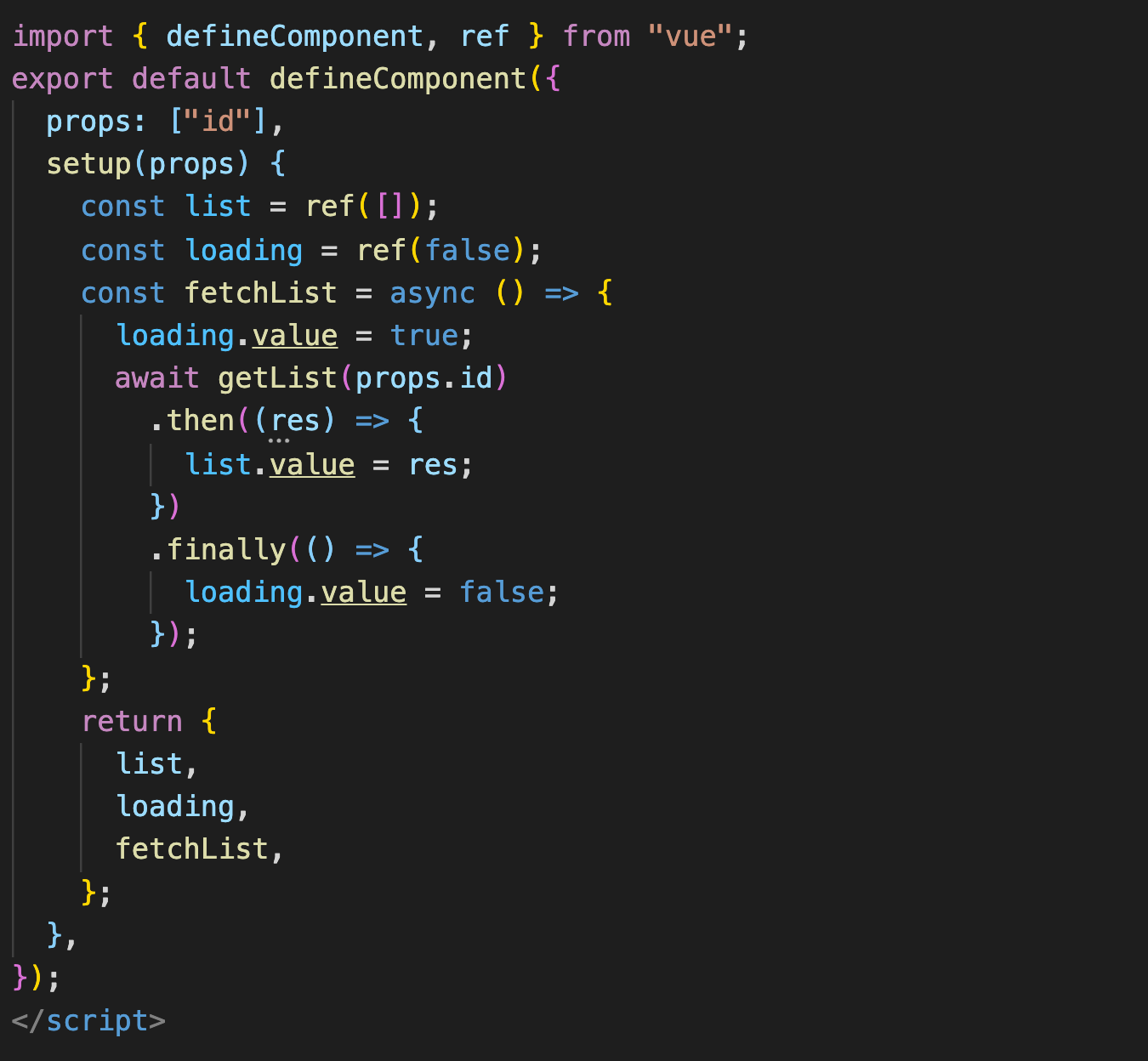
1.setup的执行
是在 beforeCreate 之前执行,所以在 setup 内部,this 不是当前组件实例的引用,也就是说 setup 中无法直接调用组件的其他数据
Composition API 让我们 setup 中使用生命周期钩子函数、响应式数据等组件特性
2. props 、context
setup不是生命周期钩子函数,并且具备props 和 context
import { toRefs } from 'vue';
setup(props, context) {
   //因为 props 是响应式的,所以不能直接对 props 使用 ES6 解构,因为它会消除 prop 的响应性
   const {title} = toRefs(props); //通过toRefs包装后的props可以在解构后仍然具有响应式
    const { attrs, slots, emit } = context;
    // Attribute (非响应式对象)
    console.log(attrs);
    // 组件插槽 (非响应式对象)
    console.log(slots);

    // 触发事件 (方法)
    console.log(emit);
}
3.在 setup 中使用生命周期钩子(需要从 Vue 引入带有 on 前缀的生命周期)
import { toRefs, onMounted } from 'vue';

setup (props) {
    const { title } = toRefs(props);
    onMounted(() => {
        console.log('onMounted', title);
    });
}
因为 setup 本身是基于beforeCreate运行, 所以在setup 中没有 beforeCreate 和 created 这两个生命周期
4.setup的返回值
(1)ref
通过ref 包装的变量会具有响应性
setup 内部,ref 包装后的变量需要通过 value 来修改变量的值
(2)setup 还可以返回一个渲染函数,则组件中定义的 template 将会失效
import { h, ref, reactive } from 'vue'

export default {
  setup() {
    const readersNumber = ref(0)
    const book = reactive({ title: 'Vue 3 Guide' })
    // 返回一个渲染函数以覆盖 template
    return () => h('div', [readersNumber.value, book.title])
  }
}
5. Computed、Watch
import { ref, computed } from 'vue'

setup() {
  const list = ref([]);
  const lable = computed(() => list.value.length > 0 ? list.join('-')  : '暂无数据');
  return {
    list,
    lable,
  }
}
import { ref, watch } from 'vue'

setup() {
  const type = ref('');

  watch(type, (newValue, oldValue) => {
   switch (type) {
    case 0:
        console.log('good')
        break;
    case 1:
        console.log("just so so");
         break;
    case 2:
        console.log("wrong");
   }
  });

  return {
    type,
  }
}
监听多个数据
watch([() => state.age, year], ([curAge, newVal], [preAge, oldVal]) => {
console.log("新值:", curAge, "老值:", preAge); console.log("新值:", newVal,
"老值:", oldVal); });
监听复杂的嵌套对象
const state = reactive({
  room: {
    id: 100,
    attrs: {
      size: "140平方米",
      type: "三室两厅",
    },
  },
});
watch(
  () => state.room,
  (newType, oldType) => {
    console.log("新值:", newType, "老值:", oldType);
  },
  { deep: true }
);
如果不使用第三个参数deep:true, 是无法监听到数据变化的。 前面我们提到,默认情况下,watch 是惰性的, 那什么情况下不是惰性的, 可以立即执行回调函数呢?其实使用也很简单, 给第三个参数中设置immediate: true即可
7.抽取公共逻辑
例如有一个列表展示与数据搜索过滤的功能
// src/composables/useList.js

import { ref, onMounted, watch } from 'vue';

// 发起接口请求
function fetchList() {
  // ...
}

export default function useList(query) {
  // 创建数据列表 list (data)
  const list = ref([]);
  // 创建查询并更新 list 的方法 (methods)
  const getList = async () => {
    list.value = await fetchList(query);
  };

  // 生命周期 mounted
  onMounted(getList);
  // 监听 query 的变化并更新 list
  watch(query, getList);

  return {
    list,
    getList,
  };
}
// src/composables/useFilter.js

import { ref, computed } from 'vue';

export default function useFilter(list) {
  // 创建搜索关键字 keyword (data)
  const keyword = ref('');
  // 创建筛选结果 filterRes (computed)
  const filterRes = computed(() => {
    return list.filter((value) => {
      return value.includes(keyword.value);
    });
  });

  return {
    keyword,
    filterRes,
  };
}
在组件中引用
import { defineComponent, toRefs } from 'vue';
import useList from '@/composables/useList';
import useFilter from '@/composables/useFilter';

export default defineComponent({
  props: ['query'],
  setup(props) {
    const { query } = toRefs(props);
    const { list, getList } = useList(query);
    const { keyword, filterRes } = useFilter(list);
    return {
      keyword, // 筛选关键字
      getList, // 查询并更新数据列表
      list: filterRes, // 不需要返回未经筛选的列表
    };
  },
});
8.自定义hooks
import { ref, Ref, computed } from "vue";

type CountResultProps = {
  count: Ref<number>;
  multiple: Ref<number>;
  increase: (delta?: number) => void;
  decrease: (delta?: number) => void;
};

export default function useCount(initValue = 1): CountResultProps {
  const count = ref(initValue);

  const increase = (delta?: number): void => {
    if (typeof delta !== "undefined") {
      count.value += delta;
    } else {
      count.value += 1;
    }
  };
  const multiple = computed(() => count.value * 2);

  const decrease = (delta?: number): void => {
    if (typeof delta !== "undefined") {
      count.value -= delta;
    } else {
      count.value -= 1;
    }
  };

  return {
    count,
    multiple,
    increase,
    decrease,
  };
}
在组件中使用这个hooks
<template>
  <p>count: {{ count }}</p>
  <p>倍数: {{ multiple }}</p>
  <div>
    <button @click="increase()">加1</button>
    <button @click="decrease()">减一</button>
  </div>
</template>

<script lang="ts">
import useCount from "../hooks/useCount";
 setup() {
    const { count, multiple, increase, decrease } = useCount(10);
        return {
            count,
            multiple,
            increase,
            decrease,
        };
    },
</script>
9.Teleport
使用场景,例如在子组件Header中使用到Dialog组件,但希望Dialog渲染到外部挂载的 DOM,同时还可以使用到 Vue 组件内的状态
在index.html中定一个供挂载的元素
<body>
  <div id="app"></div>
  <div id="dialog"></div>
</body>
定义一个Dialog组件, to 属性的值与挂载的id相同
<template>
  <teleport to="#dialog">
    <div class="dialog">
      <div class="dialog_wrapper">
        <div class="dialog_header" v-if="title">
          <slot name="header">
            <span>{{ title }}</span>
          </slot>
        </div>
      </div>
      <div class="dialog_content">
        <slot></slot>
      </div>
      <div class="dialog_footer">
        <slot name="footer"></slot>
      </div>
    </div>
  </teleport>
</template>
在Header组件中使用Dialog组件
<div class="header"><navbar />
    <Dialog v-if="dialogVisible"></Dialog>
</div>
10.Suspense
使用场景:在前后端交互获取数据时, 是一个异步过程,一般我们都会提供一个加载中的动画,当数据返回时配合v-if来控制数据显示
vue3中内置组件Suspense, 提供两个template slot, 刚开始会渲染一个 fallback 状态下的内容, 直到到达某个条件后才会渲染 default 状态的正式内容
<Suspense>
        <template #default>
            <async-component></async-component>
        </template>
        <template #fallback>
            <div>
                Loading...
            </div>
        </template>
  </Suspense>
asyncComponent.vue
<<template>
<div>
    <h4>这个是一个异步加载数据</h4>
    <p>用户名:{{user.nickname}}</p>
    <p>年龄:{{user.age}}</p>
</div>
</template>

<script>
import { defineComponent } from "vue"
import axios from "axios"
export default defineComponent({
    setup(){
        const rawData = await axios.get("http://xxx.xinp.cn/user")
        return {
            user: rawData.data
        }
    }
})
</script>
11.自定义指令
在 Vue 3 中对自定义指令的 API 进行了更加语义化的修改, 就如组件生命周期变更一样
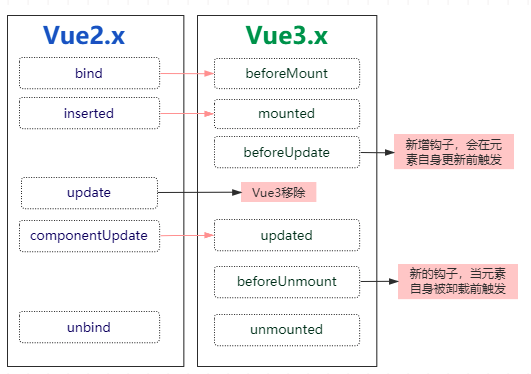
自定义指令
const { createApp } from "vue"

const app = createApp({})
app.directive('focus', {
    mounted(el) {
        el.focus()
    }
})
在组件中使用
<input v-focus />

 浙公网安备 33010602011771号