
C#之SyStem Timer与Form Timer的一点小区别
今天突然get到一个新技能,就是在C#中,System.Timers.Timer和System.Windows.Forms.Timer(也就是设计窗口直接拖出来的那个Timer)有一个区别,线程访问方式不同。System.Windows.Forms.Timer应该是通过主线程访问的,可以通过此定时器的事件来访问窗体显示控件,不会出现线程间操作无效的异常。而System.Timers.Timer的定时事件则不能直接访问窗体显示控件,只能通过委托或开单线程来访问。
下面开始测试:
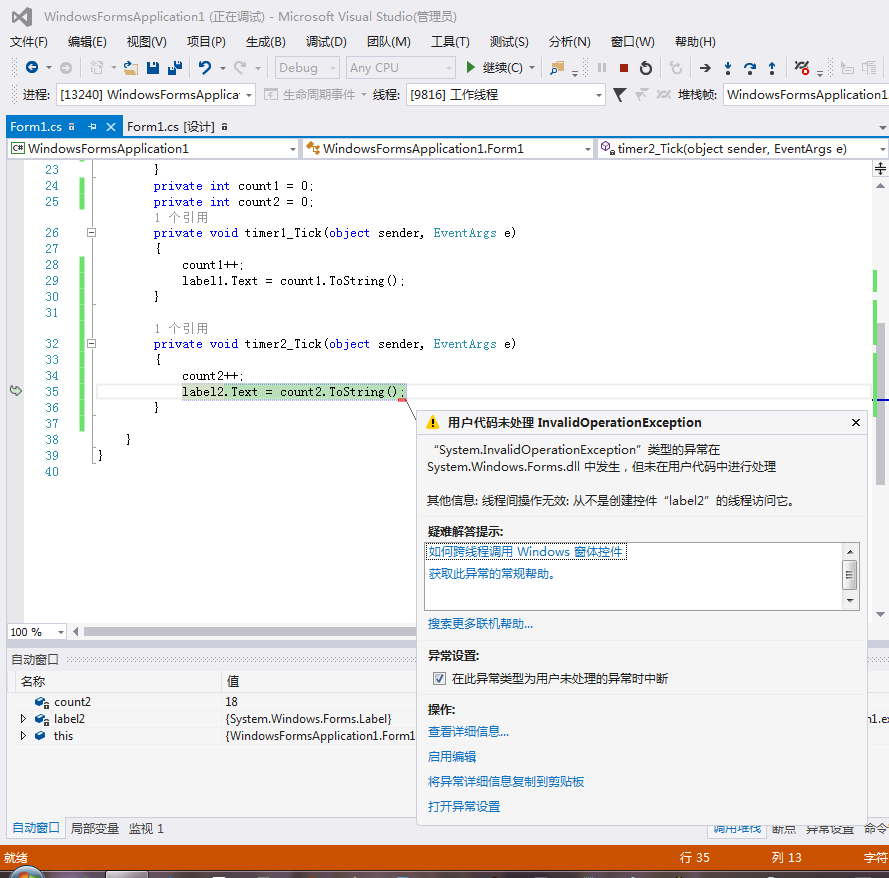
新建一个窗体应用程序,拖两个Label到窗体,拖一个Timer并开启定时事件。代码中,定义一个System.Timers.Timer,设置定时周期为100ms,添加定时事件函数。另外定义两个变量,用于在两个定时器的事件中进行计数,并将计数值显示到Label上。先开启定时器1,即System.Windows.Forms.Timer,可以看到程序正常运行,计数显示正常,然后开启定时器2,即System.Timers.Timer,发现程序出现异常,线程间操作无效:从不是创建控件“label2”的线程访问它。因为在定时器2的事件中直接操作了label2,而System.Timers.Timer不属于主线程创建,因此异常。
代码如下:
using System;
using System.Collections.Generic;
using System.ComponentModel;
using System.Data;
using System.Drawing;
using System.Linq;
using System.Text;
using System.Threading.Tasks;
using System.Windows.Forms;
namespace WindowsFormsApplication1
{
public partial class Form1 : Form
{
private System.Timers.Timer timer2 = new System.Timers.Timer(100);
public Form1()
{
InitializeComponent();
timer2.Elapsed += new System.Timers.ElapsedEventHandler(timer2_Tick);
timer1.Start();
//timer2.Start();
}
private int count1 = 0;
private int count2 = 0;
private void timer1_Tick(object sender, EventArgs e)
{
count1++;
label1.Text = count1.ToString();
}
private void timer2_Tick(object sender, EventArgs e)
{
count2++;
label2.Text = count2.ToString();
}
}
}
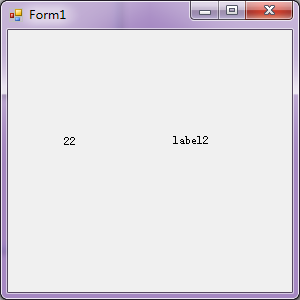
测试结果:
System.Windows.Forms.Timer事件中操作label成功
System.Timers.Timer中操作label报异常
好了,今天的测试就到此为止,希望对大家有所帮助,需要一些简单的界面操作又不想使用委托的小伙伴们可以参考一下。如果有什么不对的地方,欢迎大家指出。

 浙公网安备 33010602011771号