echarts

 
复制代码
xAxis: {
    data: anameArr,
    axisLabel: {
       show: true,
        textStyle: {
          color: '#c3dbff',  //更改坐标轴文字颜色
          fontSize : 14      //更改坐标轴文字大小
        }
     },
     axisTick: {
         show: false
     },
     axisLine:{
         lineStyle:{
            color:'#315070' //更改坐标轴颜色
         }
   }
}


(function () {
  let myChart = echarts.init(document.querySelector(".div_div"))
  option = {
    color: ['green'],
    tooltip: {
      trigger: 'axis',
      axisPointer: {
        type: 'shadow'
      }
    },
    xAxis: {
      type: 'category',
      data: ['Mkion', 'Tue', 'Wed', 'Thu', 'Fri', 'Sat', 'Sun'],

      axisline: {
        show: 'fales'
      }
    },
    yAxis: {
      type: 'value',
      axisLabel: {
        color: 'red',
      },
      axisLine: {
        lineStyle: {
          width: 22
        }

      }
    },
    grid: {
      top: 10,
      let: 30,
      right: 80,
      bottom: 100,
      continLabel: true
    },
    series: [{
      barWidth: '35px',
      data: [120, 200, 150, 80, 70, 110, 130],
      type: 'bar',
      itemStyle: {
        //柱形图圆角,鼠标移上去效果
        emphasis: {
          barBorderRadius: [10, 10, 10, 10]
        },

        normal: {
          //柱形图圆角,初始化效果
          barBorderRadius: [20, 20, 20, 20]
        }
      },
    }]
  };
  myChart.setOption(option)
  window.addEventListener("resize", function () {
    myChart.resize();
  });
})();
(function () {
  var myColo = ['red', 'green', 'rebeccapurple', 'pink'];
  let myChart = echarts.init(document.querySelector('#divaa'))
  option = {

    title: {
      text: '世界人口总量',
      subtext: '数据来自网络'
    },
    tooltip: {
      trigger: 'axis',
      axisPointer: {
        type: 'shadow'
      }
    },
    legend: {
      data: ['2011年', '2012年']
    },
    grid: {
      left: '3%',
      right: '4%',
      bottom: '3%',
      containLabel: true
    },
    xAxis: {
      show: false,
      type: 'value',
      boundaryGap: [0, 0.01]
    },
    yAxis: [{
      type: 'category',
      inverse: true,
      data: ['巴西', '印尼', '美国', '印度', '中国', '世界人口(万)'],
      "axisTick": {       //y轴刻度线
        "show": false
      },
      "axisLine": {       //y轴
        "show": false

      },
      axisLabel: {   // X轴线 标签修改 
        textStyle: {
          color: 'red', //坐标值得具体的颜色
        }
      },
    },
    {
      type: 'category',
      inverse: true,
      data: ['巴西', '印尼', '美国', '印度', '中国', '世界人口(万)'],
      "axisTick": {       //y轴刻度线
        "show": false
      },
      "axisLine": {       //y轴
        "show": false

      },
      axisLabel: {   // X轴线 标签修改 
        textStyle: {
          color: 'red', //坐标值得具体的颜色
        }
      },
    }
    ],
    series: [
      {
        yAxisIndex: 0,//相当于z-index
        barWidth: 15,
        // barCateGoryGap: 60,
        name: '2011年',
        type: 'bar',
        data: [18203, 23489, 29034, 104970, 131744, 630230],
        // 主子的颜色
        itemStyle: {
          barBorderRadius: 20,
          color: function (params) {
            console.log(params, "params")
            return myColo[params.dataIndex]
          }
        },
        // 图形上显示文本标签
        label: {
          show: true,
          // 图形没显示
          position: 'inside',
          // 文字的显示格式
          formatter: '{c}%',
          textStyle: {
            color: 'green', //坐标值得具体的颜色
          }
        }
      },
      {
        barWidth: 20,
        yAxisIndex: 1,//相当于z-index
        name: '2012年',
        type: 'bar',
        data: [19325, 23438, 31000, 121594, 134141, 681807],
        itemStyle: {
          color: 'none',
          borderColor: 'red',

          barBorderRadius: 15
        }
      },

    ]
  };
  myChart.setOption(option)
})();


、、、、、、、、、、、、
百度

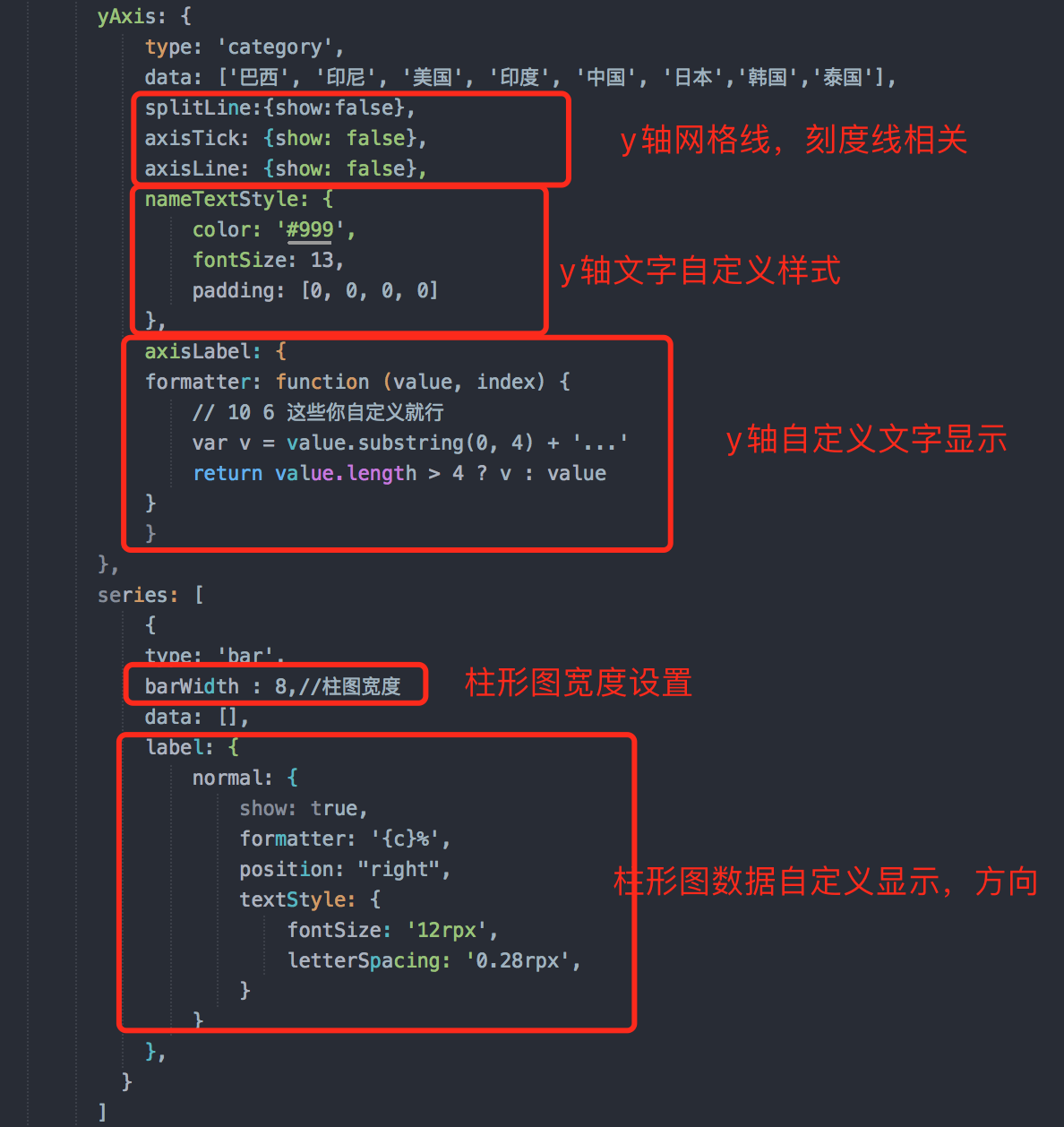
以下属性对x轴,y轴均有效:


1.取消网格线

    splitLine: {
        show: false
    }

2.取消坐标轴刻度线

    axisTick: {
        show: false
    }

3.取消显示坐标值

    axisLabel: {
        show: false
    }

4.取消显示坐标轴

    axisLine: {
        show: false
    }

5.取消显示坐标轴,坐标轴刻度,坐标值(如果是y轴,默认的网格线也会取消显示)

  show: false

tooltip ={ //提示框组件
trigger: 'item', //触发类型,'item'数据项图形触发,主要在散点图,饼图等无类目轴的图表中使用。 'axis'坐标轴触发,主要在柱状图,折线图等会使用类目轴的图表中使用。
triggerOn:"mousemove", //提示框触发的条件,'mousemove'鼠标移动时触发。'click'鼠标点击时触发。'mousemove|click'同时鼠标移动和点击时触发。'none'不在 'mousemove' 或 'click' 时触发
showContent:true, //是否显示提示框浮层
alwaysShowContent:true, //是否永远显示提示框内容
showDelay:0, //浮层显示的延迟,单位为 ms
hideDelay:100, //浮层隐藏的延迟,单位为 ms
enterable:false, //鼠标是否可进入提示框浮层中
confine:false, //是否将 tooltip 框限制在图表的区域内
transitionDuration:0.4, //提示框浮层的移动动画过渡时间,单位是 s,设置为 0 的时候会紧跟着鼠标移动
position:['50%', '50%'], //提示框浮层的位置,默认不设置时位置会跟随鼠标的位置,[10, 10],回掉函数,inside鼠标所在图形的内部中心位置,top、left、bottom、right鼠标所在图形上侧,左侧,下侧,右侧,
formatter:"{b0}: {c0}<br />{b1}: {c1}", //提示框浮层内容格式器,支持字符串模板和回调函数两种形式,模板变量有 {a}, {b},{c},{d},{e},分别表示系列名,数据名,数据值等
backgroundColor:"transparent", //标题背景色
borderColor:"#ccc", //边框颜色
borderWidth:0, //边框线宽
padding:5, //图例内边距,单位px 5 [5, 10] [5,10,5,10]
textStyle:mytextStyle, //文本样式
};

————————————————
版权声明:本文为CSDN博主「痛心的丶玩笑」的原创文章,遵循CC 4.0 BY-SA版权协议,转载请附上原文出处链接及本声明。
原文链接:https://blog.csdn.net/zhen_xin_ai_ni/article/details/84103026


拐点颜色

  itemStyle: {
          color: '#0184d5',
          borderColor: 'rgba(221,220,107,.1)',
          borderWidth: 12
        },
posted @ 2021-08-01 07:51  k凯阳  阅读(218)  评论(0)    收藏  举报