Public Sub 获取窗口状态()
    Dim myState As String
    myState = Application.WindowState
    If myState = xlMaximized Then
        MsgBox "Excel窗口最大化", vbInformation
    ElseIf myState = xlMinimized Then
        MsgBox "Excel窗口最小化", vbInformation
    ElseIf myState = xlNormal Then
        MsgBox "Excel窗口一般显示", vbInformation
    End If
End Sub
Public Sub 获取Excel库文件夹的路径()
    MsgBox "库文件夹的路径是: " & Application.LibraryPath
End Sub
Public Sub 获取Excel路径()
    MsgBox "Excel 的安装路径是: " & Application.Path
End Sub
Public Sub 获取Excel模板保存路径()
    MsgBox "模板保存的默认路径是: " & Application.TemplatesPath
End Sub
Public Sub 获取窗口高度和宽度()
    Dim myHeight As Double, myWidth As Double
    myHeight = Application.Height
    myWidth = Application.Width
    MsgBox "Excel主应用程序窗口的高度和宽度分别为:" _
        & vbCrLf & "高度:" & myHeight _
        & vbCrLf & "宽度:" & myWidth, vbInformation
End Sub
Public Sub 获取当前工作表的用户名()
    MsgBox "当前用户名是: " & Application.UserName
End Sub
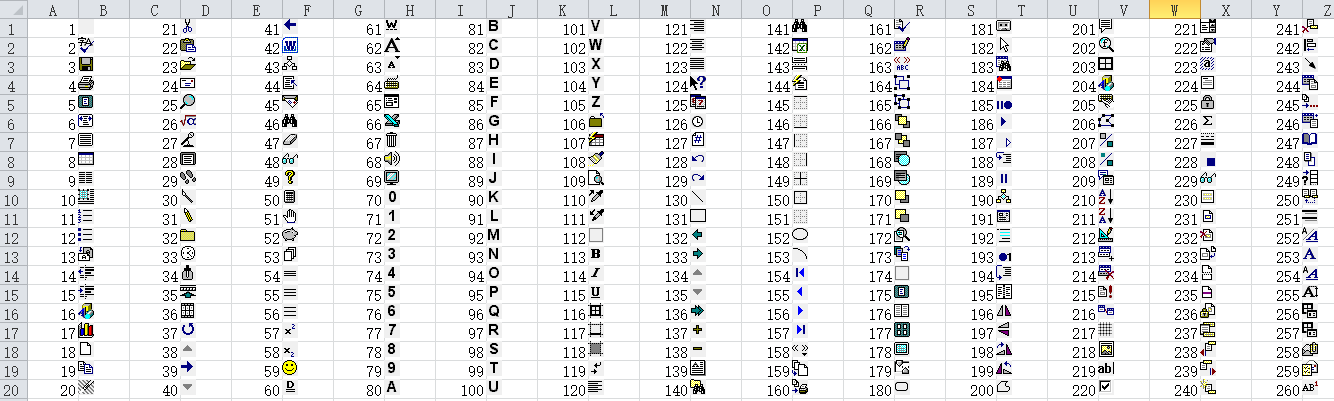
Public Sub 快速填充编号()
    Dim myCommandBar As CommandBar
    Dim myCommandBarCnt As CommandBarControl
    Dim i As Long
    Cells.Clear    '清除所有单元格
    For Each myShape In Worksheets(1).Shapes
        If myShape.Name <> "myButton" Then
             myShape.Delete    '删除名字不为myButton的图形对象
        End If
    Next
    On Error Resume Next
    Application.CommandBars("FaceID").Delete
    On Error GoTo 0
    '创建一个临时的自定义工具栏FaceID
    Set myCommandBar = Application.CommandBars.Add(Name:="FaceID")
    Set myCommandBarCnt = myCommandBar.Controls.Add(Type:=1)
    For i = 1 To 300
        myCommandBarCnt.FaceId = i
        myCommandBarCnt.CopyFace    '复制命令按钮的Icon
        With Worksheets(1)
            .Paste    '将复制的命令按钮Icon粘贴到工作表中
            .Shapes(.Shapes.Count).Top = .Cells(i, 2).Top
            .Shapes(.Shapes.Count).Left = .Cells(i, 2).Left
            .Cells(i, 1).Value = i
        End With
    Next i
    myCommandBar.Delete    '删除临时的自定义工具栏FaceID
    Set myCommandBarCnt = Nothing
End Sub
Public Sub 快速填充编号()
    Dim myCommandBar As CommandBar
    Dim myCommandBarCnt As CommandBarControl
    Dim aa, bb As Integer
    Dim i As Long
    Cells.Clear    '清除所有单元格
    For Each myShape In Worksheets(1).Shapes
        If myShape.Name <> "myButton" Then
             myShape.Delete    '删除名字不为myButton的图形对象
        End If
    Next
    On Error Resume Next
    Application.CommandBars("FaceID").Delete
    On Error GoTo 0
    '创建一个临时的自定义工具栏FaceID
    Set myCommandBar = Application.CommandBars.Add(Name:="FaceID")
    Set myCommandBarCnt = myCommandBar.Controls.Add(Type:=1)
    aa = 2
    bb = 1
    For i = 1 To 300
        bb = i Mod 20
        If bb = 0 Then
        bb = 20
        End If
        myCommandBarCnt.FaceId = i
        myCommandBarCnt.CopyFace    '复制命令按钮的Icon
        With Worksheets(1)
            .Paste    '将复制的命令按钮Icon粘贴到工作表中
            .Shapes(.Shapes.Count).Top = .Cells(bb, aa).Top
            .Shapes(.Shapes.Count).Left = .Cells(bb, aa).Left
            .Cells(bb, aa - 1).Value = i
        End With
        If i Mod 20 = 0 Then
        aa = aa + 2
        End If
    Next i
    myCommandBar.Delete    '删除临时的自定义工具栏FaceID
    Set myCommandBarCnt = Nothing
End Sub
![]()
Public Sub 切换Excel引用模式()
    Application.ReferenceStyle = xlA1    'A1引用样式
    MsgBox "已经切换为A1引用样式"
    Application.ReferenceStyle = xlR1C1   'R1C1引用样式
    MsgBox "已经切换为R1C1引用样式"
End Sub
![]()
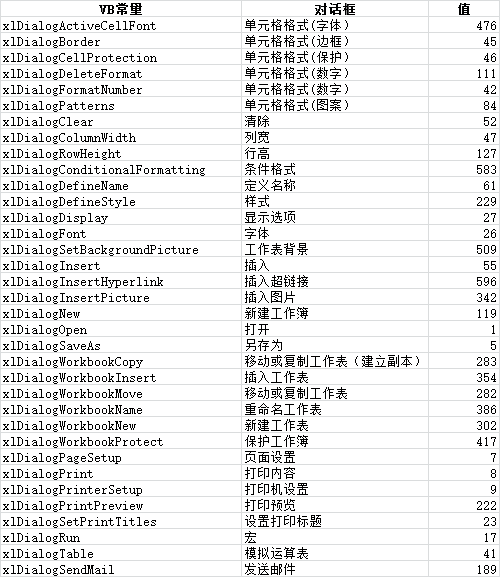
Public Sub 显示Excel内置对话框()
    UserForm1.Show
End Sub
Public Sub 修改Excel的标题()
    Application.Caption = "标题修改试验"
    MsgBox "Excel标题已经被改为: " & Application.Caption _
        & "! 下面将恢复默认的标题文字!"
    Application.Caption = vbNullString
End Sub
Public Sub 隐藏正在使用的Excel工作薄()
    Application.Visible = False
    MsgBox "Excel已经被隐藏! 下面将重新显示Excel!"
    Application.Visible = True
End Sub


 浙公网安备 33010602011771号