
AD域组策略------将“登录用户 || IP地址 || 登录时间 || 系统信息”字段写入到计算机描述
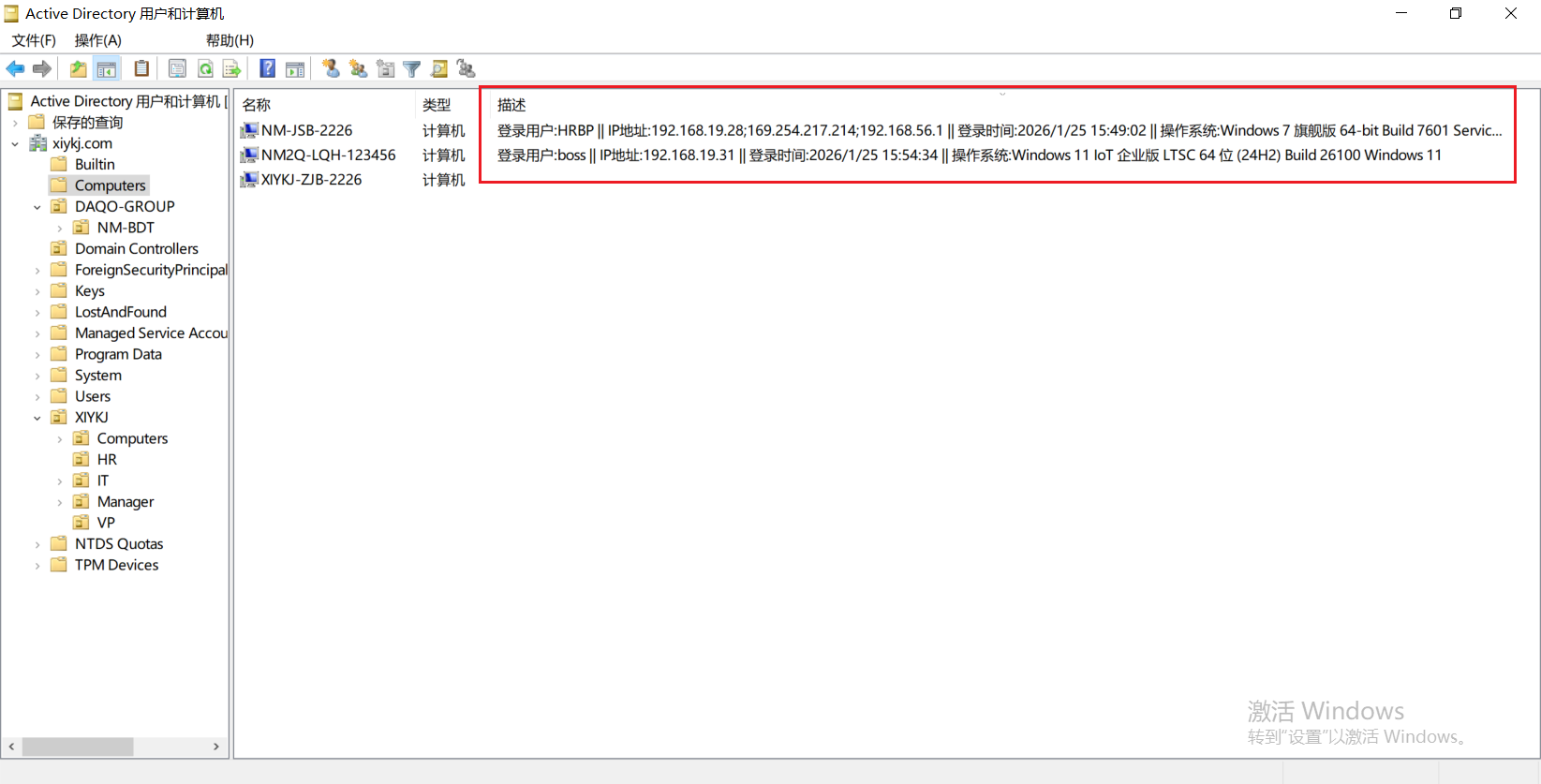
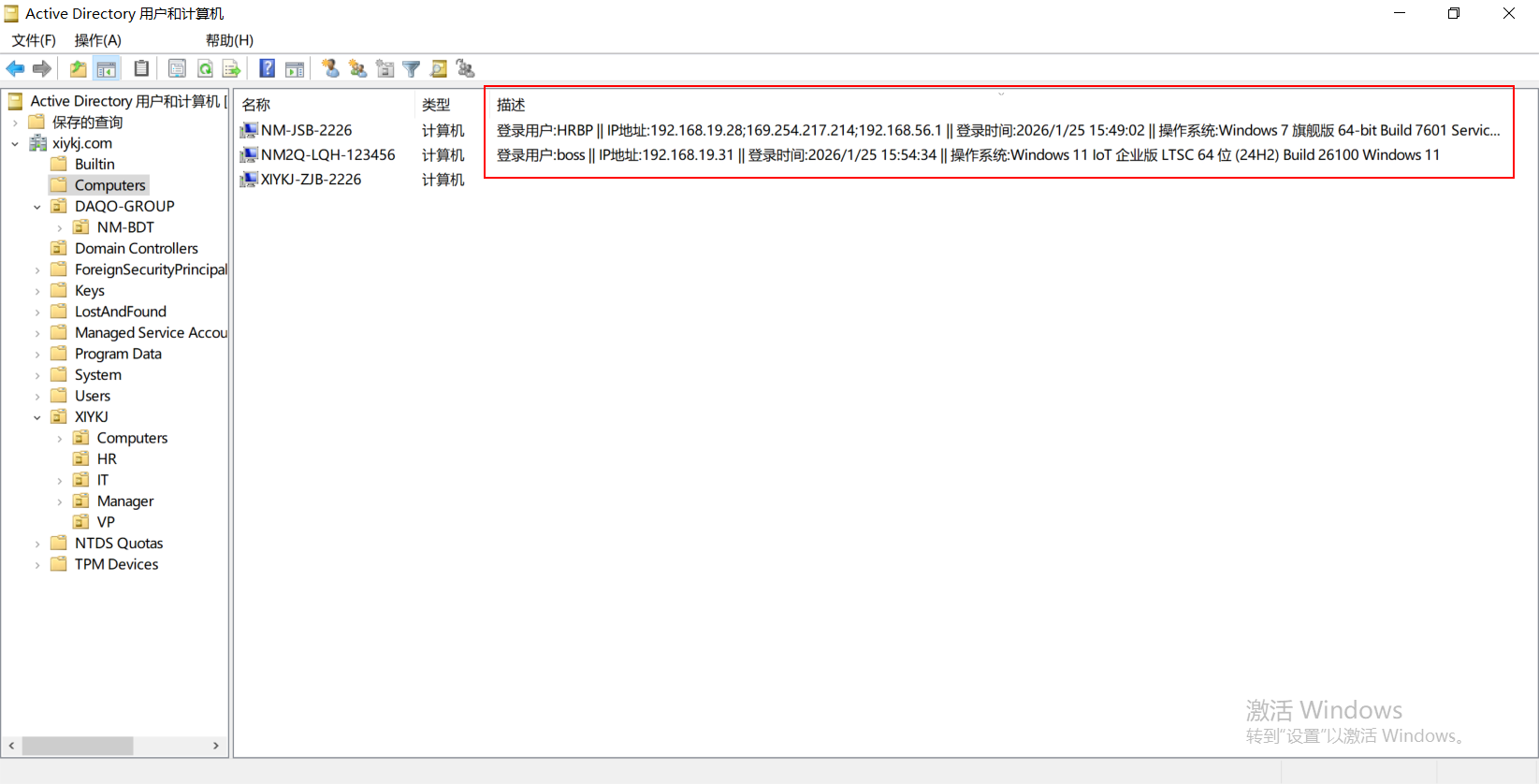
AD域控制器上效果如图:
1、复制如下代码,另存为*.vbs脚本文件
' AD域计算机描述更新脚本 - 详细操作系统版本
' 文件名: UpdateComputerDesc.vbs
' 适用于组策略用户登录脚本

Option Explicit
On Error Resume Next

' 记录日志函数,如果不想每次执行后生成日志文件(日志文件在客户端C:\windows\temp\ComputerDescUpdate.log),可将此段使用 ' 注释掉
Sub WriteLog(strMessage)
    Dim objFSO, objLogFile, strLogPath
    strLogPath = "C:\Windows\Temp\ComputerDescUpdate.log"
    Set objFSO = CreateObject("Scripting.FileSystemObject")

    If objFSO.FileExists(strLogPath) Then
        Set objLogFile = objFSO.OpenTextFile(strLogPath, 8, True)
    Else
        Set objLogFile = objFSO.CreateTextFile(strLogPath, True)
    End If

    objLogFile.WriteLine Now & " - " & strMessage
    objLogFile.Close
    Set objFSO = Nothing
End Sub

' 获取IPv4地址
Function GetIPv4Address()
    Dim objWMIService, colAdapters, objAdapter
    Dim strIP, strIPList, i

    strIPList = ""

    Set objWMIService = GetObject("winmgmts:\\.\root\cimv2")
    Set colAdapters = objWMIService.ExecQuery("SELECT * FROM Win32_NetworkAdapterConfiguration WHERE IPEnabled = True")

    For Each objAdapter In colAdapters
        If IsArray(objAdapter.IPAddress) Then
            For i = 0 To UBound(objAdapter.IPAddress)
                If InStr(objAdapter.IPAddress(i), ".") > 0 Then ' IPv4地址
                    If strIPList <> "" Then strIPList = strIPList & ";"
                    strIPList = strIPList & objAdapter.IPAddress(i)
                End If
            Next
        End If
    Next

    If strIPList = "" Then
        GetIPv4Address = "NoIP"
    Else
        GetIPv4Address = strIPList
    End If

    Set colAdapters = Nothing
    Set objWMIService = Nothing
End Function

' 获取详细的系统版本信息
Function GetDetailedOSVersion()
    Dim objWMIService, colOperatingSystems, objOS
    Dim strCaption, strVersion, strBuild, strArch, strServicePack, strInstallDate
    Dim strOSInfo, strEdition, strOSName

    Set objWMIService = GetObject("winmgmts:\\.\root\cimv2")
    Set colOperatingSystems = objWMIService.ExecQuery("SELECT Caption, Version, BuildNumber, OSArchitecture, CSDVersion, InstallDate, ProductType, OtherTypeDescription FROM Win32_OperatingSystem")

    For Each objOS In colOperatingSystems
        strCaption = objOS.Caption
        strVersion = objOS.Version
        strBuild = objOS.BuildNumber
        strArch = objOS.OSArchitecture
        strServicePack = objOS.CSDVersion

        ' 提取系统名称(去掉Microsoft和版本号)
        strOSName = strCaption
        strOSName = Replace(strOSName, "Microsoft", "")
        strOSName = Replace(strOSName, "(TM)", "")
        strOSName = Replace(strOSName, "(R)", "")

        ' 提取版本号
        Dim strDisplayVersion, strReleaseId
        strDisplayVersion = GetDisplayVersion()

        ' 获取Windows 10/11版本信息
        Dim strWinVersion
        If InStr(strCaption, "Windows 10") > 0 Or InStr(strCaption, "Windows 11") > 0 Then
            strWinVersion = GetWindowsVersion(strVersion, strBuild)
        Else
            strWinVersion = ""
        End If

        ' 清理空格
        strOSName = Trim(strOSName)

        ' 构建详细的系统信息
        strOSInfo = strOSName

        ' 添加架构
        If Not IsNull(strArch) And strArch <> "" Then
            strOSInfo = strOSInfo & " " & strArch
        End If

        ' 添加版本号
        If strDisplayVersion <> "" Then
            strOSInfo = strOSInfo & " (" & strDisplayVersion & ")"
        End If

        ' 添加构建号
        If strBuild <> "" Then
            strOSInfo = strOSInfo & " Build " & strBuild
        End If

        ' 添加Windows版本信息(如21H2, 22H2等)
        If strWinVersion <> "" Then
            strOSInfo = strOSInfo & " " & strWinVersion
        End If

        ' 添加Service Pack信息(如果有)
        If Not IsNull(strServicePack) And strServicePack <> "" Then
            strOSInfo = strOSInfo & " " & strServicePack
        End If

        Exit For
    Next

    Set colOperatingSystems = Nothing
    Set objWMIService = Nothing

    If strOSInfo = "" Then
        GetDetailedOSVersion = "UnknownOS"
    Else
        ' 清理多余的空格
        strOSInfo = Trim(Replace(strOSInfo, "  ", " "))
        GetDetailedOSVersion = strOSInfo
    End If
End Function

' 获取Windows显示版本(适用于Windows 10/11)
Function GetDisplayVersion()
    On Error Resume Next
    Dim objShell, objReg
    Set objShell = CreateObject("WScript.Shell")

    ' 尝试从注册表获取显示版本
    Dim strDisplayVersion, strReleaseId

    ' 方法1:DisplayVersion(Windows 10 20H2+)
    strDisplayVersion = ""
    strReleaseId = ""

    ' 检查注册表键值是否存在
    Const HKEY_LOCAL_MACHINE = &H80000002
    Dim objRegistry, strKeyPath
    Set objRegistry = GetObject("winmgmts:\\.\root\default:StdRegProv")

    ' DisplayVersion
    strKeyPath = "SOFTWARE\Microsoft\Windows NT\CurrentVersion"
    objRegistry.GetStringValue HKEY_LOCAL_MACHINE, strKeyPath, "DisplayVersion", strDisplayVersion

    ' ReleaseId
    objRegistry.GetStringValue HKEY_LOCAL_MACHINE, strKeyPath, "ReleaseId", strReleaseId

    ' 如果DisplayVersion为空但ReleaseId不为空,使用ReleaseId
    If strDisplayVersion = "" And strReleaseId <> "" Then
        strDisplayVersion = strReleaseId
    End If

    ' 如果都为空,尝试获取当前版本
    If strDisplayVersion = "" Then
        ' 通过WMI获取版本号
        Dim objWMIService, colOS
        Set objWMIService = GetObject("winmgmts:\\.\root\cimv2")
        Set colOS = objWMIService.ExecQuery("SELECT Version FROM Win32_OperatingSystem")

        For Each objOS In colOS
            strDisplayVersion = objOS.Version
            Exit For
        Next
    End If

    Set objRegistry = Nothing
    Set objWMIService = Nothing

    GetDisplayVersion = strDisplayVersion
End Function

' 获取Windows版本信息(如21H2, 22H2)
Function GetWindowsVersion(strVersion, strBuild)
    Dim strWinVersion

    ' Windows版本映射表
    Select Case strBuild
        Case "22000", "22000.*"
            strWinVersion = "Windows 11 21H2"
        Case "22621", "22621.*"
            strWinVersion = "Windows 11 22H2"
        Case "22631", "22631.*"
            strWinVersion = "Windows 11 23H2"
        Case "19041", "19041.*"
            strWinVersion = "Windows 10 20H1"
        Case "19042", "19042.*"
            strWinVersion = "Windows 10 20H2"
        Case "19043", "19043.*"
            strWinVersion = "Windows 10 21H1"
        Case "19044", "19044.*"
            strWinVersion = "Windows 10 21H2"
        Case "19045", "19045.*"
            strWinVersion = "Windows 10 22H2"
        Case "10240"
            strWinVersion = "Windows 10 1507"
        Case "10586"
            strWinVersion = "Windows 10 1511"
        Case "14393"
            strWinVersion = "Windows 10 1607"
        Case "15063"
            strWinVersion = "Windows 10 1703"
        Case "16299"
            strWinVersion = "Windows 10 1709"
        Case "17134"
            strWinVersion = "Windows 10 1803"
        Case "17763"
            strWinVersion = "Windows 10 1809"
        Case "18362"
            strWinVersion = "Windows 10 1903"
        Case "18363"
            strWinVersion = "Windows 10 1909"
        Case Else
            ' 根据版本号判断
            If strVersion >= "10.0.22000" Then
                strWinVersion = "Windows 11"
            ElseIf strVersion >= "10.0.10240" Then
                strWinVersion = "Windows 10"
            Else
                strWinVersion = ""
            End If
    End Select

    GetWindowsVersion = strWinVersion
End Function

' 获取简化的系统信息(保持兼容性)
Function GetSimpleOSInfo()
    Dim objWMIService, colOS, objOS
    Dim strCaption, strArch, strOSInfo

    Set objWMIService = GetObject("winmgmts:\\.\root\cimv2")
    Set colOS = objWMIService.ExecQuery("SELECT Caption, OSArchitecture FROM Win32_OperatingSystem")

    For Each objOS In colOS
        strCaption = objOS.Caption
        strArch = objOS.OSArchitecture

        ' 简化系统名称
        strCaption = Replace(strCaption, "Microsoft ", "")
        strCaption = Replace(strCaption, " Professional", " Pro")
        strCaption = Replace(strCaption, " Enterprise", " Ent")

        ' 移除括号内容
        Dim pos
        pos = InStr(strCaption, "(")
        If pos > 0 Then
            strCaption = Trim(Left(strCaption, pos - 1))
        End If

        ' 添加架构
        If Not IsNull(strArch) Then
            If strArch = "64-bit" Then
                strOSInfo = strCaption & " x64"
            Else
                strOSInfo = strCaption & " x86"
            End If
        Else
            strOSInfo = strCaption
        End If

        Exit For
    Next

    Set colOS = Nothing
    Set objWMIService = Nothing

    If strOSInfo = "" Then
        GetSimpleOSInfo = "UnknownOS"
    Else
        GetSimpleOSInfo = strOSInfo
    End If
End Function

' 主程序
Sub Main()
    Dim objSysInfo, objComputer, objUser
    Dim strCompDesc, strIP, strComputerName, strOSVersion
    Dim strNewDescription, bSuccess

    WriteLog "=== 脚本开始执行 ==="

    ' 获取系统信息
    On Error Resume Next
    Set objSysInfo = CreateObject("ADSystemInfo")
    If Err.Number <> 0 Then
        WriteLog "错误: 无法创建ADSystemInfo对象 - " & Err.Description
        Exit Sub
    End If

    ' 获取计算机名称(从ADSystemInfo直接获取完整路径)
    strComputerName = objSysInfo.ComputerName
    WriteLog "计算机完整DN: " & strComputerName

    ' 提取计算机名(不含域部分)
    Dim arrComputer
    arrComputer = Split(strComputerName, ",")
    Dim strShortName
    strShortName = Replace(arrComputer(0), "CN=", "")
    WriteLog "计算机短名称: " & strShortName

    ' 获取用户信息
    Set objUser = GetObject("LDAP://" & objSysInfo.UserName)
    strCompDesc = objUser.CN
    If strCompDesc = "" Then
        strCompDesc = objUser.sAMAccountName
    End If
    WriteLog "登录用户: " & strCompDesc

    ' 获取IP地址
    strIP = GetIPv4Address()
    WriteLog "IP地址: " & strIP

    ' 获取操作系统版本
    strOSVersion = GetDetailedOSVersion()
    WriteLog "操作系统: " & strOSVersion

    ' 检查描述长度(AD限制约1024字符)
    Dim strTempDesc
    strTempDesc = strCompDesc & "|" & Date & " " & Time & "|" & strIP & "|" & strOSVersion

    If Len(strTempDesc) > 900 Then
        WriteLog "警告: 描述长度可能超过AD限制 (" & Len(strTempDesc) & " 字符)"
        ' 如果太长,使用简化版本
        strOSVersion = GetSimpleOSInfo()
        WriteLog "使用简化系统信息: " & strOSVersion
    End If

    ' 构建新的描述信息
    ' 格式: 用户名|时间|IP|操作系统
    strNewDescription = "登录用户:" & strCompDesc & " || IP地址:"  & strIP & " || 登录时间:" & Date & " " & Time & " || 操作系统:" & strOSVersion
    WriteLog "新的描述 (" & Len(strNewDescription) & " 字符): " & strNewDescription

    ' ========== 方法1: 直接使用ADSystemInfo获取的路径 ==========
    WriteLog "尝试方法1: 直接绑定计算机对象..."
    Set objComputer = GetObject("LDAP://" & strComputerName)

    If Err.Number = 0 Then
        objComputer.Description = strNewDescription
        objComputer.SetInfo

        If Err.Number = 0 Then
            WriteLog "成功更新计算机描述"
            bSuccess = True
        Else
            WriteLog "错误: 更新失败 - " & Err.Description & " (错误号: " & Hex(Err.Number) & ")"

            ' 如果是权限问题,提供详细错误信息
            If Err.Number = &H80070005 Then ' 拒绝访问
                WriteLog "权限错误: 用户 " & strCompDesc & " 没有权限修改计算机对象"
            End If
        End If
    Else
        WriteLog "方法1失败: " & Err.Description
        Err.Clear
    End If

    ' ========== 方法2: 使用ADODB搜索 ==========
    If Not bSuccess Then
        WriteLog "尝试方法2: 使用ADODB搜索..."

        Dim objConnection, objCommand, objRecordSet
        Dim strSearchFilter, strSearchBase

        Set objConnection = CreateObject("ADODB.Connection")
        Set objCommand = CreateObject("ADODB.Command")
        Set objRecordSet = CreateObject("ADODB.Recordset")

        objConnection.Provider = "ADsDSOObject"
        objConnection.Open "Active Directory Provider"

        Set objCommand.ActiveConnection = objConnection
        objCommand.Properties("Page Size") = 1000
        objCommand.Properties("Timeout") = 30
        objCommand.Properties("Cache Results") = False

        ' 搜索条件 - 使用cn属性
        strSearchFilter = "(&(objectCategory=computer)(cn=" & strShortName & "))"
        strSearchBase = "DC=xiykj,DC=com"

        objCommand.CommandText = "<LDAP://" & strSearchBase & ">;" & strSearchFilter & ";distinguishedName;subtree"

        Set objRecordSet = objCommand.Execute

        If Not objRecordSet.EOF Then
            Dim strComputerDN
            strComputerDN = objRecordSet.Fields("distinguishedName").Value
            WriteLog "找到计算机DN: " & strComputerDN

            ' 绑定并更新
            Set objComputer = GetObject("LDAP://" & strComputerDN)

            If Err.Number = 0 Then
                objComputer.Description = strNewDescription
                objComputer.SetInfo

                If Err.Number = 0 Then
                    WriteLog "成功更新计算机描述(方法2)"
                    bSuccess = True
                Else
                    WriteLog "错误: 方法2更新失败 - " & Err.Description
                End If
            Else
                WriteLog "错误: 方法2绑定失败 - " & Err.Description
            End If
        Else
            WriteLog "错误: 方法2未找到计算机对象"
        End If

        Set objRecordSet = Nothing
        Set objCommand = Nothing
        Set objConnection = Nothing
    End If

    ' ========== 方法3: 使用WinNT提供者 ==========
    If Not bSuccess Then
        WriteLog "尝试方法3: 使用WinNT提供者..."

        Dim strDomain, strWinNTPath
        ' 提取域名
        Dim arrUserDN
        arrUserDN = Split(objSysInfo.UserName, ",")
        For Each part In arrUserDN
            If InStr(part, "DC=") = 1 Then
                strDomain = Replace(part, "DC=", "")
                Exit For
            End If
        Next

        If strDomain <> "" Then
            strWinNTPath = "WinNT://" & strDomain & "/" & strShortName
            WriteLog "WinNT路径: " & strWinNTPath

            On Error Resume Next
            Set objComputer = GetObject(strWinNTPath)

            If Err.Number = 0 Then
                ' WinNT提供者可能不支持Description属性
                WriteLog "警告: WinNT提供者可能不支持Description属性"
            Else
                WriteLog "方法3失败: " & Err.Description
            End If
        End If
    End If

    ' 清理对象
    Set objUser = Nothing
    Set objComputer = Nothing
    Set objSysInfo = Nothing

    If bSuccess Then
        WriteLog "=== 脚本执行成功 ==="
    Else
        WriteLog "=== 脚本执行失败 ==="
    End If
End Sub

' 执行主程序
Main
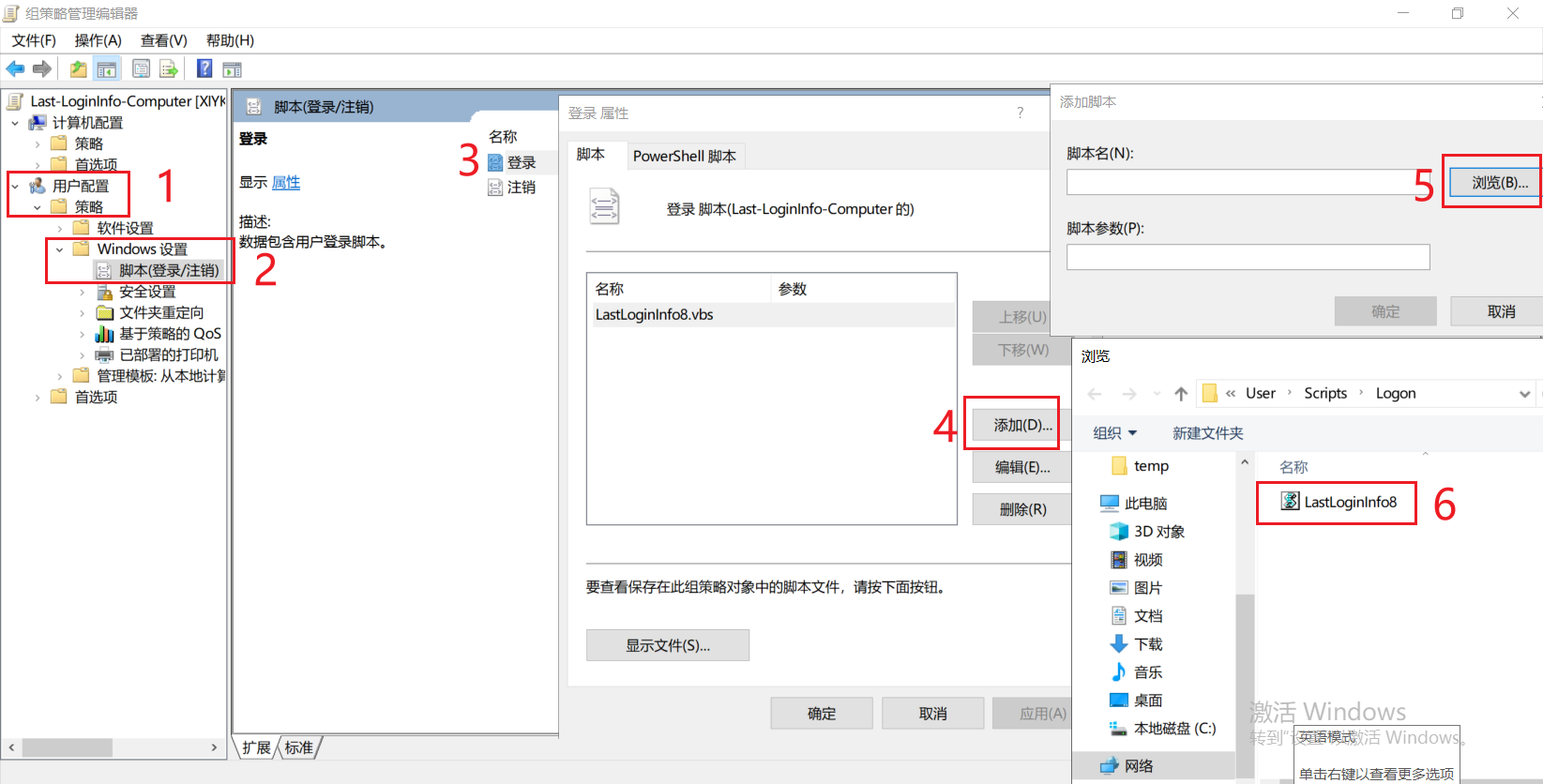
2、AD域控制器新建组策略,右键编辑,用户配置------策略------Windows设置------脚本(登录/注销),在右侧“登录”选项中选择脚本文件即可
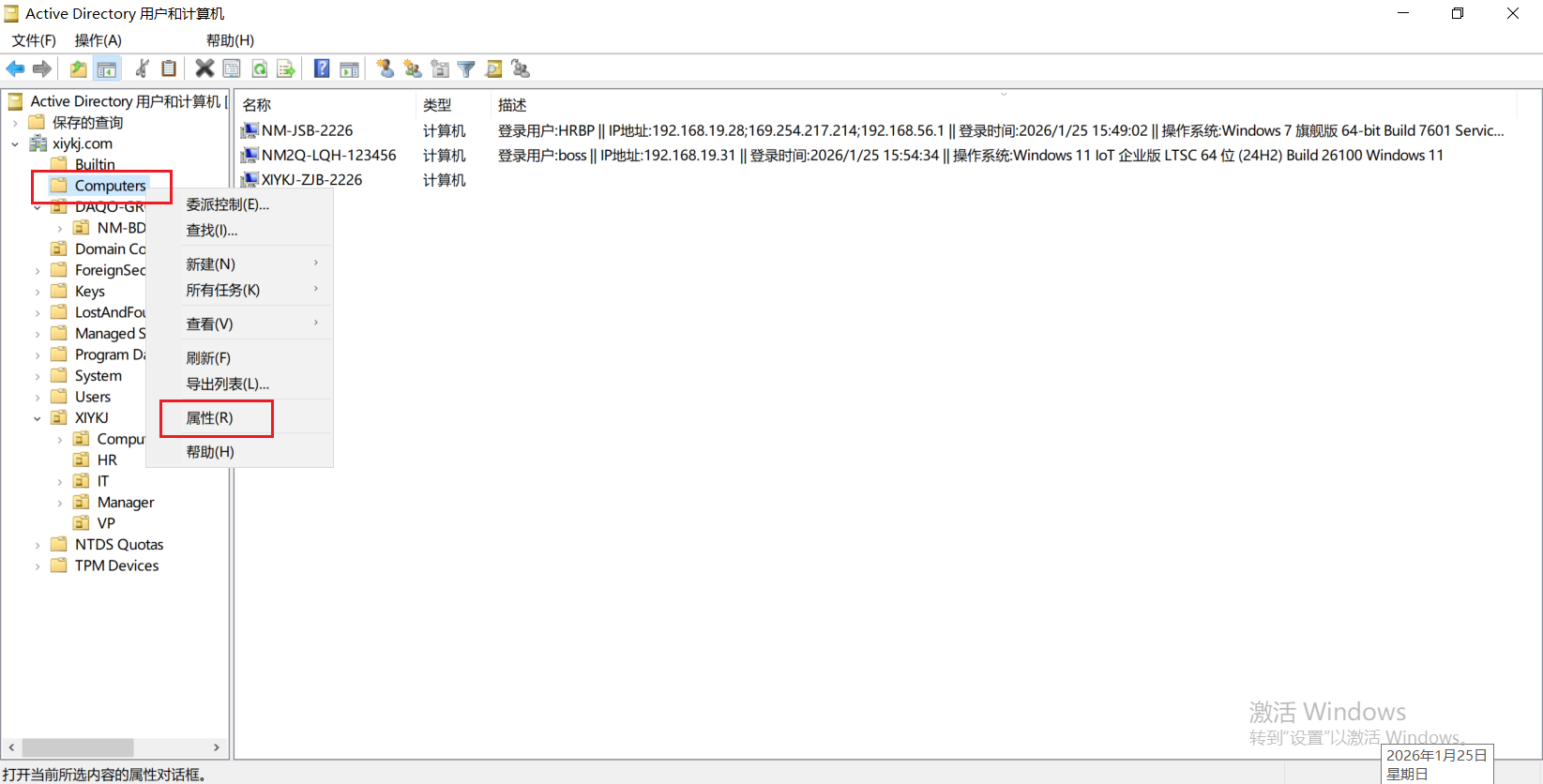
3、委派权限,默认Domain Users是没有权限对计算机“描述”字段进行写入权限的,在Computers容器上右键,选择“属性”
4、安全------高级------添加
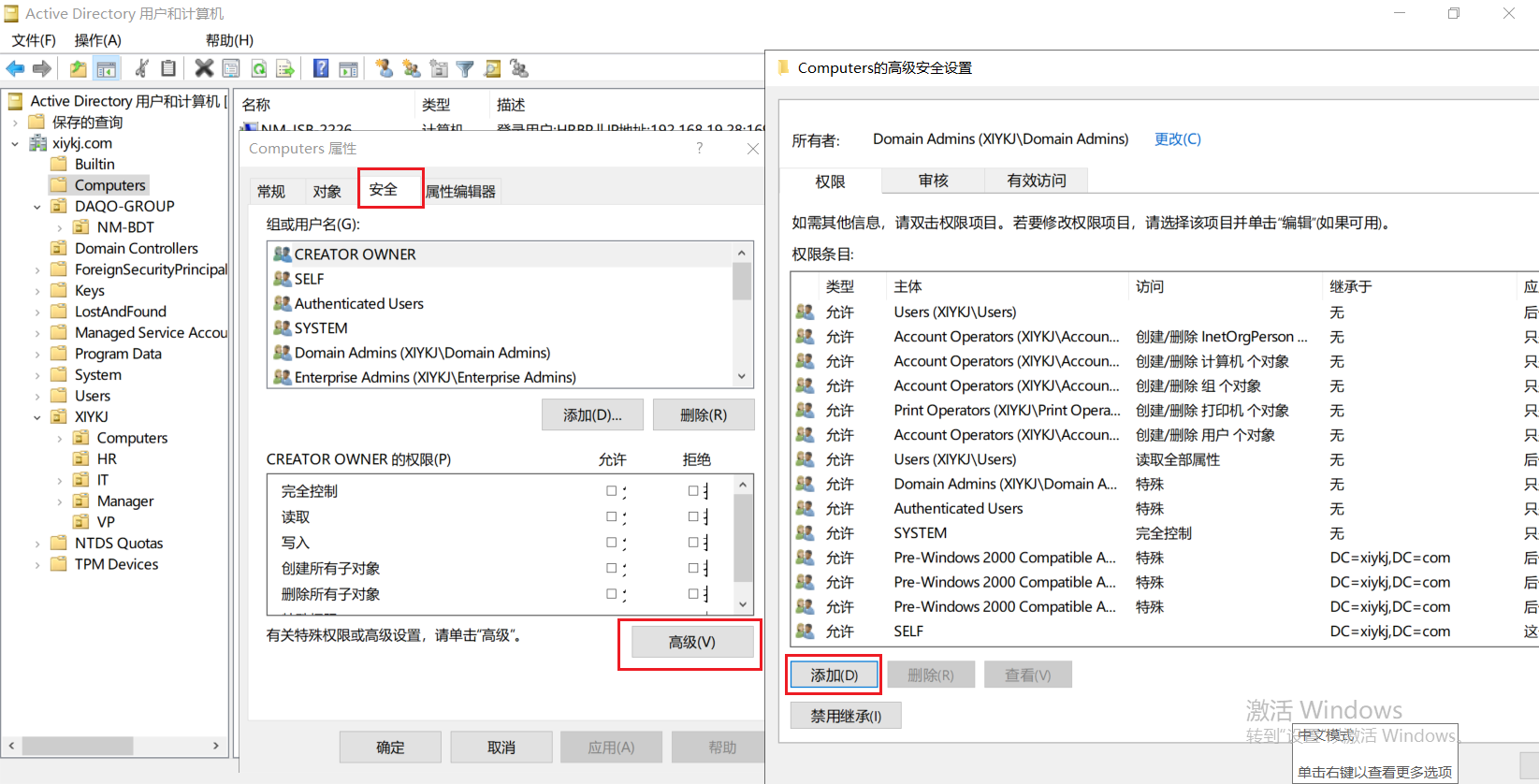
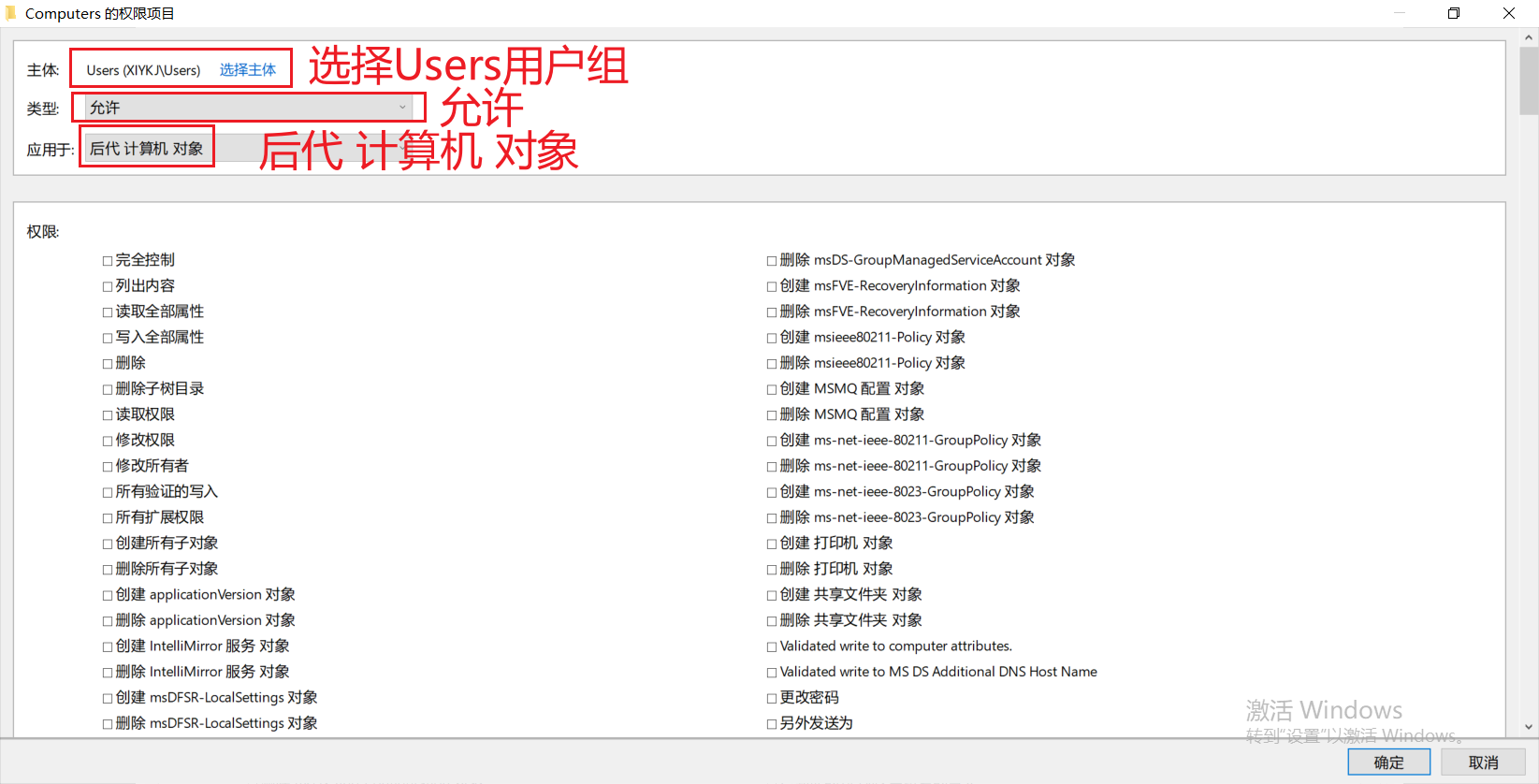
5、主体【Users普通用户组】;类型【允许】;应用于【后代 计算机 对象】;
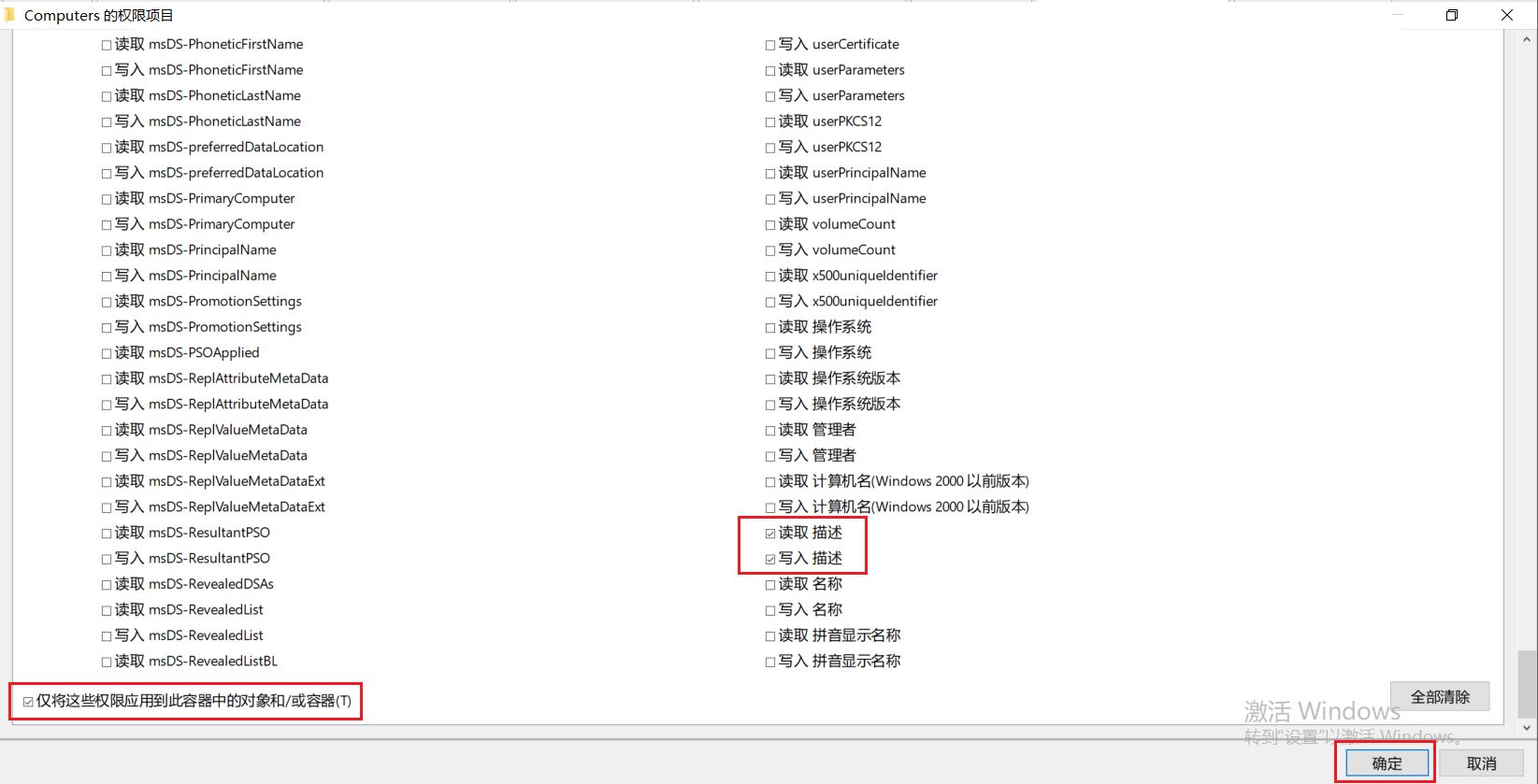
6、拉到最底下,将“读取 描述”,“写入 描述”这两项√勾上,仅将这些权限应用到此容器中的对象和/或容器 也√勾上,点击确定
7、后面加入域的计算机,首次用域账号登录时即可将“登录用户 || IP地址 || 登录时间 || 系统信息”字段写入到计算机描述,方便管理员操作管理域内计算机

 浙公网安备 33010602011771号