
python代码实现批量自动备份交换机配置
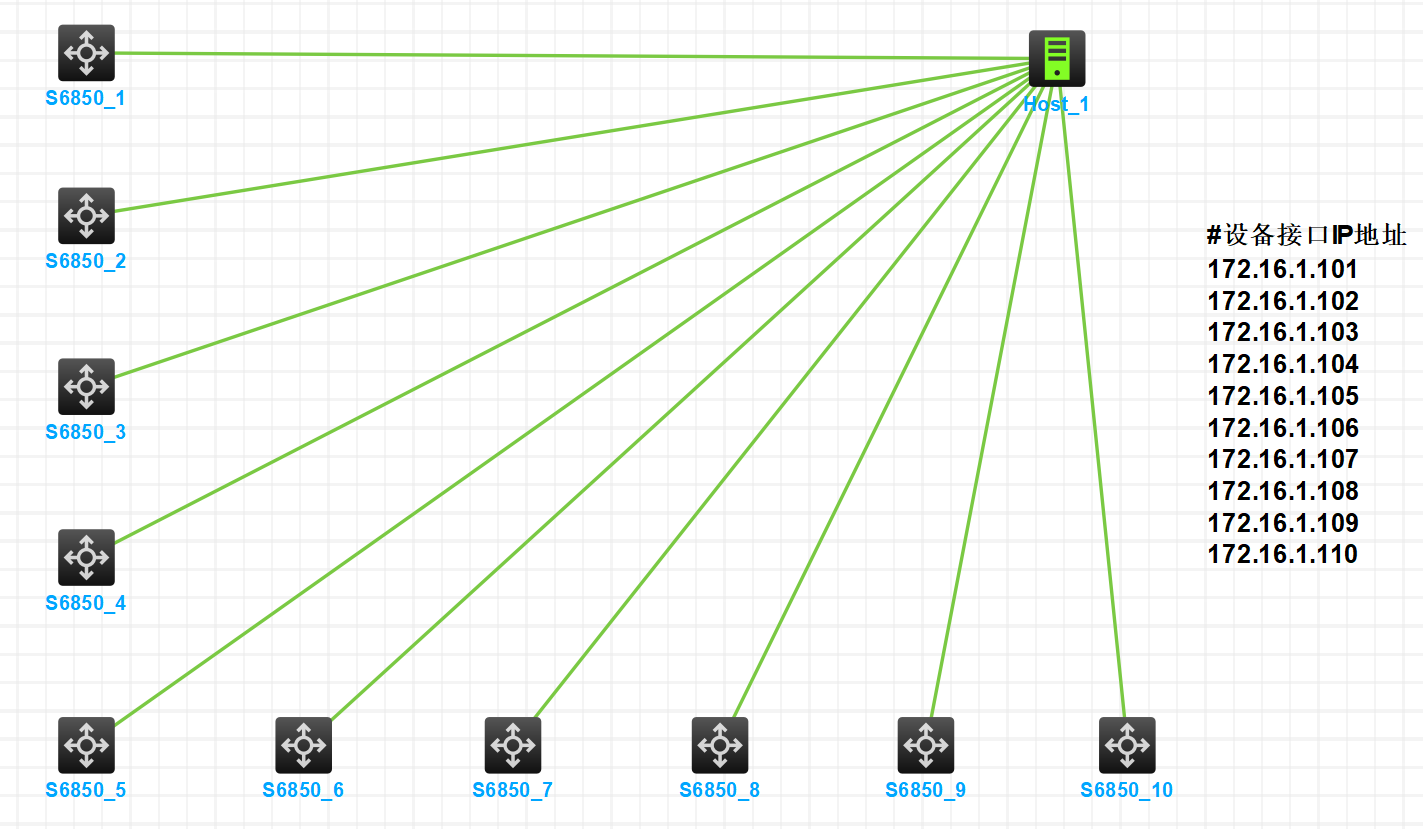
网络拓扑图
Python代码
import logging
import telnetlib3 as telnetlib
import time
import datetime
from multiprocessing import Pool


class TelnetClient():
    def __init__(self,):
        self.tn = telnetlib.Telnet()

    # 此函数实现telnet登录主机
    def login_host(self,host_ip,username,password):
        try:
            # self.tn = telnetlib.Telnet(host_ip,port=23)
            self.tn.open(host_ip,port=23)
        except:
            logging.warning('%s网络连接失败'%host_ip)
            return False
        # 等待login出现后输入用户名,最多等待10秒
        self.tn.read_until(b'Username: ',timeout=10)
        self.tn.write(username.encode('ascii') + b'\n')
        # 等待Password出现后输入用户名,最多等待10秒
        self.tn.read_until(b'Password: ',timeout=10)
        self.tn.write(password.encode('ascii') + b'\n')
        # 延时两秒再收取返回结果,给服务端足够响应时间
        time.sleep(2)
        # 获取登录结果
        # read_very_eager()获取到的是的是上次获取之后本次获取之前的所有输出
        command_result = self.tn.read_very_eager().decode('ascii')
        if 'Login failed' not in command_result:
            logging.warning('%s登录成功'%host_ip)
            return True
        else:
            logging.warning('%s登录失败,用户名或密码错误'%host_ip)
            return False

    # 此函数实现执行传过来的命令,并输出其执行结果
    def execute_some_command(self,command):
        # 执行命令
        self.tn.write(command.encode('ascii')+b'\n')
        time.sleep(2)
        # 获取命令结果
        command_result = self.tn.read_very_eager().decode('ascii')
        # command_result=self.tn.read_all().decode('ascii')
        logging.warning('命令执行结果:\n%s' % command_result)

    # 退出telnet
    def logout_host(self):
        self.tn.write(b"quit\n")

#执行交换机备份
def switchbak(i,u,p,c):
    telnet_client = TelnetClient()
    if telnet_client.login_host(i,u,p) :
        telnet_client.execute_some_command(c)
        telnet_client.logout_host()

if __name__ == '__main__':
    print('开始多进程并发备份')
    start=time.time()
    #50为进程数,用户可根据客户端及服务器配置自行调整,注意:过大进程易被安全软件识别为恶意攻击
    p=Pool(50)
    for ip in open('switchs.txt').readlines():
        ip=ip.strip()
        #交换机具备backup命令的telnet用户
        username = 'zhang'
        #该用户密码
        password = 'zhang@123'
        #tftp服务器地址
        ftphost ='172.16.1.1'
        filename = ip.replace('.','.')+ '-'+datetime.date.today().strftime('%Y%m%d')+'.bak.cfg'
        command1 = 'backup startup-configuration to ' +(ftphost)+' '+ filename
        p.apply_async(switchbak,args=(ip,username,password,command1))
    p.close()
    p.join()
    end=time.time()
    print('备份完成,耗时:%0.2f 秒' %(end-start) )
环境需求:
1、一台具备python3执行环境的机器
2、一台tftp服务器
3、被管理交换机已开启telnet服务,并设置相应的用户和密码及授权执行backup命令权限
使用方法:
1、将Switch_AutoBackup.py与switchs.txt放在同一目录下
2、编辑Switch_AutoBackup.py文件,填入本地设备环境对应的信息
        #交换机具备backup命令的telnet用户
        username = 'zhang'
        #该用户密码
        password = 'zhang@123'
        #tftp服务器地址
        ftphost ='172.16.1.1'
3、编辑switchs.txt,填入需要备份配置的交换机管理IP地址,每行一个IP地址
172.16.1.101
172.16.1.102
172.16.1.103
172.16.1.104
172.16.1.105
172.16.1.106
172.16.1.107
172.16.1.108
172.16.1.109
172.16.1.110
4、执行python代码,配置文件备份成功(文件名以“设备IP地址-日期.bak.cfg”)
python .\Switch_AutoBackup.py
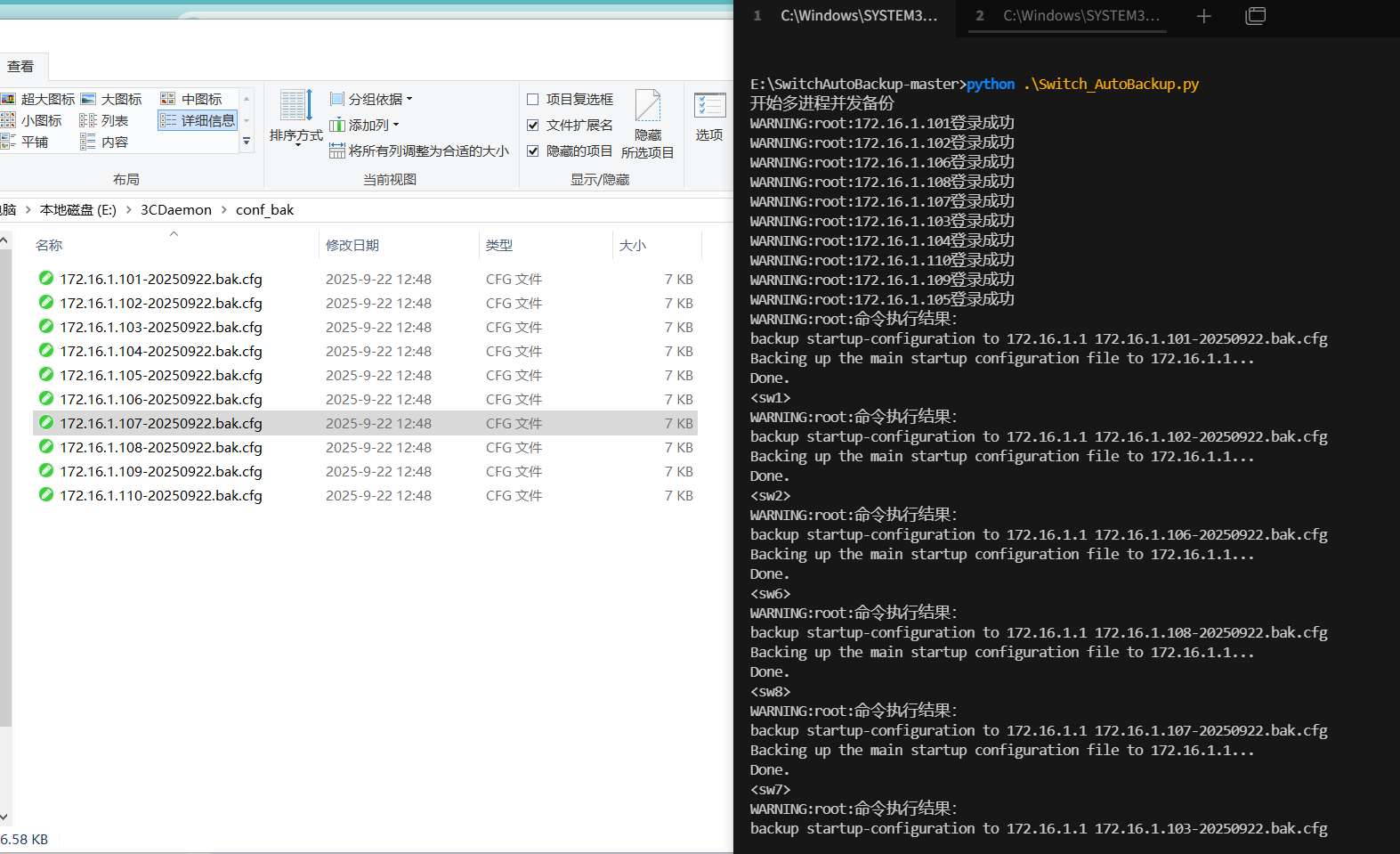
5、可根据自己的需求将如下命令设置为Windows或Linux计划任务,实现自动备份设备配置文件
python .\Switch_AutoBackup.py
项目开源地址:https://github.com/hzh1019/SwitchAutoBackup

 浙公网安备 33010602011771号