
ubuntu配置静态ip
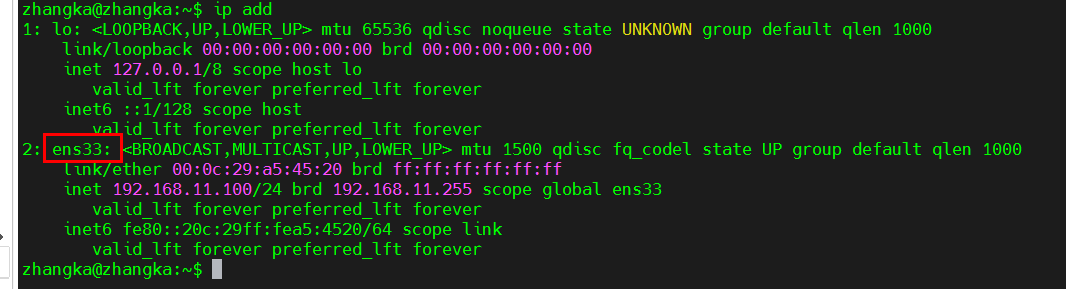
1、确定网络接口名称
ip add
ens33就是网卡名称
2、备份网卡配置文件
sudo cp /etc/netplan/00-installer-config.yaml /etc/netplan/00-installer-config.yaml.bak
3、编辑网卡配置文件
sudo vim /etc/netplan/00-installer-config.yaml
#这是默认的网卡DHCP配置
# This is the network config written by 'subiquity'
network:
  ethernets:
    ens33:
      dhcp4: true
  version: 2
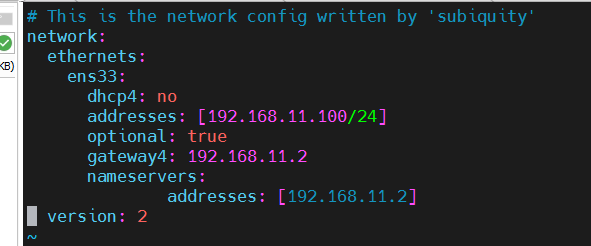
修改成如下信息,192.168.11.100为静态ip地址,192.168.11.2为网关ip地址,nameservers为dns服务器地址
# This is the network config written by 'subiquity'
network:
    ethernets:
        ens33:
            dhcp4: no
            addresses: [192.168.19.25/24]
            optional: true
            gateway4: 192.168.19.2
            nameservers:
              addresses: [192.168.19.2]
    version: 2
4、应用配置
sudo netplan apply
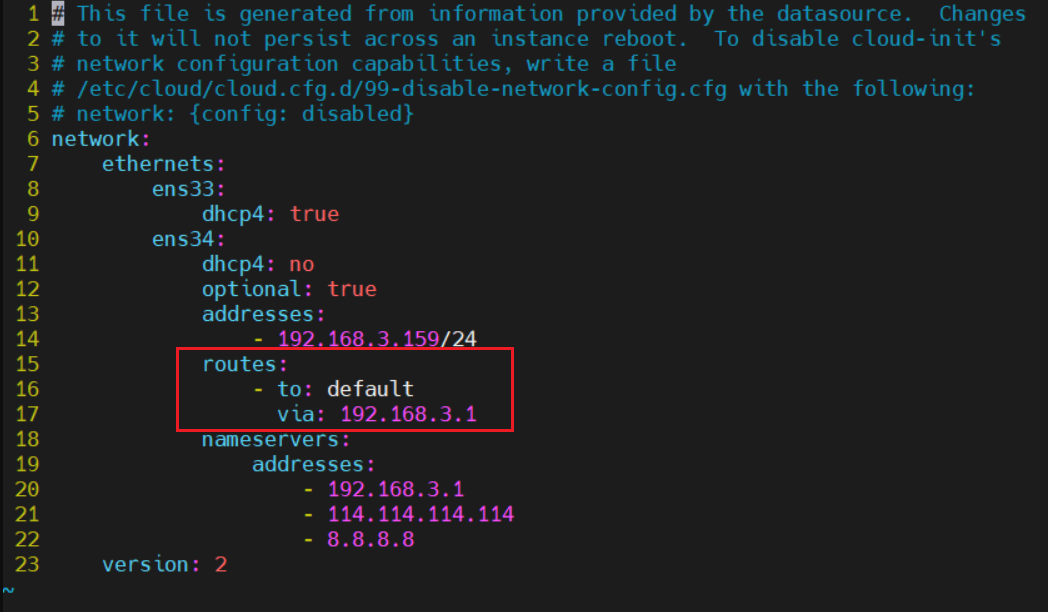
### 如果执行 sudo netplan apply 出现如下报错

请重新修改网卡配置文件中网关信息改成如下格式保存后再执行 sudo netplan apply

 浙公网安备 33010602011771号