
Matplotlib
Matplotlib是一个强大的Python绘图和数据可视化的工具包
安装:pip install matplotlib
引用:import matplotlib.pyplot as plt
绘图函数:plt.plot()
显示图像:plt.show()
In [4]: import matplotlib.pyplot as plt

In [5]: plt.plot([1,2,3,4],[2,1,7,6])
Out[5]: [<matplotlib.lines.Line2D at 0x1caf8fd0>]

In [6]: plt.show()
Matplotlib-plot函数
plot函数:绘制点图或线图
- 线性linestyle (-, -., --, ..)
- 点型marker (v, ^, s, H, +, x, D, o等)
- 颜色color (b,g,r,y,k,w等)
In [8]: plt.plot([1,2,3,4],[2,1,7,6])  #实线折线图
Out[8]: [<matplotlib.lines.Line2D at 0xb98bd30>]

In [9]: plt.show()

In [10]: plt.plot([1,2,3,4],[2,1,7,6],'o--') #圆点虚线折线图
Out[10]: [<matplotlib.lines.Line2D at 0xb921930>]

In [11]: plt.show()

In [12]: plt.plot([1,2,3,4],[2,1,7,6],'o--y')  #圆点虚线黄色折线图
Out[12]: [<matplotlib.lines.Line2D at 0xba9d530>]

In [13]: plt.show()

In [14]: plt.plot([1,2,3,4],[2,1,7,6],color='red') #红线折线图
Out[14]: [<matplotlib.lines.Line2D at 0x6dc3a10>]

In [15]: plt.show()
show多条线,如果show之前设置多条线,那么此时调用就会show这一组线
In [21]: plt.plot([1,2,3,4],[7,5,8,9],color='red')
Out[21]: [<matplotlib.lines.Line2D at 0xb8d82b0>]

In [22]: plt.plot([1,2,3,4],[2,1,7,6],color='black',marker='o')
Out[22]: [<matplotlib.lines.Line2D at 0xb8d4c70>]

In [23]: plt.show()
Matplotlib-图像标注
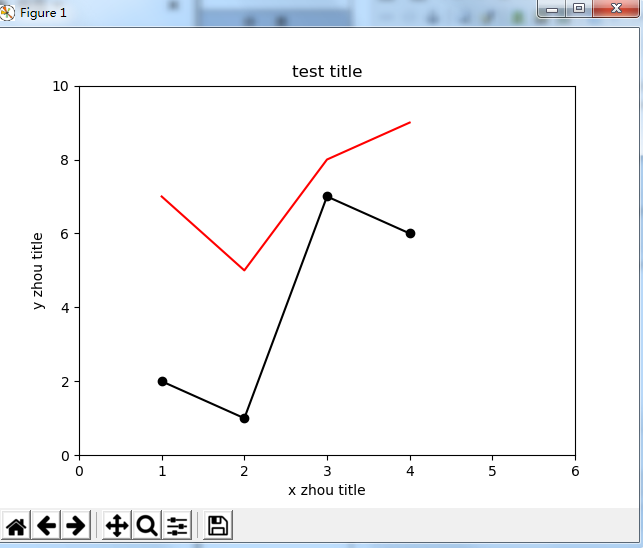
- 设置图像标题 plt.title()
- 设置x轴名称 plt.xlabel()
- 设置y轴名称 plt.ylabel()
- 设置x轴范围 plt.xlim()
- 设置y轴范围 plt.ylim()
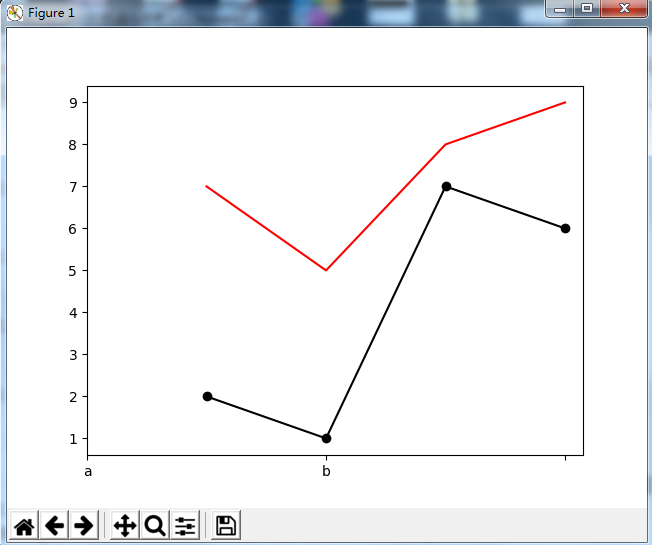
- 设置x轴刻度 plt.xticks()
- 设置y轴刻度 plt.yticks()
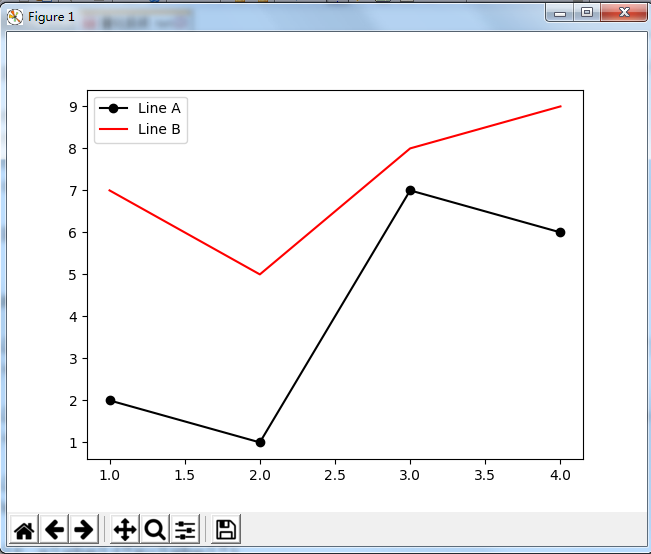
- 设置曲线图例 plt.legend()
In [39]: plt.plot([1,2,3,4],[2,1,7,6], color='black', marker='o')
Out[39]: [<matplotlib.lines.Line2D at 0x17bb7f98>]

In [40]: plt.plot([1,2,3,4],[7,5,8,9], color='red')
Out[40]: [<matplotlib.lines.Line2D at 0x17c07940>]

In [41]: plt.title('test title')
Out[41]: Text(0.5, 1.0, 'test title')

In [42]: plt.xlabel('x zhou title')
Out[42]: Text(0.5, 0, 'x zhou title')

In [43]: plt.ylabel('y zhou title')
Out[43]: Text(0, 0.5, 'y zhou title')

In [44]: plt.xlim(0,6)
Out[44]: (0, 6)

In [45]: plt.ylim(0,10)
Out[45]: (0, 10)

In [46]: plt.show()
指定刻度名
In [47]: plt.plot([1,2,3,4],[2,1,7,6], color='black', marker='o')
Out[47]: [<matplotlib.lines.Line2D at 0x17befdd8>]

In [48]: plt.plot([1,2,3,4],[7,5,8,9], color='red')
Out[48]: [<matplotlib.lines.Line2D at 0x1a934710>]

In [50]: plt.xticks(np.arange(0,5,2), ['a','b']) #刻度范围为一个可迭代的数据,规定刻度间距,其中第二个列表为指定刻度名称,在柱状图用常用
Out[50]:
([<matplotlib.axis.XTick at 0x1aa18438>,
  <matplotlib.axis.XTick at 0x1a9a5d30>,
  <matplotlib.axis.XTick at 0x1a9a5a58>],
 <a list of 2 Text xticklabel objects>)

In [51]: plt.show()
增加图例
In [52]: plt.plot([1,2,3,4],[2,1,7,6], color='black', marker='o',label='Line A')
Out[52]: [<matplotlib.lines.Line2D at 0x1aa49320>]

In [53]: plt.plot([1,2,3,4],[7,5,8,9], color='red', label='Line B')
Out[53]: [<matplotlib.lines.Line2D at 0x1ab10898>]

In [54]: plt.legend()
Out[54]: <matplotlib.legend.Legend at 0x1ab55400>

In [55]: plt.show()
pandas与Matplotlib结合
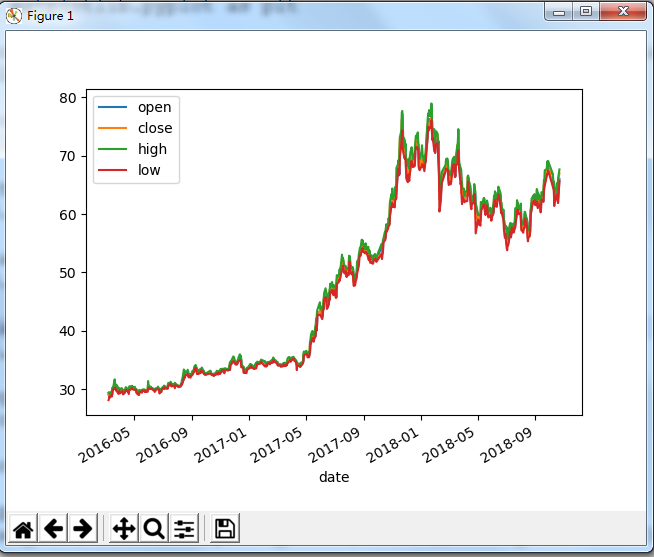
In [56]: df = pd.read_csv('111.csv', parse_dates=['date'], index_col='date')[['open','close','high','low']]

In [57]: df.plot()
Out[57]: <matplotlib.axes._subplots.AxesSubplot at 0x1abf1860>

In [58]: plt.show()
Matplotlib-画布与图
上面的画的都是单图,如果想呈现多个图进行对比,那么就要用画布了,画布你就想象成一块黑板,然后把这块分割成多个区域,每个区域内都画个图,在这里叫子图
- 画布:figure fig = plt.figure()
- 图: subplot ax1 = fig.add_subplot(2,2,1)
- 调节子图间距:subplots_adjust(left, bottom, right,top), wspace, hspace)
In [20]: fig = plt.figure()

In [21]: ax1 = fig.add_subplot(2,2,1)  #分成两行两列  占第一份

In [22]: ax1.plot([1,2,3,4],[5,6,7,8])  #给第一张图加数据
Out[22]: [<matplotlib.lines.Line2D at 0x32bdd10>]

In [23]: ax2 = fig.add_subplot(2,2,3)  #占第三份

In [24]: fig.show()

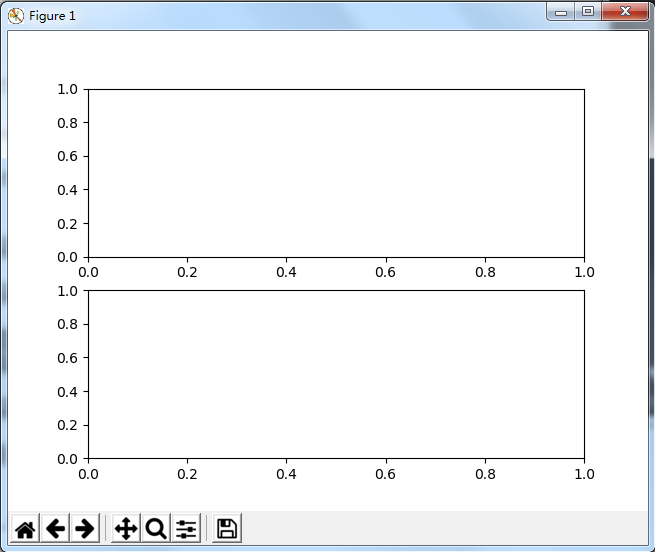
In [29]: fig = plt.figure()

In [30]: ax1 = fig.add_subplot(2,1,1)  #分成两行一列  占第一份

In [31]: ax2 = fig.add_subplot(2,1,2)  #占第二份

In [32]: fig.show()
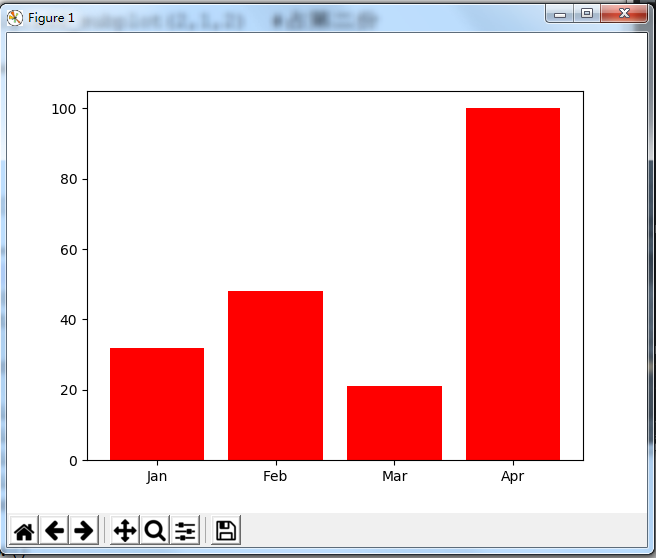
柱状图 plt.bar()
In [83]: data = [32, 48, 21, 100]

In [84]: labels = ['Jan', 'Feb', 'Mar', 'Apr']

In [85]: plt.bar(np.arange(len(data)), data, color='red')
Out[85]: <BarContainer object of 4 artists>

In [86]: plt.xticks(np.arange(len(data)), labels)
Out[86]:
([<matplotlib.axis.XTick at 0x1b97a390>,
  <matplotlib.axis.XTick at 0x1c4b3d68>,
  <matplotlib.axis.XTick at 0x1c4b3358>,
  <matplotlib.axis.XTick at 0x1c5062e8>],
 <a list of 4 Text xticklabel objects>)

In [87]: plt.show()
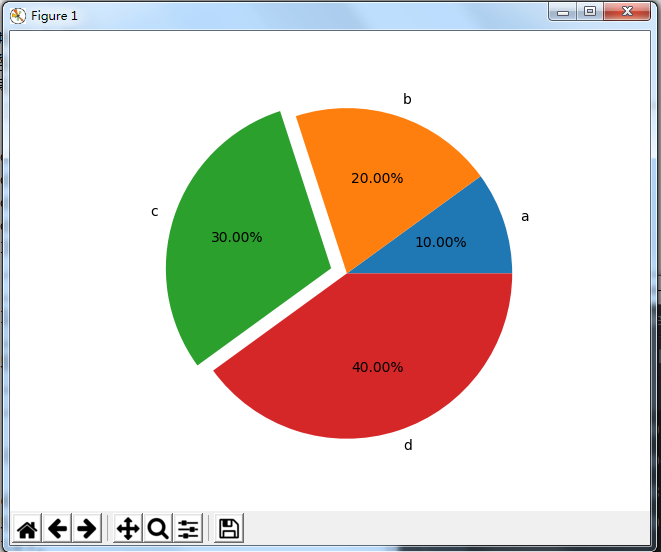
饼图 plt.pie()
- labels 每块饼的名称
- autopct 按照格式显示数据
- explode 突出某块饼
In [39]: plt.pie([10,20,30,40],labels=['a','b','c','d'],autopct='%.2f%%',explode=[0,0,0.1,0])
Out[39]:
([<matplotlib.patches.Wedge at 0x109d2970>,
  <matplotlib.patches.Wedge at 0x109d2430>,
  <matplotlib.patches.Wedge at 0x109d21b0>,
  <matplotlib.patches.Wedge at 0x32a8b10>],
 [Text(1.04616,0.339919,'a'),
  Text(0.339919,1.04616,'b'),
  Text(-1.14127,0.37082,'c'),
  Text(0.339919,-1.04616,'d')],
 [Text(0.570634,0.18541,'10.00%'),
  Text(0.18541,0.570634,'20.00%'),
  Text(-0.66574,0.216312,'30.00%'),
  Text(0.18541,-0.570634,'40.00%')])

In [40]: plt.axis('equal')  #让饼图平铺  不是斜的
Out[40]:
(-1.2128537683838656,
 1.105374020036155,
 -1.1179348077041187,
 1.1179347975732619)

In [41]: plt.show()
k线图
matplotlib.finanace子包有许多绘制金融相关图的函数接口(如果matplotlib模块没有finance,可以下载这个mpl_finance)
绘制k线图:matplotlib.finanace.candlestick_ochl函数
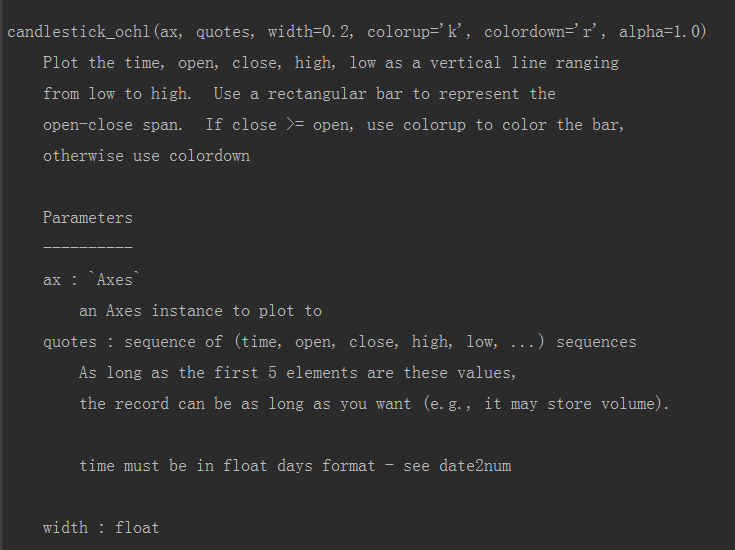
- ax 画布子图实例
- quotes 序列(时间,开,关,高,低,…)的值,其中时间必须是date2num类型,from matplotlib.dates import date2num
In [21]: import matplotlib.pyplot as plt

In [22]: import mpl_finance as fin
#用于把dataframe对象里的时间对象转换成python的时间对象
In [23]: from matplotlib.dates import date2num

In [24]: df = pd.read_csv('111.csv',parse_dates=['date'], index_col=['date'])[['open','close','high','low']]

In [25]: df
Out[25]:
              open   close    high     low
date
2016-03-08  29.022  29.321  29.368  28.094
2016-03-09  28.872  29.396  29.462  28.347
2016-03-10  29.022  28.797  29.312  28.759
2016-03-11  28.638  29.078  29.134  28.544
2016-03-14  29.031  29.143  29.574  28.947
2016-03-15  29.087  29.378  29.499  28.712
2016-03-16  29.134  30.099  30.221  29.087
2016-03-17  30.071  29.977  30.324  29.865
2016-03-18  30.277  30.090  30.371  29.865
2016-03-21  30.343  30.755  31.663  30.202
2016-03-22  30.586  30.071  30.951  29.977
2016-03-23  30.249  30.221  30.689  30.052
2016-03-24  30.043  29.790  30.061  29.743
2016-03-25  29.799  30.033  30.727  29.640
2016-03-28  30.071  29.471  30.305  29.368
2016-03-29  29.612  29.275  29.752  29.172
2016-03-30  29.602  29.968  30.033  29.527
2016-03-31  30.061  29.799  30.146  29.705
2016-04-01  29.818  29.902  29.940  29.237
2016-04-05  29.696  29.977  30.165  29.509
2016-04-06  29.771  29.734  29.940  29.640
2016-04-07  29.874  29.387  29.940  29.378
2016-04-08  29.228  29.190  29.293  29.078
2016-04-11  29.340  29.518  29.827  29.340
2016-04-12  29.499  29.556  29.743  29.415
2016-04-13  29.790  29.893  30.221  29.715
2016-04-14  30.052  29.996  30.333  29.865
2016-04-15  30.005  29.968  30.071  29.865
2016-04-18  29.790  29.780  30.061  29.518
2016-04-19  29.977  29.912  30.015  29.743
...            ...     ...     ...     ...
2018-09-03  61.980  62.109  62.376  61.495
2018-09-04  62.228  64.159  64.287  61.921
2018-09-05  63.772  62.178  64.000  62.178
2018-09-06  62.100  61.320  62.520  61.010
2018-09-07  61.880  62.780  63.500  61.600
2018-09-10  62.600  62.030  62.870  61.600
2018-09-11  62.000  61.680  62.580  61.250
2018-09-12  61.310  60.600  61.460  60.280
2018-09-13  61.780  62.400  62.400  61.010
2018-09-14  62.570  63.300  63.760  62.420
2018-09-17  62.300  62.510  63.180  62.250
2018-09-18  62.150  64.120  64.300  62.100
2018-09-19  64.090  65.150  65.800  63.810
2018-09-20  65.200  64.800  65.560  64.610
2018-09-21  65.280  67.490  67.500  64.970
2018-09-25  66.900  67.190  67.730  66.480
2018-09-26  67.230  67.960  69.000  66.830
2018-09-27  67.730  67.200  67.750  66.860
2018-09-28  67.500  68.500  69.100  67.440
2018-10-08  66.800  64.780  66.840  64.710
2018-10-09  64.630  65.000  65.380  64.330
2018-10-10  65.090  64.650  65.580  64.200
2018-10-11  62.100  61.850  63.200  61.380
2018-10-12  62.500  63.870  64.250  62.300
2018-10-15  63.900  63.200  64.440  63.090
2018-10-16  63.350  64.000  65.180  63.330
2018-10-17  65.170  64.160  65.320  62.410
2018-10-18  63.490  62.450  63.520  62.250
2018-10-19  61.990  65.620  66.100  61.880
2018-10-22  66.010  66.990  67.650  65.620

[641 rows x 4 columns]
#由于构筑蜡烛图的时候,第二参数必须要转入一个列表,列表第一个为是时间,而且必须要求为python里的时间戳对象
In [26]: df['time'] = date2num(df.index.to_pydatetime()) #series对象不支持转成时间戳对象,而索引可以

In [27]: df
Out[27]:
              open   close    high     low      time
date
2016-03-08  29.022  29.321  29.368  28.094  736031.0
2016-03-09  28.872  29.396  29.462  28.347  736032.0
2016-03-10  29.022  28.797  29.312  28.759  736033.0
2016-03-11  28.638  29.078  29.134  28.544  736034.0
2016-03-14  29.031  29.143  29.574  28.947  736037.0
2016-03-15  29.087  29.378  29.499  28.712  736038.0
2016-03-16  29.134  30.099  30.221  29.087  736039.0
2016-03-17  30.071  29.977  30.324  29.865  736040.0
2016-03-18  30.277  30.090  30.371  29.865  736041.0
2016-03-21  30.343  30.755  31.663  30.202  736044.0
2016-03-22  30.586  30.071  30.951  29.977  736045.0
2016-03-23  30.249  30.221  30.689  30.052  736046.0
2016-03-24  30.043  29.790  30.061  29.743  736047.0
2016-03-25  29.799  30.033  30.727  29.640  736048.0
2016-03-28  30.071  29.471  30.305  29.368  736051.0
2016-03-29  29.612  29.275  29.752  29.172  736052.0
2016-03-30  29.602  29.968  30.033  29.527  736053.0
2016-03-31  30.061  29.799  30.146  29.705  736054.0
2016-04-01  29.818  29.902  29.940  29.237  736055.0
2016-04-05  29.696  29.977  30.165  29.509  736059.0
2016-04-06  29.771  29.734  29.940  29.640  736060.0
2016-04-07  29.874  29.387  29.940  29.378  736061.0
2016-04-08  29.228  29.190  29.293  29.078  736062.0
2016-04-11  29.340  29.518  29.827  29.340  736065.0
2016-04-12  29.499  29.556  29.743  29.415  736066.0
2016-04-13  29.790  29.893  30.221  29.715  736067.0
2016-04-14  30.052  29.996  30.333  29.865  736068.0
2016-04-15  30.005  29.968  30.071  29.865  736069.0
2016-04-18  29.790  29.780  30.061  29.518  736072.0
2016-04-19  29.977  29.912  30.015  29.743  736073.0
...            ...     ...     ...     ...       ...
2018-09-03  61.980  62.109  62.376  61.495  736940.0
2018-09-04  62.228  64.159  64.287  61.921  736941.0
2018-09-05  63.772  62.178  64.000  62.178  736942.0
2018-09-06  62.100  61.320  62.520  61.010  736943.0
2018-09-07  61.880  62.780  63.500  61.600  736944.0
2018-09-10  62.600  62.030  62.870  61.600  736947.0
2018-09-11  62.000  61.680  62.580  61.250  736948.0
2018-09-12  61.310  60.600  61.460  60.280  736949.0
2018-09-13  61.780  62.400  62.400  61.010  736950.0
2018-09-14  62.570  63.300  63.760  62.420  736951.0
2018-09-17  62.300  62.510  63.180  62.250  736954.0
2018-09-18  62.150  64.120  64.300  62.100  736955.0
2018-09-19  64.090  65.150  65.800  63.810  736956.0
2018-09-20  65.200  64.800  65.560  64.610  736957.0
2018-09-21  65.280  67.490  67.500  64.970  736958.0
2018-09-25  66.900  67.190  67.730  66.480  736962.0
2018-09-26  67.230  67.960  69.000  66.830  736963.0
2018-09-27  67.730  67.200  67.750  66.860  736964.0
2018-09-28  67.500  68.500  69.100  67.440  736965.0
2018-10-08  66.800  64.780  66.840  64.710  736975.0
2018-10-09  64.630  65.000  65.380  64.330  736976.0
2018-10-10  65.090  64.650  65.580  64.200  736977.0
2018-10-11  62.100  61.850  63.200  61.380  736978.0
2018-10-12  62.500  63.870  64.250  62.300  736979.0
2018-10-15  63.900  63.200  64.440  63.090  736982.0
2018-10-16  63.350  64.000  65.180  63.330  736983.0
2018-10-17  65.170  64.160  65.320  62.410  736984.0
2018-10-18  63.490  62.450  63.520  62.250  736985.0
2018-10-19  61.990  65.620  66.100  61.880  736986.0
2018-10-22  66.010  66.990  67.650  65.620  736989.0

[641 rows x 5 columns]

In [28]: fig  = plt.figure()

In [29]: ax = fig.add_subplot(1,1,1)  #创建子图实例,传入第一参数

In [30]: arr = df[['time','open','close','high','low']].values  #获取序列化值,传入第二参数

In [31]: fin.candlestick_ochl(ax,arr) #把子图和数据传入

In [33]: fig.show()

tushare介绍-财经数据获取
一个自动获取财经数据的模块,需要下载pandas requests beautifulsoup4模块才能使用
获取到数据就是df对象
使用指南 http://tushare.org/
pip install tushare
In [1]: import tushare as ts

In [2]: ts.get_k_data('601318')
Out[2]:
           date    open   close    high     low     volume    code
0    2015-08-07  31.956  32.483  32.819  31.774  1524162.0  601318
1    2015-08-10  32.589  33.634  33.969  32.177  2198393.0  601318
2    2015-08-11  33.451  33.423  34.209  33.260  1664871.0  601318
3    2015-08-12  33.068  32.388  33.317  32.368  1333463.0  601318
4    2015-08-13  32.311  32.656  32.857  32.110  1100029.0  601318
5    2015-08-14  32.761  32.483  32.838  32.397  1155956.0  601318
6    2015-08-17  32.023  31.602  32.100  31.247  1521704.0  601318
7    2015-08-18  31.659  29.991  32.234  29.943  2103894.0  601318
8    2015-08-19  29.665  30.106  30.327  29.234  1614533.0  601318
9    2015-08-20  29.713  29.282  30.097  29.253  1098640.0  601318
10   2015-08-21  29.196  28.170  29.857  28.084  2058581.0  601318
11   2015-08-24  27.308  25.352  27.317  25.352  4032962.0  601318
12   2015-08-25  24.250  24.068  26.407  23.627  4316161.0  601318
13   2015-08-26  24.154  25.266  26.167  24.077  3826691.0  601318
14   2015-08-27  26.263  27.796  27.796  25.851  3939984.0  601318
15   2015-08-28  28.276  28.419  29.129  27.595  3319339.0  601318
16   2015-08-31  27.662  29.033  29.090  27.336  2894666.0  601318
17   2015-09-01  28.304  28.908  28.927  27.461  3690911.0  601318
18   2015-09-02  27.940  28.736  28.985  27.825  3735058.0  601318
19   2015-09-07  28.419  27.681  29.023  27.413  1363133.0  601318
20   2015-09-08  27.662  28.525  28.630  27.662  1255286.0  601318
21   2015-09-09  28.793  29.141  29.565  28.552  1430501.0  601318
22   2015-09-10  29.006  29.189  29.276  28.745   878888.0  601318
23   2015-09-11  29.083  28.774  29.382  28.552   708262.0  601318
24   2015-09-14  28.900  29.063  29.121  27.704  2206746.0  601318
25   2015-09-15  28.543  28.408  28.726  27.964  1183297.0  601318
26   2015-09-16  28.282  29.459  30.057  28.032  1148146.0  601318
27   2015-09-17  29.401  29.179  30.066  29.025  1016069.0  601318
28   2015-09-18  29.333  29.478  29.989  29.276   856438.0  601318
29   2015-09-21  29.131  29.854  30.037  28.977   810319.0  601318
..          ...     ...     ...     ...     ...        ...     ...
610  2018-02-05  74.400  75.710  75.950  74.300   948054.0  601318
611  2018-02-06  73.850  73.770  74.700  72.500  2049666.0  601318
612  2018-02-07  74.600  71.380  74.650  70.500  1747840.0  601318
613  2018-02-08  70.610  68.990  71.500  68.370  1530108.0  601318
614  2018-02-09  66.500  64.430  66.970  62.200  2492029.0  601318
615  2018-02-12  64.660  64.960  65.650  64.000  1029611.0  601318
616  2018-02-13  66.200  67.020  68.350  66.060  1147957.0  601318
617  2018-02-14  67.500  68.890  69.190  67.200   646501.0  601318
618  2018-02-22  70.230  69.770  70.420  69.230   783649.0  601318
619  2018-02-23  70.250  70.640  71.460  69.830   556011.0  601318
620  2018-02-26  70.990  70.800  71.580  69.600   693840.0  601318
621  2018-02-27  71.020  69.810  71.190  69.470   780994.0  601318
622  2018-02-28  69.200  67.760  69.240  67.700   782170.0  601318
623  2018-03-01  67.180  68.930  69.380  66.880   663296.0  601318
624  2018-03-02  68.000  67.680  68.660  67.450   581439.0  601318
625  2018-03-05  67.660  67.880  68.590  67.000   609823.0  601318
626  2018-03-06  68.400  69.320  69.390  67.400   657077.0  601318
627  2018-03-07  68.980  68.780  70.180  68.180   590555.0  601318
628  2018-03-08  69.060  70.540  70.840  68.760   692681.0  601318
629  2018-03-09  71.000  70.890  71.460  70.310   476222.0  601318
630  2018-03-12  71.600  71.120  71.860  70.600   583351.0  601318
631  2018-03-13  71.200  69.420  71.350  69.180   609492.0  601318
632  2018-03-14  68.850  68.820  69.200  68.260   514760.0  601318
633  2018-03-15  68.410  70.490  70.700  68.400   627110.0  601318
634  2018-03-16  70.700  70.510  71.950  70.450   701326.0  601318
635  2018-03-19  70.890  73.810  73.880  70.480   924499.0  601318
636  2018-03-20  73.100  74.090  74.190  72.700   659778.0  601318
637  2018-03-21  76.700  73.820  76.710  73.030  1367485.0  601318
638  2018-03-22  73.510  72.880  74.170  71.680   902877.0  601318
639  2018-03-23  70.000  70.300  70.770  69.420  1486954.0  601318

[640 rows x 7 columns]

 浙公网安备 33010602011771号