

【转】Android View类的getScrollX的说明
转自http://blog.csdn.net/rnclcl/article/details/17355405
今天在读代码时遇到了getScrollX()这个函数,一开始理解错了,以为是横向滑动距离,结果走不通了
仔细查了一下原来是这个道理
我们知道手机屏幕左上角为原点(0,0)
创建一些子View的时候,就会有一些超过屏幕的区域,可正可负,如图所示
相关的几个方法如下:
scrollTo():表示的是移动到哪个坐标点,坐标点的位置就会移动到屏幕原点的位置
scrollBy():表示的是移动的增量dx和dy,如果为负值则移动的是相反方向(为正时代表右向左或者下向上)
getScrollX():屏幕原点X坐标减去调用视图左上角X坐标,例如蓝色图得到的为0-(-480)=480
getScrollY():屏幕原点Y坐标减去调用视图左上角Y坐标,例如蓝色图得到的为0-0=0
以下转自http://stackoverflow.com/questions/7773206/where-does-android-view-scrolltox-y-scroll-to
After extensive research and testing I've finally understood how scrollTo() works.
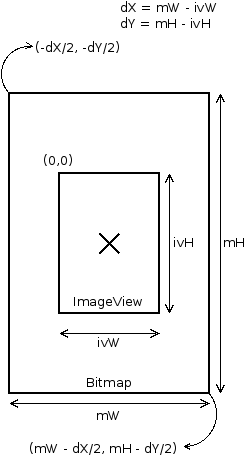
(0,0) are the coordinates to the top left corner of the View container. When scrolling to any (x,y)point, the top left corner of the View will be placed at the (x,y) coordinates.
If the View is showing an image, Bitmap, larger than the View itself, scrolling to (0,0) will place theView in the center of the image. This way, the top left corner of the image will be located at (-dX/2, -dY/2) and the bottom right corner at (mW - dX/2, mH - dY/2). dX represents the difference between the widths of the image and the View. And dY represents the difference between the heights of the image and the View.
In order to see the bottom right corner and not go passed it (lower or further to the right), this is the proper call: scrollTo(mW - ivW - dX/2, mH - ivH - dY/2);
The attached image shows the graphical representation of the View and Bitmap image positioning.

 浙公网安备 33010602011771号