

nginx自测 代理
Nginx负载均衡
1、轮询(默认)每个请求按时间顺序逐一分配到不同的后端服务器,如果后端服务器down掉,能自动剔除。
2、weight权重 指定轮询几率,weight和访问比率成正比,用于后端服务器性能不均的
如果客户已经访问了某个服务器,当用户再次访问时,会将该请求通过哈希算法,自动定位到该服务器(避免登录信息丢失)
upstream backserver {
ip_hash;
server 192.168.0.14:88;
server 192.168.0.15:80;
}
4、fair(第三方)
按后端服务器的响应时间来分配请求,响应时间短的优先分配。
upstream backserver {
server server1;
server server2;
fair;
}
5、url_hash(第三方)
按访问url的hash结果来分配请求,使每个url定向到同一个后端服务器,后端服务器为缓存时比较有效。
upstream backserver {
server squid1:3128;
server squid2:3128;
hash $request_uri;
hash_method crc32;
}
cd /usr/local/nginx/conf nginx.conf配置修改
cd /usr/local/nginx/sbin
# ./nginx 启动、通过kill删除
#user  nobody;
worker_processes  1;
#error_log  logs/error.log;
#error_log  logs/error.log  notice;
#error_log  logs/error.log  info;
#pid        logs/nginx.pid;
events {
    worker_connections  1024;
}
http {
    include       mime.types;
    default_type  application/octet-stream;
    #log_format  main  '$remote_addr - $remote_user [$time_local] "$request" '
    #                  '$status $body_bytes_sent "$http_referer" '
    #                  '"$http_user_agent" "$http_x_forwarded_for"';
    access_log  logs/access.log ;
    sendfile        on;
    #tcp_nopush     on;
    #keepalive_timeout  0;
    keepalive_timeout  65;
    #gzip  on;
        upstream tomcatserver1 {
            server 192.168.89.131:15672;
            }
        upstream tomcatserver2 {
            server 192.168.89.131:15673;
            }
    server {
        listen       80;
        server_name  15672.xmh.com;
        #charset koi8-r;
        access_log  logs/host.access.log  ;
        location / {
            #root   html;
            proxy_pass http://192.168.89.131:15672;
            index  index.html index.htm;
        }
        #error_page  404              /404.html;
        # redirect server error pages to the static page /50x.html
        #
        error_page   500 502 503 504  /50x.html;
        location = /50x.html {
            root   html;
        }
        # proxy the PHP scripts to Apache listening on 127.0.0.1:80
        #
        #location ~ \.php$ {
        #    proxy_pass   http://127.0.0.1;
        #}
        # pass the PHP scripts to FastCGI server listening on 127.0.0.1:9000
        #
        #location ~ \.php$ {
        #    root           html;
        #    fastcgi_pass   127.0.0.1:9000;
        #    fastcgi_index  index.php;
        #    fastcgi_param  SCRIPT_FILENAME  /scripts$fastcgi_script_name;
        #    include        fastcgi_params;
        #}
        # deny access to .htaccess files, if Apache's document root
        # concurs with nginx's one
        #
        #location ~ /\.ht {
        #    deny  all;
        #}
    }
    server {
        listen       80;
        server_name  15673.xmh.com;
        #charset koi8-r;
        access_log  logs/host.access.log ;
        location / {
            proxy_pass   http://192.168.89.131:15673;
            index  index.html index.htm;
        }
    }

}
测试结果
http://15672.xmh.com/   http://192.168.89.131:15672
http://15673.xmh.com/   http://192.168.89.131:15673
#user  nobody;
worker_processes  1;
#error_log  logs/error.log;
#error_log  logs/error.log  notice;
#error_log  logs/error.log  info;
#pid        logs/nginx.pid;
events {
    worker_connections  1024;
}
http {
    include       mime.types;
    default_type  application/octet-stream;
    #log_format  main  '$remote_addr - $remote_user [$time_local] "$request" '
    #                  '$status $body_bytes_sent "$http_referer" '
    #                  '"$http_user_agent" "$http_x_forwarded_for"';
    access_log  logs/access.log ;
    sendfile        on;
    #tcp_nopush     on;
    #keepalive_timeout  0;
    keepalive_timeout  65;
    #gzip  on;
       upstream mqadmin{
        server 192.168.89.131:15672 weight=3;
        server 192.168.89.131:15673 weight=1;
    }
    server {
        listen       80;
        server_name  15672.xmh.com;
        #charset koi8-r;
        access_log  logs/host.access.log  ;
        location / {
            #root   html;
            proxy_pass http://mqadmin;
            index  index.html index.htm;
        }
        error_page   500 502 503 504  /50x.html;
        location = /50x.html {
            root   html;
        }
    }

}
location ^~ /mapi/smsCodeVoice {
proxy_pass http://user;
proxy_set_header Host $host;
proxy_set_header X-Forwarded-For $http_x_forwarded_for;
}
http://localhost:8000/hello/one
location ^~ /hello/one 在前   如果匹配上就不会再往下匹配
location ^~ /hello/  在前  遵循最长匹配规则,仍然会向下匹配/hello/one
#user  nobody;
worker_processes  1;
#error_log  logs/error.log;
#error_log  logs/error.log  notice;
#error_log  logs/error.log  info;
#pid        logs/nginx.pid;
events {
    worker_connections  1024;
}
http {
    include       mime.types;
    default_type  application/octet-stream;
    #log_format  main  '$remote_addr - $remote_user [$time_local] "$request" '
    #                  '$status $body_bytes_sent "$http_referer" '
    #                  '"$http_user_agent" "$http_x_forwarded_for"';
    access_log  logs/access.log ;
    sendfile        on;
    #tcp_nopush     on;
    #keepalive_timeout  0;
    keepalive_timeout  65;
    #gzip  on;
    upstream sportaward {
        server 192.168.89.133:9092;
    }
    upstream sportaward3 {
        server 192.168.89.133:8080;
    }
        server {
        listen       8000;
        listen       9000;
        server_name  localhost;

        proxy_read_timeout 600;

        client_max_body_size 100m;
        client_header_buffer_size 10m;
        large_client_header_buffers 4 10m;
        location ^~ /hello/ {
                proxy_pass   http://sportaward;
                proxy_set_header Host  $host;
                proxy_set_header X-Forwarded-For  $http_x_forwarded_for;
        }
        location ^~ /hello/one {
               proxy_pass   http://sportaward3;
                proxy_set_header Host  $host;
                proxy_set_header X-Forwarded-For  $http_x_forwarded_for;
        }
        }

}
proxy_set_header X-Real-IP $remote_addr;
#后端的Web服务器可以通过X-Forwarded-For获取用户真实IP
proxy_set_header Host $host
proxy_host就是代理服务器请求的host也就是后端服务器137
proxy_set_header X-Forwarded-For $http_X_Forwarded_For;
匹配路径结尾不带/,是完全匹配proxy_pass,不做追加,直接跳到proxy_pass
location ^~ /hello/one/two {
                proxy_pass   http://sportaward/hello/one/three;
                proxy_set_header Host  $host;
                proxy_set_header X-Forwarded-For  $http_x_forwarded_for;
        }

匹配路径结尾带/,做追加,追加到proxy_pass
location ^~ /hello/one/ {
       proxy_pass   http://sportaward3;
	proxy_set_header Host  $host;
       proxy_set_header X-Forwarded-For  $http_x_forwarded_for;
}


最长匹配
/hello/
/hello/one/
/one/
'http://192.168.89.133:8000/hello/one/two' 匹配的是 /hello/one/

从最左开始匹配
/hello/
/one/
http://192.168.89.133:8000/hello/one/two  匹配的是 /hello/

/one/
http://192.168.89.133:8000/hello/one/two  匹配不上

/one/  能匹配 http://192.168.89.133:8000/one/two   不能匹配 http://192.168.89.133:8000/one
/hello/one 能匹配 http://192.168.89.133:8000/hello/one/two 能匹配 能匹配 http://192.168.89.133:8000/hello/one12   追加还是直接跳
/hello/one/  不能匹配 http://192.168.89.133:8000/hello/one

/hello/
/hello/one/
http://192.168.89.133:8000/hello/one 不能匹配  curl 'http://192.168.89.133:8000/hello/two' 能匹配 /hello/
http://192.168.89.133:8000/hello/one/two 能匹配 /hello/one/
如下是在nginx的LB代理层使用过的一个配置(nginx.conf中配置): log_format main '$remote_addr $remote_user [$time_local] "$request" ' '$status $body_bytes_sent "$http_referer" ' '$http_user_agent $http_x_forwarded_for $request_time $upstream_response_time $upstream_addr $upstream_status'; 然后在nginx.conf文件或vhosts/*.conf文件中的access_log日志中指定级别为main。如下: access_log logs/wiki_access.log main; error_log logs/wiki_error.log;
location进行的是模糊匹配
1)没有“/”时,location /abc/def可以匹配/abc/defghi请求,也可以匹配/abc/def/ghi等
2)而有“/”时,location /abc/def/不能匹配/abc/defghi请求,只能匹配/abc/def/anything这样的请
下面四种情况分别用http://192.168.1.4/proxy/test.html 进行访问。
第一种: location  /proxy/ { proxy_pass http://127.0.0.1:81/; } 结论:会被代理到http://127.0.0.1:81/test.html 这个url
第二种(相对于第一种,最后少一个 /) location  /proxy/ { proxy_pass http://127.0.0.1:81; } 结论:会被代理到http://127.0.0.1:81/proxy/test.html 这个url
第三种:
location  /proxy/ {
proxy_pass http://127.0.0.1:81/ftlynx/;
}
结论:会被代理到http://127.0.0.1:81/ftlynx/test.html 这个url。

第四种(相对于第三种,最后少一个 / ):
location  /proxy/ {
proxy_pass http://127.0.0.1:81/ftlynx;
}
结论:会被代理到http://127.0.0.1:81/ftlynxtest.html 这个url
访问http://15672.xmh.com/,按权重请求到不同的服务
修改nginx.conf文件,用于nginx处理静态资源。
主要配置如下(在server配置中加入location配置即可):
server {
listen 80;
server_name 123.57.162.75;
charset utf-8;
index index.html index.htm index.jsp index.do;
root /opt/nginx-1.4.7/html/resources;
#配置Nginx动静分离,定义的静态页面直接从Nginx发布目录读取。
location ~ .*\.(html|htm|gif|jpg|jpeg|bmp|png|ico|txt|js|css)$
{
root /opt/nginx-1.4.7/html/resources;
#expires定义用户浏览器缓存的时间为7天,如果静态页面不常更新,可以设置更长,这样可以节省带宽和缓解服务器的压力
expires 7d;
}
}
1、什么是正向代理?什么是反向代理?
正向代理,架设在客户机与目标主机之间,只用于代理内部网络对Internet的连接请求,客户机必须指定代理服务器,并将本来要直接发送到Web服务器上的http请求发送到代理服务器中。
反向代理服务器架设在服务器端,通过缓冲经常被请求的页面来缓解服务器的工作量,将客户机请求转发给内部网络上的目标服务器;并将从服务器上得到的结果返回给Internet上请求连接的客户端,此时代理服务器与目标主机一起对外表现为一个服务器。
2、反向代理有哪些主要应用?
现在许多大型web网站都用到反向代理。除了可以防止外网对内网服务器的恶性攻击、缓存以减少服务器的压力和访问安全控制之外,还可以进行负载均衡,将用户请求分配给多个服务器。
OSI的7层从上到下分别是 7 应用层 6 表示层 5 会话层 4 传输层 3 网络层 2 数据链路层 1 物理层 ;其中高层(即7、6、5、4层)定义了应用程序的功能,下面3层(即3、2、1层)主要面向通过网络的端到端的数据流。
先来看看如何建立连接的。

首先Client端发送连接请求报文,Server段接受连接后回复ACK报文,并为这次连接分配资源。Client端接收到ACK报文后也向Server段发生ACK报文,并分配资源,这样TCP连接就建立了。
那如何断开连接呢?简单的过程如下:
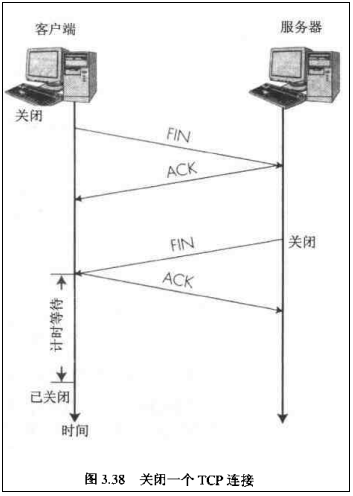
【注意】中断连接端可以是Client端,也可以是Server端。
假设Client端发起中断连接请求,也就是发送FIN报文。Server端接到FIN报文后,意思是说"我Client端没有数据要发给你了",但是如果你还有数据没有发送完成,则不必急着关闭Socket,可以继续发送数据。所以你先发送ACK,"告诉Client端,你的请求我收到了,但是我还没准备好,请继续你等我的消息"。这个时候Client端就进入FIN_WAIT状态,继续等待Server端的FIN报文。当Server端确定数据已发送完成,则向Client端发送FIN报文,"告诉Client端,好了,我这边数据发完了,准备好关闭连接了"。Client端收到FIN报文后,"就知道可以关闭连接了,但是他还是不相信网络,怕Server端不知道要关闭,所以发送ACK后进入TIME_WAIT状态,如果Server端没有收到ACK则可以重传。“,Server端收到ACK后,"就知道可以断开连接了"。Client端等待了2MSL后依然没有收到回复,则证明Server端已正常关闭,那好,我Client端也可以关闭连接了。Ok,TCP连接就这样关闭了!
整个过程Client端所经历的状态如下

 浙公网安备 33010602011771号