
0 基础实习笔记【4】:使用 Renesas Flash Programmer 向 RL78 烧写程序
今天(2025.2.7)领导让我尝试一下能不能自己用 4pin 的烧录器烧 14pin 的 J-Link 接口的板子。使用瑞萨的烧录器 EZ-CUBE3,需要先看它的使用指南。上面写着,要用到 CS+ 开发环境或者 e2 studio。经查阅资料,我决定使用 e2 studio。
安装时选择需要用到的 RL78 系列。烧录程序时费了好大劲研究,发现原来看错代码了,我需要的是编译后的 .mot 文件,而不是源码。.mot 文件同事已经编译好了,领导后来发给我了。后来发现 e2 studio 用不明白,劳资不用了。
同时给我发了一个另一种烧写器的使用指南《Flash_ForRL78 烧写器使用说明 V3.0》。实物是一个长方形裸漏电路板,一头有USB接口。
《说明》里面说,要用到 Renesas Flash Programmer 。它还说,这个软件操作跟 EZCUBE 烧写器使用软件,以及软件的操作步骤都是完全一致。
于是我结合 EZ-CUBE3 操作指南和 Flash_ForRL78 使用说明烧录成功了。
首先要根据原理图和烧写器上的示图对好引脚。
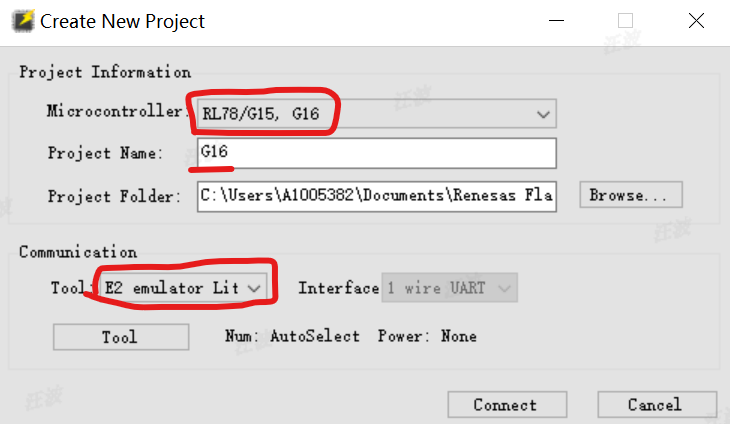
然后在 Renesas Flash Programmer 种新建项目,配置好相关信息,点击connect。找到 .mot 文件,点击 start 烧录程序。
烧录成功之后显示:
Connecting the tool
Tool : E2 emulator Lite (EZ3L01399), Interface : 1 wire UART
Emulator's supply power : OFF
Emulator's firmware version:3.05.00.000
Connecting to the target device
Query the device information.
Signature:
    Device: RL78/G15, G16
Code Flash 1 (Address : 0x00000000,  Size : 32 K,  Erase Size : 32 K)
Data Flash 1 (Address : 0x00009000,  Size : 1 K,  Erase Size : 1 K)

Disconnecting the tool
Operation completed.
推荐链接:

 浙公网安备 33010602011771号