

文件
- 打开文件
要打开文件,可使用函数open,它位于自动导入的模块io中。
>>> f = open('/opt/python/123')
文件模式
调用函数open时,如果只指定文件名,将获得一个可读取的文件对象。如果要写入文件,必须通过指定模式来显示的指出这一点。
函数open的参数mode的最常见取值
值 描述
'r' 读取模式(默认值)
'w' 写入模式
'x' 独占写入模式
'a' 附加模式
'b' 二进制模式(与其他模式结合使用)
't' 文本模式(默认值,与其他模式结合使用)
'+' 读写模式(与其他模式结合使用)
文件的基本方法
读取和写入
1 >>> f = open('/opt/python/123','w')
2 >>> f.write('hehe, ')
3 6
4 >>> f.write('hahaha!')
5 7
6 >>> f.close()
1 >>> f = open('/opt/python/123', 'r')
2 >>> f.read()
3 'hehe, hahaha!'
使用管道重定向输出
计算sys.stdin中包含多少个单词
#123.txt
hehe, hahaha!
#12.py
import sys
text = sys.stdin.read()
words = text.split()
wordcount = len(words)
print('Wordcount:', wordcount)
执行结果
cat 123 | python 12.py |sort
关闭文件
要确保文件得以关闭,可使用一条try/finally语句,并在finally子句中调用close.
#在这里打开文件
try:
#将数据写入到文件中
finally:
file.close()
实际上,有一条专门为此设计的语句,那就是with语句。
with open("somefile.txt") as somefile:
do_something(somefile)
with语句让你能够打开文件并将其赋给一个变量(这里是somefile).在语句体中,你将数据写入文件(还可能做其他事情)。到达该语句末尾时,将自动关闭文件。
使用文件的基本方法
 read(n)
 1 >>> f = open(r'/opt/python/123')
 2 >>> f.read(7)
 3 'hello h'
 4
 read()
 5 >>> f = open(r'/opt/python/123')
 6 >>> print(f.read())
 7 hello hellohello hello
 8
 readline()
 9 >>> f = open(r'/opt/python/123')
10 >>> for i in range(3):
11 ...     print(str(i) + ': ' + f.readline(), end='')
12 ...
13 0: hello hellohello hello
14 1: hehehehehe
15 2: hahahaha
readlines()
16 >>> import pprint
17 >>> pprint.pprint(open(r'/opt/python/123').readlines())
18 ['hello hellohello hello\n', 'hehehehehe\n', 'hahahaha\n']
 writelines(list):
 1 >>> f = open(r'/opt/python/123')
 2 >>> lines = f.readlines()
 3 >>> f.close()
 4 >>> lines[1] = "xiaoming\n"
 5 >>> f = open(r'/opt/python/123', 'w')
 6 >>> f.writelines(lines)
 7 >>> f.close()
 8 >>> f = open(r'/opt/python/123')
 9 >>> f.read()
10 'hello hellohello hello\nxiaoming\nhahahaha\n'
- 迭代文件内容
使用fileinput实现延迟行迭代
使用fileinput迭代行
1 import fileinput
2 for line in fileinput.input('/opt/python/123'):
3     print(line)
执行结果
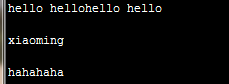
文件迭代器
迭代文件
1 with open('/opt/python/123') as f:
2     for line in f:
3         print(line)
4

在不将文件对象赋给变量的情况下迭代文件
5 import sys
6
7 for line in open('/opt/python/123'):
8     print(line)
 1 >>> f = open('/opt/python/123', 'w')
 2 >>> print('Firsh', 'line', file=f)
 3 >>> print('Second', 'line', file=f)
 4 >>> print('Third', 'and final', 'line', file=f)
 5 >>> f.close()
 6 >>> lines = list(open('/opt/python/123'))
 7 >>> lines
 8 ['Firsh line\n', 'Second line\n', 'Third and final line\n']
 9 >>> first, second, third = open('/opt/python/123')
10 >>> first
11 'Firsh line\n'
12 >>> second
13 'Second line\n'
14 >>> third
15 'Third and final line\n'


 浙公网安备 33010602011771号