

开箱即用
- 模块
模块就是程序
 任何python程序都可以作为模块导入
1 >>> import sys
2 >>> sys.path.append('/opt/python/')
3 >>> import hello
4 hello, world!
模块是用来定义的
- 在模块中定义函数
#hello2.py
def hello():
print("hello, world!")
1 >>> import hello2
2 >>> hello2.hello()
3 hello, world!
2. 在模块中添加测试代码
  在主程序中(包括解释器的交互式提示符),变量__name__的值是'__main__',而再倒入的模块中,这个变量被设置为该模块的名称
1 >>> __name__
2 '__main__'
3 >>> hello2.__name__
4 'hello2'
#hello3.py
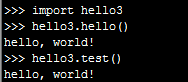
一个包含有条件的执行的测试代码的模块,如果将这个模块作为程序运行,将执行函数hello;如果导入它,其行为将像普通模块一样。
1 def hello():
2     print("hello, world!")
3
4 def test():
5     hello()
6
7 if __name__ == '__main__': test()
  执行结果
让模块可用
- 将模块放在正确的位置
 1 >>> import sys, pprint
 2 >>> pprint.pprint(sys.path)
 3 ['',
 4  '/usr/local/python3.5/lib/python35.zip',
 5  '/usr/local/python3.5/lib/python3.5',
 6  '/usr/local/python3.5/lib/python3.5/plat-linux',
 7  '/usr/local/python3.5/lib/python3.5/lib-dynload',
 8  '/usr/local/python3.5/lib/python3.5/site-packages',
 9  '/opt/python/',
10  '/opt/python/',
11  '/opt/python/',
12  '/opt/python/',
13  '/opt/python/']
2. 包
为组织模块,可将其编组为包。包其实就是另一种模块,但他们可以包含其他模块。模块存储在扩展名为.py的文件中,而包则是一个目录。要被python视为包,目录必须包含文件__init__.py。如果像普通模块一样导入包,文件__init__.py的内容就将是包的内容。要将模块加入包中,只需将模块文件放在包目录中即可。你还可以在包中嵌套其他包。例如,要创建一个名为drawing的包,其中包含模块shapes和colors.
一种简单的包布局
文件目录 描述
~/python/ PYTHONPATH中的目录
~/python/drawing/ 包目录(包drawing)
~/python/drawing/__init__.py 包代码(模块drawing)
~/python/drawing/colors.py 模块colosr
~/python/drawing/shapes.py 模块shapes
import drawing 导入drawing包
import drawing.colors 导入drawing包中的模块colors
from drawing import shapes 导入模块shapes
- 探索模块
模块中包含什么
1.使用dir
  要查明模块包含哪些东西,可使用函数dir,它列出对象的所有属性(对于模块,它列出所有的函数、类,变量等)。如果将dir(copy)的结果打印出来,将是一个很长的名称列表
1 >>> import copy
2 >>> [n for n in dir(copy) if not n.startswith('_')]
3 ['Error', 'PyStringMap', 'builtins', 'copy', 'deepcopy', 'dispatch_table', 'error', 'name', 't', 'weakref']
2.变量__all__
  这个变量包含一个列表,它与前面使用列表推导创建的列表类似,但是在模块内部设置的
1 >>> copy.__all__
2 ['Error', 'copy', 'deepcopy']
文档
 这样就获得了函数range的准确描述
1 >>> print(range.__doc__)
2 range(stop) -> range object
3 range(start, stop[, step]) -> range object
4
5 Return an object that produces a sequence of integers from start (inclusive)
6 to stop (exclusive) by step.  range(i, j) produces i, i+1, i+2, ..., j-1.
7 start defaults to 0, and stop is omitted!  range(4) produces 0, 1, 2, 3.
8 These are exactly the valid indices for a list of 4 elements.
9 When step is given, it specifies the increment (or decrement).
使用源代码
1 >>> print(copy.__file__)
2 /usr/local/python3.5/lib/python3.5/copy.py
- 标准库
sys
模块sys能访问与python解释器紧密相关的变量和函数
模块sys中一些重要的函数和变量
函数/变量 描述
argv 命令行参数,包括脚本名
exit([arg]) 退出当前程序,可通过可选参数指定返回值或错误消息
modules 一个字典,将模块名称映射到加载的模块
path 一个列表,包含要在其中查找模块的目录名称
platform 一个平台标识符,如sunos5或win32
stdin 标准输入流——一个类似于文件的对象
stdout 标准输出流——一个类似于文件的对象
stderr 标准错误流——一个类似于文件的对象
os
模块os让你能够访问多个操作系统服务,os及其子模块os.path还包含多个查看、创建和删除目录及文件的函数,以及一些操作路径的函数
模块os中的一些重要的函数和变量
函数/变量 描述
environ 包含环境变量的映射
system(command) 在子shell中执行操作系统命令
sep 路径中使用的分隔符
pathsep 分隔不同路径的分隔符
linesep 行为分隔符('\n'、'\r'或'\r\n')
urandom(n) 返回n个字节的强加密随机数据
fileinput
模块fileinput中一些重要的函数
函数 描述
input([files[, inplace[, backup]]]) 帮助迭代多个输入流中的行
filename() 返回当前文件的名称
lineno() 返回(累计的)当前行号
filelineno() 返回在当前文件中的行号
isfirstline() 检查当前行是否是文件中的第一行
isstdin() 检查最后一行是否来自sys.stdin
nextfile() 关闭当前文件并移到下一个文件
close() 关闭序列
- 函数fileinput.filename 返回当前文件(即当前处理的行所属文件)的文件名
- 函数fileinput.lineno返回当前行的编号。这个值是累计的,因此处理完一个文件并接着处理下一个文件时,不会重置行号,而是从前一个文件最后一行的行号+1开始。
- 函数fileinput.filelineno返回当前行在当前文件中的行号。每次处理玩一个文件并接着处理下一个文件时,将重置这个行号并从1重新开始。
- 函数fileinput.isstdin在当前行为当前行中的第一行时返回True,否则返回False。
- 函数fileinput.nextfile关闭当前文件并跳到下一个文件,且技术是忽略跳过的行。
- 函数fileinput.close关闭整个文件链并结束迭代。
#11.py
1 import fileinput
2
3 for line in fileinput.input(inplace=True):
4     line = line.rstrip()
5     num = fileinput.lineno()
6     print('{:<50} # {:2d}'.format(line, num))
如果像下面这样执行程序,并将其作为参数传入:
# python 11.py 11.py
执行结果
#!/usr/bin/env python                              #  1
#-*- coding:utf-8 -*-                              #  2
import fileinput                                   #  3
                                                   #  4
for line in fileinput.input(inplace=True):         #  5
    line = line.rstrip()                           #  6
    num = fileinput.lineno()                       #  7
    print('{:<50} # {:2d}'.format(line, num))      #  8
- 集合、堆和双端队列
集合
在较新的版本中,集合是有内置类set实现的,这意味着你可以直接创建集合,而无需导入模块sets
1 >>> set(range(10))
2 {0, 1, 2, 3, 4, 5, 6, 7, 8, 9}
可使用序列(或其他可迭代对象)来创建集合,也可使用花括号显示的指定。不能仅使用花括号来创建空集合,因为这将创建一个空字典。
1 >>> type({})
2 <class 'dict'>
要计算连个集合的并集,可对其中一个集合调用方法union,也可使用按位或运算符|
1 >>> a = {1, 2, 3}
2 >>> b = {2, 3, 4}
3 >>> a.union(b)
4 {1, 2, 3, 4}
5 >>> a | b
6 {1, 2, 3, 4}
 1 >>> c = a & b
 2 >>> c.issubset(a)
 3 True
 4 >>> c <= a
 5 True
 6 >>> c.issuperset(a)
 7 False
 8 >>> c >= a
 9 False
10 >>> a.intersection(b)
11 {2, 3}
12 >>> a & b
13 {2, 3}
14 >>> a.difference(b)
15 {1}
16 >>> a - b
17 {1}
18 >>> a.symmetric_difference(b)
19 {1, 4}
20 >>> a ^ b
21 {1, 4}
22 >>> a.copy()
23 {1, 2, 3}
24 >>> a.copy() is a
25 False
堆
模块heapq中一些重要的函数
函数 描述
heappush(heap, x) 将x压入堆中
heappop(heap) 从堆中弹出最小的元素
heapify(heap) 让列表具备堆特征
heapreplace(heap, x) 弹出最小的元素,并将x压入堆中
nlargest(n, iter) 返回iter中n个最大的元素
nsmallest(n, iter) 返回iter中n个最小的元素
 函数heappush用于在堆中添加一个元素
 1 >>> from heapq import *
 2 >>> from random import shuffle
 3 >>> data = list(range(10))
 4 >>> shuffle(data)
 5 >>> heap = []
 6 >>> for n in data:
 7 ...     heappush(heap, n)
 8 ...
 9 >>> heap
10 [0, 1, 4, 3, 2, 7, 6, 8, 5, 9]
11 >>> heappush(heap, 0.5)
12 >>> heap
13 [0, 0.5, 4, 3, 1, 7, 6, 8, 5, 9, 2]
函数heappop弹出最小的元素(总是位于索引0处),并确保剩余元素中最小的那个位于索引0处(保持堆特征)
1 >>> heappop(heap)
2 0
3 >>> heappop(heap)
4 0.5
5 >>> heappop(heap)
6 1
7 >>> heap
8 [2, 3, 4, 5, 9, 7, 6, 8]
双端队列(及其他集合)
在需要按添加元素的顺序进行删除时,双端队列很有用。在模块collections中,包含类型deque以及其他几个集合collection类型
>>> from collections import deque
>>> q = deque(range(5))
>>> q.append(5)
>>> q.appendleft(6)
>>> q
deque([6, 0, 1, 2, 3, 4, 5])
>>> q.pop()
5
>>> q.popleft()
6
>>> q.rotate(3)
>>> q
deque([2, 3, 4, 0, 1])
>>> q.rotate(-1)
>>> q
deque([3, 4, 0, 1, 2])
time
模块time中一些重要的函数
函数 描述
asctime([tuple]) 将时间元组转换为字符串
localtime([secs]) 将描述转换为表示当地时间的日期元组
mktime(tuple) 将时间元组转换为当地时间
sleep(secs) 休眠(什么都不做)secs秒
strptime(string[,format]) 将字符串转换为时间元组
time() 当前时间(从新纪元开始后的秒数,以UTC为准)
函数time.asctime将当前时间转换为字符串
1 >>> import time
2 >>> time.asctime()
3 'Wed Apr 11 20:13:15 2018'
- 函数time.localtime将日期元组转换为从新纪元后的秒数,这与localtime的功能相反
- 函数time.sleep让解释器等待指定的秒数。
- 函数time.strptime将一个字符串(其格式与asctime所返回字符串的格式相同)转换为日期元组
- 函数time.time返回当前的国际标准时间,已从新纪元开始的秒数表示
- random
模块random中一些重要的函数
函数 描述
random() 返回一个0~1(含)的随机实数
getrandbits(n) 以长整数方式返回n个随机的二进制位
uniform(a, b) 返回一个a~b(含)的随机实数
randrange([start], stop, [step]) 从range(start, stop, step)中随机地选择一个数
choice(seq) 从序列seq中随机地选择一个元素
shuffle(seq[, random]) 就地打乱序列seq
sample(seq, n) 从序列seq中随机地选择n个值不同的元素
- 函数random.randrange是生成随机整数的标准函数。为指定这个随机整数所在的范围,你可像调用range那样给这个函数提供参数。
- 函数random.shuffle随机地打乱一个可变序列中的元素,并确保每种可能的排列顺序出现的概率相同。
- 函数random.sample从给定序列中随机(均匀)地选择指定数量的元素,并确保所选择元素的值各不相同。
1 from random import *
2 from time import *
3 date1 = (2016, 1, 1, 0, 0, 0, -1, -1, -1)
4 time1 = mktime(date1)
5 date2 = (2017, 1, 1, 0, 0, 0, -1, -1,-1)
6 time2 = mktime(date2)
7 random_time = uniform(time1, time2)      #以均匀的方式生成一个位于该范围内(不包括上限)的随机数
8 print(asctime(localtime(random_time)))   #将这个数转换为易于理解的日期
  执行结果


- shelve和json
- 一个潜在的陷阱
1 >>> import shelve
2 >>> s = shelve.open('test.dat')
3 >>> s['x'] = ['a', 'b', 'c']
4 >>> s['x'].append('d')
5 >>> s['x']
6 ['a', 'b', 'c']
'd'到哪里去了呢?
列表['a', 'b', 'c']被存储到s的'x'键下
获取存储的表示,并使用它创建一个新列表,再将'd'附加到这个新列表末尾,但这个修改后的版本未被存储。
最后,再次获取原来的版本------其中没有'd'
要正确的修改使用模块shelve存储的对象,必须获取的副本赋给一个临时变量,并在修改这个副本后再次存储:
1 >>> temp = s['x']
2 >>> temp.append('d')
3 >>> s['x'] = temp
4 >>> s['x']
5 ['a', 'b', 'c', 'd']
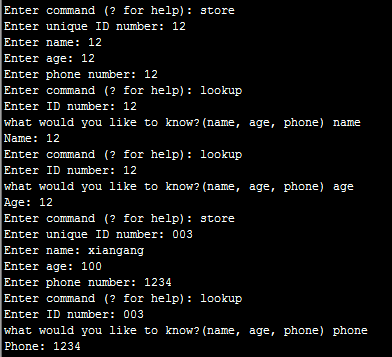
一个简单的数据库应用程序


 1 import sys, shelve
 2
 3 def store_person(db):
 4     pid = input('Enter unique ID number: ')
 5     person = {}
 6     person['name'] = input('Enter name: ')
 7     person['age'] = input('Enter age: ')
 8     person['phone'] = input('Enter phone number: ')
 9     db[pid] = person
10
11 def lookup_person(db):
12     pid = input('Enter ID number: ')
13     field = input('what would you like to know?(name, age, phone) ')
14     field = field.strip().lower()
15
16     print(field.capitalize() + ':', db[pid][field])
17
18 def print_help():
19     print('The available commands are:')
20     print('store : Stores information about a person')
21     print('lookup : Looks up a person from ID number')
22     print('quit : Save changes and exit')
23     print('? : Prints this message')
24
25 def enter_command():
26     cmd = input('Enter command (? for help): ')
27     cmd = cmd.strip().lower()
28     return cmd
29
30 def main():
31     database = shelve.open("/opt/python/2.dat")
32     try:
33         while True:
34             cmd = enter_command()
35             if cmd == 'store':
36                 store_person(database)
37             elif cmd == 'lookup':
38                 lookup_person(database)
39             elif cmd == '?':
40                 print_help()
41             elif cmd == 'quit':
42                 return
43     finally:
44         database.close()
45
46 if __name__ == '__main__' : main()
- re
模块re中一些重要的函数
函数 描述
comile(pattern[, flags]) 根据包含正则表达式的字符串创建模式对象
search(pattern, string[, flags]) 在字符串中查找模式
match(pattern, string[, flags]) 在字符串开头匹配模式
split(pattern, string[, maxsplit=0]) 根据模式来分割字符串
findall(pattern, string) 返回一个列表,其中包含字符串中所有与模式匹配的子串
sub(pat, repl, string[, count=0]) 将字符串中与模式pat匹配的子串都替换为repl
escape(string) 对字符串中所有的正则表达式特殊字符都进行转义
函数re.split根据与模式匹配的子串来分割字符串。这类似于字符串方法split,但使用正则表达式来指定分隔符,而不是指定固定的分隔符。使用字符串方法split时,可以字符串', '为分割符分割字符串,但使用re. split时,可以空格和逗号为分隔符来分割字符串。
1 >>> some_test = 'abcd, aaaa,,,,,bbbb  cba'
2 >>> re.split('[, ]+', some_test)
3 ['abcd', 'aaaa', 'bbbb', 'cba']
 maxsplit之分最多分割多少次
1 >>> some_test = 'abcd, aaaa,,,,,bbbb  cba'
2 >>> re.split('[, ]+', some_test, maxsplit=2)
3 ['abcd', 'aaaa', 'bbbb  cba']
4 >>> re.split('[, ]+', some_test, maxsplit=1)
5 ['abcd', 'aaaa,,,,,bbbb  cba']
函数re.findall返回一个列表,其中包含所有与给定模式匹配的子串。
1 >>> pat = '[a-zA-Z]+'
2 >>> text = '"Hm... Err -- are you sure?" he said, sounding insecure.'
3 >>> re.findall(pat, text)
4 ['Hm', 'Err', 'are', 'you', 'sure', 'he', 'said', 'sounding', 'insecure']
查找所有的标点符号
1 >>> text = '"Hm... Err -- are you sure?" he said, sounding insecure.'
2 >>> pat = r'[.?\-",]+'
3 >>> re.findall(pat, text)
4 ['"', '...', '--', '?"', ',', '.']
函数re.sub从左往右将与模式匹配的子串替换为指定内容
1 >>> pat = '{name}'
2 >>> text = 'Dear {name}...'
3 >>> re.sub(pat, 'Mr. Gumby', text)
4 'Dear Mr. Gumby...'
re.escape是一个工具函数,用于字符串中所有可能被视为正则表达式运算符的字符进行转义。
1 >>> re.escape('www.python.org')
2 'www\\.python\\.org'
3 >>> re.escape('But where is the ambiguity?')
4 'But\\ where\\ is\\ the\\ ambiguity\\?'
匹配对象和编组
在模块re中,查找与模式匹配的子串的函数都在找到时返回MatchObject对象。
在下面的模式中:
'There (was a (wee) (cooper)) who (lived in Fyfe)'
包含如下编组:
0 There was a wee cooper who lived in Fyfe
1 was a wee cooper
2 wee
3 cooper
4 lived in Fyfe
通常,编组包含诸如通配符和重复运算符等特殊字符,因此你可能想知道与给定编组匹配的内容。例如,在下面的模式中:
r'www\.(.+)\.com$'
编组0包含真个字符串,而编组1包含'www.'和'.com'之间的内容。通过创建类似于这样的模式,可提取字符串中你感兴趣的部分。
re匹配对象的重要方法
方法 描述
group([group1, ...]) 获取与给定子模式(编组)匹配的子串
start([group]) 返回与给定编组匹配的子串的起始位置
end([group]) 返回与给定编组匹配的子串终止位置(与切片一样,不包含终止位置)
span([group]) 返回与给定编组匹配的子串的起始和终止位置
方法group返回与模式中给定编组匹配的子串。如果没有指定编组号,则默认为0.如果只指定了一个编组号(或使用默认值0),将只返回一个字符串;否则返回一个元组,其中包含与给定编组匹配的子串。
方法start返回与给定编组(默认为0,即整个模式)匹配的子串的起始索引。
方法end类似于start,但返回终止索引加1.
方法span返回一个元组,其中包含与给定编组(默认为0,即整个模式)匹配的子串的起始索引和终止索引。
替换中的组号和函数
1  >>> emphasis_pattern = re.compile(r'''
2  ... \*                       # 起始突出标志------一个星号
3  ... (                         # 与要突出的内容匹配的编组的起始位置
4  ... [^\*]+                # 与除星号外的其他字符都匹配
5  ... )                         # 编组到此结束
6  ... \*                       # 结束突出的标志
7  ...          ''', re.VERBOSE)
8  >>> re.sub(emphasis_pattern, r'<em>\1</em>', 'Hello, *world*!') 'Hello, <em>world</em>!'


 浙公网安备 33010602011771号