
webpack 搭建 vue项目环境
目录结构:
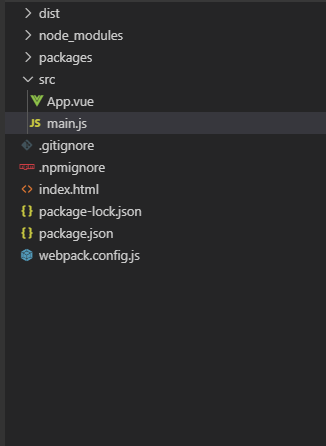
index.html:
<!DOCTYPE html>
<html lang="en">

<head>
  <meta charset="UTF-8">
  <meta name="viewport" content="width=device-width, initial-scale=1.0">
  <meta http-equiv="X-UA-Compatible" content="ie=edge">
  <title>Document</title>
</head>

<body>
  <div id="app"></div>
  <script src="/dist/main.js"></script>
</body>

</html>
main.js
import Vue from 'vue'
import App from './App.vue'
import MM from '../packages/index'

Vue.config.productionTip = false
Vue.use(MM)

var app = new Vue({
  el: '#app',
  template: '<App/>',
  components: { App }
})
app.vue
<template>
  <div id="app" style="height:100%">
    <VueCalendar />
  </div>
</template>

<script>
export default {
  name: 'app',
  methods: {
  },
  mounted () {
  }
}
</script>

<style>
</style>
包文件:
{
  "name": "vx-component",
  "version": "1.0.0",
  "description": "",
  "main": "dist/main.js",
  "private": false,
  "scripts": {
    "dev": "webpack-dev-server --open --config webpack.config.js",
    "test": "echo \"Error: no test specified\" && exit 1"
  },
  "keywords": [],
  "author": "wenguang.xia",
  "license": "ISC",
  "devDependencies": {
    "@babel/core": "^7.10.3",
    "@babel/preset-env": "^7.10.3",
    "babel-loader": "^8.1.0",
    "clean-webpack-plugin": "^3.0.0",
    "css-loader": "^3.6.0",
    "html-webpack-plugin": "^4.3.0",
    "style-loader": "^1.2.1",
    "url-loader": "^4.1.0",
    "vue-loader": "^15.9.3",
    "vue-template-compiler": "^2.6.11",
    "webpack": "^4.43.0",
    "webpack-cli": "^3.3.12",
    "webpack-dev-server": "^3.11.0"
  },
  "dependencies": {
    "vue": "^2.6.11"
  }
}
webpack.config.js
const path = require('path')
const { VueLoaderPlugin } = require('vue-loader')
const HtmlWebpackPlugin = require('html-webpack-plugin');
const { CleanWebpackPlugin } = require('clean-webpack-plugin');

module.exports = {
  entry: './src/main.js',
  output: {
    path: path.join(__dirname, './dist'),
    publicPath: '/dist/',
    filename: 'main.js'
  },
  resolve: {
    alias: {
      'vue$': 'vue/dist/vue.esm.js' //内部为正则表达式  vue结尾的
    }
  },
  devServer: {
    historyApiFallback: true,
    overlay: true
  },
  module: {
    rules: [
      {
        test: /\.vue$/,
        use: [
          {
            loader: 'vue-loader',
          }
        ]
      },
      {
        test: /\.js$/,
        exclude: /(node_modules|bower_components)/,
        use: {
          loader: 'babel-loader',
          options: {
            presets: ['@babel/preset-env']
          }
        }
      },
      {
        test: /\.css$/,
        use: [
          'style-loader',
          'css-loader'
        ]
      },
      {
        test: /\.(png|jpg|gif|svg|bmp)$/,
        use: [
          {
            loader: 'url-loader',
            options: {
              limit: 8192,
              name: '[path][name].[ext]'
            }
          }
        ]
      },
      // {
      //   test: /\.(woff|woff2|eot|ttf|otf)$/,
      //   use: [
      //     {
      //       loader: 'file-loader',
      //       options: {
      //         name: '[path][name].[ext]',
      //         context: 'src',
      //       },
      //     },
      //   ],
      // }
    ]
  },
  plugins: [
    new CleanWebpackPlugin(),
    new HtmlWebpackPlugin({
      title: 'vx-component'
    }),
    new VueLoaderPlugin(),
  ],
}
遇到的问题
[Vue warn]: You are using the runtime-only build of Vue where the template compiler is not available. Either pre-compile the templates into render functions, or use the compiler-included build.
vue有两种形式的代码 compiler(模板)模式和runtime模式(运行时),vue模块的package.json的main字段默认为runtime模式, 指向了"dist/vue.runtime.common.js"位置。
这是vue升级到2.0之后就有的特点。而我的main.js文件中,初始化vue却是这么写的,这种形式为compiler模式的,所以就会出现上面的错误信息
// compiler
new Vue({
  el: '#app',
  template: '<App/>',
  components: { App }
})
方法一: 将main.js中的代码修改如下就可以
//runtime

new Vue({
  render: h => h(App)
}).$mount("#app")
方法二:webpack配置文件里有个别名配置,具体如下
resolve: {
    alias: {
        'vue$': 'vue/dist/vue.esm.js' //内部为正则表达式  vue结尾的
    }
}
方法三: 那就是在引用vue时,直接写成如下即可
import Vue from 'vue/dist/vue.esm.js'
[Vue warn]: Unknown custom element: – did you register the component correctly? For recursive components, make sure to provide the “name” option
这个报错是因为找不到 这个组件导致的,对于新手来说,这是个坑,因为vue要求如果创建组件时使用驼峰命名,调用组件的时候需要将驼峰改为横线-写法
注:用vue-lodaer处理单文件组件后就不存在这样的问题了

 浙公网安备 33010602011771号