
.NET MAUI 使用 WebView 实现 JS 与 C# 交互和数据传输,解决访问 URL 白屏与 A JavaScript exception occurred 问题
参考
- 豆包
- DeepSeek
- https://learn.microsoft.com/zh-cn/dotnet/maui/user-interface/controls/webview
- https://learn.microsoft.com/zh-cn/dotnet/maui/?view=net-maui-10.0
环境
| 软件/系统 | 版本 | 说明 |
|---|---|---|
| macOS | macOS 15.6.1 | Apple M2 芯片 |
| Safari | 18.6 | |
| .NET | 10.0.100 | |
| Visual Studio Code | 1.107.1 | |
| Visual Studio Code 扩展: .NET MAUI | 1.12.15 | |
| Visual Studio Code 扩展: C# | 2.110.4 | |
| Visual Studio Code 扩展: .NET Install Tool | 3.0.0 | |
| Visual Studio Code 扩展: C# Dev Kit | 1.90.2 |
注意
iOS 和 Mac Catalyst:使用 WKWebView,它基于 Safari WebKit 浏览器引擎。 这是 iOS 和 macOS 上的 Safari 浏览器使用的相同引擎。 -- https://learn.microsoft.com/zh-cn/dotnet/maui/user-interface/controls/webview
WKWebView存在 JS 兼容问题,建议先在 Safari 中进行验证与测试。- 在
WKWebView注入自定义函数时出现下面的错误, 是多行JS直接作为字符串传递可能会出现问题,因为里面有换行符。多行必须转换为一行。Error Domain=WKErrorDomain Code=4 "A JavaScript exception occurred" UserInfo={WKJavaScriptExceptionLineNumber=1, WKJavaScriptExceptionMessage=SyntaxError: Unexpected EOF, WKJavaScriptExceptionColumnNumber=0, WKJavaScriptExceptionSourceURL= https://www.xxxx.com/ , NSLocalizedDescription=A JavaScript exception occurred} - 在 iOS 和 Mac Catalyst 上配置应用传输安全性(允许 http 请求),在
项目/Platforms/MacCatalyst/Info.plist添加以下代码:<!-- 允许不安全的请求 https://learn.microsoft.com/zh-cn/dotnet/maui/user-interface/controls/webview?view=net-maui-10.0&pivots=devices-maccatalyst#inspect-a-webview-on-mac-catalyst --> <key>NSAppTransportSecurity</key> <dict> <key>NSAllowsArbitraryLoads</key> <true/> </dict>
正文
客户端代码
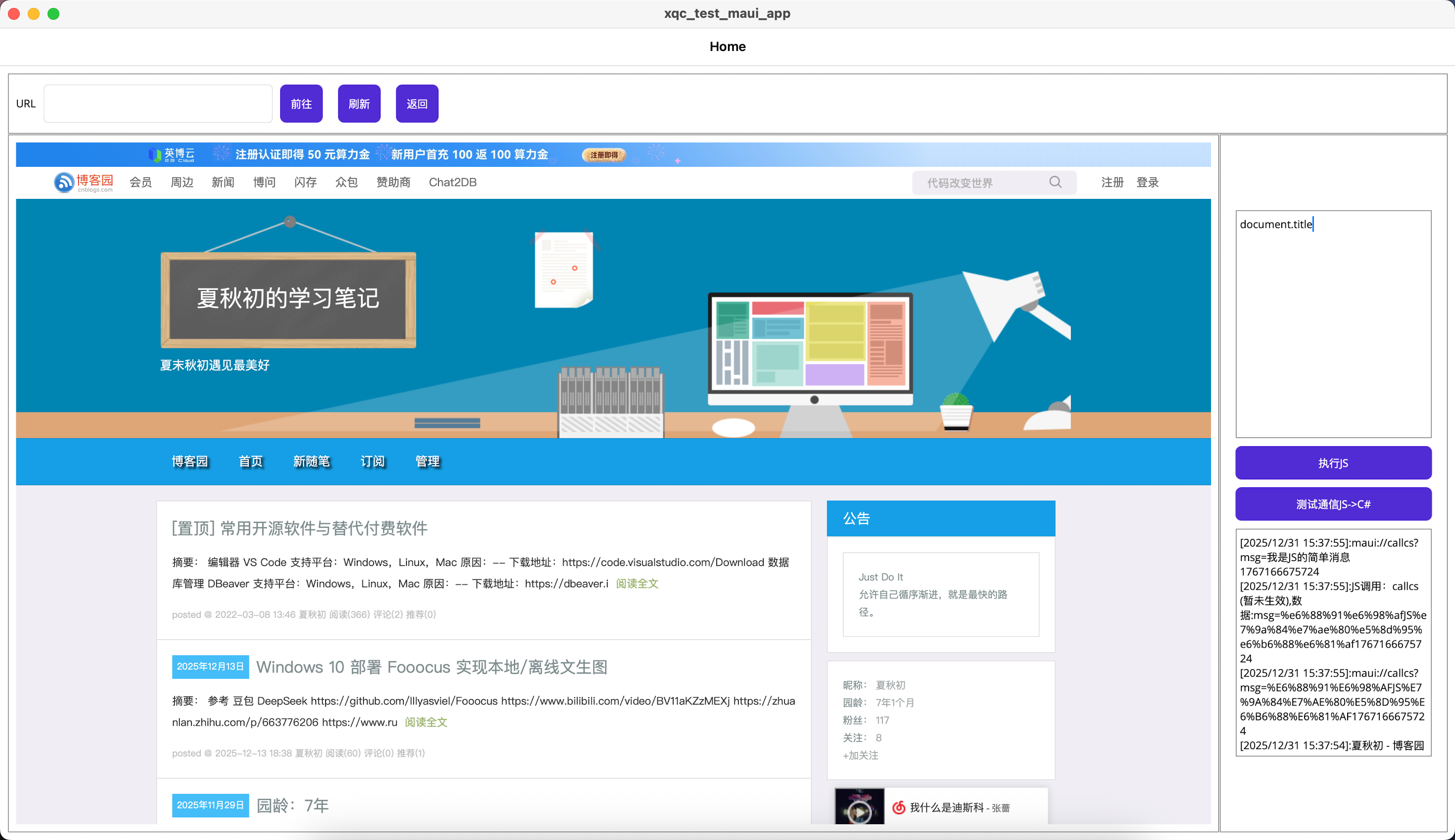
JS->C# 通过JS触发 Navigating 事件进行解析数据传递相关的 URL进行数据传输。
C#->JS 通过 webView.EvaluateJavaScriptAsync(js) 进行执行JS。
- MainPage.xaml.cs
using System.Diagnostics; using System.Web; namespace xqc_test_maui_app; public partial class MainPage : ContentPage { public MainPage() { InitializeComponent(); } private void AddLog(string msg) { if (string.IsNullOrEmpty(msg)) { return; } Debug.WriteLine(msg); MainThread.InvokeOnMainThreadAsync(() => { logEditor.Text = $"[{DateTime.Now}]:" + msg + "\r\n" + logEditor.Text; }); } /// <summary> /// 导航完成事件 /// </summary> /// <param name="sender"></param> /// <param name="e"></param> private void webView_Navigated(object sender, WebNavigatedEventArgs e) { Debug.WriteLine("导航完毕"); } /// <summary> /// 监听窗口刷新 /// </summary> /// <param name="sender"></param> /// <param name="e"></param> private async void WebView_Navigating(object sender, WebNavigatingEventArgs e) { var url = e.Url; if (!url.StartsWith("maui://")) { return; } // AddLog(url); // 阻止网页跳转 e.Cancel = true; // 当前URL Uri uri = new Uri(url); var function = uri.Host; var paramses = HttpUtility.ParseQueryString(uri.Query); // if (function == "JsSendTestMessage") { AddLog($"JS发送测试消息,{paramses["message"]}"); } else { AddLog($"JS调用:{function} (暂未生效),数据:{paramses.ToString()}"); } } private void Go_Clicked(object sender, EventArgs e) { webView.Source = inputUrl.Text; } private void Ref_Clicked(object sender, EventArgs e) { webView.Reload(); } private void Back_Clicked(object sender, EventArgs e) { webView.GoBack(); } /// <summary> /// 执行js /// </summary> /// <param name="sender"></param> /// <param name="e"></param> private async void EvaluateJavaScriptAsync_Clicked(object sender, EventArgs e) { if (string.IsNullOrEmpty(jsEditor.Text)) { return; } try { AddLog(await webView.EvaluateJavaScriptAsync(jsEditor.Text)); } catch (Exception ex) { AddLog(ex.Message); } } /// <summary> /// 测试js调用C# /// </summary> /// <param name="sender"></param> /// <param name="e"></param> private async void TestJsCallCSharp_Clicked(object sender, EventArgs e) { var msg = await webView.EvaluateJavaScriptAsync(@"window.location.href = ""maui://callcs?msg=我是JS的简单消息"" + new Date().getTime();"); AddLog(msg); } } - MainPage.xaml
<?xml version="1.0" encoding="utf-8" ?>
<ContentPage xmlns="http://schemas.microsoft.com/dotnet/2021/maui"
			 xmlns:x="http://schemas.microsoft.com/winfx/2009/xaml"
			 x:Class="xqc_test_maui_app.MainPage">
	<ContentPage.Resources>
		<Style TargetType="Entry"
			   x:Key="webViewEntry">
			<Setter Property="HeightRequest"
					Value="50"></Setter>
			<Setter Property="WidthRequest"
					Value="300"></Setter>
		</Style>
		<Style TargetType="Button"
			   x:Key="webViewBtn">
			<Setter Property="HeightRequest"
					Value="50"></Setter>
			<Setter Property="Margin"
					Value="0, 0, 10, 0"></Setter>
		</Style>
	</ContentPage.Resources>
	<Grid RowDefinitions="80,*"
		  Padding="10"
		  ColumnDefinitions="*,300">
		<Border Stroke="Gray"
				Padding="10"
				Grid.Row="0"
				Grid.Column="0"
				Grid.ColumnSpan="2 ">
			<StackLayout Orientation="Horizontal"
						 Spacing="10">
				<StackLayout Orientation="Horizontal"
							 Spacing="10">
					<Label Text="URL"
							HeightRequest="20"></Label>
					<Entry x:Name="inputUrl"
						   Style="{StaticResource webViewEntry}"></Entry>
				</StackLayout>
				<Button Clicked="Go_Clicked"
						Text="前往"
						Style="{StaticResource webViewBtn}"></Button>
				<Button Clicked="Ref_Clicked"
						Text="刷新"
						Style="{StaticResource webViewBtn}"></Button>
				<Button Clicked="Back_Clicked"
						Text="返回"
						Style="{StaticResource webViewBtn}"></Button>
			</StackLayout>
		</Border>
		<Border Stroke="Gray"
				Padding="10"
				Grid.Row="1"
				Grid.Column="0">
			<WebView x:Name="webView"
					Source="https://www.cnblogs.com/xiaqiuchu"
					Navigated="WebView_Navigated"
					Navigating="WebView_Navigating"></WebView>
		</Border>
		<Border Stroke="Gray"
				Padding="10"
				Grid.Row="1"
				Grid.Column="1">
			<StackLayout Padding="10"
						 Spacing="10"
					VerticalOptions="Center">
				<Border Stroke="Gray"
						HeightRequest="300">
					<Editor x:Name="jsEditor"></Editor>
				</Border>
				<Button Clicked="EvaluateJavaScriptAsync_Clicked"
						Text="执行JS"></Button>
				<Button Clicked="TestJsCallCSharp_Clicked"
						Text="测试通信JS->C#"></Button>
				<Border Stroke="Gray"
						HeightRequest="300">
					<Editor x:Name="logEditor"
							IsReadOnly="True"></Editor>
				</Border>
			</StackLayout>
		</Border>
	</Grid>


</ContentPage>
注入JS示例
- 压缩前
// alert(JSON.stringify(CSharpDocumentJsObject)) // C#调用 function setDataAndStart(callFunctionName) { callFunctionName && callFunctionName(); } // JS 调用 function sendData(paramers = {}) { callCSharp('JsSendCurrentData', paramers) } function sendTestMessage(message = 'sendTestMessage') { callCSharp('JsSendTestMessage', { message: message }) } function callCSharp(functionName, paramers = {}) { location.href = 'maui://' + functionName + objectToQueryString(paramers) } function objectToQueryString(obj = {}) { return '?' + Object.keys(obj).map(key => { return encodeURIComponent(key) + '=' + encodeURIComponent(obj[key]) }).join('&') } function waitForElement(selector, callback, interval = 100, timeout = 10000) { const startTime = Date.now(); const checkElement = () => { const element = document.querySelector(selector); if (element) { callback(element); return true } if (Date.now() - startTime > timeout) { console.warn(`等待元素${selector}超时`); return false } setTimeout(checkElement, interval) }; checkElement() } - 压缩后
function setDataAndStart(callFunctionName){callFunctionName&&callFunctionName()}function sendData(paramers={}){callCSharp('JsSendCurrentData',paramers)}function sendTestMessage(message='sendTestMessage'){callCSharp('JsSendTestMessage',{message:message})}function callCSharp(functionName,paramers={}){location.href='maui://'+functionName+objectToQueryString(paramers)}function objectToQueryString(obj={}){return'?'+Object.keys(obj).map(key=>{return encodeURIComponent(key)+'='+encodeURIComponent(obj[key])}).join('&')}function waitForElement(selector,callback,interval=100,timeout=10000){const startTime=Date.now();const checkElement=()=>{const element=document.querySelector(selector);if(element){callback(element);return true}if(Date.now()-startTime>timeout){console.warn(`等待元素${selector}超时`);return false}setTimeout(checkElement,interval)};checkElement()}
博 主 :夏秋初
地 址 :https://www.cnblogs.com/xiaqiuchu/p/19427009
如果对你有帮助,可以点一下 推荐 或者 关注 吗?会让我的分享变得更有动力~
转载时请带上原文链接,谢谢。
地 址 :https://www.cnblogs.com/xiaqiuchu/p/19427009
如果对你有帮助,可以点一下 推荐 或者 关注 吗?会让我的分享变得更有动力~
转载时请带上原文链接,谢谢。

 浙公网安备 33010602011771号