
ASP.NET Core MVC 在开发时禁止浏览器自动启动
参考
环境
| 软件/系统 | 版本 | 说明 |
|---|---|---|
| Windows | windows 10 专业版 22H2 64 位操作系统, 基于 x64 的处理器 | |
| Microsoft Visual Studio | Community 2022 (64 位) - Current 版本 17.14.9 | |
| .NET | 8 | |
| ASP.NET Core MVC | ASP.NET Core MVC in .NET 8.0 |
正文
本文基于 Microsoft Visual Studio 编辑器,如需 VS Code 配置,请参考 https://blog.csdn.net/xingkongtianyuzhao/article/details/104452709 。
- 打开
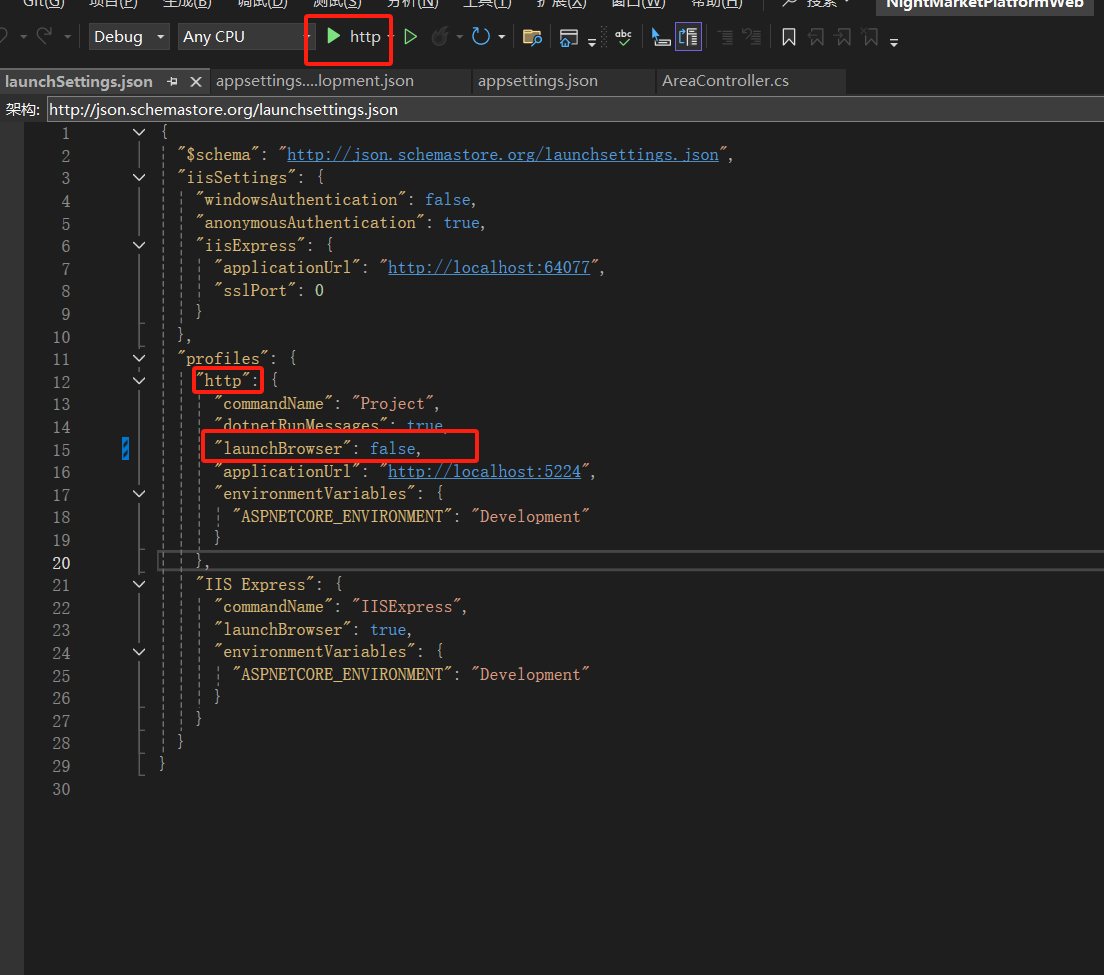
解决方案资源管理器->项目->Properties->launchSettings.json - 将当前运行模式的配置文件内的
launchBrowser修改为false,保存后重启项目即可,
博 主 :夏秋初
地 址 :https://www.cnblogs.com/xiaqiuchu/p/19001304
如果对你有帮助,可以点一下 推荐 或者 关注 吗?会让我的分享变得更有动力~
转载时请带上原文链接,谢谢。
地 址 :https://www.cnblogs.com/xiaqiuchu/p/19001304
如果对你有帮助,可以点一下 推荐 或者 关注 吗?会让我的分享变得更有动力~
转载时请带上原文链接,谢谢。

 浙公网安备 33010602011771号