
Pytorch笔记 1 Tensor和Variable
Tensor
首先导入有关的库
import torch
import numpy as np
numpy与tensor的转换
由numpy转换成tensor
对于numpy到tensor的转换,一般有两种方法
利用torch.Tensor
tensor_from_np1 = torch.Tensor(numpy_tensor)
tensor_from_np2 = torch.from_numpy(numpy_tensor)
下面是将tensor转化成numpy
numpy_array = tensor_from_np1.numpy()
如果此时tensor在gpu上,应先转化为cpu上后再进行转化
dtype = torch.cuda.FloatTensor
gpu_tensor = torch.randn(10, 20).type(dtype)
将tensor放到cpu上
cpu_tensor = gpu_tensor.cpu()
Tensor属性的访问
print(cpu_tensor.shape)    #形状
print(cpu_tensor.size())    #形状
print(cpu_tensor.type())    #数据类型
print(cpu_tensor.dim())   #维度
print(cpu_tensor.numel())    #元素个数

Tensor的操作
创造全一数组
x = torch.ones(2, 2)

创造随机数组
x = torch.randn(3,4)

查看/转换种类
x.type() #查看种类

x = x .long()    # 转化成整形
x = x.float()    #转回浮点型
算术操作
max_value, max_idx = torch.max(x, dim=0)  # 按列求最大值
sumx = torch.sum(x)    #求总和
sumy = torch.sum(x, dim=1) #按行求和
维度变化
x1 = x.unsqueeze(0)
x2 = x.unsqueeze(1)
x3 = x.squeeze()
改变形状
x = x.view(-1, 5) # -1 指随意取值,5是把第二维调成5
x = x.view(3, 20) # reshape (3, 20)

Variable
from torch.autograd import Variable
Variable支持反向求导
x_tensor = torch.randn(10, 5)
y_tensor = torch.randn(10, 5)
# tensor转化成Variable
x = Variable(x_tensor, requires_grad=True) # 默认Variable不需要梯度
y = Variable(y_tensor, requires_grad=True)
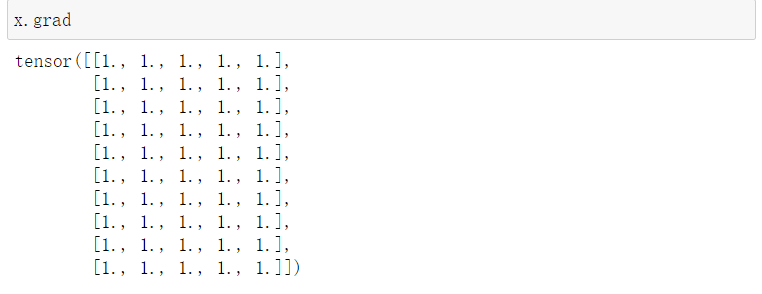
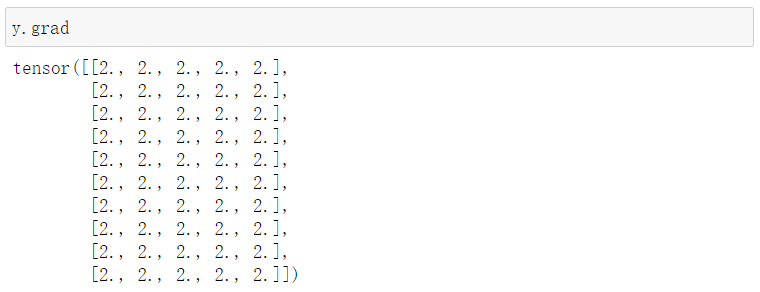
我们如果设定z为结果,使得z=x+2y
再将z的总和反向求导,注意,反向求导的对象应该是标量
z.backward()
很喜欢听到一个老师说的“半年理论”,现在做出的努力,一般要在半年的沉淀之后,才能出结果,所以在遇到瓶颈之时,不妨再努力半年

 浙公网安备 33010602011771号