
1.558329] sd 8:8:8:8:[sda] Assuming drive cache: write through
[2.863093] XFS (dm-8): Internal error xPS_AINT_CORRUPTED_6OTm at line 1727 of file fs/xislibxfsxfs_alloc.c. Caller xfs_free_extent+Bxaa/Bx150[xfs]
[2.863427] XT'S (dm-8): Internal error xfs_trans_cancel at line 993 of file fs/xfs/xdi's_trans.c.Caller xfs_ef i_recouer+0x18e/8x1c[xfsl
[2.863697] XFS (dm-8): Corruption of in-memory data detected. Shutting dowm filesystem[2.863728] XTS (dm-8): Please umount the filesystem and rectify the problem(s)
[2.863762]XFS (dm-d): Failed to recover intents
Generating "run/initramf s/rdsosreport.txt"
Entering emergency mode. Exit the shell to continue.Tupe ".journalctl" to view system logs.
rou might want to save "rruninitramf s/rdsosreport.txt " to a USB stick or rbootafter mounting them and attach it to a bug report.
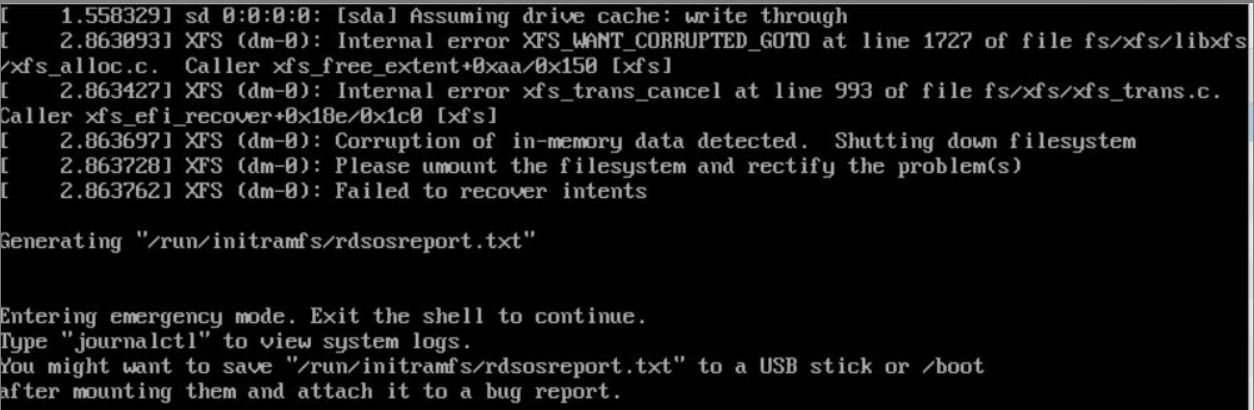
这是Linux系统中XFS文件系统检测到内存数据损坏并触发了文件系统保护机制。以下是分步解决方案:
核心问题分析
错误日志表明:
- XFS文件系统(设备
dm-0)检测到内存数据损坏(Corruption of in-memory data detected)。 - 系统已自动关闭文件系统并进入紧急模式(Emergency Mode),需手动修复。
解决步骤
1. 确保数据安全(首要操作)
- 如果有重要数据:立即通过Live USB/CD启动系统,避免在损坏的文件系统上操作,优先通过数据恢复工具(如
ddrescue、testdisk)备份数据。 - 若无重要数据或已备份:继续以下修复步骤。
2. 尝试在紧急模式下修复(适用于能进入紧急模式的情况)
当前已在紧急模式,执行以下命令(假设文件系统挂载点为 /,设备为 /dev/dm-0,请根据实际情况调整):
# 1. 检查文件系统(强制检查,跳过部分安全检查)
xfs_repair -L /dev/dm-0

# 说明:
# - `-L` 选项强制日志清空(Last Write Wins),适用于严重损坏时,但可能导致少量数据丢失
# - 执行前确保设备未被挂载(可通过 `df -h` 确认)

# 2. 若上述命令失败,尝试以只读模式挂载并修复
mkdir /mnt/repair
mount -o ro /dev/dm-0 /mnt/repair
xfs_repair /dev/dm-0
umount /mnt/repair
2. 后续预防措施
- 定期备份重要数据(推荐使用
rsync或专业备份工具)。 - 检查硬件健康状态(尤其是存储设备,可使用
smartctl工具)。 - 避免在系统运行时强制断电或拔出存储设备。
注意事项
xfs_repair -L是有风险的操作,可能导致部分未写入数据丢失,仅在确认无重要数据或已备份时使用。

 浙公网安备 33010602011771号