本地安装nginx

下载nginx

本地环境:win10-64位。
下载地址: http://nginx.org/en/download.html
![在这里插入图片描述]( https://img-blog.csdnimg.cn/20200623094603806.png?x-oss-process=image/watermark ,type_ZmFuZ3poZW5naGVpdGk,shadow_10,text_aHR0cHM6Ly9ibG9nLmNzZG4ubmV0L2N5d3hqY3k=,size_16,color_FFFFFF,t_70)

nginx命令

进入到nginx目录(D:/nginx-1.16.1),cmd,使用“start nginx.exe ”进行nginx的安装,如下图所示:
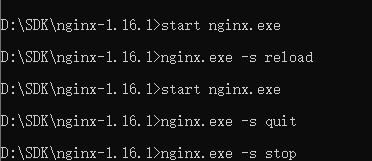
在这里插入图片描述
nginx.exe -s stop //停止nginx

nginx.exe -s reload //重新加载nginx

nginx.exe -s quit //退出nginx

命令中 .exe 可去掉

启动成功

启动成功后会在任务管理器看到nginx的进程
![在这里插入图片描述]( https://img-blog.csdnimg.cn/20200623095200674.png?x-oss-process=image/watermark ,type_ZmFuZ3poZW5naGVpdGk,shadow_10,text_aHR0cHM6Ly9ibG9nLmNzZG4ubmV0L2N5d3hqY3k=,size_16,color_FFFFFF,t_70)
启动成功后在浏览器输入127.0.0.1 会看到nginx的欢迎界面
![在这里插入图片描述]( https://img-blog.csdnimg.cn/20200623095107711.png?x-oss-process=image/watermark ,type_ZmFuZ3poZW5naGVpdGk,shadow_10,text_aHR0cHM6Ly9ibG9nLmNzZG4ubmV0L2N5d3hqY3k=,size_16,color_FFFFFF,t_70)

启动失败

若启动失败可到D:\SDK\nginx-1.16.1目录下的logs文件夹下的error下查看,有可能是端口被占用。
或是cmd命令进入dos下执行:netstat -aon | findstr :80 查看80端口是否被占用,如果占用,需要修改注册表,如下步骤:
1、打开注册表:regedit

2、找到:HKEY_LOCAL_MACHINE\SYSTEM\CurrentControlSet\services\HTTP

3、找到一个REG_DWORD类型的项Start,将其改为0

4、重启系统,System进程不会占用80端口

配置文件

配置文件详细解析:http://www.2cto.com/os/201212/176520.html![在这里插入图片描述]( https://img-blog.csdnimg.cn/20200623100032239.png?x-oss-process=image/watermark ,type_ZmFuZ3poZW5naGVpdGk,shadow_10,text_aHR0cHM6Ly9ibG9nLmNzZG4ubmV0L2N5d3hqY3k=,size_16,color_FFFFFF,t_70)

posted @ 2020-06-23 10:10  Amy小影儿  阅读(1787)  评论(0)    收藏  举报