

react 国际化 react-i18next
重点:
动态切换语言,不刷新页面的情况下切换,无需redux(从官网文档找到):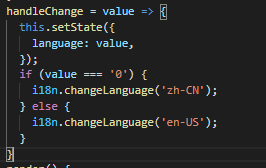
选择插件 react-i18next,
先安装npm install i18next react-i18next --save
然后引入依赖代码如下,
import React from 'react';
import ReactDOM from 'react-dom';
import i18n from 'i18next';
import { useTranslation, initReactI18next } from 'react-i18next';
import langCN from './langCN.js'
import langEN from './langEN.js'
i18n
  .use(initReactI18next) // passes i18n down to react-i18next
  .init({
    // the translations
    // (tip move them in a JSON file and import them)
    resources: {
      en: {
        translation: langEN
      },
      zh: {
        translation: langCN
      }
    },
    lng: 'en',
    fallbackLng: 'en',

    interpolation: {
      escapeValue: false
    }
  });
function App() {
  const { t } = useTranslation();
  React.translate = t;
  return (
    <Provider store={store}>
        <HashRouter>
          <LocaleProvider locale={zhCN}>
            <Main />
          </LocaleProvider>
        </HashRouter>
    </Provider >
  );
}
ReactDOM.render(
  <App />
  ,
  document.getElementById('app')
);
注意:useTranslation()必须是函数组件中使用否则会报,hooks错误。
React.translate = t; 将该方法放到全局函数中。

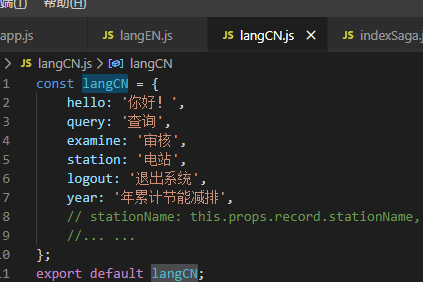
<div className={styles.savingText}>{React.translate('year')}</div>
使用全局定义的方法即可进行转换。
目前为止,还没有用到 i18next-xhr-backend , 这个插件可以使你的 json 文件放到 public 目录下使用(下例 Locales JSON)。
而 i18next-browser-languagedetector , 可以帮助你自动识别浏览器语言
cnpm install i18next-xhr-backend i18next-browser-languagedetector --save
方式二:请求后台数据
Basic sample with XHR JSON:
cnpm install i18next-xhr-backend i18next-browser-languagedetector i18next-multiload-backend-adapter --save
i18n
  .use(BackendAdapter)
  // detect user language
  .use(LanguageDetector)
  // pass the i18n instance to react-i18next.
  .use(initReactI18next)
  // init i18next
  // for all options read: https://www.i18next.com/overview/configuration-options
  .init({
    lng: navigator.language,
    fallbackLng: 'en',
    debug: true,
    preload: navigator.languages,
    interpolation: {
      escapeValue: false // not needed for react as it escapes by default
    },
    backend: {
      backend: XHR,
      allowMultiLoading: true,
      backendOption: {
        loadPath: function(lngs, namespaces) {
          console.log(lngs, namespaces);
          return 'https://my-json-server.typicode.com/TserHub/Json/qinwm?lng={{lng}}&ns={{ns}}';
        },
        addPath:
          'https://my-json-server.typicode.com/TserHub/Json/qinwm?lng={{lng}}&ns={{ns}}'
      }
    }
  });
转载自:https://www.cnblogs.com/jserhub/p/12651376.html

 浙公网安备 33010602011771号