
FlinkX的安装与简单使用
FlinkX概述
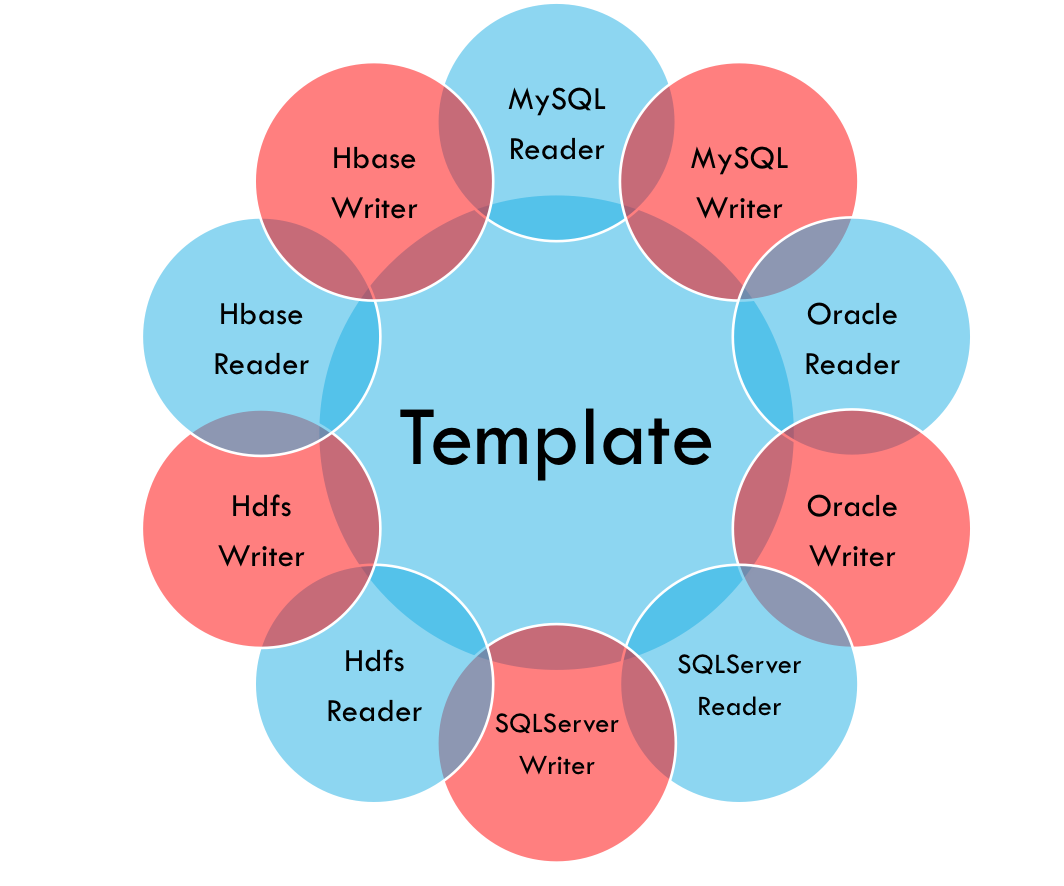
FlinkX是在是袋鼠云内部广泛使用的基于flink的分布式离线和实时的数据同步框架,实现了多种异构数据源之间高效的数据迁移。
FlinkX是一个基于Flink的批流统一的数据同步工具,既可以采集静态的数据,比如MySQL,HDFS等,也可以采集实时变化的数据,比如MySQL binlog,Kafka等
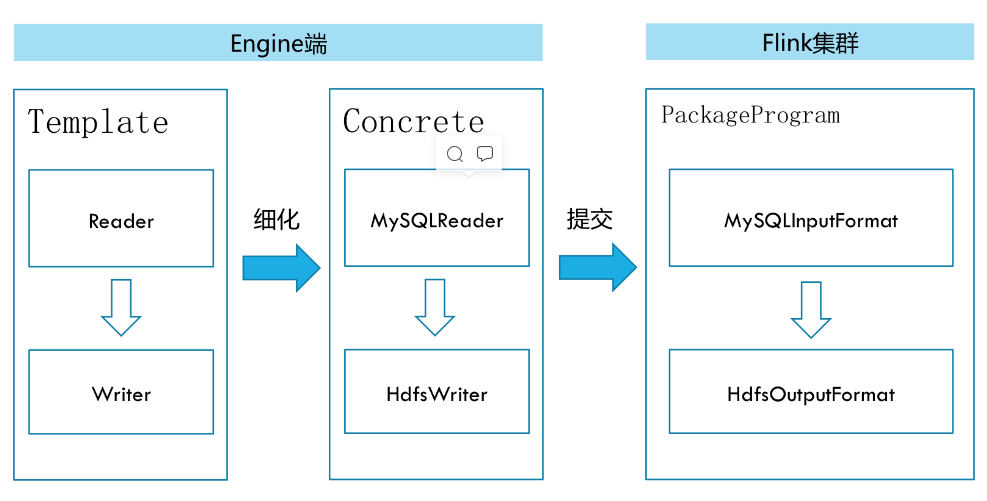
在底层实现上,FlinkX依赖Flink,数据同步任务会被翻译成StreamGraph在Flink上执行.
FlinkX的安装
https://github.com/oceanos/flinkx/blob/1.8_release/README_OLD.
1、上传并解压
unzip flinkx-1.10.zip -d /usr/local/soft/2、配置环境变量
3、给bin/flinkx这个文件加上执行权限
chmod a+x flinkx4、修改配置文件,设置运行端口、
vim flinkconf/flink-conf.yaml## web服务端口,不指定的话会随机生成一个
rest.bind-port: 8888FlinkX的简单使用
MySQLToHDFS
-
配置文件
{
    "job": {
        "content": [
            {
                "reader": {
                    "parameter": {
                        "username": "root",
                        "password": "123456",
                        "connection": [
                            {
                                "jdbcUrl": [
                                    "jdbc:mysql://master01:3306/students?useUnicode=true&characterEncoding=utf8"
                                ],
                                "table": [
                                    "student"
                                ]
                            }
                        ],
                        "column": [
                            "*"
                        ],
                        "customSql": "",
                        "where": "clazz = '19期'",
                        "splitPk": "",
                        "queryTimeOut": 1000,
                        "requestAccumulatorInterval": 2
                    },
                    "name": "mysqlreader"
                },
                "writer": {
                    "name": "hdfswriter",
                    "parameter": {
                        "path": "hdfs://master01:9000/shujia/bigdata19/flinkx/student2",
                        "defaultFS": "hdfs://master01:9000",
                        "column": [
                            {
                                "name": "col1",
                                "index": 0,
                                "type": "string"
                            },
                            {
                                "name": "col2",
                                "index": 1,
                                "type": "string"
                            },
                            {
                                "name": "col3",
                                "index": 2,
                                "type": "string"
                            },
                            {
                                "name": "col4",
                                "index": 3,
                                "type": "string"
                            },
                            {
                                "name": "col5",
                                "index": 4,
                                "type": "string"
                            },
                            {
                                "name": "col6",
                                "index": 5,
                                "type": "string"
                            }
                        ],
                        "fieldDelimiter": ",",
                        "fileType": "text",
                        "writeMode": "overwrite"
                    }
                }
            }
        ],
        "setting": {
            "restore": {
                "isRestore": false,
                "isStream": false
            },
            "errorLimit": {},
            "speed": {
                "channel": 1
            }
        }
    }
}-
启动任务
flinkx -mode local -job ./mysqlToHDFS.json -pluginRoot /usr/local/soft/flinkx-1.10/syncplugins/ -flinkconf /usr/local/soft/flinkx-1.10/flinkconf/-
监听日志
flinkx 任务启动后,会在执行命令的目录下生成一个nohup.out文件
tail -f nohup.out-
通过web界面查看任务运行情况
http://master:8888MySQLToHive
-
配置文件
{
    "job": {
        "content": [
            {
                "reader": {
                    "parameter": {
                        "username": "root",
                        "password": "123456",
                        "connection": [
                            {
                                "jdbcUrl": [
                                    "jdbc:mysql://master:3306/student?characterEncoding=utf8"
                                ],
                                "table": [
                                    "student"
                                ]
                            }
                        ],
                        "column": [
                            "id",
                            "name",
                            "age",
                            "clazz"
                        ],
                        "customSql": "",
                        "where": "clazz = '文科二班'",
                        "splitPk": "id",
                        "queryTimeOut": 1000,
                        "requestAccumulatorInterval": 2
                    },
                    "name": "mysqlreader"
                },
                "writer": {
                    "name": "hivewriter",
                    "parameter": {
                        "jdbcUrl": "jdbc:hive2://master:10000/testflinkx",
                        "username": "",
                        "password": "",
                        "fileType": "text",
                        "fieldDelimiter": ",",
                        "writeMode": "overwrite",
                        "compress": "",
                        "charsetName": "UTF-8",
                        "maxFileSize": 1073741824,
                        "tablesColumn": "{\"student\":[{\"key\":\"id\",\"type\":\"string\"},{\"key\":\"name\",\"type\":\"string\"},{\"key\":\"age\",\"type\":\"string\"},{\"key\":\"clazz\",\"type\":\"string\"}]}",
                        "defaultFS": "hdfs://master:9000"
                    }
                }
            }
        ],
        "setting": {
            "restore": {
                "isRestore": false,
                "isStream": false
            },
            "errorLimit": {},
            "speed": {
                "channel": 3
            }
        }
    }
}-
在hive中创建testflinkx数据库,并创建student分区表
create database testflinkx;
use testflinkx;
CREATE TABLE `student`(
  `id` string,
  `name` string,
  `age` string,
  `clazz` string)
PARTITIONED BY (
  `pt` string)
ROW FORMAT DELIMITED
FIELDS TERMINATED BY ','-
启动hiveserver2
# 第一种方式:
hiveserver2
# 第二种方式:
hive --service hiveserver2-
启动任务
flinkx -mode local -job ./mysql2hive.json -pluginRoot /usr/local/soft/flinkx-1.10/syncplugins/ -flinkconf /usr/local/soft/flinkx-1.10/flinkconf/-
查看日志及运行情况同上
MySQLToHBase
-
配置文件
{
    "job": {
        "content": [
            {
                "reader": {
                    "parameter": {
                        "username": "root",
                        "password": "123456",
                        "connection": [
                            {
                                "jdbcUrl": [
                                    "jdbc:mysql://master:3306/student?characterEncoding=utf8"
                                ],
                                "table": [
                                    "score"
                                ]
                            }
                        ],
                        "column": [
                            "*"
                        ],
                        "customSql": "",
                        "splitPk": "student_id",
                        "queryTimeOut": 1000,
                        "requestAccumulatorInterval": 2
                    },
                    "name": "mysqlreader"
                },
                "writer": {
                    "name": "hbasewriter",
                    "parameter": {
                        "hbaseConfig": {
                            "hbase.zookeeper.property.clientPort": "2181",
                            "hbase.rootdir": "hdfs://master:9000/hbase",
                            "hbase.cluster.distributed": "true",
                            "hbase.zookeeper.quorum": "master,node1,node2",
                            "zookeeper.znode.parent": "/hbase"
                        },
                        "table": "testFlinkx",
                        "rowkeyColumn": "$(cf1:student_id)_$(cf1:course_id)",
                        "column": [
                            {
                                "name": "cf1:student_id",
                                "type": "string"
                            },
                            {
                                "name": "cf1:course_id",
                                "type": "string"
                            },
                            {
                                "name": "cf1:score",
                                "type": "string"
                            }
                        ]
                    }
                }
            }
        ],
        "setting": {
            "restore": {
                "isRestore": false,
                "isStream": false
            },
            "errorLimit": {},
            "speed": {
                "channel": 3
            }
        }
    }
}-
启动hbase 并创建testflinkx表
create 'testFlinkx','cf1'-
启动任务
flinkx -mode local -job ./mysqlToHBase.json -pluginRoot /usr/local/soft/flinkx-1.10/syncplugins/ -flinkconf /usr/local/soft/flinkx-1.10/flinkconf/-
查看日志及运行情况同上
MySQLToMySQL
配置文件
{
    "job": {
      "content": [
        {
          "reader": {
            "name": "mysqlreader",
            "parameter": {
              "column": [
                {
                  "name": "id",
                  "type": "int"
                },
                {
                  "name": "name",
                  "type": "string"
                },
                {
                  "name": "age",
                  "type": "int"
                },
                {
                  "name": "gender",
                  "type": "string"
                },
                {
                  "name": "clazz",
                  "type": "string"
                }
              ],
              "username": "root",
              "password": "123456",
              "connection": [
                {
                  "jdbcUrl": [
                    "jdbc:mysql://master:3306/student?useSSL=false"
                  ],
                  "table": [
                    "student"
                  ]
                }
              ]
            }
          },
          "writer": {
            "name": "mysqlwriter",
            "parameter": {
              "username": "root",
              "password": "123456",
              "connection": [
                {
                  "jdbcUrl": "jdbc:mysql://master:3306/student?useSSL=false",
                  "table": [
                    "student2"
                  ]
                }
              ],
              "writeMode": "insert",
              "column": [
                {
                    "name": "id",
                    "type": "int"
                  },
                  {
                    "name": "name",
                    "type": "string"
                  },
                  {
                    "name": "age",
                    "type": "int"
                  },
                  {
                    "name": "gender",
                    "type": "string"
                  },
                  {
                    "name": "clazz",
                    "type": "string"
                  }
              ]
            }
          }
        }
      ],
      "setting": {
        "speed": {
          "channel": 1,
          "bytes": 0
        }
      }
    }
  }
 浙公网安备 33010602011771号