


git rm -r --cached_git 撤销对文件的追踪
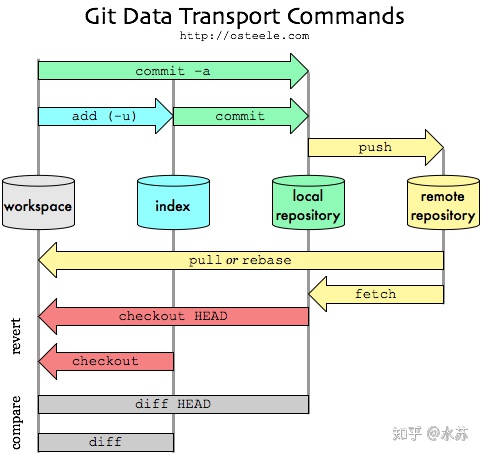
撤销暂存区(index)区的track
当我们新增加文件时,使用git status会打印出:
Untracked files:

(use "git add <file>..." to include in what will be committed)

hello.txt

nothing added to commit but untracked files present (use "git add" to track)
可见,git add 命令可以用来追踪文件。
当我们使用 git add hello.txt后,再使用git status后,会打印出:
Changes to be committed:

(use "git restore --staged <file>..." to unstage)

new file: hello.txt
可见,文件已经被追踪了,只是还没提交到本地仓库。此时可以使用git restore来撤销这个追踪。
> git restore hello.txt --staged > git status On branch master Your branch is up to date with 'origin/master'. Untracked files: (use "git add <file>..." to include in what will be committed) hello.txt
撤销“已经提交到本地仓库的文件”的追踪
当一个文件(例如hello.txt)已经提交到本地仓库时。后续你再往.gitignore添加它,也不会起作用。怎么解除这种追踪呢?最常见的做法是直接删除这个文件,流程是:本地删除,提交删除这个commit到仓库。
但这样本地的也会被删除。有时我们只是想删除仓库的副本,可以使用git rm --cached。git rm经常被用来删除工作区和暂存区的文件。它可以携带一个cache参数,作用如下(摘自文档):
git rm --cached

Use this option to unstage and remove paths only from the index. Working tree files, whether modified or not, will be left alone.

使用这个项来解除暂存区的缓存,工作区的文件将保持不动。
意思就是不会在实际上删掉这个文件,只是解除它的追踪关系。
举例:
> git rm --cached hello.txt

// rm 'hello.txt'

> git status

On branch master

Your branch is up to date with 'origin/master'.

Changes to be committed:

(use "git restore --staged <file>..." to unstage)

deleted: hello.txt
工作区的hello.txt还在,但已经没有被git追踪了。之后,只要我们把hello.txt添加到.gitignore后,修改hello.txt并不会产生改动。
接下来我们提交下这个改动。
git commit -m 'delete hello.txt'

[master d7a2e3e] delete hello.txt

1 files changed, 17 deletions(-)

delete mode 100644 hello.txt
使用rm这个命令时,我们经常会用到-r这个命令。-r是递归的意思,表示删除整个文件夹,包括它的子文件夹。

 浙公网安备 33010602011771号