
Java spring5 学习笔记(2021.11.4~11.5)
Spring
一、Spring简介
-
Spring--->软件行业的春天
-
2002--->Spring前身interface21框架
-
2004年3月24出现1.0版本
-
Rod Johnson,作者
-
spring理念:更简单,整合所有框架
-
SSH:Struts2+Spring+Hibernate
-
SSM:SpringMVC+Spring+Mybatis
官网:https://spring.io/projects/spring-framework
GitHub:https://github.com/spring-projects/spring-framework
Maven依赖:
<!-- https://mvnrepository.com/artifact/org.springframework/spring-webmvc -->
<dependency>
    <groupId>org.springframework</groupId>
    <artifactId>spring-webmvc</artifactId>
    <version>5.3.12</version>
</dependency>
<!-- https://mvnrepository.com/artifact/org.springframework/spring-jdbc -->
<dependency>
    <groupId>org.springframework</groupId>
    <artifactId>spring-jdbc</artifactId>
    <version>5.3.12</version>
</dependency>
优点:
- 开源免费框架
- 轻量级非入侵式框架
- 控制反转(ioc)面向切面编程(aop)
- 支持事务的处理,对框架整合的支持!
二、Spring组成及拓展
组成
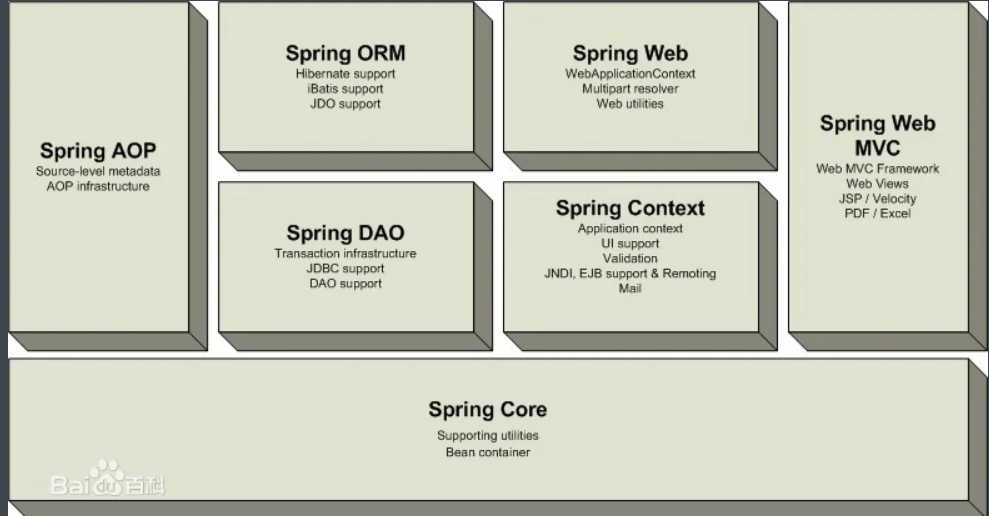
拓展
- Spring Boot:
- 快速开发脚手架
- 快速开发单个微服务
- 约定大于配置
- SpringCloud
- 基于Spring Boot开发
弊端:发展了太久违背了原来的理念,配置十分繁琐,人称配置地狱
三、IOC理论推导
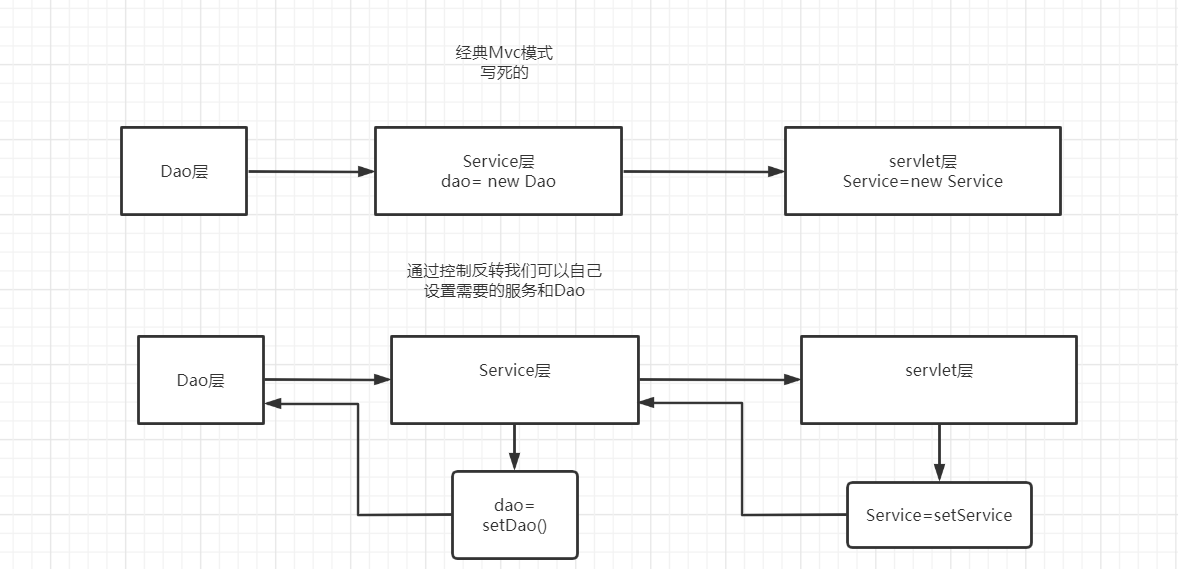
四、IOC本质
本质就是上面那个图,别整有的没的。
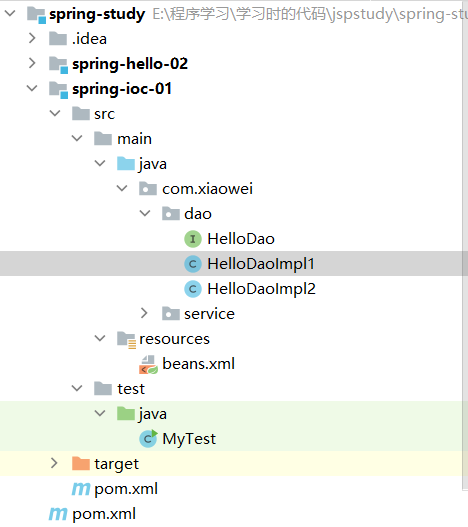
五、HelloSpring
第一步:搭建环境导入依赖
项目结构:
第二步:在资源文件夹,放入xml
<?xml version="1.0" encoding="UTF-8"?>
<beans xmlns="http://www.springframework.org/schema/beans"
       xmlns:xsi="http://www.w3.org/2001/XMLSchema-instance"
       xsi:schemaLocation="http://www.springframework.org/schema/beans
        https://www.springframework.org/schema/beans/spring-beans.xsd">

    <bean id="hello1" class="com.xiaowei.dao.HelloDaoImpl1"></bean>
    <bean id="hello2" class="com.xiaowei.dao.HelloDaoImpl2"></bean>

    <bean id="helloser" class="com.xiaowei.service.HelloServiceIpml">
        <property name="helloDaoImpl" ref="hello1"/>
    </bean>

</beans>
第三步:创建Dao/service接口和Dao/service实现类
Dao接口
public interface HelloDao {
    void sayHello();
}
Dao实现类
public class HelloDaoImpl1 implements HelloDao{
    @Override
    public void sayHello() {
        System.out.println("hello spring1");
    }
}
public class HelloDaoImpl2 implements HelloDao{
    @Override
    public void sayHello() {
        System.out.println("hello spring2");
    }
}
Service接口
public interface HelloService {
    void hello();
}
Service实现类
public class HelloServiceIpml implements HelloService {
    private HelloDao helloDaoImpl;

    public HelloDao getHelloDaoImpl() {
        return helloDaoImpl;
    }

    public void setHelloDaoImpl(HelloDao helloDaoImpl) {
        this.helloDaoImpl = helloDaoImpl;
    }

    @Override
    public void hello() {
        helloDaoImpl.sayHello();
    }
}
第四步:测试类
public class MyTest {
    public static void main(String[] args) {
        //读取xml内容
        ApplicationContext context = new ClassPathXmlApplicationContext("beans.xml");
        HelloService helloser = (HelloService) context.getBean("helloser");
        helloser.hello();
    }
}
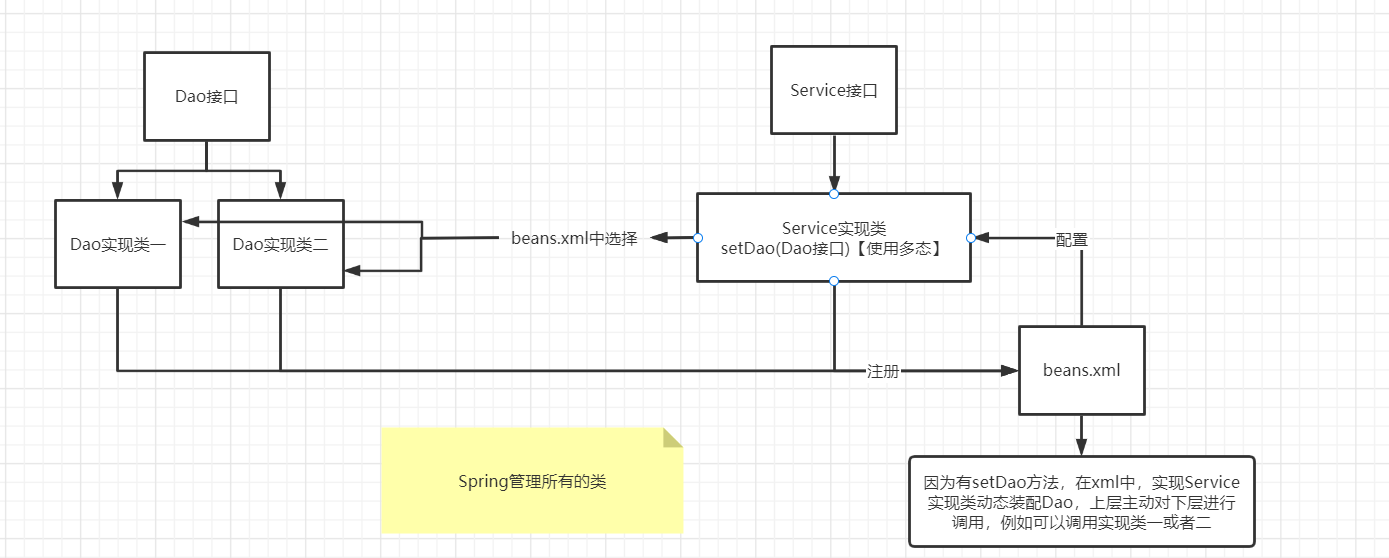
整体思路:
六、IOC创建对象方式
-
在调用beans.xml的时候创建了内部所有的对象
-
假设需要使用有参构造
-
下标赋值
<bean id="user" class="com.xiaowei.pojo.User"> <constructor-arg index="0" value="xiaowei"/> <constructor-arg index="1" value="22"/> </bean> -
name赋值
<bean id="user" class="com.xiaowei.pojo.User">
    <constructor-arg name="age" value="18"/>
    <constructor-arg name="name" value="xiaowei9"/>
</bean>
-
七、Spring配置说明
别名
name:原名,alias:别名
<alias name="user" alias="user2"/>
import,合并xml,将其他人写的bean也加进来
<import resource="beans.xml"/>
bean配置
<!--
id:唯一标识符
class:类型
name:别名
-->
<bean id="user" class="com.xiaowei.pojo.User" name="user3,u2">
    <constructor-arg name="age" value="18"/>
    <constructor-arg name="name" value="xiaowei9"/>
</bean>
八、DI依赖注入环境
什么是依赖?什么是注入?
我们的所有的bean在spring框架中,创建它依赖于容器
我们的bean中的所有属性,由容器注入
构造器注入
- 之前说过
但是当我们遇到一个复杂的类的时候不可能在使用简单的构造器注入,例如:
public class Address {
    private String name;
    private Address address;
    private String[] books;
    private List<String> hobbys;
    private Map<String,String> card;
    private Set<String> games;
    private String usenull;
    private Properties info;
}
九、依赖注入之Set注入
<?xml version="1.0" encoding="UTF-8"?>
<beans xmlns="http://www.springframework.org/schema/beans"
       xmlns:xsi="http://www.w3.org/2001/XMLSchema-instance"
       xsi:schemaLocation="http://www.springframework.org/schema/beans
        https://www.springframework.org/schema/beans/spring-beans.xsd">

    <bean id="address" class="com.xiaowei.pojo.Address"/>
    <bean id="student" class="com.xiaowei.pojo.Student">

        <!--第一种,property普通注入-->
        <property name="name" value="xiaowei"/>

        <!--第二种,Bean注入-->
        <property name="address" ref="address"/>

        <!--第三种,数组注入-->
        <property name="books">
            <array>
                <value>book1</value>
                <value>book2</value>
                <value>book3</value>
                <value>book4</value>
            </array>
        </property>

        <!--第四种,列表注入-->
        <property name="hobbys">
            <list>
                <value>赚钱</value>
                <value>打游戏</value>
                <value>写代码</value>
            </list>
        </property>

        <!--Map注入-->
        <property name="card">
            <map>
                <entry key="1" value="壹"/>
                <entry key="2" value="贰"/>
                <entry key="3" value="叁"/>
                <entry key="4" value="肆"/>
            </map>
        </property>

        <!--Set注入-->
        <property name="games">
            <set value-type="java.lang.String">
                <value>我的世界</value>
                <value>英雄联盟</value>
                <value>云顶之弈</value>
                <value>Apex英雄</value>
            </set>
        </property>

        <!--null注入1-->
        <property name="usenull">
            <null/>
        </property>
        <!--null注入2-->
        <!--<property name="usenull" value="">
        </property>-->

        <!--Properties注入-->
        <property name="info">
            <props>
                <prop key="url">www.xiaowei.com</prop>
                <prop key="username">admin</prop>
                <prop key="pwd">123123</prop>
            </props>
        </property>

    </bean>

</beans>
十、c命名和p命名空间注入
P命名空间注入:
加入:在beans 标签内
xmlns:p="http://www.springframework.org/schema/p"
使用
<!--p命名空间注入,可以直接注入属性-->
<bean id="user" class="com.xiaowei.pojo.User" p:name="xiaowei" p:age="22"/>
C命名空间注入:
加入:
xmlns:c="http://www.springframework.org/schema/c"
使用
<!--c命名空间注入,通过构造器注入-->
<bean id="user2" class="com.xiaowei.pojo.User" c:name="xiaowei2" c:age="16"/>
测试:
@Test
public void test(){
    ApplicationContext context = new ClassPathXmlApplicationContext("userbeans.xml");
    User user = context.getBean("user2", User.class);
    System.out.println(user.toString());
}
注意需要在beans标签中加入约束
- xmlns:c="http://www.springframework.org/schema/c"
- xmlns:p="http://www.springframework.org/schema/p"
十一、Bean的作用域
生成的有效范围↓
| 范围 | 描述 |
|---|---|
| singleton | (Default) Scopes a single bean definition to a single object instance for each Spring IoC container. |
| prototype | Scopes a single bean definition to any number of object instances. |
| request | Scopes a single bean definition to the lifecycle of a single HTTP request. That is, each HTTP request has its own instance of a bean created off the back of a single bean definition. Only valid in the context of a web-aware Spring .ApplicationContext |
| session | Scopes a single bean definition to the lifecycle of an HTTP . Only valid in the context of a web-aware Spring .Session``ApplicationContext |
| application | Scopes a single bean definition to the lifecycle of a . Only valid in the context of a web-aware Spring .ServletContext``ApplicationContext |
| websocket | Scopes a single bean definition to the lifecycle of a . Only valid in the context of a web-aware Spring .WebSocket``ApplicationContext |
单例模式singleton【默认】:指定了这个范围,beans.xml中每次生成的是同一个对象,引用都是一样的
<bean id="user2" class="com.xiaowei.pojo.User" c:name="xiaowei2" c:age="16" scope="singleton"/>

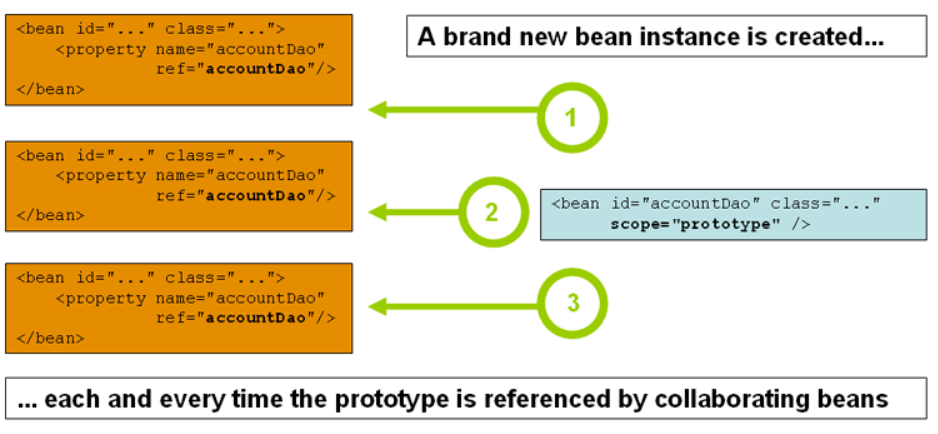
原型模式prototype:指定了这个范围,beans.xml中每次生成的都是不同的对象,引用不一样
<bean id="user2" class="com.xiaowei.pojo.User" c:name="xiaowei2" c:age="16" scope="prototype"/>
其他模式
request、session、application,要在web项目中才能使用
十二、自动装配Bean
自动装配的式spring满足bean依赖的一种方式
在上下文中自动寻找,自动给bean装配属性
spring中有三种装配方式
在xml中配置(前面学了)
环境:一个人和两个宠物
在Java代码中显式配置
不需要可以看,需要的时候弄
隐式的自动装配bean【重要】
<bean id="dog" class="com.xiaowei.pojo.Dog"/>
<bean id="cat" class="com.xiaowei.pojo.Cat"/>
<bean id="people" class="com.xiaowei.pojo.People" autowire="byName">
    <property name="name" value="xiaowei"/>
</bean>
autowire="byName":功能
- 他会自动根据people类中属性的变量名cat和dog
- 自动在beans.xml上下文中寻找
- 是否有bean的名字是cat和dog,找到自动匹配
<bean id="dog" class="com.xiaowei.pojo.Dog"/>
<bean id="cat" class="com.xiaowei.pojo.Cat"/>
<bean id="people" class="com.xiaowei.pojo.People" autowire="byType">
    <property name="name" value="xiaowei"/>
</bean>
autowire="byType":功能
- 他会自动根据people类中属性的类型
- 自动在beans.xml上下文中寻找
- 是否有bean的类型一致,找到自动匹配
优点:
- 可以偷懒
- 减少代码量
缺点:
- 有可能出现类型一致
- 有可能找不到匹配的变量名
十三、注解实现自动装配
jdk1.5以上支持注解,spring2.5以上支持注解
使用注解装配的支持:
<?xml version="1.0" encoding="UTF-8"?>
<beans xmlns="http://www.springframework.org/schema/beans"
    xmlns:xsi="http://www.w3.org/2001/XMLSchema-instance"
    xmlns:context="http://www.springframework.org/schema/context"
    xsi:schemaLocation="http://www.springframework.org/schema/beans
        https://www.springframework.org/schema/beans/spring-beans.xsd
        http://www.springframework.org/schema/context
        https://www.springframework.org/schema/context/spring-context.xsd">

    <context:annotation-config/>

</beans>
例子:
xml支持context
<?xml version="1.0" encoding="UTF-8"?>
<beans xmlns="http://www.springframework.org/schema/beans"
       xmlns:xsi="http://www.w3.org/2001/XMLSchema-instance"
       xmlns:context="http://www.springframework.org/schema/context"
       xsi:schemaLocation="http://www.springframework.org/schema/beans
        https://www.springframework.org/schema/beans/spring-beans.xsd
        http://www.springframework.org/schema/context
        https://www.springframework.org/schema/context/spring-context.xsd">


    <context:annotation-config/>
    <bean id="dog" class="com.xiaowei.pojo.Dog"/>
    <bean id="cat" class="com.xiaowei.pojo.Cat"/>
    <bean id="people" class="com.xiaowei.pojo.People"/>
</beans>
java代码属性上使用注解可以不用写Set了
package com.xiaowei.pojo;

import org.springframework.beans.factory.annotation.Autowired;

public class People {
    @Autowired
    private Dog dog;
    @Autowired
    private Cat cat;
    private String name;

    public People(Dog dog, Cat cat, String name) {
        this.dog = dog;
        this.cat = cat;
        this.name = name;
    }

    public People() {
    }

    public Dog getDog() {
        return dog;
    }

    public Cat getCat() {
        return cat;
    }

    public String getName() {
        return name;
    }


    @Override
    public String toString() {
        return "People{" +
                "dog=" + dog +
                ", cat=" + cat +
                ", name='" + name + '\'' +
                '}';
    }
}
注意名字格式需要一致,本质使用的是byName
PS:注解@Nullable 字段标记了这个注解后,就可以为null了。
在字段上使用Qualifier注解,可以实现byName的映射,byName会匹配注解中的值
Resource注解同理
@Qualifier(value = "cat")
@Resource(name = "cat")
总结:
- @Autowired和@Resource都是可以自动装配
- 前者通过ByName查找,且要求对象存在!
- 后者先byName找不到byType,还找不到就报错,且可以指定byName的映射
- @Resource(name = "cat")
十四、Spring注解开发
使用注解在Spring4之后,需要保证aop的包存在
也需要context支持
内容:
-
bean
-
//默认名字是类的小写,相当于直接在beans.xml文件创建了bean @Component public class User { public String name; } -
属性如何注入
-
public class User { //直接注入值 @Value("xiaowei") public String name; } -
衍生的注解
-
@Component
-
@Repository【一般用在dao层】
-
@Service【一般用在业务层】
-
@Controller【一般用在servlet层控制层】
这几个效果完全一样,都是注册bean
-
-
-
作用域
- @Scope("scopeType")
十五、使用JavaConfig实现配置
我们现在完全不使用xml的配置了,全部给Java做
在Spring4后,JavaConfig变成了推荐使用的功能
配置类:
/*
Configuration:设置为配置类
ComponentScan:扫描包
 */
@Configuration
@ComponentScan("com.xiaowei.pojo")
public class Config {
    /*
    相当与设置了一个id是getUser的bean。
     */
    @Bean
    public User getUser(){
        return new User();
    }
}
实体类:
package com.xiaowei.pojo;

import org.springframework.beans.factory.annotation.Value;
import org.springframework.stereotype.Component;

@Component
public class User {
    private String name;

    public User(String name) {
        this.name = name;
    }

    public User() {
    }

    public String getName() {
        return name;
    }
    @Value("xiaowei")
    public void setName(String name) {
        this.name = name;
    }
}
测试类:
public class Mytest {
    @Test
    public void test(){
        ApplicationContext context = new AnnotationConfigApplicationContext(Config.class);
        User getUser = (User) context.getBean("getUser");
        System.out.println(getUser.getName());
    }
}
十六、静态代理模式
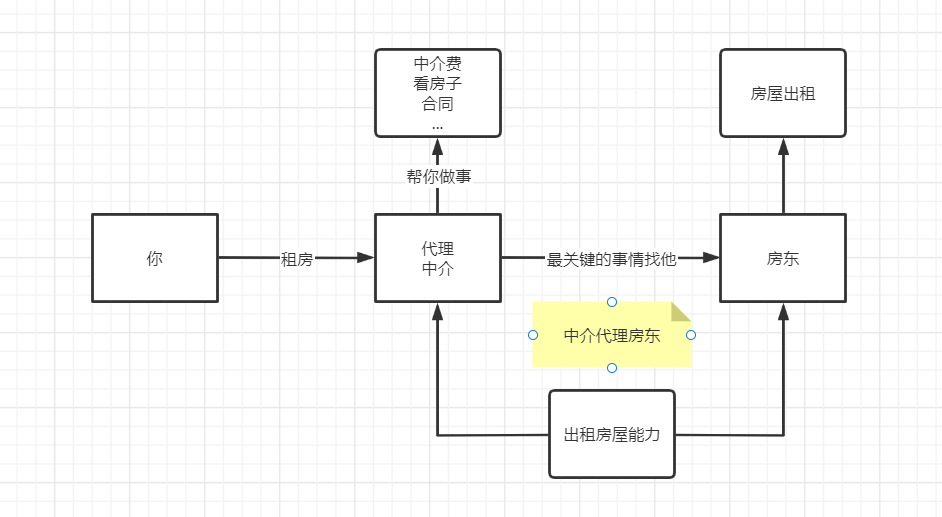
你租房:
public class Client {
    public static void main(String[] args) {
        //租房只能找中介
        new ZhongJie(new Host()).rent();
    }
}
房屋出租能力:
public interface Rent {
    public void rent();
}
代理中介:
public class ZhongJie implements Rent{
    //找房东,房东只有中介能找到
    private Host host;

    public ZhongJie(Host host){
        this.host=host;
    }
    @Override
    public void rent() {
        System.out.println("看房、合同、收中介费...");
        //房东也租房,不管其他的
        this.host.rent();
    }
}
房东
public class Host implements Rent{
    @Override
    public void rent() {
        System.out.println("把房子交给房东出租然后收费");
    }
}
十七、静态代理再理解
优点:
- 让“房东”的操作更加存粹不用关注公共的服务
- 更多的操作“共性的”操作给代理做,业务分工
- 共性操作发生拓展的时候好管理
缺点:
- 一个“房东”就需要一个“中介”,代码量翻倍,开发效率低
AOP面向切面编程需要代理,不要加代码!
十八、动态代理详解
- 动态代理和静态代理角色一样
- 动态代理的代理类动态生成,不是写好的
- 两大类:基于类,基于接口
- 基于接口--->jdk动态代理【这里使用】
- 基于类--->cglib
- java字节码实现:javasist
需要了解两个类:Proxy(代理)、InvocationHandler(调用处理程序)
使用方法:
别管,先用
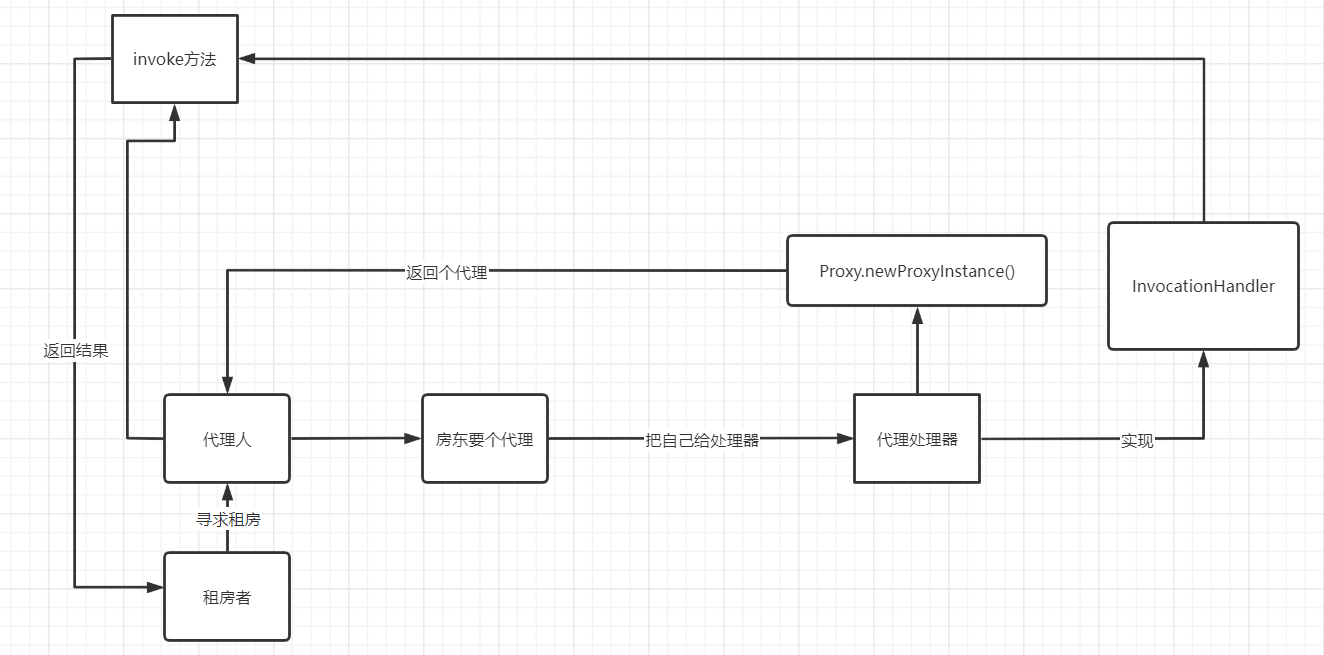
反射处理器:实现了调用处理器,有获得代理和调用方法代理方法的方法
public class ProxyInvocationHandler implements InvocationHandler {
    private Object target;

    public void setTarget(Object target){
        this.target = target;
    }

    public Object getProxy(){
        return Proxy.newProxyInstance(this.getClass().getClassLoader(),
                target.getClass().getInterfaces(),this);
    }

    @Override
    public Object invoke(Object proxy, Method method, Object[] args) throws Throwable {
        Object result = method.invoke(target, args);
        return result;
    }
}
出租房方法:
public interface Rent {
    public void rent();
}
房东:他要一个代理人:
public class Host implements Rent {
    @Override
    public void rent() {
        System.out.println("把房子交给房东出租然后收费");
    }
}
现在我们不想自己写代理了,我们要自动生成一个代理人给我们
public class Client {
    public static void main(String[] args) {
        //获得房东
        Host host = new Host();
        ProxyInvocationHandler pih = new ProxyInvocationHandler();//获得代理处理器
        pih.setTarget(host);//设置要代理的对象
        Rent proxy = (Rent) pih.getProxy();//获得代理
        proxy.rent();//代理开始做事

    }
}
十九、AOP实现方式
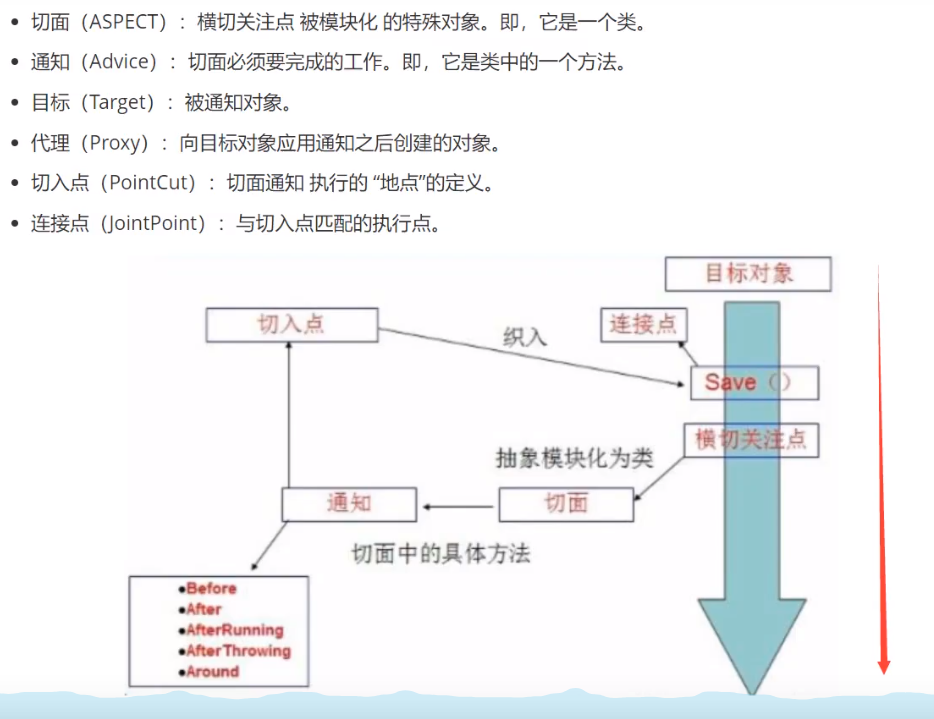
例子

导入包:
<!-- https://mvnrepository.com/artifact/org.aspectj/aspectjweaver -->
<dependency>
    <groupId>org.aspectj</groupId>
    <artifactId>aspectjweaver</artifactId>
    <version>1.9.7</version>
</dependency>
方式一:pointcut:切入点;advisor:环绕方法
<!--方式一:使用Spring的API接口-->
<bean id="afterLog" class="com.xiaowei.log.AfterLog"/>
<aop:config>
    <aop:pointcut id="pointcut" expression="execution(* com.xiaowei.service.UserServiceImpl.*(..))"/>
    <aop:advisor advice-ref="log" pointcut-ref="pointcut"/>
    <aop:advisor advice-ref="afterLog" pointcut-ref="pointcut"/>
</aop:config>
实现接口:
public class AfterLog implements AfterReturningAdvice {
    @Override
    public void afterReturning(Object returnValue, Method method, Object[] args, Object target) throws Throwable {
        System.out.println(method.getName()+"被"+target.toString()+"执行了,参数是"+
                args+",返回值是:"+returnValue);

    }
}
方式二:aspect:切面引用,after:执行后
<bean id="diy" class="com.xiaowei.diy.MyDiy"/>
<aop:config>
    <aop:aspect ref="diy">
        <aop:pointcut id="pointcut" expression="execution(* com.xiaowei.service.UserServiceImpl.*(..))"/>
        <aop:after method="after" pointcut-ref="pointcut"/>
        <aop:before method="before" pointcut-ref="pointcut"/>
    </aop:aspect>

</aop:config>
自定义类:
public class MyDiy {
    public void before(){
        System.out.println("执行前=======");
    }
    public void after(){
        System.out.println("执行后=======");
    }
}
二十、注解实现AOP
@Aspect
public class MyDiy {
    @Before("execution(* com.xiaowei.service.UserServiceImpl.*(..))")
    public void before(){
        System.out.println("执行前=======");
    }
    @After("execution(* com.xiaowei.service.UserServiceImpl.*(..))")
    public void after(){
        System.out.println("执行后=======");
    }
}
xml:
<bean id="diy" class="com.xiaowei.diy.MyDiy"/>
<aop:aspectj-autoproxy/>
二十一、回顾Mybatis,整合环境
整合需要:
- 导入包
- junit
- mybatis
- spring
- mysql
- aop
- mybatis-spring
- 编写配置文件
- 测试
依赖:
<dependencies>
    <dependency>
        <groupId>junit</groupId>
        <artifactId>junit</artifactId>
        <version>4.12</version>
    </dependency>
    <dependency>
        <groupId>mysql</groupId>
        <artifactId>mysql-connector-java</artifactId>
        <version>5.1.47</version>
    </dependency>
    <dependency>
        <groupId>org.mybatis</groupId>
        <artifactId>mybatis</artifactId>
        <version>3.5.6</version>
    </dependency>
    <dependency>
        <groupId>org.springframework</groupId>
        <artifactId>spring-webmvc</artifactId>
        <version>5.3.12</version>
    </dependency>
    <!-- https://mvnrepository.com/artifact/org.springframework/spring-jdbc -->
    <dependency>
        <groupId>org.springframework</groupId>
        <artifactId>spring-jdbc</artifactId>
        <version>5.3.12</version>
    </dependency>
    <dependency>
        <groupId>org.aspectj</groupId>
        <artifactId>aspectjweaver</artifactId>
        <version>1.9.7</version>
    </dependency>
    <!-- https://mvnrepository.com/artifact/org.mybatis/mybatis-spring -->
    <dependency>
        <groupId>org.mybatis</groupId>
        <artifactId>mybatis-spring</artifactId>
        <version>2.0.6</version>
    </dependency>

</dependencies>
自己回去看看mybatis
二十二、整合Mybatis方式一
现在spring中配置mybatis:
<?xml version="1.0" encoding="UTF-8"?>
<beans xmlns="http://www.springframework.org/schema/beans"
xmlns:xsi="http://www.w3.org/2001/XMLSchema-instance"
xmlns:aop="http://www.springframework.org/schema/aop"
xsi:schemaLocation="http://www.springframework.org/schema/beans
https://www.springframework.org/schema/beans/spring-beans.xsd
http://www.springframework.org/schema/aop
https://www.springframework.org/schema/aop/spring-aop.xsd">
<!--第一步:DataSource-->
<bean id="dataSource" class="org.springframework.jdbc.datasource.DriverManagerDataSource">
<property name="driverClassName" value="com.mysql.jdbc.Driver"/>
<property name="url" value="jdbc:mysql://localhost:3306/mybatis?useUnicode=true&characterEncoding=utf8&useSSL=false"/>
<property name="username" value="root"/>
<property name="password" value="123456"/>
</bean>
<!--第二步:获得Session工厂-->
<bean id="sessionFactory" class="org.mybatis.spring.SqlSessionFactoryBean">
<property name="dataSource" ref="dataSource"/>
<property name="configLocation" value="classpath:mybatis-config.xml"/>
<property name="mapperLocations" value="classpath:com/xiaowei/mapper/*.xml"/>
</bean>
<!--第三步:获得Session。前三步相当于在工具类中的内容-->
<bean id="sqlSession" class="org.mybatis.spring.SqlSessionTemplate">
<constructor-arg index="0" ref="sessionFactory"/>
</bean>
<!--第四步,获得实现类-->
<bean id="userMapperImpl" class="com.xiaowei.mapper.UserMapperImpl">
<property name="sqlSession" ref="sqlSession"/>
</bean>
</beans>
注意点:在设置了这两个属性后,一定要见检查mybatis-config.xml。
其中的结果集一定要注释掉,至少不能与属性mapperLocations中的有冲突
<property name="configLocation" value="classpath:mybatis-config.xml"/> <property name="mapperLocations" value="classpath:com/xiaowei/mapper/*.xml"/>
要加个实现类,全部过程委托spring管理
这里可以直接继承一个SqlSessionDaoSupport,直接getSqlSession()就可以呢到sql
public class UserMapperImpl implements UserMapper{
    private SqlSessionTemplate sqlSession;

    public void setSqlSession(SqlSessionTemplate sqlSession) {
        this.sqlSession = sqlSession;
    }

    @Override
    public List<User> selectUser() {
        UserMapper mapper = sqlSession.getMapper(UserMapper.class);
        List<User> userList = mapper.selectUser();
        return userList;
    }
}
最后的结果测试类使用,只需要全部交给spring做:
@Test
public void test2() throws IOException {
    ApplicationContext context = new ClassPathXmlApplicationContext("spring-dao.xml");
    UserMapperImpl userMapperImpl = (UserMapperImpl) context.getBean("userMapperImpl");
    List<User> userList = userMapperImpl.selectUser();
    for (User user : userList) {
        System.out.println(user);
    }
}
二十四、事务回顾
事务回顾
要么都成功要么都失败
acid
原子性
一致性
持久性
隔离性
- 多个业务操作同一个资源的时候防止数据损坏
二十五、Spring声明式事务
- 声明式事务:AOP【常用】
<!--结合AOP切面加入事务的植入-->
<!--#获得声明式事务-->
<bean id="transactionManeger" class="org.springframework.jdbc.datasource.DataSourceTransactionManager">
    <property name="dataSource" ref="dataSource"/>
</bean>
<!--配置使用事务通知-->
<tx:advice id="txAdvice" transaction-manager="transactionManeger">
    <tx:attributes>
        <tx:method name="add" propagation="REQUIRED"/>
        <tx:method name="select" propagation="REQUIRED"/>
        <tx:method name="delete" propagation="REQUIRED"/>
        <tx:method name="update" propagation="REQUIRED"/>
        <tx:method name="*" propagation="REQUIRED"/>
    </tx:attributes>
</tx:advice>
<!--AOP加入事务通知-->
<aop:config>
    <aop:pointcut id="txPointCut" expression="execution(* com.xiaowei.mapper.*.*(..))"/>
    <aop:advisor advice-ref="txAdvice" pointcut-ref="txPointCut"/>
</aop:config>
这样子,在execution(* com.xiaowei.mapper..(..))范围内的切入点中的这些方法都会被事务锁定。
<tx:method name="add" propagation="REQUIRED"/>
        <tx:method name="select" propagation="REQUIRED"/>
        <tx:method name="delete" propagation="REQUIRED"/>
        <tx:method name="update" propagation="REQUIRED"/>
        <tx:method name="*" propagation="REQUIRED"/>
- 编程式事务:Java代码(无用)

 浙公网安备 33010602011771号