
Java 多线程 学习笔记(2021.10.13~17)
多线程
一、线程简介
任务、进程、线程、多线程
1. 多任务
同时进行两个任务:边玩游戏边听歌
2. 多线程
一条路只能走一辆车,想要一条路走两辆车需要分出很多道,这样太能同时开两辆车(类比)
3. 普通方法和多线程
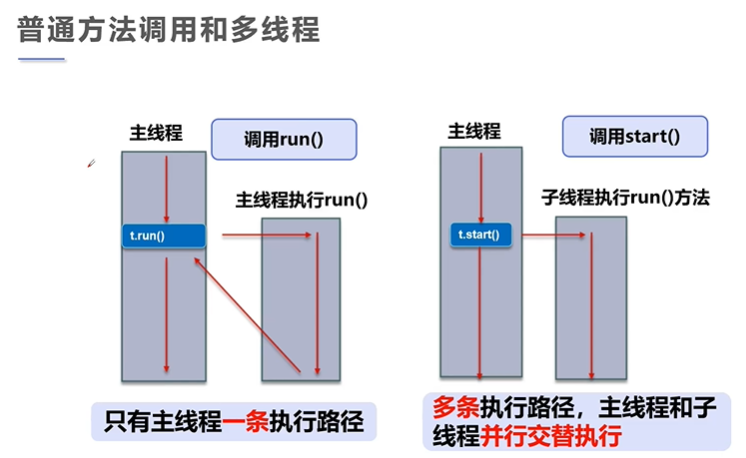
4. 程序、进程、线程
- 运行的程序就是进程
- 一个进程可以有多个线程,如:视频中可以同时看图像,听声音,看弹幕。
- 进程包含至少一个线程,如果是模拟出的多线程,即在一个CPU中快速切换,感觉到是同时执行
5. 核心概念
- 线程就是独立的执行路径;
- 在程序运行时,即使没有自己创建线程,后台也会有多个线程,如主线程,gc线程;main()称之为主线程,为系统的入口,用于执行整个程序;
- 在一个进程中,如果开辟了多个线程,线程的运行由调度器安排调度,调度器是与操作系统紧密相关的,先后顺序是不能认为的干预的。
- 对同一份资源操作时,会存在资源抢夺的问题,需要加入并发控制;线程会带来额外的开销,如cpu调度时间,并发控制开销。
- 每个线程在自己的工作内存交互,内存控制不当会造成数据不一致
二、线程创建
1. 三种创建方式
-
Thread class:继承Thread类(重点)
-
package com.xiaowei9s.lesson01; //创建线程方式一:继承Thread类,重写run方法,调用start开启线程 //总结:线程不一定start后直接执行,由CPU调度 public class ThreadTest1 extends Thread { public static void main(String[] args) { ThreadTest1 threadTest1 = new ThreadTest1(); threadTest1.start(); for (int i = 0; i < 200; i++) { System.out.println("main"+i); } } @Override public void run() { for (int i = 0; i < 200; i++) { System.out.println("run"+i); } } } -
Runnable接口:实现Runnable接口(重点)
-
package com.xiaowei9s.lesson01;

//创建线程方式一:继承Thread类,重写run方法,调用start开启线程

//总结:线程不一定start后直接执行,由CPU调度

public class ThreadTest3 implements Runnable {
    public static void main(String[] args) {
        ThreadTest3 threadTest3 = new ThreadTest3();
        new Thread(threadTest3).start();

        for (int i = 0; i < 2000; i++) {
            System.out.println("main"+i);
        }


    }

    @Override
    public void run() {
        for (int i = 0; i < 2000; i++) {
            System.out.println("run"+i);
        }
    }
}
初时多并发:
package com.xiaowei9s.lesson01;

//多个线程同时操作一个对象

//发现问题,线程不安全了
//模拟同时买票
public class ThreadTest4 implements Runnable {
    private int ticketNum=10;
    public static void main(String[] args) {
        ThreadTest4 tt1 = new ThreadTest4();
        ThreadTest4 tt2 = new ThreadTest4();

        new Thread(tt1,"小明").start();
        new Thread(tt1,"老师").start();
        new Thread(tt1,"黄牛").start();


    }


    @Override
    public void run() {
        while (ticketNum>=0){
            try {
                Thread.sleep(200);
            }catch (Exception e){
                System.out.println(e);
            }

            System.out.println(Thread.currentThread().getName()+"拿到了第"+ticketNum+"号票");
            ticketNum--;
        }

    }
}
龟兔赛跑
package com.xiaowei9s.lesson01; //龟兔赛跑 //跑一百米 //兔子睡觉并且输掉游戏 public class ThreadTest5 implements Runnable{ private String winner; public static void main(String[] args) { ThreadTest5 threadTest5 = new ThreadTest5();//共用一个对象 new Thread(threadTest5,"兔子").start(); new Thread(threadTest5,"乌龟").start(); } private boolean gameOver(int step){//是否结束游戏 if (winner!=null){ return true; } if (step==0){ winner = Thread.currentThread().getName(); System.out.println(winner+"赢了"); return true; } return false; } @Override public void run() { int step = 100;//虽然共用一个对象,但是方法是两个,每个线程调用方法时方法时独立得方法,方法内的资源不共用 while(true){ try {//延时 Thread.sleep(100); } catch (InterruptedException e) { e.printStackTrace(); } if(gameOver(step)){ break; } if (Thread.currentThread().getName().equals("兔子")&&step%10==0){//兔子跑十下休息以下 try { Thread.sleep(50); } catch (InterruptedException e) { e.printStackTrace(); } } System.out.println(Thread.currentThread().getName()+"还剩"+step+"步"); step--; } } } -
Callable接口:实现Callable接口(了解)
-
package com.xiaowei9s.lesson01;

import org.apache.commons.io.FileUtils;

import java.io.File;
import java.io.IOException;
import java.net.URL;
import java.util.concurrent.*;

/*
    线程创建方式三,实现Callable接口
    优势:
    1. 自定义返回值类型
    2. 可以抛出异常
*/

public class ThreadTest6 implements Callable<Boolean> {
    public ThreadTest6(String name, String url) {
        this.name = name;
        this.url = url;
    }

    public String name;
    public String url;


    public static void main(String[] args) throws ExecutionException, InterruptedException {
        //创建线程池
        ExecutorService exs = Executors.newFixedThreadPool(3);

        //提交线程
        Future<Boolean> submit = exs.submit(new ThreadTest6("1.jpg", "https://pics6.baidu.com/feed/42a98226cffc1e17b881c7a94554b40a728de9bd.jpeg?token=6f6f69fad743d5bf129581dcbe35269f"));
        Future<Boolean> submit1 = exs.submit(new ThreadTest6("2.jpg","https://pics1.baidu.com/feed/4b90f603738da97767ecd34db795ba108418e3e6.jpeg?token=2695638344602480017c59554e078749"));
        Future<Boolean> submit2 = exs.submit(new ThreadTest6("3.jpg","https://pics3.baidu.com/feed/377adab44aed2e73899a0cee8ac5e38285d6faca.jpeg?token=2bc485aa1ae4cea267fb997488b209d5"));

        //获得线程结果
        Boolean aBoolean = submit.get();
        Boolean aBoolean1 = submit1.get();
        Boolean aBoolean2 = submit2.get();

        //关闭服务
        exs.shutdownNow();

    }

    @Override
    public Boolean call() throws Exception {
        MyDownloader downloader = new MyDownloader();
        downloader.download(url,name);
        return true;
    }

    class MyDownloader{
        public void download(String url,String name){
            try {
                FileUtils.copyURLToFile(new URL(url),new File(name));
                System.out.println(name);
            } catch (IOException e) {
                e.printStackTrace();
            }
        }
    }
}
推荐使用Runnable接口,因为Runnable接口可以解耦,继承Thread类有局限性
三、静态代理
让主要的类专注于处理实现关键功能,例如
new Thread(()->System.out.println("run()方法中的事情")).start();
package com.xiaowei9s.lesson02;

public class StaticMode {
    public static void main(String[] args) {

        ToolMan toolMan = new ToolMan(new You());
        toolMan.toDo();
    }
}


class You implements Work{

    @Override
    public void toDo() {
        System.out.println("你做了关键的事情");
    }
}

class ToolMan implements Work{
    public ToolMan(Work toWork) {
        this.toWork = toWork;
    }

    public Work toWork;//把工具人帮助的人加入工具人,两个人实现了同一个接口就是静态代理

    @Override
    public void toDo() {
        System.out.println("工具人先做了辅助的事情");
        toWork.toDo();
    }
}

interface Work{
    public void toDo();
}
四、Lambda表达式
- 函数式接口:只包含唯一一个抽象方法,它就是一个函数式接口
- 对于函数式接口,我们可以使用Lambda表达式创建该接口的对象
package com.xiaowei9s.lesson02;


//逐渐导出Lambda表达式
//实现类->匿名内部类->Lambda表达式

public class LambdaDemo {
    public static void main(String[] args) {
        //匿名内部类
        FunMode fm = new FunMode() {
            @Override
            public void toDo() {
                System.out.println("使用匿名内部类实现");
            }
        };

        fm.toDo();
        new Test1().toDo();

        //Lambda表达式
        fm = ()-> System.out.println("使用Lambda表达式实现");
        fm.toDo();

    }

    interface FunMode{//函数式接口
        public void toDo();
    }


}
///使用实现类
class Test1 implements LambdaDemo.FunMode {

    @Override
    public void toDo() {
        System.out.println("使用实现类实现");
    }
}
五、线程停止
线程状态:
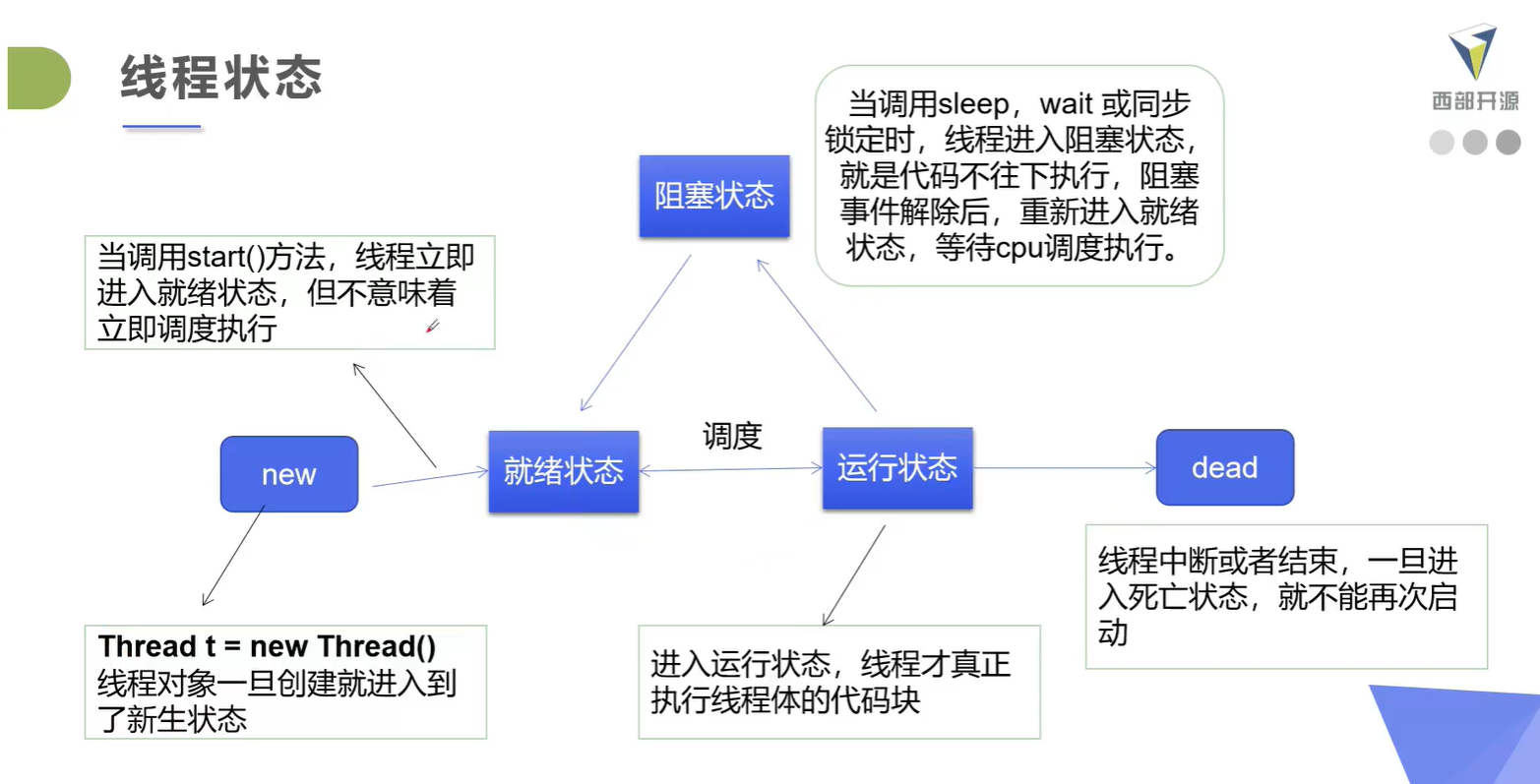
线程方法:
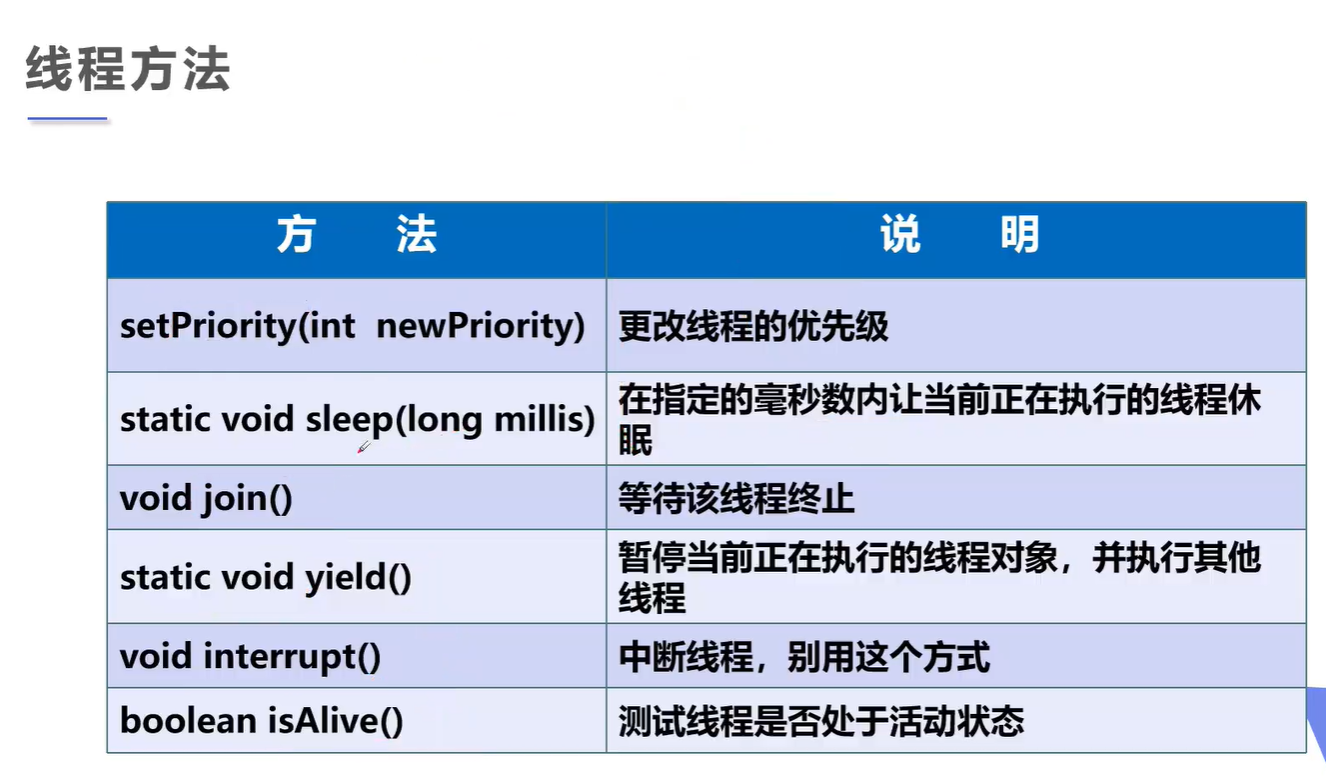
1. 停止线程的方法
-
官方不建议使用JDK中的方法
-
使用一个停止标志位实现线程停止
-
package com.xiaowei9s.lession03;

public class TestStop {
    public static void main(String[] args) {
        Arun arun = new Arun();
        new Thread(arun).start();

        for (int i = 0; i < 1000; i++) {
            if (i==500){
                arun.stop();
                System.out.println("stop");
            }
            System.out.println(i);
        }
    }
}
class Arun implements Runnable{
    private boolean isStop = true;

    @Override
    public void run() {
        int i = 0;
        while (isStop){

            System.out.println("I am running..."+i++);
        }
        System.out.println("ji");
    }

    public void stop(){
        this.isStop = false;
    }


}
六、线程休眠
- sleep(时间)表示当前线程休眠时间,单位:毫秒
- sleep存在异常InterruptedExpection;
- sleep时间达到后,线程重新进入就绪状态;
- sleep可以模拟网络延时、倒计时等等;
- 每一个对象都有锁,sleep不会释放锁;(记住、不用理解)
Demo:模拟网络延迟:
package com.xiaowei9s.lession03;

//模拟网络延迟
public class TestSleep implements Runnable{
    public int ticket = 10;

    public static void main(String[] args) {
        TestSleep testSleep = new TestSleep();
        new Thread(testSleep,"小明").start();
        new Thread(testSleep,"小红").start();
        new Thread(testSleep,"老师").start();
        new Thread(testSleep,"黄牛").start();

    }

    @Override
    public void run() {
        while (ticket>=0){

            try {
                Thread.sleep(100);
            } catch (InterruptedException e) {
                e.printStackTrace();
            }
            System.out.println(Thread.currentThread().getName()+"-->买了第"+ticket+"号票");
            ticket--;
        }


    }
}
Demo:模拟时钟:
package com.xiaowei9s.lession03;

import java.text.SimpleDateFormat;
import java.util.Date;

public class TestTime {
    public static void main(String[] args) throws InterruptedException {

        while (true){
            Date date = new Date(System.currentTimeMillis());
            System.out.println(new SimpleDateFormat("HH:mm:ss").format(date));
            Thread.sleep(1000);
        }

    }
}
七、线程礼让
- 让当前进程从运行变成就绪状态
- 当前进程不阻塞,依然拥有资源
- 不一定了礼让成功,变成就绪的起跑线,cpu依然有可能让礼让的线程重新进入运行
package com.xiaowei9s.lession03;

public class TestYeild {
    public static void main(String[] args) {
        new Thread(new MyYield(),"A").start();
        new Thread(new MyYield(),"B").start();
    }
}

class MyYield implements Runnable{

    @Override
    public void run() {
        System.out.println(Thread.currentThread().getName()+"线程开始");
        Thread.yield();//礼让
        System.out.println(Thread.currentThread().getName()+"线程结束");
    }
}
八、线程强制执行(线程插队)
直接加入指定进程,插队!
package com.xiaowei9s.lession03;

public class TestJoin implements Runnable {
    public static void main(String[] args) throws InterruptedException {
        TestJoin testJoin = new TestJoin();
        Thread thread = new Thread(testJoin);
        thread.start();
        for (int i = 0; i < 500; i++) {
            if (i==150){
                thread.join();
            }
            System.out.println(i+"main");
        }

    }

    @Override
    public void run() {
        for (int i = 0; i < 100; i++) {
            System.out.println(i);
        }
    }
}
九、线程状态检测
线程在停止后,不能再次start()。
package com.xiaowei9s.lession03;

public class TestState {
    public static void main(String[] args) throws InterruptedException {
        Thread thread = new Thread(() -> {
            for (int i = 0; i < 5; i++) {
                try {
                    Thread.sleep(1000);
                } catch (InterruptedException e) {
                    e.printStackTrace();
                }
            }
            System.out.println("THE END");
        });

        Thread.State state = thread.getState();
        System.out.println(state);

        thread.start();
        while (state!=Thread.State.TERMINATED){
            Thread.sleep(100);
            state = thread.getState();
            System.out.println(state);
        }

        state = thread.getState();
        System.out.println(state);

    }
}
十、线程优先级
数字越小,优先级越低,10优先级最高
main线程默认优先级是5
优先级只是意味着cpu调度概率,优先级低也有概率会先执行
优先级设置在start之前
package com.xiaowei9s.lession03;

public class TestPriority implements Runnable {

    public static void main(String[] args) {
        TestPriority testPriority = new TestPriority();
        Thread a = new Thread(testPriority, "a");
        Thread b = new Thread(testPriority, "b");
        Thread c = new Thread(testPriority, "c");
        Thread d = new Thread(testPriority, "d");
        Thread e = new Thread(testPriority, "e");
        Thread f = new Thread(testPriority, "f");
        Thread g = new Thread(testPriority, "g");
        Thread h = new Thread(testPriority, "h");
        Thread i = new Thread(testPriority, "i");

        System.out.println("main-->"+Thread.currentThread().getPriority());
        a.setPriority(1);
        b.setPriority(2);
        c.setPriority(3);
        d.setPriority(4);
        e.setPriority(6);
        f.setPriority(7);
        g.setPriority(8);
        h.setPriority(9);

        a.start();
        b.start();
        c.start();
        d.start();
        e.start();
        f.start();
        g.start();
        h.start();
        i.start();

    }


    @Override
    public void run() {
        System.out.println("this Thread"+Thread.currentThread().getName()
                +"-->"+Thread.currentThread().getPriority());
    }
}
十一、守护线程Deamon
一旦线程被设置成守护线程,则主线程不会等待守护线程结束。
使用方法
thread.setDeamon(true);//将该线程设置成守护线程
Demo:
package com.xiaowei9s.lession03;

public class TestDeamon {
    public static void main(String[] args) {
        You you = new You();
        God god = new God();


        Thread gt = new Thread(god);
        gt.setDaemon(true);
        gt.start();
        new Thread(you).start();
    }
}

class You implements Runnable{

    @Override
    public void run() {
        for (int i = 0; i < 35000; i++) {
            System.out.println("你活了:" + i + "天");
        }
    }
}

class God implements Runnable{

    @Override
    public void run() {
        while (true){
            System.out.println("你的家人朋友守护着你");
        }
    }
}
十二、线程同步机制
多个线程操作一个资源
1. 并发
同一个对象被多个线程同时操作
在处理线程时多个线程同时访问一个对象,这个时候我们需要线程同步。
线程同步其实就是等待机制,多个线程进入该对象的线程池中等待形成队列,进行顺序访问。
2. 队列和锁
队列:保证访问顺序
锁:保证对象同一时间只能有一个对象访问
锁机制:synchronized,主要就是排它锁
3. 性能问题
进行线程同步会导致性能下降和优先级倒置问题
4. 三大不安全案例
-
不安全的买票
-
package com.xiaowei9s.syn; public class UnsafeTicket { public static void main(String[] args) { BuyTicket buyTicket = new BuyTicket(); new Thread(buyTicket,"小明").start(); new Thread(buyTicket,"小黄").start(); new Thread(buyTicket,"小红").start(); } } class BuyTicket implements Runnable{ int numTicket = 10; boolean flag = true; //买票 public void buy(){ if (numTicket<=0){ flag = false; } System.out.println(Thread.currentThread().getName()+"买到了"+numTicket--+"票"); } @Override public void run() { while (flag){ try { Thread.sleep(100); } catch (InterruptedException e) { e.printStackTrace(); } buy(); } } } -
不安全的取钱
-
package com.xiaowei9s.syn; public class UnsafeBank { public static void main(String[] args) { Account account = new Account("结婚基金", 1000); Drawing d1 = new Drawing(account, 500, "老公"); Drawing d2 = new Drawing(account, 800, "老婆"); d1.start(); d2.start(); } } //账户 class Account{ public String name; public int monny; public Account(String name , int monny){ this.name = name; this.monny = monny; } } //银行取钱 class Drawing extends Thread{ Account account; int nowMonny; int getMonny; public Drawing(Account account, int getMonny, String name){ super(name); this.account = account; this.getMonny = getMonny; } //取钱 @Override public void run() { try { Thread.sleep(3000); } catch (InterruptedException e) { e.printStackTrace(); } if (account.monny - getMonny < 0){ System.out.println("账户里还有" + account.monny + "元,钱不够了"); return; } nowMonny += getMonny; account.monny -= getMonny; System.out.println(Thread.currentThread().getName()+"取了" + getMonny+"元,还剩"+account.monny+"元,现在ta有" + nowMonny+"元"); } } -
不安全的列表
-
package com.xiaowei9s.syn;

import java.util.ArrayList;

public class UnsafeList {
    public static void main(String[] args) throws InterruptedException {
        ArrayList arrayList = new ArrayList();
        for (int i = 0; i < 10000; i++) {
            new Thread(()->{
                arrayList.add(1);
            }).start();
        }
        Thread.sleep(3000);
        System.out.println(arrayList.size());
    }
}
5. 同步方法
在方法中加入同步方法关键字synchronized,这个方法就变成了同步方法,这个方法只能在获得对象的锁的时候才能运行,执行完成才返回这把锁。这把锁锁的是this,也就是方法体所在的对象。
缺陷:影响效率
比如之前的买票,在run方法加入关键字即可同步
package com.xiaowei9s.syn;

public class UnsafeTicket {
    public static void main(String[] args) {
        BuyTicket buyTicket = new BuyTicket();
        new Thread(buyTicket,"小明").start();
        new Thread(buyTicket,"小黄").start();
        new Thread(buyTicket,"小红").start();
    }
}

class BuyTicket implements Runnable{
    int numTicket = 10;
    boolean flag = true;

    //买票
    public void buy(){
        System.out.println(Thread.currentThread().getName()+"买到了第"+numTicket--+"票");
        if (numTicket==0){
            flag = false;
        }
    }

    @Override
    public synchronized void run() {//加入关键字
        while (flag){
            try {
                Thread.sleep(100);
            } catch (InterruptedException e) {
                e.printStackTrace();
            }

            buy();
        }
    }
}
6. 同步块
synchronized(Obj){};//Obj是需要监视的对象,也就是对这个对象加上锁
例如银行取钱,我们只需要对账户加上监视,让它同步即可:
package com.xiaowei9s.syn;

public class UnsafeBank {
    public static void main(String[] args) {
        Account account = new Account("结婚基金", 1000);
        Drawing d1 = new Drawing(account, 500, "老公");
        Drawing d2 = new Drawing(account, 800, "老婆");

        d1.start();
        d2.start();
    }

}

//账户
class Account{
    public String name;
    public int monny;
    public Account(String name , int monny){
        this.name = name;
        this.monny = monny;
    }
}

//银行取钱
class Drawing extends Thread{
    Account account;
    int nowMonny;
    int getMonny;

    public Drawing(Account account, int getMonny, String name){
        super(name);
        this.account = account;
        this.getMonny = getMonny;
    }

    //取钱
    @Override
    public void run() {

            try {
                Thread.sleep(100);
            } catch (InterruptedException e) {
                e.printStackTrace();
            }
        synchronized (account){
            if (account.monny - getMonny < 0){
                System.out.println("账户里还有" + account.monny + "元,钱不够了");
                return;
            }
            nowMonny += getMonny;
            account.monny -= getMonny;
            System.out.println(Thread.currentThread().getName()+"取了"
                    + getMonny+"元,还剩"+account.monny+"元,现在ta有"
                    + nowMonny+"元");
        }

    }
}
7. CopyOnWriteArrayList
就是一个JUC并发编程中的一个列表类。
他内部实现了一个锁和同步的功能,不用自己去实现同步。
十三、死锁
当一个同步块拥有两个以上的对象的锁的时候有可能发生。
因为一个对象被一个线程占有,而另一个对象被另一个线程占有,两个线程都不愿意放手,就谁都做不了事情。
package com.xiaowei9s.syn;

public class DieLock {
    public static void main(String[] args) {
        Key1 key1 = new Key1();
        Key2 key2 = new Key2();
        LockNeedK1K2 lockNeedK1K2 = new LockNeedK1K2(key1, key2);
        new Thread(lockNeedK1K2,"小红").start();
        new Thread(lockNeedK1K2,"小黄").start();
    }
}

class LockNeedK1K2 implements Runnable{
    public LockNeedK1K2(Key1 k1, Key2 k2) {
        this.k1 = k1;
        this.k2 = k2;
    }

    public Key1 k1;
    public Key2 k2;

    @Override
    public void run() {
        if(Thread.currentThread().getName().equals("小红")){
            synchronized (k1){
                System.out.println(Thread.currentThread().getName() + "获得了第一个密码");
                try {
                    Thread.sleep(1000);
                } catch (InterruptedException e) {
                    e.printStackTrace();
                }
                synchronized (k2){
                    System.out.println(Thread.currentThread().getName() + "获得了第二个密码");
                    System.out.println("密码是:" + k1.password1 + k2.password2);
                    System.out.println("打开了宝箱");
                }
            }
        }
        if(Thread.currentThread().getName().equals("小黄")){
            synchronized (k2){
                System.out.println(Thread.currentThread().getName() + "获得了第二个密码");
                try {
                    Thread.sleep(1000);
                } catch (InterruptedException e) {
                    e.printStackTrace();
                }
                synchronized (k1){
                    System.out.println(Thread.currentThread().getName() + "获得了第一个密码");
                    System.out.println("密码是:" + k1.password1 + k2.password2);
                    System.out.println("打开了宝箱");
                }
            }
        }

    }
}

class Key1{
    String password1 = "123";
}

class Key2{
    String password2 = "321";
}
避免死锁:不要在同步块中再次嵌入同步块!
十四、Lock(锁)
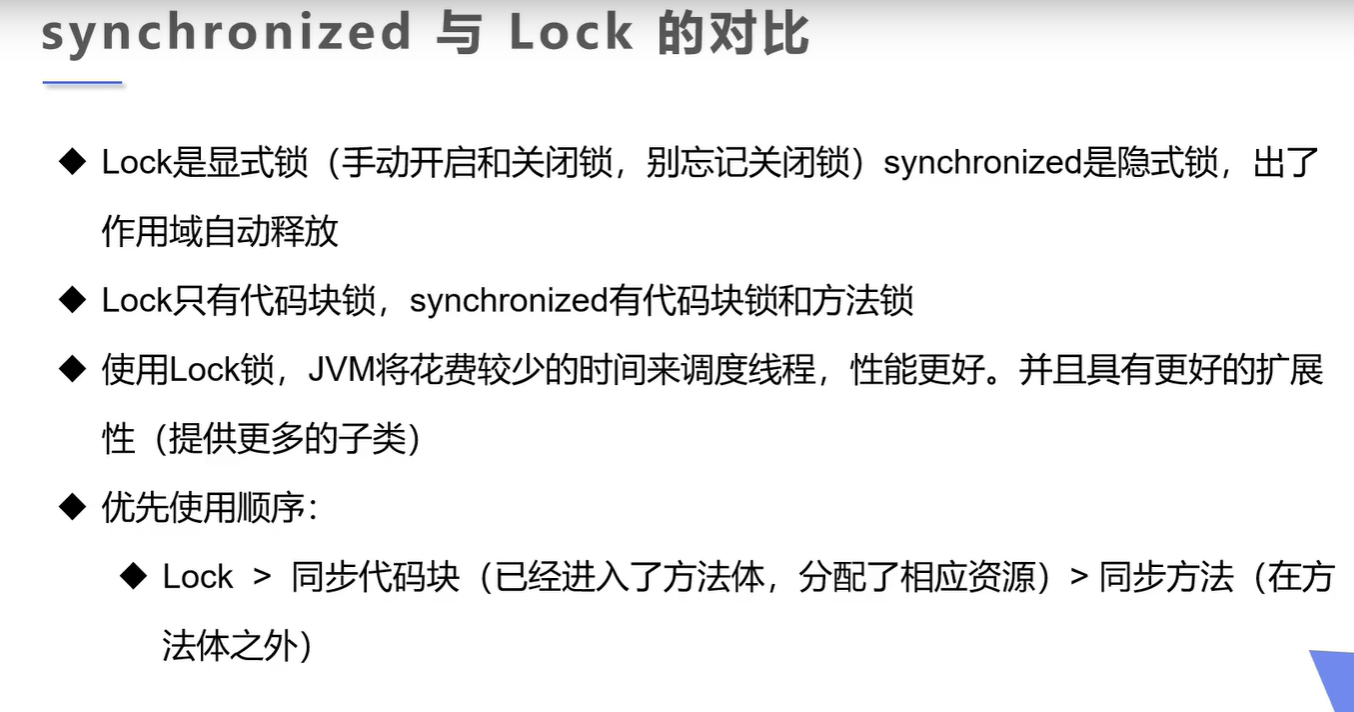
demo:
package com.xiaowei9s.syn;

import java.util.concurrent.locks.ReentrantLock;

public class TestLock {
    public static void main(String[] args) {
        Lock1 lock1 = new Lock1();
        new Thread(lock1,"hong").start();
        new Thread(lock1,"huang").start();
        new Thread(lock1,"jun").start();
    }
}

class Lock1 implements Runnable{
    public int ticket = 10;
    public ReentrantLock lock = new ReentrantLock();

    @Override
    public void run() {

        try {
            lock.lock();
            while (ticket>0){
                try {
                    Thread.sleep(500);
                } catch (InterruptedException e) {
                    e.printStackTrace();
                }
                System.out.println(Thread.currentThread().getName()+ticket);
                ticket--;
            }
        }catch (Exception e){

        }finally {
            lock.unlock();
        }


    }
}
十五、线程协作
生产者消费者问题
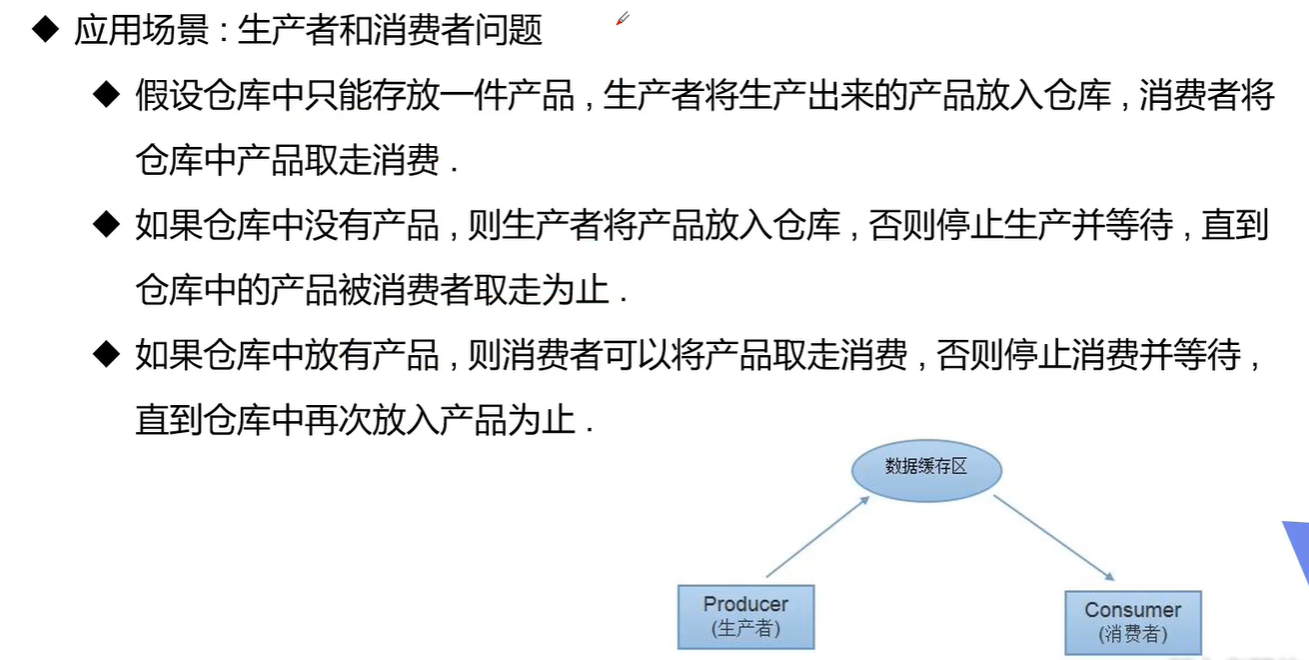
相关方法:
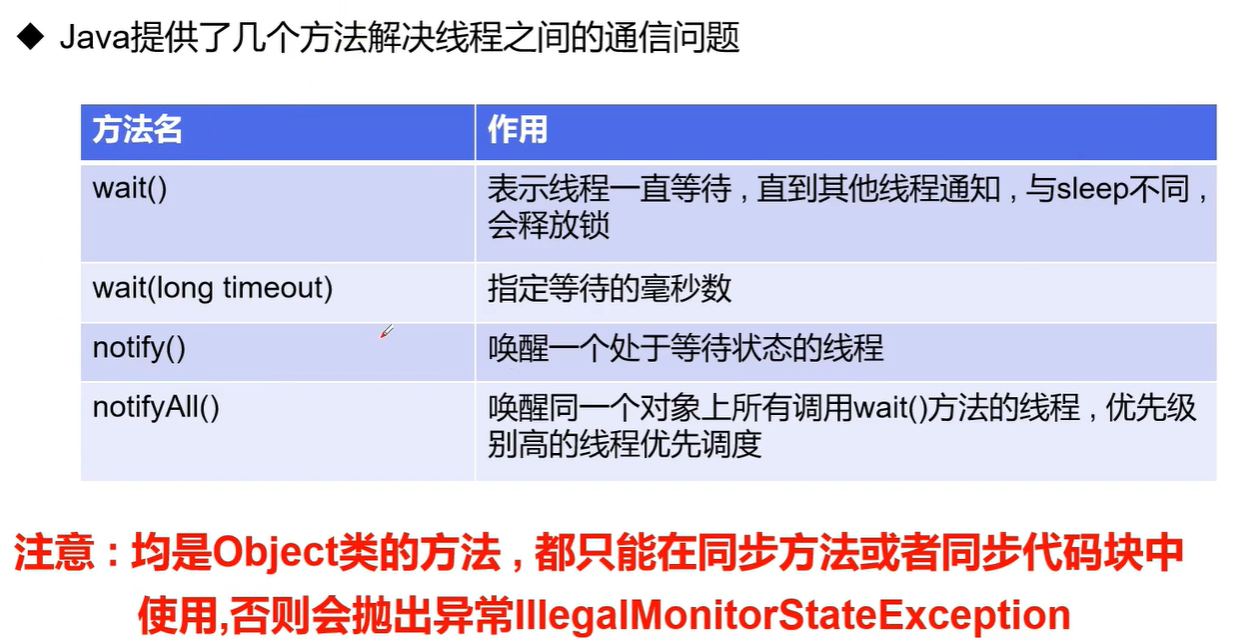
解决方法:
-
缓冲区法,设置缓冲区(管程法)
-
package com.xiaowei9s.syn; public class TestPC { public static void main(String[] args) { SynContain synContain = new SynContain(); new Producer(synContain).start(); new Customer(synContain).start(); } } class Producer extends Thread{ public SynContain synContain; public Producer(SynContain synContain){ this.synContain = synContain; } //生产 @Override public void run() { for (int i = 0; i < 100; i++) { try { synContain.add(i); System.out.println("生产了第" + i + "只鸡"); } catch (InterruptedException e) { e.printStackTrace(); } } } } class Customer extends Thread{ public SynContain synContain; public Customer(SynContain synContain){ this.synContain = synContain; } //消费 @Override public void run() { for (int i = 0; i < 100; i++) { try { synContain.minus(i); System.out.println("消费了第" + i + "只鸡"); } catch (InterruptedException e) { e.printStackTrace(); } } } } class Chichen{ public Chichen(int id) { this.id = id; } int id; } class SynContain{ Chichen[] contain = new Chichen[10]; int count = -1; public synchronized void add(int i) throws InterruptedException { if(count+1<contain.length){ contain[++count] = new Chichen(i); this.notifyAll(); }else if (count>=10){ this.wait(); } } public synchronized void minus(int i) throws InterruptedException { if(count>=0){ contain[count] = null; count--; this.notifyAll(); }else if (count==0){ this.wait(); } } } -
信号灯法:设置信号用于唤醒或等待
-
package com.xiaowei9s.syn;

public class TestPC2 {
    public static void main(String[] args) {
        Food food = new Food();
        new Eater(food).start();
        new Cooker(food).start();
    }
}

//厨师
class Cooker extends Thread{
    Food food;

    public Cooker(Food food) {
        this.food = food;
    }

    @Override
    public void run() {
        for (int i = 0; i < 20; i++) {
            try {
                food.cook();
            } catch (InterruptedException e) {
                e.printStackTrace();
            }
        }
    }
}

//顾客
class Eater extends Thread{
    Food food;

    public Eater(Food food) {
        this.food = food;
    }

    @Override
    public void run() {
        for (int i = 0; i < 20; i++) {
            try {
                food.eat();
            } catch (InterruptedException e) {
                e.printStackTrace();
            }
        }
    }
}

//菜品
class Food{
    String name = "满汉全席";
    boolean flag = false;

    public synchronized void eat() throws InterruptedException {
        if (!flag){
            this.wait();
        }
        System.out.println("顾客在吃"+name);
        flag = !flag;
        this.notifyAll();

    }

    public synchronized void cook() throws InterruptedException {
        if (flag){
            this.wait();
        }
        System.out.println("厨师在做"+name);
        flag = !flag;
        this.notifyAll();
    }
}
十六、使用线程池
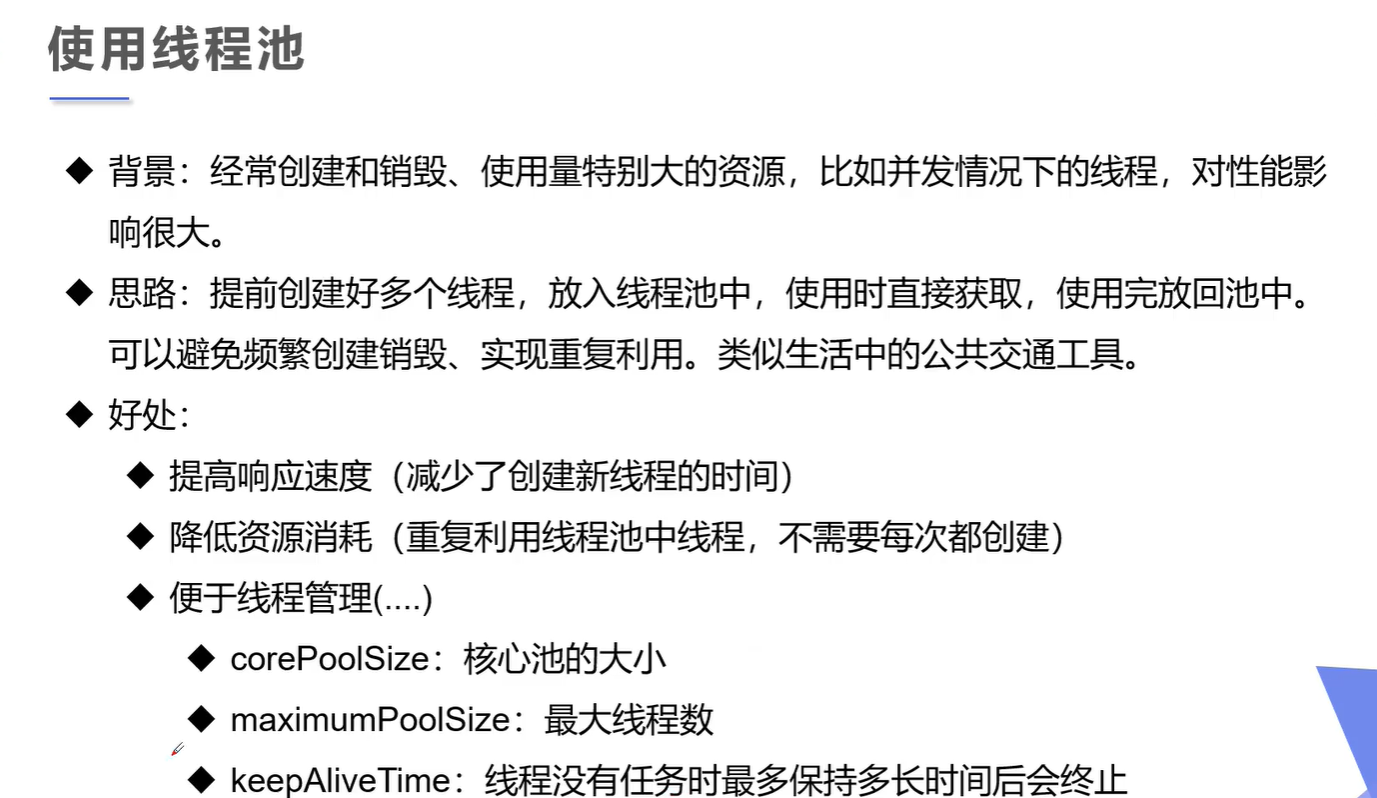
使用:
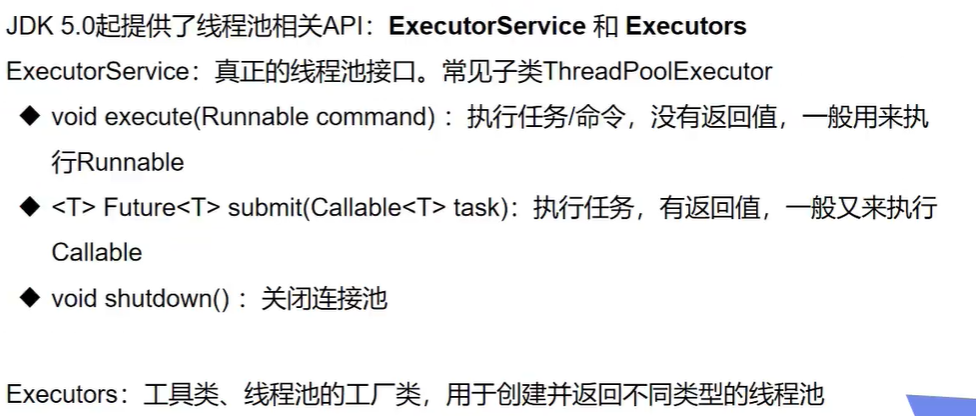
demo:
package com.xiaowei9s.syn;

import java.util.concurrent.ExecutorService;
import java.util.concurrent.Executors;

public class TestPool {
    public static void main(String[] args) {
        ExecutorService executorService = Executors.newFixedThreadPool(10);
        executorService.execute(new MyThread());
        executorService.execute(new MyThread());
        executorService.execute(new MyThread());
        executorService.shutdownNow();
    }
}

class MyThread implements Runnable {

    @Override
    public void run() {
        for (int i = 0; i < 10; i++) {
            System.out.println(i);
        }
    }
}
知识来源:kuangstudy.com

 浙公网安备 33010602011771号