
OLLVM混淆学习
Ollvm混淆学习:
环境搭建:
ollvm 搭建的环境为
- ubuntu22.04
下载 ollvm 4.0 源码
git clone -b llvm-4.0 --depth=1 https://github.com/obfuscator-llvm/obfuscator.git
安装 docker
sudo apt install docker.io
安装编译 ollvm 的 docker 环境
sudo docker pull nickdiego/ollvm-build
编译 ollvm
下载编译脚本
git clone --depth=1 https://github.com/oacia/docker-ollvm.git
编译
ollvm-build.sh`  后面跟的参数是 `ollvm的源码目录
sudo docker-ollvm/ollvm-build.sh /home/xw/Desktop/ollvm/obfuscator/
创建软链接
#!/usr/bin/env bash
# 一键部署 OLLVM 可执行文件到 /usr/local/ollvm/bin,并加 -ollvm 后缀

set -e

SRC_DIR="/home/xw/Desktop/ollvm/obfuscator/build_release/bin"
DEST_DIR="/usr/local/ollvm/bin"

sudo mkdir -p "${DEST_DIR}"

echo ">>> 正在批量创建软链接 ..."
for f in "${SRC_DIR}"/*; do
    base=$(basename "$f")
    sudo ln -sf "$f" "${DEST_DIR}/${base}-ollvm"
done

echo ">>> 已完成链接到 ${DEST_DIR}"
vim ~/.bashrc
export PATH="/usr/local/ollvm/bin:$PATH"
source ~/.hasbrc
测试代码:
#include<stdio.h>

/*
RC4初始化函数
*/
void rc4_init(unsigned char* s, unsigned char* key, unsigned long Len_k)
{
	int i = 0, j = 0;
	char k[256] = { 0 };
	unsigned char tmp = 0;
	for (i = 0; i < 256; i++) {
		s[i] = i;
		k[i] = key[i % Len_k];
	}
	for (i = 0; i < 256; i++) {
		j = (j + s[i] + k[i]) % 256;
		tmp = s[i];
		s[i] = s[j];
		s[j] = tmp;
	}
}

/*
RC4加解密函数
unsigned char* Data     加解密的数据
unsigned long Len_D     加解密数据的长度
unsigned char* key      密钥
unsigned long Len_k     密钥长度
*/
void rc4_crypt(unsigned char* Data, unsigned long Len_D, unsigned char* key, unsigned long Len_k) //加解密
{
	unsigned char s[256];
	rc4_init(s, key, Len_k);
	int i = 0, j = 0, t = 0;
	unsigned long k = 0;
	unsigned char tmp;
	for (k = 0; k < Len_D; k++) {
		i = (i + 1) % 256;
		j = (j + s[i]) % 256;
		tmp = s[i];
		s[i] = s[j];
		s[j] = tmp;
		t = (s[i] + s[j]) % 256;
		Data[k] = Data[k] ^ s[t];
	}
}
int main()
{
	//字符串密钥
	unsigned char key[] = "zstuctf";
	unsigned long key_len = sizeof(key) - 1;
	//数组密钥
	//unsigned char key[] = {};
	//unsigned long key_len = sizeof(key);

	//加解密数据
	unsigned char data[] = { 0x7E, 0x6D, 0x55, 0xC0, 0x0C, 0xF0, 0xB4, 0xC7, 0xDC, 0x45,
		0xCE, 0x15, 0xD1, 0xB5, 0x1E, 0x11, 0x14, 0xDF, 0x6E, 0x95,
		0x77, 0x9A, 0x12, 0x99 };
	//加解密
	rc4_crypt(data, sizeof(data), key, key_len);

	for (int i = 0; i < sizeof(data); i++)
	{
		printf("%c", data[i]);
	}
	printf("\n");
	return 0;
}
//zstuctf{xXx_team_Is_GooD
虚假控制流(BCF):
ollvm编译:
clang-ollvm -mllvm -bcf -mllvm -bcf_loop=3 -mllvm -bcf_prob=40 test.c -o test-bcf
接下来就得到了混淆后的代码,先看一下两者的对比
对比:
正常代码:
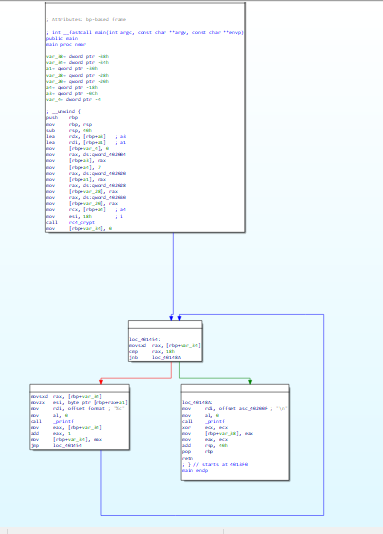
混淆代码:
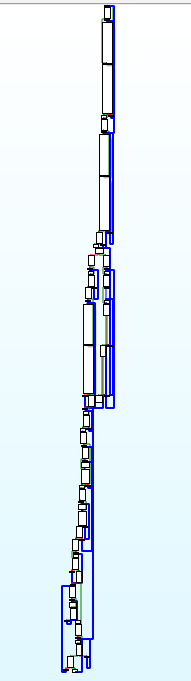
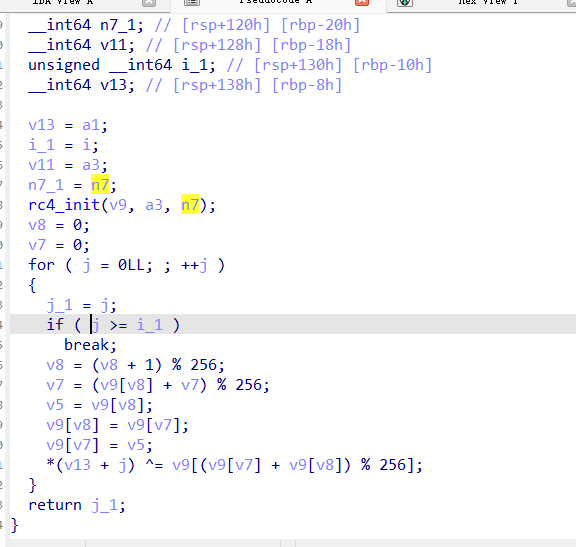
而且基本所有的函数都是这样的,很难看,不够在我测试的时候,我发现ida9.0的伪代码会直接将这个基本的bcf去除,得到和源码一样的伪代码,可能是混淆程度太低了
伪代码对比:
BCF混淆后的代码:
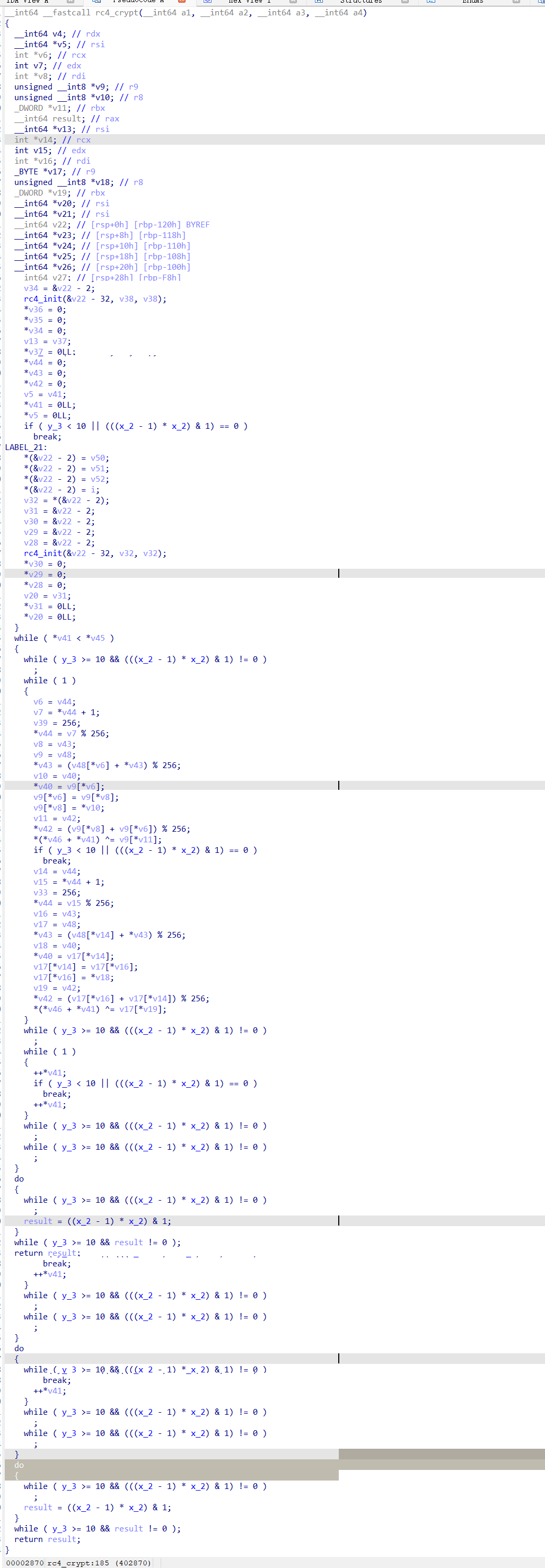
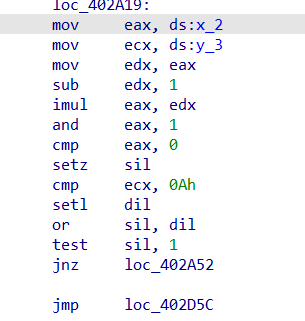
可以发现很多的x,y操作,同时看汇编也会发现有许多的垃圾指令
具有很多的( y_3 >= 10 && (((x_2 - 1) * x_2) & 1) != 0 )
其实这个肯定是虚假的,x*(x-1)肯定是偶数,&1的结果肯定为假,就是一堆虚假指令
去除:
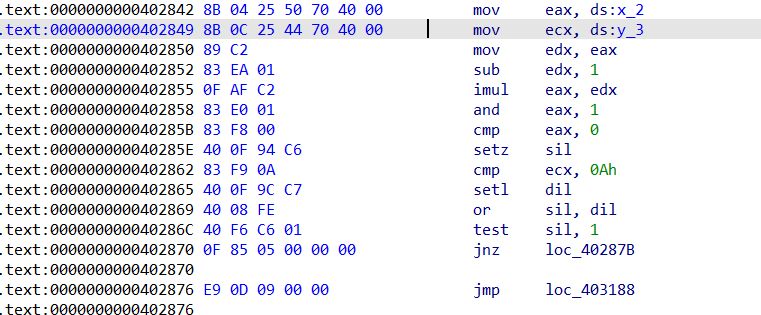
看了oacia大佬关于去除这方面的方法,我觉得还是将对x,y赋值的地方直接进行nop比较好,使用idapython进行统一的nop,又快又有通用性还具有方便性
具体修改如下:
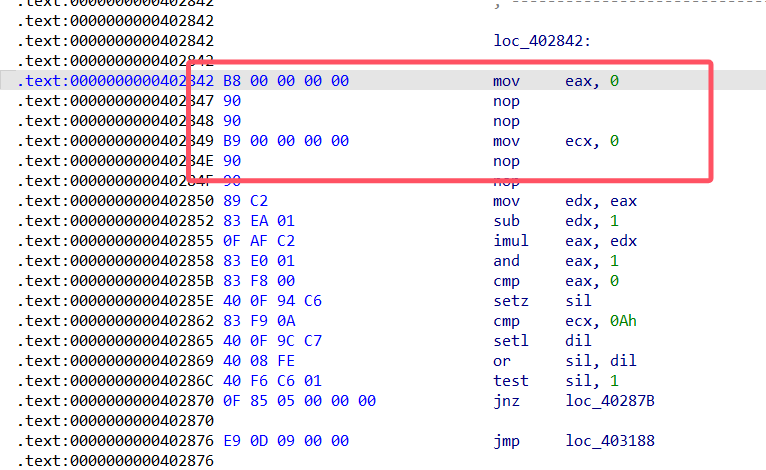
使用idapython统一修改
#去除bcf混淆
import ida_xref     #交叉引用操作
import ida_idaapi
import ida_bytes
import ida_segment

def do_patch(ea):
    if(ida_bytes.get_bytes(ea,1)==b"\x8B"):
        reg=(ord(ida_bytes.get_bytes(ea+1,1)) & 0b00111000)>>3
        ida_bytes.patch_bytes(ea,(0xB8+reg).to_bytes(1,"little")+b"\x00\x00\x00\x00\x90\x90")  #patch_bytes(ea, buf)
    else:
        print("error")

seg=ida_segment.get_segm_by_name(".bss")
start=seg.start_ea
end=seg.end_ea

for addr in range(start,end,4):
    ref=ida_xref.get_first_dref_to(addr)
    print(hex(ref).center(20,'-'))

    #获取所有的交叉引用
    while (ref!=ida_idaapi.BADADDR):#BADADDR如果不是无效地址
        do_patch(ref)
        print("patch at"+hex(ref))
        '''
        ida_idaapi.ea_t get_next_dref_to 	( 	ida_idaapi.ea_t 	to,
		ida_idaapi.ea_t 	current )
        '''
        ref=ida_xref.get_next_dref_to(addr,ref)
    print("-"*20)
print("BCF 去除 finish")
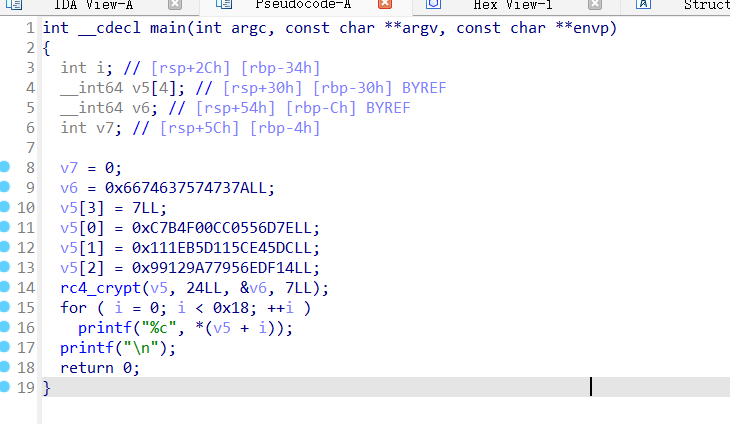
很完美的去除
还有一种方法就是D810,但是如果是魔改的就需要自己去添加规则了
具体方法可以参考大佬的介绍
另外一个方法就是将bss段设置成只读
指令替换(SUB):
ollvm编译:
clang-ollvm -mllvm -sub -mllvm -sub_loop=3 test.c -o test-sub
对比:
在流程方面倒是没有很大的差距,但是在伪代码方面非常的复杂
源代码:
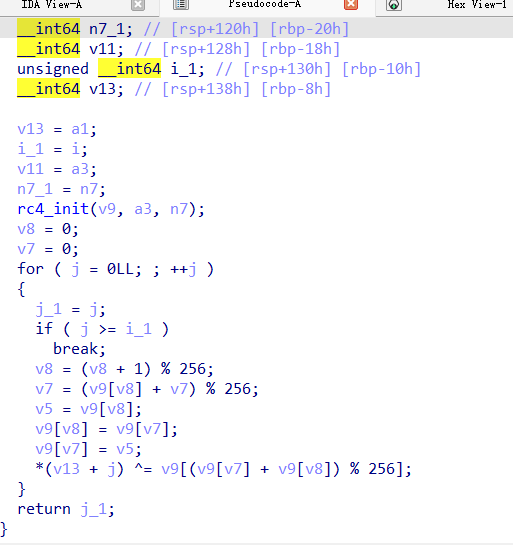
混淆代码:
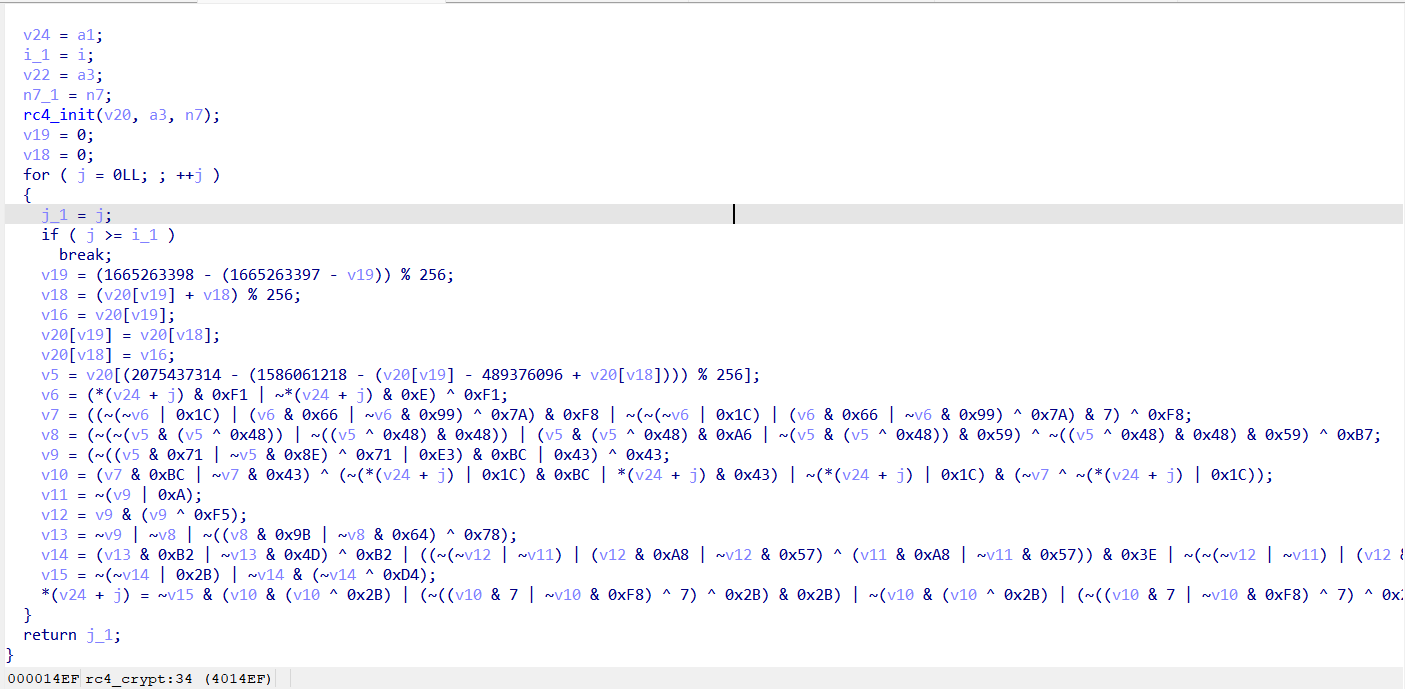
只能说非常的抽象啊
这个让我想起来了腾讯安卓23年初赛的那道vm,都是类似于这种的
去除:
1、D810:可以用d810试试
2、GAMBA简化运算
可以参考一下这个项目的识别
不过我用了一下,成功的概率不是很大,不如直接交给ai或者使用python手动赋值观察
控制流平坦化(FLA):
这个控制流平坦化是我们平常最容易见到的一种混淆,学习一下这个的混淆与去混淆
原理
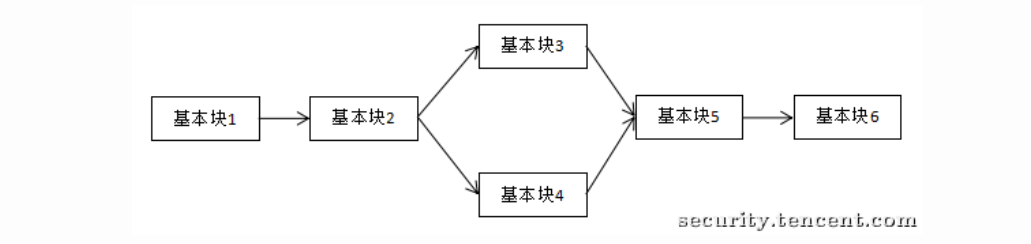
控制流平坦化就是模糊基本块之间的关系,添加一些虚假的控制块来处理
借鉴一下几个大佬的图
正常逻辑是这个:
而添加了虚假块之后:
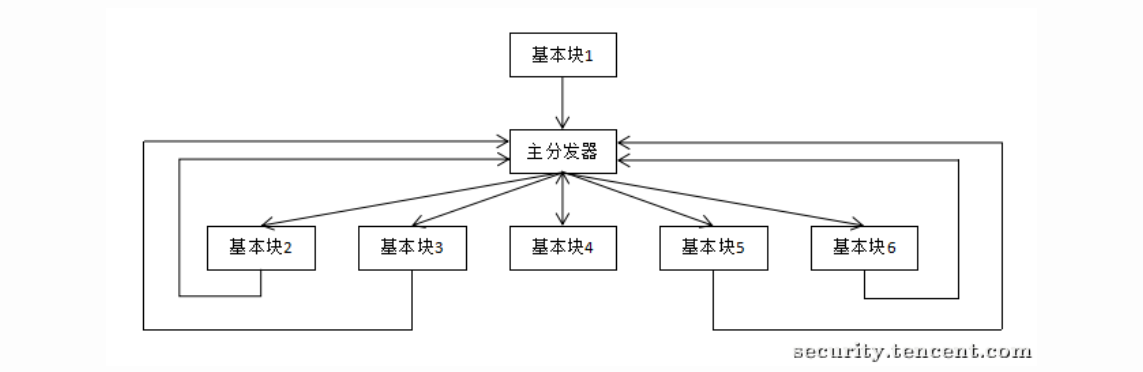
形成的流程图:
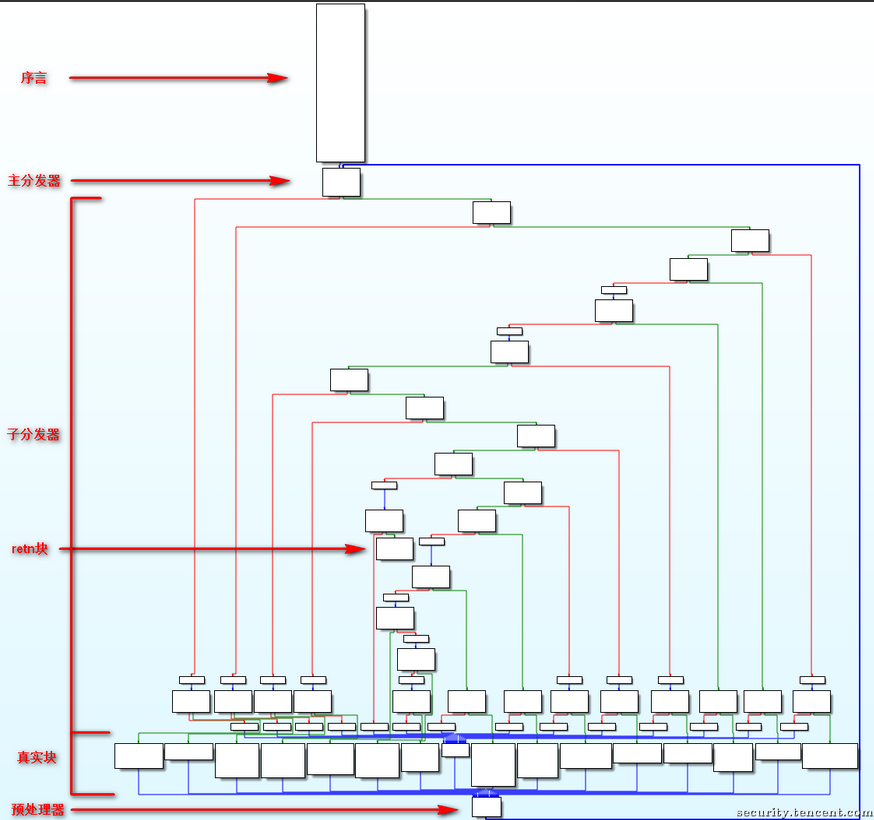
各部分介绍:
序言:函数的第一个执行的基本块
主 (子) 分发器:控制程序跳转到下一个待执行的基本块
retn 块:函数出口
真实块:混淆前的基本块,程序真正执行工作的块
预处理器:跳转到主分发器
ollvm编译:
clang-ollvm -mllvm -fla -mllvm -split -mllvm -split_num=3 test.c -o test-fla
- -mllvm -fla : 激活控制流平坦化
- -mllvm -split : 激活基本块分割
- -mllvm -split_num=3 : 指定基本块分割的数目
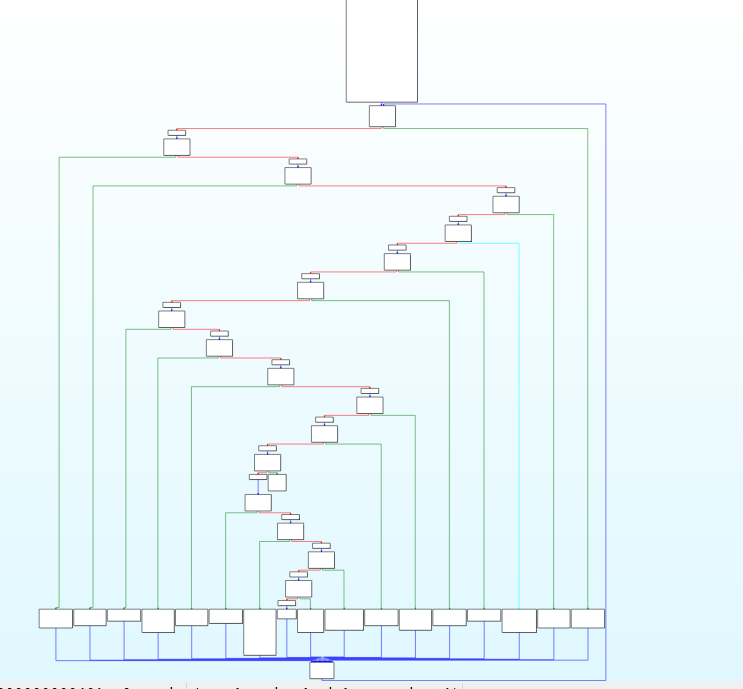
标准的ollvm控制流平坦化
去混淆思路:
对于经典的ollvm来说,各个块之间的关系如下:
序言块:函数的开始部分,也就是函数的入口
主分发器:序言块的后继
预处理器:处理序言块外的另外一个主分发器的前驱
真实块:预处理器的所有前驱
子分发器:除此之外的所有块
返回块:ret的地方
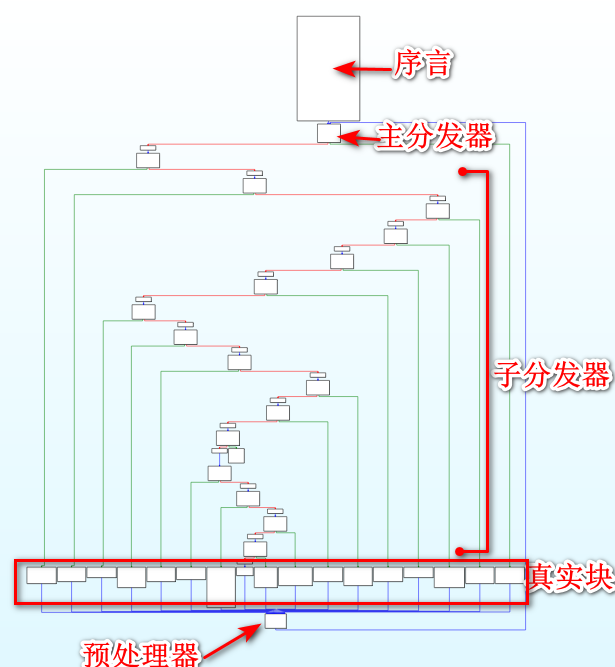
去混淆的步骤:
1、找到真实块:手动找、idapython通过各个块之间的关系找、angr模拟执行找、unidbg找
2、得到真实块之间的关系:模拟执行、trace
3、修复各个真实块之间的跳转关系,nop掉虚假的控制块
通过idapython来寻找真实块
#idapython寻找真实块
import idaapi
import idc

target_func=0x401CE0#要处理的函数地址
preprocess_block=0x402057#预处理块的地址
#寻找所有预处理器的前驱
True_Block=[]
Fake_Block=[]
'''FlowChart
Constructor
@param f: A func_t type, use get_func(ea) to get a reference
@param bounds: A tuple of the form (start, end). Used if "f" is None
@param flags: one of the FC_xxxx flags.
这个函数就是返回ida流程图中的所有块中的操作权,比如查看函数起始地址,结束地址等等
'''
f_block=idaapi.FlowChart(idaapi.get_func(target_func),flags=idaapi.FC_PREDS)
for block in f_block:
    #print(block)
    #预处理器的前驱都是真实块
    if block.start_ea==preprocess_block:
        Fake_Block.append((block.start_ea,idc.prev_head(block.end_ea)))
        print("Find True Bolcks\n")
        tbs=block.preds()
        for tb in tbs:
            True_Block.append((tb.start_ea,idc.prev_head(tb.end_ea)))
        print(True_Block)
    elif not [x for x in block.succs()]:
        print("find ret")
        True_Block.append((block.start_ea,idc.prev_head(block.end_ea)))
    elif block.start_ea!=target_func:
        Fake_Block.append((block.start_ea,idc.prev_head(block.end_ea)))

print('True block')
print(True_Block)
print("Fake Block")
print(Fake_Block)
模拟执行:
那接下来的任务就很明确了,就是寻找这些真实块之间的关系,然后patch一下,将所有的虚假块全部nop
这里考虑的就是使用angr还是unidbg/unicoin
unicorn:
#使用unicorn来模拟执行hook
from threading import stack_size
from unicorn import *
from unicorn.x86_const import *
from keystone import * #pip install keystone-engine
from capstone import *

Base=0x400000
Code=Base+0x0
Code_size=0x100000
Stack=0x7F00000000
stack_size=0x100000
Fs=0x7FF0000000
Fs_size=0x100000

ks=Ks(KS_ARCH_X86,KS_MODE_64)
uc=Uc(UC_ARCH_X86,UC_MODE_64)
cs=Cs(CS_ARCH_X86,CS_MODE_64)

tbs=[(4202572, 4202582), (4202137, 4202137), (4202142, 4202229), (4202234, 4202248), (4202253, 4202260), (4202265, 4202278), (4202283, 4202300), (4202305, 4202329), (4202334, 4202356), (4202361, 4202376), (4202381, 4202403), (4202408, 4202425), (4202430, 4202463), (4202468, 4202481), (4202486, 4202502), (4202507, 4202520), (4202525, 4202532), (4202537, 4202567)]

tb_call=[]
main_addr=0x401CE0
main_end=0x402056

def hook_code(uc:unicorn.Uc,address,size,user_data):
    #反汇编这一句的指令
    for i in cs.disasm(CODE_DATA[address-Base:address-Base+size],address):
        if i.mnemonic =="call":
            print("调用call,跳过--")
            uc.reg_write(UC_X86_REG_RIP,address+size)
        elif i.mnemonic == "ret":
            print("执行结束")
            uc.emu_stop()
            print(tb_call)
        for tb in tbs:
            if address==tb[1]:
                #print(tb)
                #print (uc.reg_read (UC_X86_REG_FLAGS))#ZF 标志位在第 6 位
                ZF_flag=(uc.reg_read(UC_X86_REG_FLAGS)&0b1000000)>>6
                tb_call.append((tb,ZF_flag))
                break

def hook_mem_access(uc:unicorn.Uc,type,address,size,value,userdata):
    pc=uc.reg_read(UC_X86_REG_RSP)
    print('pc:%x type:%d addr:%x size:%x' % (pc, type, address, size))
    return True

def inituc(uc:unicorn.Uc):
    uc.mem_map(Code,Code_size,UC_PROT_ALL)#分配代码段内存
    uc.mem_map(Stack,stack_size,UC_PROT_ALL)#分配栈内存
    uc.mem_write(Code,CODE_DATA)#分配代码数组
    uc.reg_write(UC_X86_REG_RSP,Stack+0x10000)#设置栈顶指针
    uc.hook_add(UC_HOOK_CODE,hook_code)#设置hook代码
    uc.hook_add(UC_HOOK_MEM_UNMAPPED, hook_mem_access)#当代码访问未映射内存是触发
    uc.hook_add(UC_HOOK_INTR, hook_mem_access)  # 来捕捉中断


with open("./test-fla", "rb") as f:
    CODE_DATA = f.read()

inituc(uc)
try:
    uc.emu_start(main_addr,0)
except Exception as e:
    print(e)
因为大概率会针对so,写一下arm64的(好像不是很兼容?)
from unicorn import *
from unicorn.arm64_const import *
from capstone import *

# 模拟内存区域配置
BASE = 0x400000
CODE_ADDR = BASE
CODE_SIZE = 0x100000
STACK_ADDR = 0x80000000
STACK_SIZE = 0x100000

# 初始化 disasm 与 unicorn 引擎
cs = Cs(CS_ARCH_ARM64, CS_MODE_ARM)
uc = Uc(UC_ARCH_ARM64, UC_MODE_ARM)

# 你自己定义的 block 范围(例)
tbs = [(0x401000, 0x401010), (0x401020, 0x401040)]  # 请按实际地址替换

tb_call = []
main_addr = 0x401000  # 请设置成入口点
main_end = 0          # 设为0表示直到遇到异常或 ret

# code hook
def hook_code(uc, address, size, user_data):
    for i in cs.disasm(CODE_DATA[address - BASE:address - BASE + size], address):
        print("Executing: 0x%x:\t%s\t%s" % (i.address, i.mnemonic, i.op_str))

        if i.mnemonic == "blr" or i.mnemonic == "bl":
            print("调用 bl/blr,跳过")
            # 模拟压栈 + 跳转
            sp = uc.reg_read(UC_ARM64_REG_SP)
            ret_addr = address + size
            uc.mem_write(sp - 16, ret_addr.to_bytes(8, 'little'))
            uc.reg_write(UC_ARM64_REG_SP, sp - 16)
            uc.reg_write(UC_ARM64_REG_PC, ret_addr)
        elif i.mnemonic == "ret":
            print("执行 ret,停止")
            uc.emu_stop()
            print("tb_call:", tb_call)

        for tb in tbs:
            if address == tb[1]:
                nzcv = uc.reg_read(UC_ARM64_REG_NZCV)
                ZF = (nzcv >> 30) & 1  # NZCV: bit 30 is Z
                tb_call.append((tb, ZF))
                break

# memory hook
def hook_mem_invalid(uc, access, address, size, value, user_data):
    print(f"[!] Memory Access Violation at 0x{address:x}")
    return False  # 返回 False 让 Unicorn 抛出异常停止

# 初始化内存与 hook
def init_uc():
    uc.mem_map(CODE_ADDR, CODE_SIZE)
    uc.mem_map(STACK_ADDR, STACK_SIZE)
    uc.mem_write(CODE_ADDR, CODE_DATA)
    uc.reg_write(UC_ARM64_REG_SP, STACK_ADDR + STACK_SIZE - 0x10)
    uc.hook_add(UC_HOOK_CODE, hook_code)
    uc.hook_add(UC_HOOK_MEM_UNMAPPED, hook_mem_invalid)

# 加载代码
with open("test-fla-arm64", "rb") as f:
    CODE_DATA = f.read()

# 运行
init_uc()
try:
    uc.emu_start(main_addr, main_end)
except Exception as e:
    print(f"[!] Emulation error: {e}")
angr:
安装使用(直接使用docker)
docker pull angr/angr
docker run -it angr/angr
angr的模拟执行就是deflt.py项目相关,可以参考一下大佬写的讲解:
patch:
#patch脚本
#先明确目的,nop掉所有的虚假块,按照刚才模拟执行的顺序patch成有顺序的块

import idaapi
import ida_bytes
import idc
from keystone import *
ks=Ks(KS_ARCH_X86,KS_MODE_64)

#因为正常的ollvm真实块最后都是jmp 预处理器,所以判断jump修改就行
#同时有的逻辑会存在if语句,所以我们要根据特殊情况来处理jnz和jz的情况
def jump_patch(start,target,j_code='jmp'):
    global debug
    patch_byte,count=ks.asm(f"{j_code} {hex(target)}",addr=start)
    #获取当前地址指令长度,补齐字节
    patch_byte=bytes(patch_byte)+b"\x00"*(idc.get_item_size(start)+len(patch_byte))
    print(hex(start),f"{j_code} {hex(target)}",patch_byte)
    ida_bytes.patch_bytes(start,patch_byte)

#将无关代码全部nop
def patch_nop(start,end):
    while start<end:
        ida_bytes.patch_bytes(start,bytes([0x90]))
        start+=1
#nop掉某一行不再是大范围nop了
def patch_nop_line(addr):
    patch_nop(addr,addr+idc+idc.get_item_size(addr))

preamble_block = 0x402057  # 序言块的地址
internal_reg = '[rbp+var_B4]'#中间变量的名称,遇到这个想都不用想直接 NOP

tb_path= [((4202142, 4202229), 1), ((4202234, 4202248), 1), ((4202253, 4202260), 1), ((4202265, 4202278), 1), ((4202283, 4202300), 1), ((4202305, 4202329), 0), ((4202334, 4202356), 0), ((4202361, 4202376), 1), ((4202381, 4202403), 0), ((4202408, 4202425), 1), ((4202430, 4202463), 1), ((4202468, 4202481), 1), ((4202486, 4202502), 0), ((4202507, 4202520), 1), ((4202525, 4202532), 1), ((4202265, 4202278), 1), ((4202283, 4202300), 1), ((4202305, 4202329), 0), ((4202334, 4202356), 0), ((4202361, 4202376), 1), ((4202381, 4202403), 0), ((4202408, 4202425), 1), ((4202430, 4202463), 1), ((4202468, 4202481), 1), ((4202486, 4202502), 0), ((4202507, 4202520), 1), ((4202525, 4202532), 1), ((4202265, 4202278), 1), ((4202283, 4202300), 1), ((4202305, 4202329), 0), ((4202334, 4202356), 0), ((4202361, 4202376), 1), ((4202381, 4202403), 0), ((4202408, 4202425), 1), ((4202430, 4202463), 1), ((4202468, 4202481), 1), ((4202486, 4202502), 0), ((4202507, 4202520), 1), ((4202525, 4202532), 1), ((4202265, 4202278), 1), ((4202283, 4202300), 1), ((4202305, 4202329), 0), ((4202334, 4202356), 0), ((4202361, 4202376), 1), ((4202381, 4202403), 0), ((4202408, 4202425), 1), ((4202430, 4202463), 1), ((4202468, 4202481), 1), ((4202486, 4202502), 0), ((4202507, 4202520), 1), ((4202525, 4202532), 1), ((4202265, 4202278), 1), ((4202283, 4202300), 1), ((4202305, 4202329), 0), ((4202334, 4202356), 0), ((4202361, 4202376), 1), ((4202381, 4202403), 0), ((4202408, 4202425), 1), ((4202430, 4202463), 1), ((4202468, 4202481), 1), ((4202486, 4202502), 0), ((4202507, 4202520), 1), ((4202525, 4202532), 1), ((4202265, 4202278), 1), ((4202283, 4202300), 1), ((4202305, 4202329), 0), ((4202334, 4202356), 0), ((4202361, 4202376), 1), ((4202381, 4202403), 0), ((4202408, 4202425), 1), ((4202430, 4202463), 1), ((4202468, 4202481), 1), ((4202486, 4202502), 0), ((4202507, 4202520), 1), ((4202525, 4202532), 1), ((4202265, 4202278), 1), ((4202283, 4202300), 1), ((4202305, 4202329), 0), ((4202334, 4202356), 0), ((4202361, 4202376), 1), ((4202381, 4202403), 0), ((4202408, 4202425), 1), ((4202430, 4202463), 1), ((4202468, 4202481), 1), ((4202486, 4202502), 0), ((4202507, 4202520), 1), ((4202525, 4202532), 1), ((4202265, 4202278), 1), ((4202283, 4202300), 1), ((4202305, 4202329), 0), ((4202334, 4202356), 0), ((4202361, 4202376), 1), ((4202381, 4202403), 0), ((4202408, 4202425), 1), ((4202430, 4202463), 1), ((4202468, 4202481), 1), ((4202486, 4202502), 0), ((4202507, 4202520), 1), ((4202525, 4202532), 1), ((4202265, 4202278), 1), ((4202283, 4202300), 1), ((4202305, 4202329), 0), ((4202334, 4202356), 0), ((4202361, 4202376), 1), ((4202381, 4202403), 0), ((4202408, 4202425), 1), ((4202430, 4202463), 1), ((4202468, 4202481), 1), ((4202486, 4202502), 0), ((4202507, 4202520), 1), ((4202525, 4202532), 1), ((4202265, 4202278), 1), ((4202283, 4202300), 1), ((4202305, 4202329), 0), ((4202334, 4202356), 0), ((4202361, 4202376), 1), ((4202381, 4202403), 0), ((4202408, 4202425), 1), ((4202430, 4202463), 1), ((4202468, 4202481), 1), ((4202486, 4202502), 0), ((4202507, 4202520), 1), ((4202525, 4202532), 1), ((4202265, 4202278), 1), ((4202283, 4202300), 1), ((4202305, 4202329), 0), ((4202334, 4202356), 0), ((4202361, 4202376), 1), ((4202381, 4202403), 0), ((4202408, 4202425), 1), ((4202430, 4202463), 1), ((4202468, 4202481), 1), ((4202486, 4202502), 0), ((4202507, 4202520), 1), ((4202525, 4202532), 1), ((4202265, 4202278), 1), ((4202283, 4202300), 1), ((4202305, 4202329), 0), ((4202334, 4202356), 0), ((4202361, 4202376), 1), ((4202381, 4202403), 0), ((4202408, 4202425), 1), ((4202430, 4202463), 1), ((4202468, 4202481), 1), ((4202486, 4202502), 0), ((4202507, 4202520), 1), ((4202525, 4202532), 1), ((4202265, 4202278), 1), ((4202283, 4202300), 1), ((4202305, 4202329), 0), ((4202334, 4202356), 0), ((4202361, 4202376), 1), ((4202381, 4202403), 0), ((4202408, 4202425), 1), ((4202430, 4202463), 1), ((4202468, 4202481), 1), ((4202486, 4202502), 0), ((4202507, 4202520), 1), ((4202525, 4202532), 1), ((4202265, 4202278), 1), ((4202283, 4202300), 1), ((4202305, 4202329), 0), ((4202334, 4202356), 0), ((4202361, 4202376), 1), ((4202381, 4202403), 0), ((4202408, 4202425), 1), ((4202430, 4202463), 1), ((4202468, 4202481), 1), ((4202486, 4202502), 0), ((4202507, 4202520), 1), ((4202525, 4202532), 1), ((4202265, 4202278), 1), ((4202283, 4202300), 1), ((4202305, 4202329), 0), ((4202334, 4202356), 0), ((4202361, 4202376), 1), ((4202381, 4202403), 0), ((4202408, 4202425), 1), ((4202430, 4202463), 1), ((4202468, 4202481), 1), ((4202486, 4202502), 0), ((4202507, 4202520), 1), ((4202525, 4202532), 1), ((4202265, 4202278), 1), ((4202283, 4202300), 1), ((4202305, 4202329), 0), ((4202334, 4202356), 0), ((4202361, 4202376), 1), ((4202381, 4202403), 0), ((4202408, 4202425), 1), ((4202430, 4202463), 1), ((4202468, 4202481), 1), ((4202486, 4202502), 0), ((4202507, 4202520), 1), ((4202525, 4202532), 1), ((4202265, 4202278), 1), ((4202283, 4202300), 1), ((4202305, 4202329), 0), ((4202334, 4202356), 0), ((4202361, 4202376), 1), ((4202381, 4202403), 0), ((4202408, 4202425), 1), ((4202430, 4202463), 1), ((4202468, 4202481), 1), ((4202486, 4202502), 0), ((4202507, 4202520), 1), ((4202525, 4202532), 1), ((4202265, 4202278), 1), ((4202283, 4202300), 1), ((4202305, 4202329), 0), ((4202334, 4202356), 0), ((4202361, 4202376), 1), ((4202381, 4202403), 0), ((4202408, 4202425), 1), ((4202430, 4202463), 1), ((4202468, 4202481), 1), ((4202486, 4202502), 0), ((4202507, 4202520), 1), ((4202525, 4202532), 1), ((4202265, 4202278), 1), ((4202283, 4202300), 1), ((4202305, 4202329), 0), ((4202334, 4202356), 0), ((4202361, 4202376), 1), ((4202381, 4202403), 0), ((4202408, 4202425), 1), ((4202430, 4202463), 1), ((4202468, 4202481), 1), ((4202486, 4202502), 0), ((4202507, 4202520), 1), ((4202525, 4202532), 1), ((4202265, 4202278), 1), ((4202283, 4202300), 1), ((4202305, 4202329), 0), ((4202334, 4202356), 0), ((4202361, 4202376), 1), ((4202381, 4202403), 0), ((4202408, 4202425), 1), ((4202430, 4202463), 1), ((4202468, 4202481), 1), ((4202486, 4202502), 0), ((4202507, 4202520), 1), ((4202525, 4202532), 1), ((4202265, 4202278), 1), ((4202283, 4202300), 1), ((4202305, 4202329), 0), ((4202334, 4202356), 0), ((4202361, 4202376), 1), ((4202381, 4202403), 0), ((4202408, 4202425), 1), ((4202430, 4202463), 1), ((4202468, 4202481), 1), ((4202486, 4202502), 0), ((4202507, 4202520), 1), ((4202525, 4202532), 1), ((4202265, 4202278), 1), ((4202283, 4202300), 1), ((4202305, 4202329), 0), ((4202334, 4202356), 0), ((4202361, 4202376), 1), ((4202381, 4202403), 0), ((4202408, 4202425), 1), ((4202430, 4202463), 1), ((4202468, 4202481), 1), ((4202486, 4202502), 0), ((4202507, 4202520), 1), ((4202525, 4202532), 1), ((4202265, 4202278), 1), ((4202283, 4202300), 1), ((4202305, 4202329), 0), ((4202334, 4202356), 0), ((4202361, 4202376), 1), ((4202381, 4202403), 0), ((4202408, 4202425), 1), ((4202430, 4202463), 1), ((4202468, 4202481), 1), ((4202486, 4202502), 0), ((4202507, 4202520), 1), ((4202525, 4202532), 1), ((4202265, 4202278), 1), ((4202283, 4202300), 1), ((4202305, 4202329), 0), ((4202334, 4202356), 0), ((4202361, 4202376), 1), ((4202381, 4202403), 0), ((4202408, 4202425), 1), ((4202430, 4202463), 1), ((4202468, 4202481), 1), ((4202486, 4202502), 0), ((4202507, 4202520), 1), ((4202525, 4202532), 1), ((4202265, 4202278), 1), ((4202283, 4202300), 1), ((4202305, 4202329), 1), ((4202334, 4202356), 1), ((4202537, 4202567), 1)]

tbs=[(4202572, 4202582), (4202137, 4202137), (4202142, 4202229), (4202234, 4202248), (4202253, 4202260), (4202265, 4202278), (4202283, 4202300), (4202305, 4202329), (4202334, 4202356), (4202361, 4202376), (4202381, 4202403), (4202408, 4202425), (4202430, 4202463), (4202468, 4202481), (4202486, 4202502), (4202507, 4202520), (4202525, 4202532), (4202537, 4202567)]
fbs=[(4201721, 4201738), (4201744, 4201744), (4201749, 4201760), (4201766, 4201766), (4201771, 4201782), (4201788, 4201788), (4201793, 4201804), (4201810, 4201810), (4201815, 4201826), (4201832, 4201832), (4201837, 4201851), (4201857, 4201857), (4201862, 4201876), (4201882, 4201882), (4201887, 4201901), (4201907, 4201907), (4201912, 4201926), (4201932, 4201932), (4201937, 4201951), (4201957, 4201957), (4201962, 4201976), (4201982, 4201982), (4201987, 4202001), (4202007, 4202007), (4202012, 4202026), (4202032, 4202032), (4202037, 4202051), (4202057, 4202057), (4202062, 4202076), (4202082, 4202082), (4202087, 4202101), (4202107, 4202107), (4202112, 4202126), (4202132, 4202132), (4202137, 4202137), (4202142, 4202229), (4202234, 4202248), (4202253, 4202260), (4202265, 4202278), (4202283, 4202300), (4202305, 4202329), (4202334, 4202356), (4202361, 4202376), (4202381, 4202403), (4202408, 4202425), (4202430, 4202463), (4202468, 4202481), (4202486, 4202502), (4202507, 4202520), (4202525, 4202532), (4202537, 4202567), (4202583, 4202583)]

block_info = {}  #判断每一个真实块有没有 patch 结束
for i in range(len(tbs)):
    block_info[tbs[i][0]] = {'finish': 0,'ret':0}

#nop掉所有的无关块
for fb in fbs:
    patch_nop(fb[1],fb[1]+idc.get_item_size(fb[1]))

#分析真实块的指令
for tb in tbs:
    dont_patch=False
    current_addr=tb[0]
    while current_addr<=tb[1]:
        if "cmov" in idc.print_insn_mnem(current_addr):
            patch_nop_line(current_addr)
            dont_patch=True
        elif internal_reg in idc.print_operand(current_addr,0):
            print("非法指令")
            patch_nop_line(current_addr)
        elif 'ret' in idc.print_insn_mnem(current_addr):
            block_info[tb[0]]['ret']=1
            dont_patch=True
    #对每一个真实块的结尾地址进行nop
    if not dont_patch:
        patch_nop_line(tb[1])
        block_info[tb[0]]['finish']=1

#序言块到第一个真实块
jump_patch(preamble_block,tb_path[0][0][0])
for i in range(len(tb_path)-1):
    # 不是返回块,也未完成 patch, 剩下的指令都是有分支跳转的.
    if block_info[tb_path[i][0][0]]['finish']==0 and block_info[tb_path[i][0][0]]['ret']==0:
        ZF=tb_path[i][1]
        #如果当前真实块的尾地址不是下一个真实块的始地址就进行patch jnzjz,否则就是正常连接
        if(idc.next_head(tb_path[i][0][1]) != tb_path[i+1][0][0]):
            #打上标记,避免重复
            block_info[tb_path[i][0][0]]['finish']=1
            j_code=('jnz','jz')
            jump_patch(tb_path[i][0][1],tb_path[i+1][0][0],j_code[ZF])
arm64架构的:
import idc
import idaapi
import ida_bytes
from keystone import Ks, KS_ARCH_ARM64, KS_MODE_LITTLE_ENDIAN

ks = Ks(KS_ARCH_ARM64, KS_MODE_LITTLE_ENDIAN)

# ==== 配置部分 ====
# preamble block 跳转到主路径
preamble_block = 0x400800

# 被用于混淆的 filler blocks,全 NOP 掉
fbs = [
    (0x400820, 0x40083C),
    (0x400840, 0x40085C),
    # ...
]

# 有效代码块(基本块范围),用于 patch 分支
tbs = [
    (0x400860, 0x40087C),
    (0x400880, 0x40089C),
    # ...
]

# 动态执行模拟得到的路径(块 + 是否跳转)
tb_path = [
    ((0x400860, 0x40087C), 1),  # ZF==1 跳转
    ((0x400880, 0x40089C), 0),
    # ...
]

# ===== PATCH工具函数 =====
def patch_nop(start, end):
    while start < end:
        ida_bytes.patch_bytes(start, b"\x1F\x20\x03\xD5")  # NOP
        start += 4  # 每条 ARM64 指令 4 字节

def patch_nop_line(addr):
    patch_nop(addr, addr + 4)

def assemble_and_patch(addr, asm_str):
    encoding, count = ks.asm(asm_str, addr)
    if not encoding:
        print(f"[!] Keystone failed on: {asm_str}")
        return
    patch_bytes = bytes(encoding)
    ida_bytes.patch_bytes(addr, patch_bytes)
    print(f"[+] PATCH {hex(addr)}: {asm_str} -> {patch_bytes.hex()}")

# patch B label 或 B.EQ label 等跳转指令
def patch_branch(start_addr, target_addr, condition=None):
    if condition is None:
        asm = f"B #{target_addr}"
    else:
        asm = f"B.{condition.upper()} #{target_addr}"
    assemble_and_patch(start_addr, asm)

# ========== 逻辑 ==========
# NOP 掉所有 filler blocks
for fb in fbs:
    patch_nop(fb[0], fb[1])

# 每个真实块处理条件跳转与非法变量引用
block_info = {}
for tb in tbs:
    start, end = tb
    block_info[start] = {'ret': 0, 'finish': 0}
    addr = start
    while addr < end:
        mnem = idc.print_insn_mnem(addr)
        if "CSEL" in mnem or "CMOV" in mnem:
            patch_nop_line(addr)
        elif "RET" in mnem:
            block_info[start]['ret'] = 1
        addr = idc.next_head(addr)

# 序言块跳转第一个基本块
first_tb_start = tb_path[0][0][0]
patch_branch(preamble_block, first_tb_start)

# 主路径 patch:连接每个路径的结尾到下一个块
for i in range(len(tb_path) - 1):
    curr_tb, ZF = tb_path[i]
    next_tb, _ = tb_path[i + 1]

    block_start = curr_tb[0]
    block_end = curr_tb[1]

    if block_info[block_start]['ret'] or block_info[block_start]['finish']:
        continue

    jump_addr = block_end
    next_addr = next_tb[0]

    if ZF == 1:
        patch_branch(jump_addr, next_addr, condition="eq")
    else:
        patch_branch(jump_addr, next_addr, condition="ne")

    block_info[block_start]['finish'] = 1
非标准控制流平坦化:
最开始是为了腾讯23 final题目而写的这篇文章,所以上面的学到的是为了这个做准备,研究一下这个非标准的控制流平坦化怎么解决,也不知道能实现什么地步
先来看一下流程图以及伪代码:
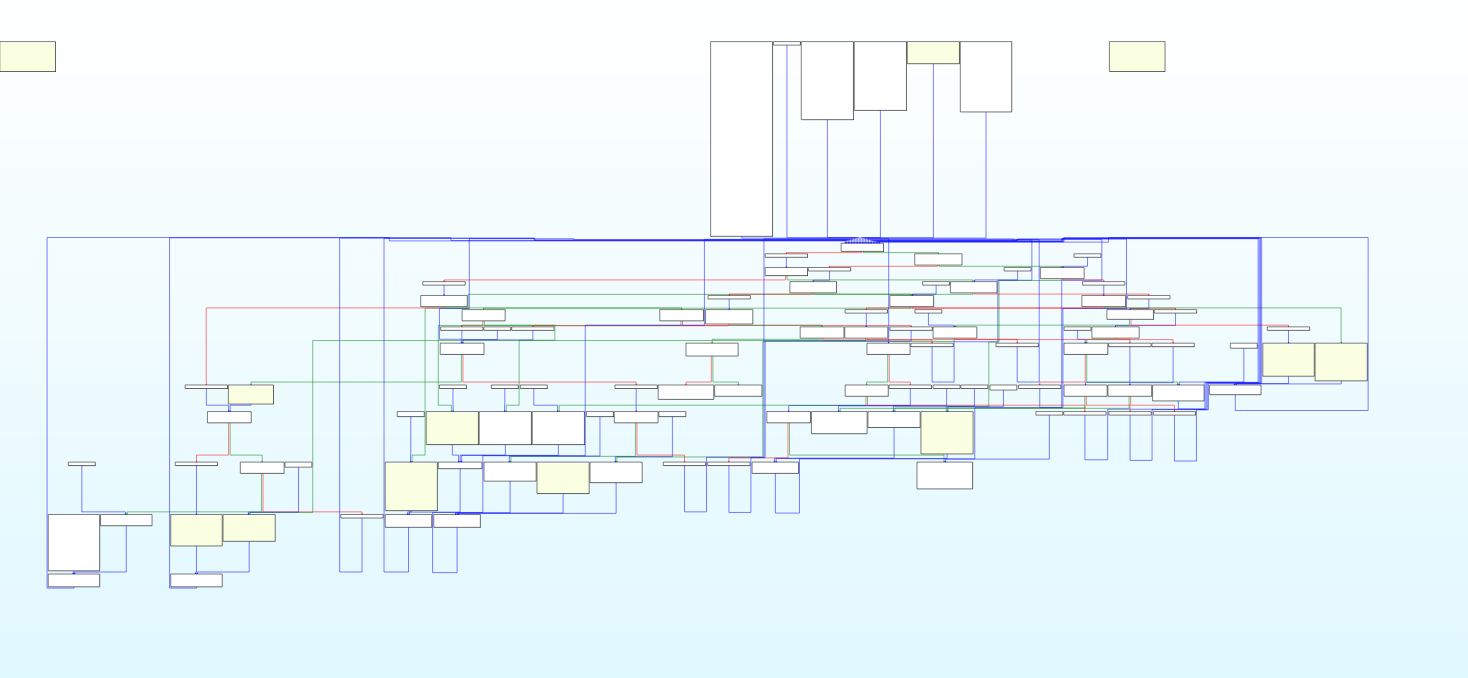
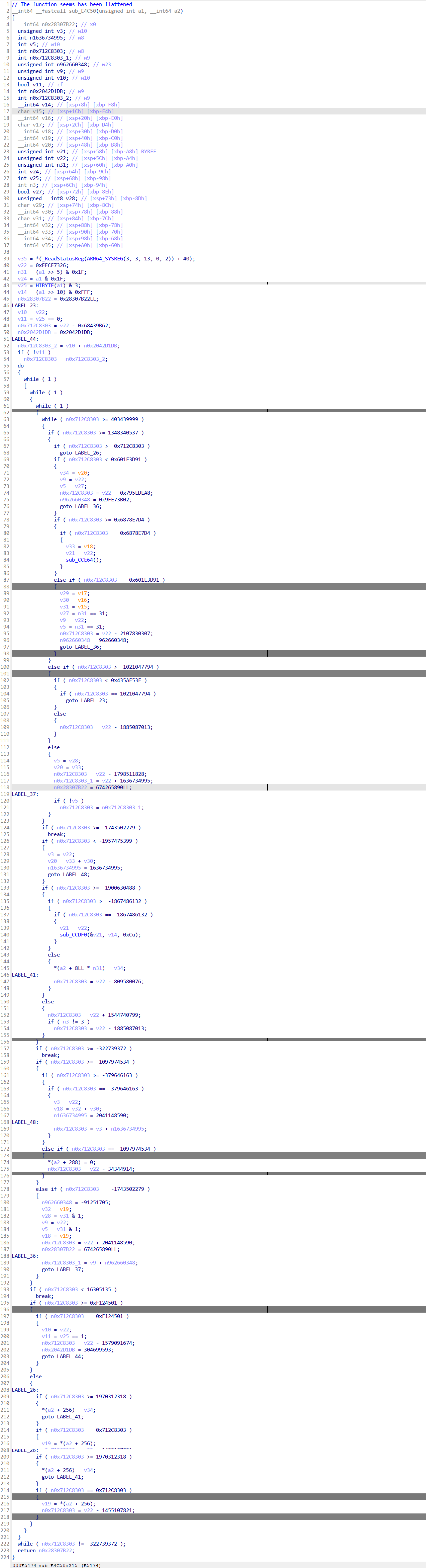
其实不去混淆的话也能看,毕竟关键的csel条件跳转已经去除了,但是为了学习还是研究一下怎么去除
寻找真实块:
错解:
经过我的观察,我觉得类似这种的像是真实块,(猜错了)
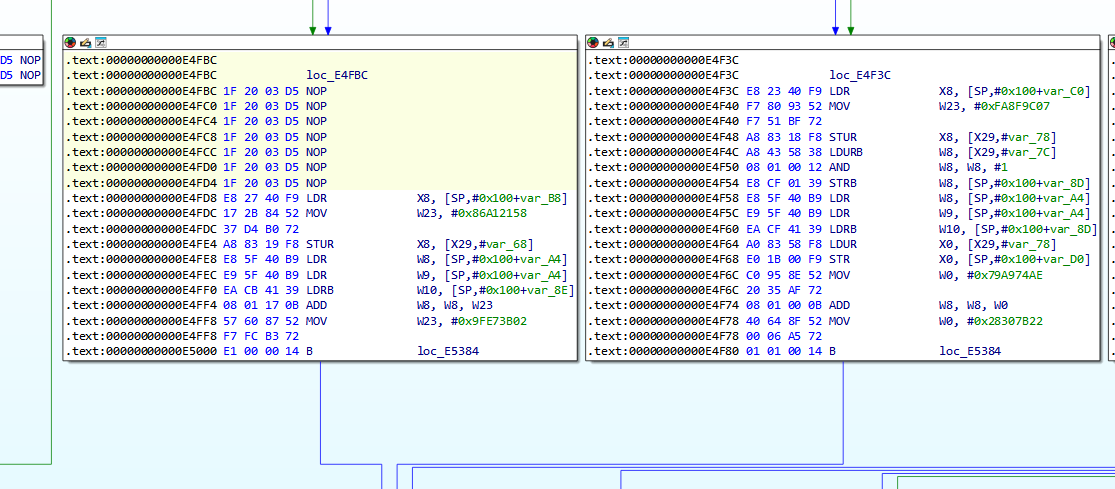
结尾一B或者BL跳转的是真实块,先用颜色标注一下看看都有多少地方以及哪些地方是
import idc
import idaapi
#根据感觉来识别真实块:
def set_color(start,end):
    for addr in range(start,end):
        idc.set_color(addr,idc.CIC_ITEM,0xd0ffc0)

target_func=0xE4C50

True_Block=[]
Fake_Block=[]
f_block=idaapi.FlowChart(idaapi.get_func(target_func),flags=idaapi.FC_PREDS)
cnt=0
for block in f_block:
    ea=block.start_ea
    ed=block.end_ea
    last=idc.prev_head(ed)
    #可以先判断块的size,如果小于5条指令(20),那么应该不是
    #然后如果结尾不是B或者BL就不是
    if ((ed-ea>4) and (idc.print_insn_mnem(last).lower() in ("b","bl"))):
        cnt+=1
        True_Block.append((ea,ed-4))
        set_color(ea,ed)
    else:
        continue


print(f"共找到{cnt}处")
print("True_block:",True_Block)
print("finish")

'''
得到:
[(937040, 937340), (937448, 937540), (937592, 937700), (937788, 937856), (937916, 937984), (938016, 938096), (938152, 938188), (938364, 938436), (938440, 938508), (938728, 938752), (938936, 938988), (939348, 939400), (939404, 939596), (939628, 939668), (939672, 939840), (939844, 939892), (939896, 939964), (939968, 940140)]
加上返回块 (0xe5884,0xe58a0)
'''
找到了18处,加上返回块应该是19处
但是经过验证不是上面的做法
正解:
首先应该找到函数的循环头,通过循环头可以直接找到所有对应的真实块,这个循环头就是许多真实块最终跳转的地方,也就用广搜来搜索多次经过的地方
def find_loop_heads(func):
    loop_heads = set()
    queue = deque()
    block = get_block_by_address(func)
    queue.append((block, []))
    while len(queue) > 0:
        cur_block, path = queue.popleft()
        if cur_block.start_ea in path:
            loop_heads.add(cur_block.start_ea)
            continue
        path = path+ [cur_block.start_ea]
        queue.extend((succ, path) for succ in cur_block.succs())
    all_loop_heads = list(loop_heads)
    all_loop_heads.sort()#升序排序,保证函数开始的主循环头在第一个
    return all_loop_heads
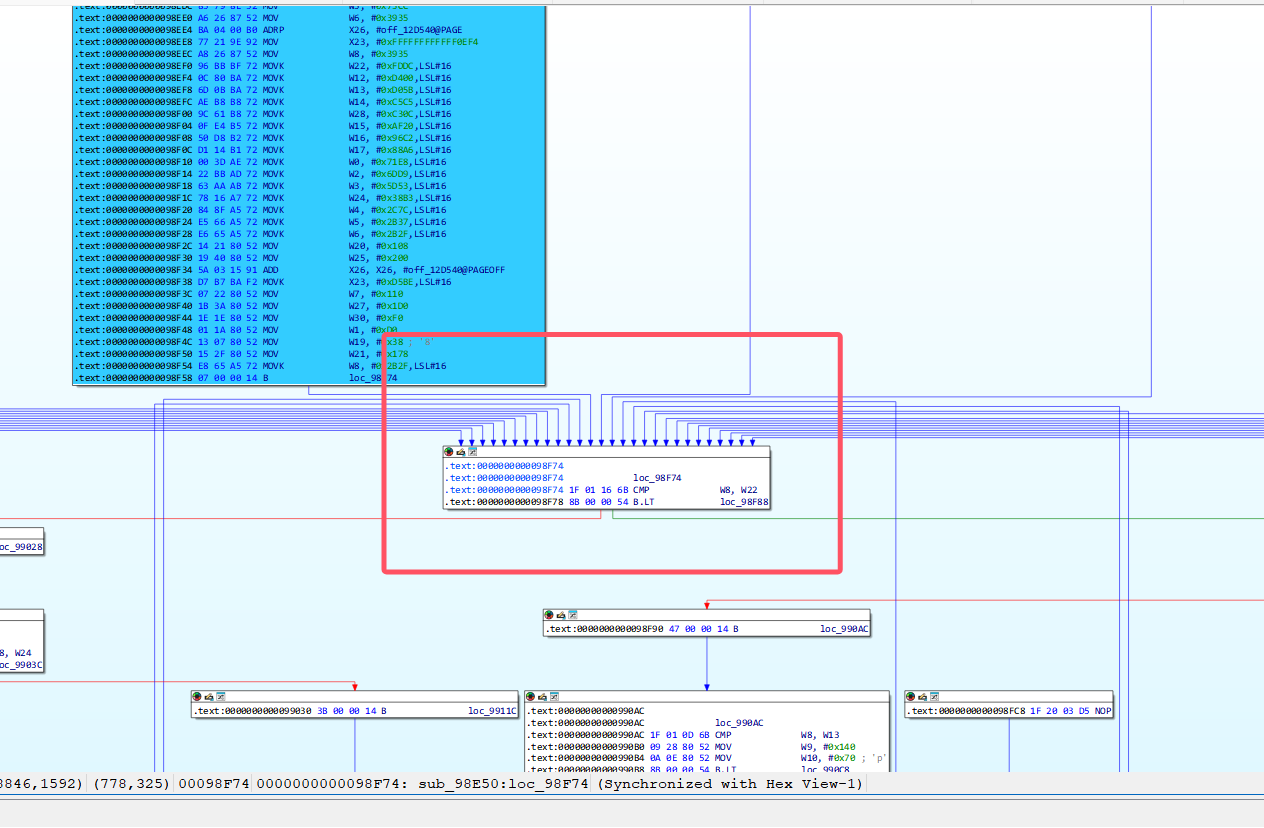
也就是这个地方,序言的后面,许多函数最后经过的地方
寻找汇聚块
对于非标准OLLVM的汇聚块基本就是循环头了,而对于标准FLA而言,汇聚块就是预处理块,我们根据预处理块寻找真实块,现在不就是根据汇聚块寻找真实块吗
#idapython寻找真实块
import idaapi
import idc

target_func=0x98E50#要处理的函数地址
preprocess_block=0x98f74#预处理块的地址
#寻找所有预处理器的前驱
True_Block=[]
Fake_Block=[]
'''FlowChart
Constructor
@param f: A func_t type, use get_func(ea) to get a reference
@param bounds: A tuple of the form (start, end). Used if "f" is None
@param flags: one of the FC_xxxx flags.
这个函数就是返回ida流程图中的所有块中的操作权,比如查看函数起始地址,结束地址等等
'''
f_block=idaapi.FlowChart(idaapi.get_func(target_func),flags=idaapi.FC_PREDS)
for block in f_block:
    #print(block)
    #预处理器的前驱都是真实块
    if block.start_ea==preprocess_block:
        Fake_Block.append((block.start_ea,idc.prev_head(block.end_ea)))
        print("Find True Bolcks\n")
        tbs=block.preds()
        for tb in tbs:
            if(tb.end_ea-tb.start_ea>4):
                True_Block.append((tb.start_ea,idc.prev_head(tb.end_ea)))
        print(True_Block)
    elif not [x for x in block.succs()]:
        print("find ret")
        True_Block.append((block.start_ea,idc.prev_head(block.end_ea)))


print('True block')
for st,ed in True_Block:
    print(f"({hex(st),hex(ed)})\t")
print(True_Block)

# 创建集合以便快速查找
True_Block_Starts = {start for start, end in True_Blocks}
True_Block_Ranges = set(True_Blocks)

def is_true_block(block):
    """检查一个块是否在真实块列表中"""
    # 检查起始地址是否在真实块集合中
    if block.start_ea in True_Block_Starts:
        return True

    # 检查整个块范围是否在真实块集合中
    if (block.start_ea, block.end_ea) in True_Block_Ranges:
        return True

    return False

# 获取目标函数的流程图
f = idaapi.get_func(target_func)
Fake_Blocks = []

# 创建流程图对象
f_block = idaapi.FlowChart(f, flags=idaapi.FC_PREDS)

# 遍历所有基本块
for block in f_block:
# 跳过预处理块
	if block.start_ea == preprocess_block:
	continue

	# 如果不是真实块,则添加到虚假块列表
	if not is_true_block(block):
		Fake_Blocks.append((block.start_ea, block.end_ea))

    # 打印结果
print("虚假块列表:")
print(Fake_Blocks)
print(f"\n共找到 {len(Fake_Blocks)} 个虚假块")

'''
得到:
[(626256, 626520), (626524, 626544), (626672, 626724), (626828, 626856), (626888, 626968), (627000, 627080), (627140, 627180), (627240, 627292), (627352, 627420), (627480, 627508), (627536, 627748), (627820, 627884), (627888, 627936), (628004, 628056), (628200, 628284), (628320, 628344), (628348, 628404), (628612, 628620)]
好像遗漏了一个
[(0x996D0,0x99780)],但是这个没有跳转指令a,所以把他和下一个基本快合并一下看看
[(0x996D0,0x9978C)]
最后:
[(626256, 626520), (626524, 626544), (626672, 626724), (626828, 626856), (626888, 626968), (627000, 627080), (627140, 627180), (627240, 627292), (627352, 627420), (627480, 627508), (627536, 627748), (627820, 627884), (627888, 627936), (628004, 628056), (628200, 628284), (628320, 628344), (628348, 628404), (0x996D0,0x9978C)]

'''
模拟执行:
我差不多得到啦这些跳转的关系:
package com.tengxun2023;


import capstone.Capstone;
import capstone.api.Instruction;
import com.alibaba.fastjson.util.IOUtils;
import com.github.unidbg.AndroidEmulator;
import com.github.unidbg.Module;
import com.github.unidbg.arm.backend.Backend;
import com.github.unidbg.arm.backend.CodeHook;
import com.github.unidbg.arm.backend.UnHook;
import com.github.unidbg.linux.android.AndroidEmulatorBuilder;
import com.github.unidbg.linux.android.AndroidResolver;
import com.github.unidbg.linux.android.dvm.DalvikModule;
import com.github.unidbg.linux.android.dvm.DvmClass;
import com.github.unidbg.linux.android.dvm.VM;
import com.github.unidbg.memory.Memory;
import com.github.unidbg.virtualmodule.android.AndroidModule;


import keystone.Keystone;
import keystone.KeystoneArchitecture;
import keystone.KeystoneEncoded;
import keystone.KeystoneMode;
//import sun.security.tools.PathList;
import unicorn.Arm64Const;
import unicorn.MemHook;

import javax.sound.midi.Patch;
import java.io.File;
import java.io.FileInputStream;
import java.nio.file.Files;
import java.util.ArrayDeque;
import java.util.ArrayList;
import java.util.*;
import java.util.List;
import java.util.Stack;

import static unicorn.UnicornConst.UC_MEM_WRITE_UNMAPPED;

//我要在这个里面写一个不同类型的混淆的去除手段
public class ollvm_anti {

    //初始化环境

    public final AndroidEmulator emulator;
    public final VM vm;
    public final Memory memory;
    public final Module module;
    private Set<Long> executedAddresses = new HashSet<>();
    public String inname="unidbg-android/src/test/java/com/tengxun2023/input.so";
    public String outname="unidbg-android/src/test/java/com/tengxun2023/output.so";
    DvmClass cNative;
    public ollvm_anti(){
        emulator = AndroidEmulatorBuilder.for64Bit().build();
        memory =  emulator.getMemory();
        memory.setLibraryResolver(new AndroidResolver(23));
        emulator.getSyscallHandler().setEnableThreadDispatcher(true);
        vm = emulator.createDalvikVM();
        new AndroidModule(emulator,vm).register(memory);
        DalvikModule dalvikModule = vm.loadLibrary(new File("unidbg-android/src/test/java/com/tengxun2023/libsec2023.so"), true);
        module = dalvikModule.getModule();
        System.out.println(module.base);
        set_hook();
        save_code(0xe4c50,0xE58A0);
        //vm.callJNI_OnLoad(emulator,module);
        module.callFunction(emulator,0x000000000094368,114514);
    }

    public static void main(String[] args){

        ollvm_anti anti_ob=new ollvm_anti();
        anti_ob.destory();


    }


    /** 记录真实块信息 */
    static class BlkInfo {
        long start, end;   // 起止偏移
        int  zf;           // 进入下一块时 NZCV.Z (ZF) 的取值

        BlkInfo(long s, long e, int z) {
            start = s;
            end   = e;
            zf    = z;
        }

        /** 打印成 ((4202234, 4202248), 1) 这样的形式               */
        @Override
        public String toString() {
            // 这里用十进制,如需十六进制可把 %d 换成 %x
            return String.format("((%d, %d), %d)", start, end, zf);
        }
    }


    public List<BlkInfo> save_code(long begin, long end) {
        Map<Long, Long> realBlocks = new HashMap<>();
        realBlocks.put(0x0E5884L, 0x0E58A0L);
        realBlocks.put(937040L, 937344L);
        realBlocks.put(937448L, 937544L);
        realBlocks.put(937592L, 937704L);
        realBlocks.put(937788L, 937860L);
        realBlocks.put(937916L, 937988L);
        realBlocks.put(938016L, 938100L);
        realBlocks.put(938152L, 938192L);
        realBlocks.put(938364L, 938440L);
        realBlocks.put(938440L, 938512L);
        realBlocks.put(938728L, 938756L);
        realBlocks.put(938936L, 938992L);
        realBlocks.put(939348L, 939404L);
        realBlocks.put(939404L, 939600L);
        realBlocks.put(939628L, 939672L);
        realBlocks.put(939672L, 939844L);
        realBlocks.put(939844L, 939896L);
        realBlocks.put(939896L, 939968L);
        realBlocks.put(939968L, 940144L);

        final List<BlkInfo> pathList = new ArrayList<>();
        final Capstone cap = new Capstone(Capstone.CS_ARCH_ARM64, Capstone.CS_MODE_ARM);
        long pass[]={0xE5694,0xE5588,0x94368,0xe55a0 };
        emulator.getBackend().hook_add_new(new CodeHook() {
            @Override
            public void hook(Backend backend, long address, int size, Object user) {
                try{
                    //System.out.printf("    [Trace] Executing at offset: 0x%x\n", address - module.base);
                    if (address == 0x94440 + module.base) {
                        backend.reg_write(Arm64Const.UC_ARM64_REG_X0, 0);
                        System.out.println("修改cmp");
                    }
                    long off = address - module.base;
                    Long blkEnd = realBlocks.get(off);
                    for(int i=0;i<pass.length;i++){
                        if(off==pass[i]){
                            System.out.println("跳过call函数");
                            backend.reg_write(Arm64Const.UC_ARM64_REG_PC, address + 4);
                            return;
                        }
                    }
                    if (blkEnd != null) {                           // 命中真实块
                        /* 读取 ARM64 ZF(NZCV bit 30) */
                        long nzcv = backend.reg_read(Arm64Const.UC_ARM64_REG_NZCV).longValue();
                        int  zf   = (int) ((nzcv >> 30) & 1);
                        System.out.printf("((0x%x,0x%x),%d)",
                                off, blkEnd, zf);
                        /* 顺序追加 */
                        pathList.add(new BlkInfo(off, blkEnd, zf));

                    }
                }
                catch (Exception e){
                    e.printStackTrace();
                }

            }
            @Override
            public void onAttach(UnHook unHook) {
                System.out.println("attach");
            }

            @Override
            public void detach() {

                System.out.println("detach");
            }
        }, module.base + begin, module.base + end, null);

        return pathList;
    }


    void destory(){
        IOUtils.close(emulator);
        System.out.println("destory");
    }

    public void set_hook(){
        emulator.getBackend().hook_add_new(new CodeHook() {
            @Override
            public void hook(Backend backend, long address, int size, Object user) {
                if (address==0x94440+module.base){
                    backend.reg_write(Arm64Const.UC_ARM64_REG_X0,0);
                }
            }

            @Override
            public void onAttach(UnHook unHook) {

            }

            @Override
            public void detach() {

            }
        },0x9443c+ module.base,0x94444+ module.base,null);
    }


}
/*
得到:
((0x98e50,0x98f58),1)((0x996d0,0x9978c),1)跳过call函数
((0x9908c,0x990a8),1)((0x995e8,0x9963c),1)((0x99350,0x99424),1)跳过call函数
((0x991c4,0x991ec),1)((0x99228,0x9925c),1)((0x99318,0x99334),1)((0x98ff0,0x99024),1)((0x995e8,0x9963c),1)((0x99350,0x99424),1)跳过call函数
((0x991c4,0x991ec),1)((0x99228,0x9925c),1)((0x99318,0x99334),1)((0x98ff0,0x99024),1)((0x995e8,0x9963c),1)((0x99350,0x99424),1)跳过call函数
((0x991c4,0x991ec),1)((0x99228,0x9925c),1)((0x99318,0x99334),1)((0x98ff0,0x99024),1)((0x995e8,0x9963c),1)((0x99350,0x99424),1)跳过call函数
((0x991c4,0x991ec),1)((0x99228,0x9925c),1)((0x99318,0x99334),1)((0x98ff0,0x99024),1)((0x995e8,0x9963c),1)((0x99350,0x99424),1)跳过call函数
((0x991c4,0x991ec),1)((0x99228,0x9925c),1)((0x99318,0x99334),1)((0x98ff0,0x99024),1)((0x995e8,0x9963c),1)((0x99350,0x99424),1)跳过call函数     ......
一堆循环
*/
跑不完啊,难搞
patch
错误的,没写出来
import idaapi, ida_bytes, idc
from keystone import Ks, KS_ARCH_ARM64, KS_MODE_LITTLE_ENDIAN

# ────────────── 手动配置 ──────────────
target_func = 0xE4C50                        # 序言块(dispatcher 之前的一跳)
internal_reg   = "xzr"                         # 若某条指令引用到该寄存器就 NOP   (可按需改)

# 真实块、虚假块、执行路径(示例)
tbs = [                                         # (start, end)  — end 为最后 branch 的地址
    (0xE4C50,0xE4D7C),(0xE566C,0xE5694),(0xE5698,0xE5740),
    (0xE5554,0xE5588),(0xE558C,0xE564C),(0xE5870,0xE5880),
    (0xE5884,0xE58A0),(0xe54dc,0xe54ec),(0xe5388,0xe5398),(0xe529c,0xe52ac),(0xe5528,0xe5534),
    (0xe52e8,0xe5300),
]

tb_path = [                                     # ((start,end), ZF)
((0xe4c50,0xe4d7c), 1),
((0xe54dc,0xe54ec), 0),
((0xe566c,0xe5694), 1),
((0xe5698,0xe5740), 1),
((0xe5388,0xe5398), 1),
((0xe529c,0xe52ac), 1),
((0xe5528,0xe5534), 1),
((0xe5554,0xe5588), 1),
((0xe558c,0xe564c), 1),
((0xe52e8,0xe5300), 1),
((0xe5870,0xe5880), 1),
((0xe5884,0xe58a0), 1),
]

fbs = [                                         # filler blocks(示例)
    (0xE54DC,0xE54EC),(0xE529C,0xE52AC),(0xE5528,0xE5534)
]
# ─────────────────────────────────────

# Keystone 初始化
ks = Ks(KS_ARCH_ARM64, KS_MODE_LITTLE_ENDIAN)

# ---------- 帮助函数 ----------
def nop_range(start, end):
    nop = b"\x1F\x20\x03\xD5"
    ea  = start
    while ea < end:
        ida_bytes.patch_bytes(ea, nop)
        ea += 4

def patch_branch(addr, dst, cond=None):
    """
    把 addr 处的指令替换为:
        • B   #dst          (cond=None)
        • B.EQ #dst         (cond='eq')
        • B.NE #dst         (cond='ne')
    """
    if cond:
        asm = f"B.{cond.upper()} #{hex(dst)}"
    else:
        asm = f"B #{hex(dst)}"
    enc, _ = ks.asm(asm, addr)
    ida_bytes.patch_bytes(addr, bytes(enc))

# ---------- 0. 预处理 ----------
# 标记每个真实块是否已经处理完 | 是否是 ret-block
blk_info = { s: {'finish':0, 'ret':0} for (s,_) in tbs }

for start, end in tbs:
    last = idc.prev_head(end)                  # 真·最后指令
    if idc.print_insn_mnem(last).upper() == "RET":
        blk_info[start]['ret'] = 1

# ---------- 1. NOP 所有 filler ----------
for st,ed in fbs:
    nop_range(st,ed)
# ---------- 2. NOP 每个真实块里用不到的指令 ----------
# for start, end in tbs:
#     ea = start
#     while ea < end:
#         mnem = idc.print_insn_mnem(ea).lower()
#         # 简单示例:碰到 cmov / 引用了 “internal_reg” 就 NOP
#         if mnem.startswith("csel") or internal_reg in idc.print_operand(ea, 0):
#             nop_range(ea, ea+4)
#         ea = idc.next_head(ea)

# ---------- 3. patch 跳转 ----------
# 3-1  让序言块直接跳到首个真实块
first_tb_start = tb_path[1][0][0]
patch_branch(tb_path[1][0][0], first_tb_start)    # 无条件 B

# 3-2  顺着 tb_path 逐块修复
for i in range(len(tb_path)-1):
    (cur_s, cur_e), zf = tb_path[i]
    (nxt_s,_),       _ = tb_path[i+1]

    if blk_info[cur_s]['ret'] or blk_info[cur_s]['finish']:
        continue

    cond = "eq" if zf else "ne"                # ZF=1 ➜ 跳 eq
    patch_branch(cur_e, nxt_s, cond)

    blk_info[cur_s]['finish'] = 1
不对啊
希望有去混淆大手子教教,真不会了

 浙公网安备 33010602011771号