
6.Django单表的增删改查
需要的工具
Django版号1.11.1
MySQL版本5.6
PyCharm
第一种方法
创建Django项目名称
django-admin startproject dbcx
创建app名称
python manage.py startapp app01
第二种方法
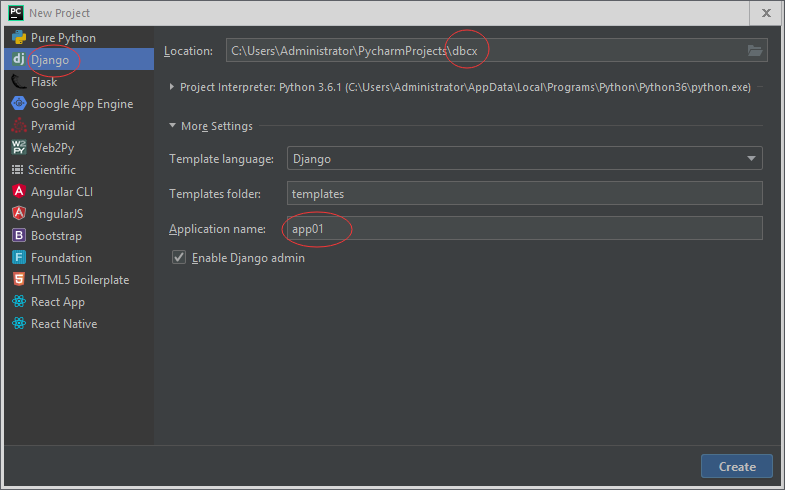
注:一定要在新窗口打开
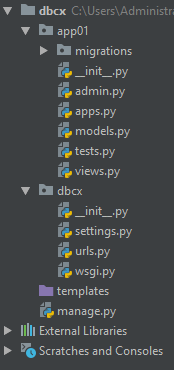
创建后的项目目录
settings.py配置
MySQL的配置
https://www.cnblogs.com/xiaoqianbook/articles/9724356.html
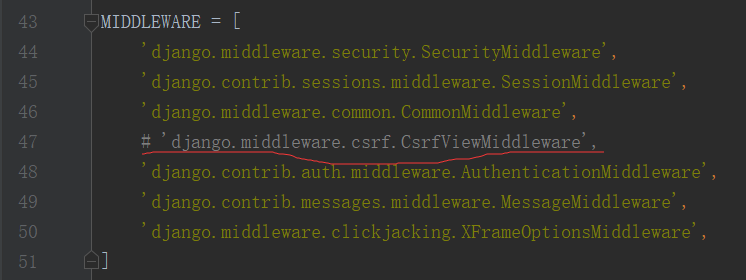
注释安全权限管理
在setting.py最后添加
STATIC_URL = '/static/'
STATICFILES_DIRS = [
    os.path.join(BASE_DIR, 'static')

]
models.py
from django.db import models

# Create your models here.
class Book(models.Model):

    id = models.AutoField(primary_key=True)
    title = models.CharField(max_length=32,unique=True)
    price = models.DecimalField(max_digits=16,decimal_places=2)
    pub_time = models.DateField()
    publish = models.CharField(max_length=20)

    def __str__(self):
        return self.title
views.py
from django.shortcuts import render, HttpResponse, redirect

# Create your views here.
from django.urls import reverse
from app01 import models

#展示
def books(request):
    all_books = models.Book.objects.all()

    print(all_books)
    return render(request, 'book_list.html', {'all_books': all_books})

#添加
def add_book(request):
    if request.method == 'GET':
        return render(request, 'add_book.html')
    else:
        title = request.POST.get('book_name')
        price = request.POST.get('book_price')
        time = request.POST.get('book_time')
        publish = request.POST.get('book_publish')

        models.Book.objects.create(title=title, price=price, pub_time=time, publish=publish)

        return redirect(reverse('book_list'))

#删除
def delete_book(request,nid):

    models.Book.objects.filter(id=nid).delete()
    return redirect(reverse('book_list'))

#编辑
def edit_book(request,nid):
    if request.method == "GET":

        obj = models.Book.objects.filter(id=nid).first()
        return render(request, 'edit_book.html', {'obj': obj})
    else:

        title = request.POST.get('book_name')
        price = request.POST.get('book_price')
        time = request.POST.get('book_time')
        publish = request.POST.get('book_publish')
        models.Book.objects.filter(id=nid).update(title=title, price=price, pub_time=time, publish=publish)

        return redirect(reverse('book_list'))
urls.py
from django.conf.urls import url
from django.contrib import admin
from app01 import views
urlpatterns = [
    # url(r'^admin/', admin.site.urls),
    url(r'^book_list/',views.books,name='book_list'),
    url(r'^add_book/',views.add_book,name='add_book'),
    url(r'^delete_book/(\d+)/',views.delete_book,name='delete_book'),
    url(r'^edit_book/(\d+)/',views.edit_book,name='edit_book'),
]
在templates文件夹中创建html文件
book_list


{% load static %}
<!DOCTYPE html>
<html lang="zh-CN">
<head>
    <meta charset="utf-8">
    <meta http-equiv="X-UA-Compatible" content="IE=edge">
    <meta name="viewport" content="width=device-width, initial-scale=1">
    <!-- 上述3个meta标签*必须*放在最前面,任何其他内容都*必须*跟随其后! -->
    <title>Bootstrap 101 Template</title>
    <link rel="stylesheet" href="https://cdn.jsdelivr.net/npm/bootstrap@3.3.7/dist/css/bootstrap.min.css"
          integrity="sha384-BVYiiSIFeK1dGmJRAkycuHAHRg32OmUcww7on3RYdg4Va+PmSTsz/K68vbdEjh4u" crossorigin="anonymous">
{#        <link rel="stylesheet" href="{% static 'bootstrap/css/bootstrap.css' %} "/>#}
    <style>
        .d1 {
            margin-top: 100px;
        }

        th, td {
            height: 60px;
            line-height: 60px;
            text-align: center;
        }
    </style>

</head>
<body>


<div class="container">
    <div class="d1"></div>
    <div class="row">
        <div class="col-md-6 col-md-offset-3">
            <a class="btn btn-success" href="{% url 'add_book' %}">添加书籍</a>

            <table class="table table-bordered table-striped table-hover">
                <thead>
                <tr>

                    <th class="text-center" style="height: 40px;line-height: 40px;">记录id值</th>
                    <th class="text-center" style="height: 40px;line-height: 40px;">id</th>
                    <th class="text-center" style="height: 40px;line-height: 40px;">书名</th>
                    <th class="text-center" style="height: 40px;line-height: 40px;">价钱</th>
                    <th class="text-center" style="height: 40px;line-height: 40px;">出版时间</th>
                    <th class="text-center" style="height: 40px;line-height: 40px;">出版社</th>
                    <th class="text-center" style="height: 40px;line-height: 40px;">操作</th>
                </tr>
                </thead>
                <tbody>
                {% for one_book in all_books %}

                    <tr>
                        <td class="text-center" style="height: 40px;line-height: 40px;">{{ forloop.counter }}</td>
                        <td class="text-center" style="height: 40px;line-height: 40px;">{{ one_book.id }}</td>
                        <td class="text-center" style="height: 40px;line-height: 40px;">{{ one_book.title }}</td>
                        <td class="text-center" style="height: 40px;line-height: 40px;">{{ one_book.price }}</td>
                        <td class="text-center"
                            style="height: 40px;line-height: 40px;">{{ one_book.pub_time|date:'Y-m-d' }}</td>
                        <td class="text-center" style="height: 40px;line-height: 40px;">{{ one_book.publish }}</td>
                        <td class="text-center" style="height: 40px;line-height: 40px;">
                            <a class="btn btn-warning" href="{% url 'edit_book' one_book.id %}">编辑</a>
                            <a class="btn btn-danger" href="{% url 'delete_book' one_book.id%}">删除</a></td>
                    </tr>

                {% endfor %}


                </tbody>

            </table>

        </div>

    </div>


</div>


</body>
</html>
add_book.html
{% load static %}
<!DOCTYPE html>
<html lang="en">
<head>
    <meta charset="UTF-8">
    <title>Title</title>
    <link rel="stylesheet" href="https://cdn.jsdelivr.net/npm/bootstrap@3.3.7/dist/css/bootstrap.min.css"
          integrity="sha384-BVYiiSIFeK1dGmJRAkycuHAHRg32OmUcww7on3RYdg4Va+PmSTsz/K68vbdEjh4u" crossorigin="anonymous">
{#    <link rel="stylesheet" href="{% static 'bootstrap/css/bootstrap.css' %}">#}
</head>
<body>
<div class="container">
    <div class=row>
        <div style="margin-top: 100px">
            <div class="col-md-6 col-md-offset-3">
                <form class="form-horizontal" action="{% url 'add_book' %}" method="post">
                    {% csrf_token %}
                    <div class="form-group">
                        <label for="book_name" class="col-sm-2 control-label">书名</label>
                        <div class="col-sm-10">
                            <input type="text" class="form-control" id="book_name" placeholder="书名" name="book_name">
                        </div>
                    </div>
                    <div class="form-group">
                        <label for="book_price" class="col-sm-2 control-label">价格</label>
                        <div class="col-sm-10">
                            <input type="text" class="form-control" id="book_price" placeholder="价格" name="book_price">
                        </div>
                    </div>
                    <div class="form-group">
                        <label for="book_time" class="col-sm-2 control-label">出版时间</label>
                        <div class="col-sm-10">
                            <input type="date" class="form-control" id="book_time" placeholder="出版时间" name="book_time">
                        </div>
                    </div>
                    <div class="form-group">
                        <label for="book_publish" class="col-sm-2 control-label">出版社</label>
                        <div class="col-sm-10">
                            <input type="text" class="form-control" id="book_publish" placeholder="出版社"
                                   name="book_publish">
                        </div>
                    </div>

                    <div class="form-group">
                        <div class="col-sm-offset-2 col-sm-10">
                            <input type="submit" value="保存" class="btn  btn-primary pull-right">

                        </div>
                    </div>
                </form>
            </div>
        </div>
    </div>
</div>
</body>
</html>
edit_book.html
{% load static %}
<!DOCTYPE html>
<html lang="en">
<head>
    <meta charset="UTF-8">
    <title>Title</title>
    <link rel="stylesheet" href="https://cdn.jsdelivr.net/npm/bootstrap@3.3.7/dist/css/bootstrap.min.css"
          integrity="sha384-BVYiiSIFeK1dGmJRAkycuHAHRg32OmUcww7on3RYdg4Va+PmSTsz/K68vbdEjh4u" crossorigin="anonymous">
{#<link rel="stylesheet" href="{% static 'bootstrap/css/bootstrap.css' %} "/>#}
</head>
<body>
<div class="container">
    <div class=row>
        <div style="margin-top: 100px">
            <div class="col-md-6 col-md-offset-3">
                <form class="form-horizontal" action="{% url 'edit_book' obj.id %}" method="post">
                    {% csrf_token %}
                    <div class="form-group">
                        <label for="book_name" class="col-sm-2 control-label">书名</label>
                        <div class="col-sm-10">
                            <input type="text" class="form-control" id="book_name" value="{{ obj.title }}" name="book_name">
                        </div>
                    </div>
                    <div class="form-group">
                        <label for="book_price" class="col-sm-2 control-label">价格</label>
                        <div class="col-sm-10">
                            <input type="text" class="form-control" id="book_price" value="{{ obj.price }}" name="book_price">
                        </div>
                    </div>
                    <div class="form-group">
                        <label for="book_time" class="col-sm-2 control-label">出版时间</label>
                        <div class="col-sm-10">
                            <input type="date" class="form-control" id="book_time" value="{{ obj.pub_time|date:'Y-m-d' }}" name="book_time">
                        </div>
                    </div>
                    <div class="form-group">
                        <label for="book_publish" class="col-sm-2 control-label">出版社</label>
                        <div class="col-sm-10">
                            <input type="text" class="form-control" id="book_publish" value="{{ obj.publish }}"
                                   name="book_publish">
                        </div>
                    </div>

                    <div class="form-group">
                        <div class="col-sm-offset-2 col-sm-10">
                            <input type="submit" value="保存" class="btn  btn-primary pull-right">

                        </div>
                    </div>
                </form>
            </div>
        </div>
    </div>
</div>
</body>
</html>
在数据库中创建数据库dbcx数据库在命令行中进行
登录数据库语句
mysql -uroot -proot;
创建数据库语句
create database dbxc;
创建数据库数据在PyCharm中的命令行运行,依次运行以下代码
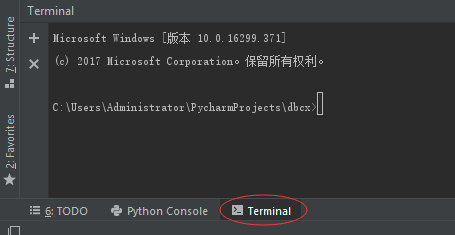
python manage.py makemigrations #记录models的变更记录
python manage.py migrate #把变更记录同步到数据库
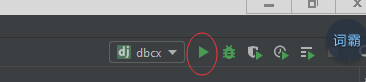
然后运行PyCharm在右上角
出现后点击http://10.127.0.0.1:8000/
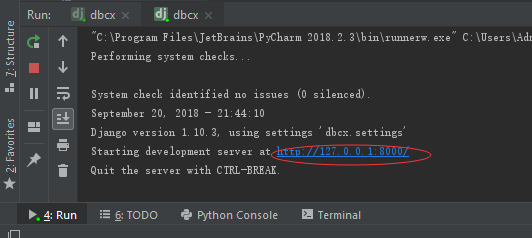
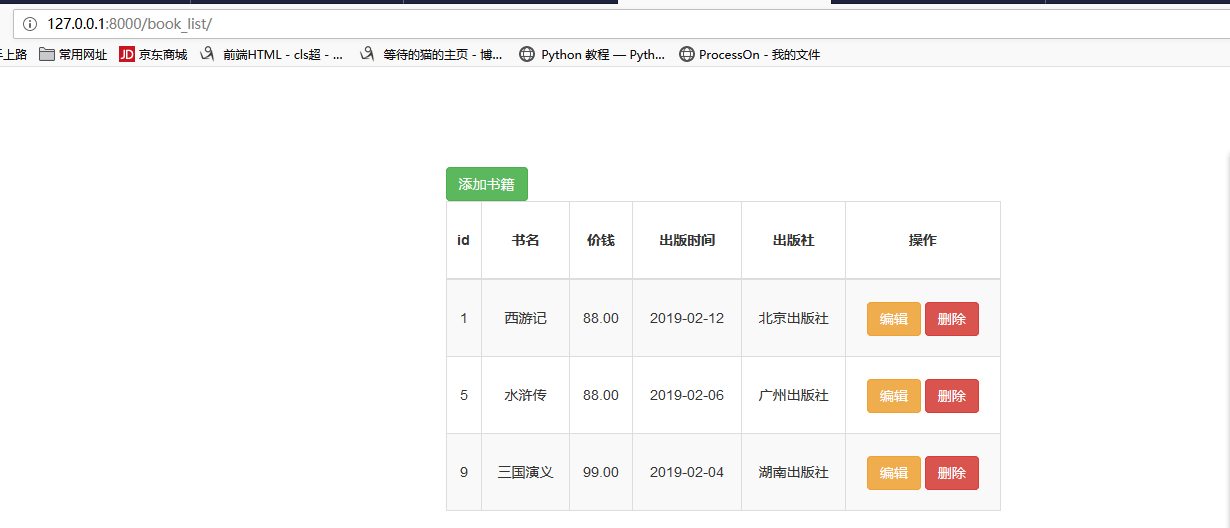
进入http://127.0.0.1:8000/book_list/就可以对数据的增删改查了

 浙公网安备 33010602011771号