一个简单的命令行闪卡式B站稍后再看整理工具
不得不说,大模型真的方便,自己一个懒得编程的人在大模型加持下也能写个小工具方便自己的生活了。
2026年01月31日
这次写的是一个B站稍后再看闪卡工具,功能包括:
- 稍后再看洗牌,类似扑克牌洗牌方法,随机抽取20个稍后再看视频重新添加到列表头部。
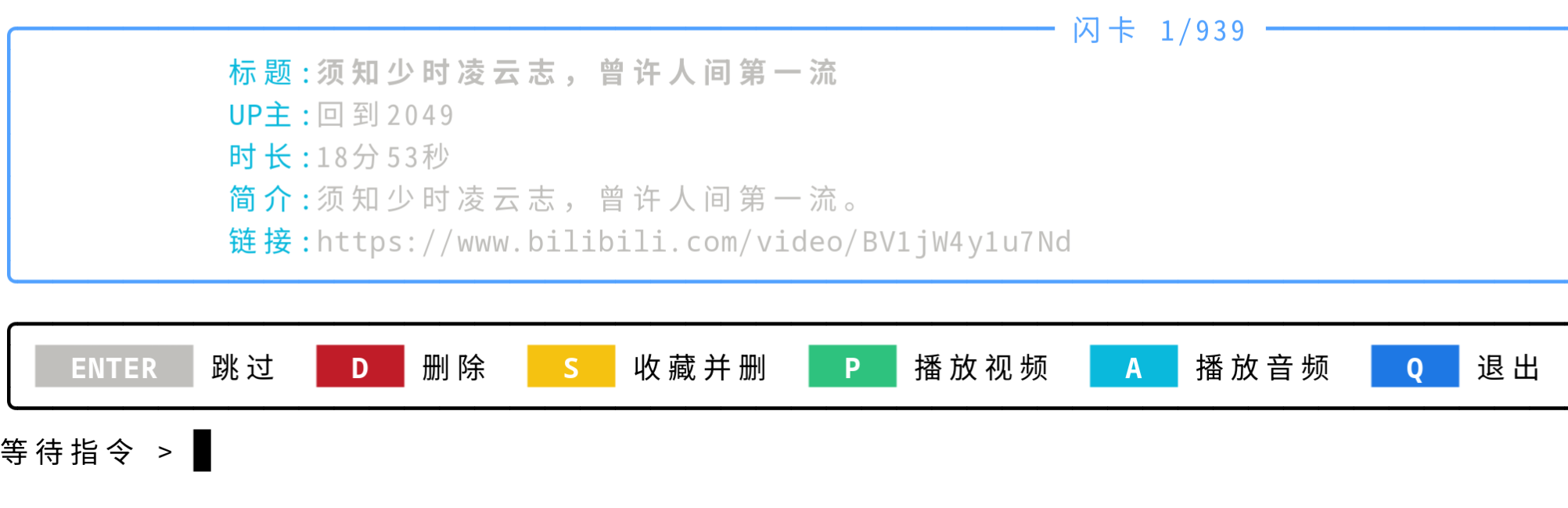
- 以闪卡的形式随机、正序或倒序展示B站视频信息,包括标题、作者、链接、时长、简介。用户可以选择删除视频、收藏并删除(删除指的是移出稍后再看列表)、播放视频、播放音频、跳过、退出。
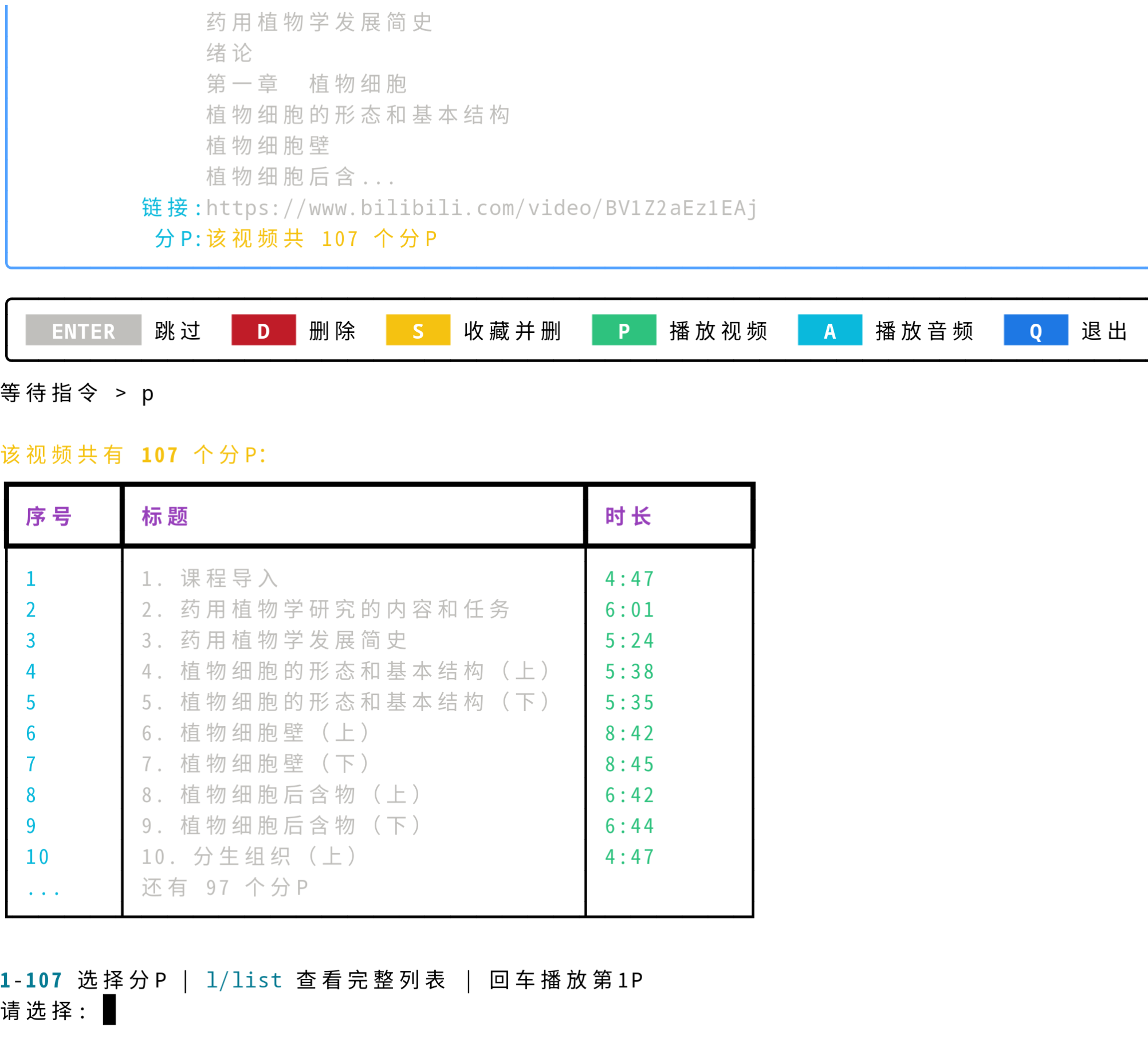
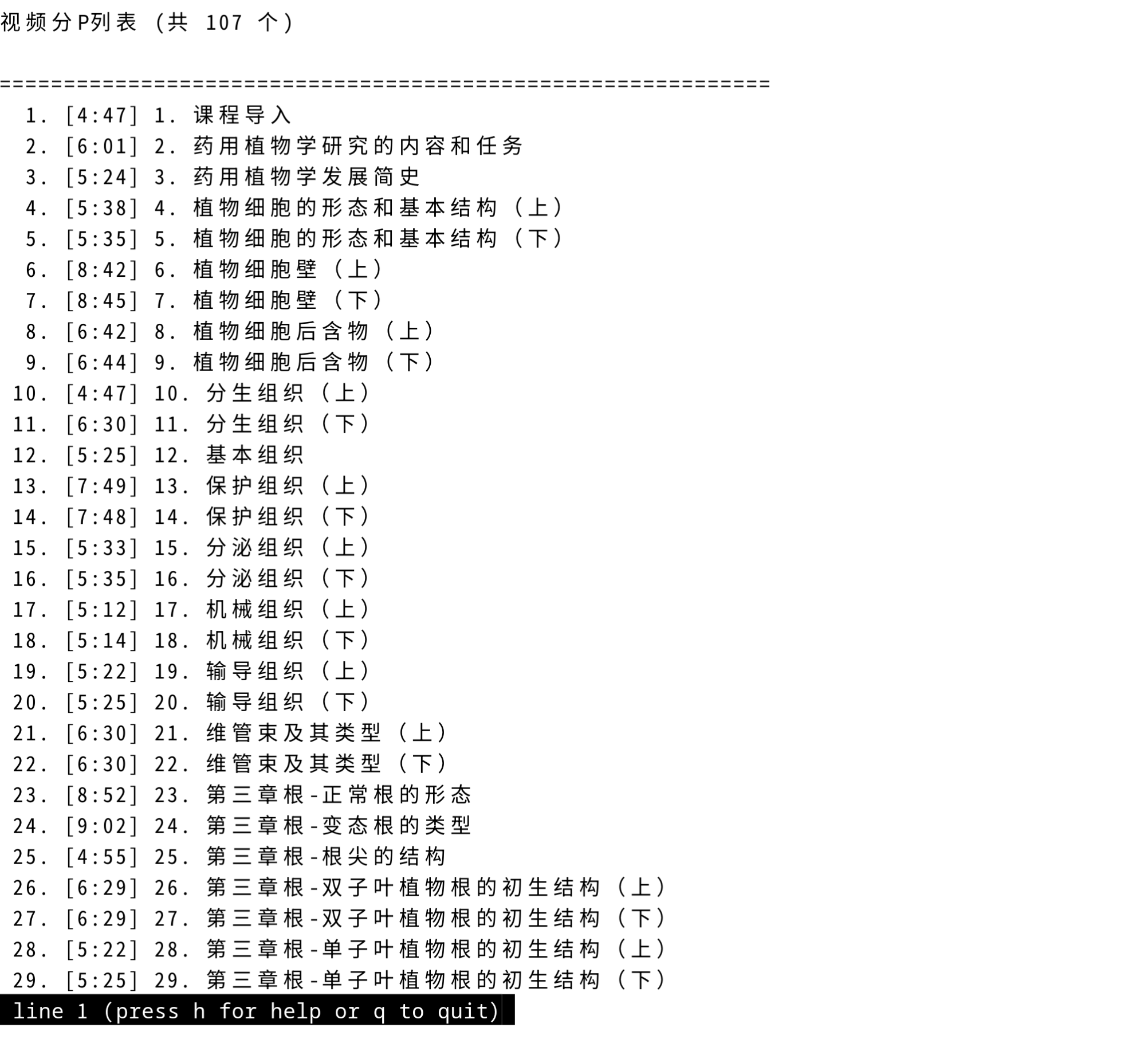
- 选择播放的时候会跳出MPV播放器进行播放,对于分集视频会提示选择哪个分P,如果分P太多会进入系统分页器展示所有分P。
做这个小工具的目的是自己用B站的时候总是将无数视频添加到稍后再看,越积越多。而且,稍后再看和视频推荐、动态视频形成注意力竞争,造成自己处于信息过载的状态。所以,自己把手机上的B站卸载了,以稍后再看为唯一播放列表,可以往列表中添加内容,但是看视频和听音频都从稍后再看点开。同时,自己也要尽量屏蔽B站网页中的信息,只需要看或听视频就好了。
工具用Python实现,需要requests、browser_cookie3、rich库,需要安装mpv视频播放器。代码读取本地保存的浏览器数据库获取自己登录的B站cookie,通过B站API接口获取自己的稍后再看列表和收藏夹ID,用MPV进行播放(MPV会自动调用yt-dlp进行取流)。
B站接口通过Bilibili-API-Collect这个项目查询。
测试环境:openSUSE Tumbleweed Python3.13、Fedora 43 Python3.14 。依赖库版本:
cat pyproject.toml
[project]
name = "bili-watchlater-proj"
version = "0.1.0"
description = "Add your description here"
readme = "README.md"
requires-python = ">=3.14"
dependencies = [
    "browser-cookie3>=0.20.1",
    "requests>=2.32.5",
    "rich>=14.3.1",
]
效果如下:

代码如下,使用Gemini和Kimi完成。
import time
import random
import browser_cookie3
import requests
import subprocess
import re
import os
from rich.console import Console
from rich.panel import Panel
from rich.table import Table
from rich.live import Live
from rich.progress import Progress, SpinnerColumn, TextColumn, BarColumn, TaskProgressColumn
console = Console()
class BiliMpvPlayer:
"""MPV播放器封装类"""
def __init__(self):
self.mpv_path = self._find_mpv()
self.current_process = None
def _find_mpv(self):
"""查找MPV可执行文件路径"""
# Windows常见路径
possible_paths = [
"mpv",
"mpv.exe",
r"C:\\Program Files\\mpv\\mpv.exe",
r"C:\\ProgramData\\chocolatey\\bin\\mpv.exe",
r"C:\\Users\\%USERNAME%\\scoop\\shims\\mpv.exe",
"/usr/bin/mpv",
"/usr/local/bin/mpv",
"/opt/homebrew/bin/mpv"
]
for path in possible_paths:
expanded_path = os.path.expandvars(path)
if os.path.isfile(expanded_path) or self._command_exists(path):
return path if path in ["mpv", "mpv.exe"] else expanded_path
return None
def _command_exists(self, cmd):
"""检查命令是否存在"""
try:
subprocess.run([cmd, "--version"], capture_output=True, check=False)
return True
except:
return False
def is_available(self):
"""检查MPV是否可用"""
return self.mpv_path is not None
def get_video_url(self, bvid, cid=None, page=1):
"""
通过B站API获取视频真实播放地址
这里使用第三方解析或官方API
"""
# 方法1: 使用 yt-dlp 获取直链(推荐,支持番剧和普通视频)
try:
import yt_dlp
url = f"https://www.bilibili.com/video/{bvid}"
if page > 1:
url += f"?p={page}"
ydl_opts = {
'format': 'best[height<=1080]', # 限制最高1080p避免卡顿
'quiet': True,
'no_warnings': True,
}
with yt_dlp.YoutubeDL(ydl_opts) as ydl:
info = ydl.extract_info(url, download=False)
if info and 'url' in info:
return info['url'], info.get('title', 'Unknown')
elif info and 'formats' in info and len(info['formats']) > 0:
# 找最佳格式
best_format = max(info['formats'],
key=lambda x: x.get('height', 0) if x.get('height') else 0)
return best_format['url'], info.get('title', 'Unknown')
except ImportError:
console.print("[yellow]提示: 安装 yt-dlp 可获得更好的播放体验 (pip install yt-dlp)[/yellow]")
except Exception as e:
console.print(f"[yellow]获取视频链接失败: {e}[/yellow]")
# 方法2: 回退到直接播放B站页面(MPV内置支持)
return f"https://www.bilibili.com/video/{bvid}" if page == 1 else f"https://www.bilibili.com/video/{bvid}?p={page}", None
def play(self, bvid, page=1, audio_only=False, title=None):
"""
播放视频或音频
Args:
bvid: 视频BV号
page: 分P序号
audio_only: 是否仅播放音频
title: 视频标题(用于显示)
Returns:
bool: 播放是否成功启动
"""
if not self.is_available():
console.print("[red]错误: 未找到MPV播放器,请先安装MPV[/red]")
console.print("[dim]下载地址: https://mpv.io/installation/[/dim]")
return False
# 获取真实播放地址
video_url, extracted_title = self.get_video_url(bvid, page=page)
display_title = title or extracted_title or bvid
# 构建MPV参数
cmd = [self.mpv_path]
if audio_only:
cmd.extend(["--no-video", "--force-window=immediate"])
console.print(f"[cyan]🎵 正在播放音频: {display_title[:30]}...[/cyan]")
else:
cmd.extend(["--force-window=immediate",])
console.print(f"[cyan]▶️ 正在播放: {display_title[:30]}...[/cyan]")
# 添加常用优化参数
cmd.extend([
"--cache=yes",
"--cache-secs=30",
"--demuxer-max-bytes=50M",
"--demuxer-max-back-bytes=25M",
"--geometry=50%:50%",
])
# 添加HTTP headers模拟浏览器
cmd.extend([
"--http-header-fields-append=Referer: https://www.bilibili.com",
"--user-agent=Mozilla/5.0 (Windows NT 10.0; Win64; x64) AppleWebKit/537.36"
])
# 添加URL
cmd.append(video_url)
try:
# 启动MPV(非阻塞模式)
if os.name == 'nt': # Windows
self.current_process = subprocess.Popen(
cmd,
creationflags=subprocess.CREATE_NEW_CONSOLE
)
else: # Linux/Mac
self.current_process = subprocess.Popen(
cmd,
stdout=subprocess.DEVNULL,
stderr=subprocess.DEVNULL
)
console.print(f"[green]MPV已启动 (PID: {self.current_process.pid})[/green]")
return True
except Exception as e:
console.print(f"[red]启动MPV失败: {e}[/red]")
return False
def wait_for_close(self):
"""等待MPV播放结束(阻塞)"""
if self.current_process:
try:
self.current_process.wait()
except:
pass
finally:
self.current_process = None
def is_playing(self):
"""检查是否正在播放"""
if self.current_process:
return self.current_process.poll() is None
return False
def stop(self):
"""强制停止播放"""
if self.current_process and self.is_playing():
try:
self.current_process.terminate()
self.current_process.wait(timeout=2)
except:
try:
self.current_process.kill()
except:
pass
finally:
self.current_process = None
class BiliLaterManager:
def __init__(self):
self.cookies = self.load_any_bili_cookie()
if not self.cookies:
raise Exception("无法从浏览器获取 Cookie,请确保已在浏览器登录 B 站并关闭浏览器后再试。")
# 提取 CSRF (bili_jct),POST请求必须
self.csrf = next((c.value for c in self.cookies if c.name == 'bili_jct'), None)
self.session = requests.Session()
self.session.cookies = self.cookies
# 必须模拟真实的浏览器头部
self.session.headers.update({
"User-Agent": "Mozilla/5.0 (Windows NT 10.0; Win64; x64) AppleWebKit/537.36 "+\
"(KHTML, like Gecko) Chrome/120.0.0.0 Safari/537.36",
"Referer": "https://www.bilibili.com/watchlater/",
"Origin": "https://www.bilibili.com"
})
self.base_url = "https://api.bilibili.com/x/v2/history/toview"
self.fav_id = self.get_default_fav_id()
if not self.fav_id:
console.print("[yellow]警告:未能自动获取默认收藏夹ID,收藏功能可能受限[/yellow]")
# 初始化MPV播放器
self.player = BiliMpvPlayer()
if self.player.is_available():
console.print("[green]✓ MPV播放器已就绪[/green]")
else:
console.print("[yellow]⚠ 未检测到MPV播放器,播放功能将不可用[/yellow]")
def load_any_bili_cookie(self):
"""读取浏览器的cookie数据"""
browsers = [browser_cookie3.chrome, browser_cookie3.edge, browser_cookie3.firefox]
for browser_fn in browsers:
try:
cj = browser_fn(domain_name='.bilibili.com')
if 'SESSDATA' in str(cj): return cj
except: continue
return None
def _get_my_uid(self):
"""获取当前登录用户的 UID"""
url = "https://api.bilibili.com/x/web-interface/nav"
res = self.session.get(url).json()
if res['code'] == 0:
return res['data']['mid']
raise Exception("获取 UID 失败,请检查登录状态")
def get_default_fav_id(self):
"""获取默认收藏夹的 media_id"""
uid = self._get_my_uid()
url = f"https://api.bilibili.com/x/v3/fav/folder/created/list-all?up_mid={uid}"
res = self.session.get(url).json()
if res['code'] == 0:
# 遍历收藏夹,寻找属性为"默认"的(通常 attr=1 或名字叫默认收藏夹)
for folder in res['data']['list']:
# 0 为公开收藏夹,也可以根据名字判断,但默认收藏夹通常是列表第一个
# 简单处理:取第一个或名字匹配的
return folder['id']
return None
def collect_video(self, aid, fav_id):
"""将视频添加到指定收藏夹"""
url = "https://api.bilibili.com/x/v3/fav/resource/deal"
# type=2 表示视频
data = {
'rid': aid,
'type': '2',
'add_media_ids': fav_id,
'csrf': self.csrf
}
res = self.session.post(url, data=data).json()
return res
def get_list(self):
"""获取稍后再看完整列表"""
res = self.session.get(self.base_url).json()
if res['code'] != 0:
console.print(f"[red]获取列表失败: {res['message']}[/red]")
return []
return res['data']['list']
def get_video_pages(self, bvid):
"""
获取视频分P信息
返回: [(page, title, duration), ...] 或空列表表示无分P
"""
url = f"https://api.bilibili.com/x/web-interface/view?bvid={bvid}"
try:
res = self.session.get(url).json()
if res['code'] == 0:
data = res['data']
pages = data.get('pages', [])
if len(pages) <= 1:
return [] # 只有1P或没有分P
result = []
for p in pages:
result.append((
p['page'],
p['part'] or f"P{p['page']}",
p['duration']
))
return result
except Exception as e:
console.print(f"[yellow]获取分P信息失败: {e}[/yellow]")
return []
def delete_video(self, aid):
"""从稍后再看删除"""
url = "https://api.bilibili.com/x/v2/history/toview/del"
data = {'aid': aid, 'csrf': self.csrf}
return self.session.post(url, data=data).json()
def add_to_view(self, bvid):
"""添加到稍后再看 (用于乱序逻辑:删了再加)"""
url = "https://api.bilibili.com/x/v2/history/toview/add"
data = {'bvid': bvid, 'csrf': self.csrf}
return self.session.post(url, data=data).json()
def shuffle_list_remote(self):
"""物理洗牌:随机抽几个视频重新置顶,并显示进度条"""
v_list = self.get_list()
total_v = len(v_list)
if total_v < 10:
console.print("[yellow]视频太少(不足10个),没必要进行服务器乱序。[/yellow]")
return
# 设定洗牌强度:随机抽取 10% - 20% 的视频重新排列,最多不超过 20 个
sample_size = min(max(int(total_v * 0.15), 5), 20)
targets = random.sample(v_list, sample_size)
console.print(f"[bold cyan]开始对 {total_v} 个视频进行物理洗牌 (抽取 {sample_size} 个)...[/bold cyan]")
# 使用 Rich 的 Progress 构造进度条
with Progress(
SpinnerColumn(), # 左侧等待动画
TextColumn("[progress.description]{task.description}"),
BarColumn(), # 进度条本体
TaskProgressColumn(), # 百分比显示
console=console
) as progress:
task = progress.add_task("[cyan]洗牌中...", total=sample_size)
for v in targets:
# 逻辑:先删再加,视频会跳到"稍后再看"的最顶端
try:
self.delete_video(v['aid'])
# 稍微停顿,避免触发频率过快的风控
time.sleep(0.3)
self.add_to_view(v['bvid'])
# 更新进度条
progress.update(task, advance=1, description=f"[cyan]正在移动: {v['title'][:15]}...")
time.sleep(0.4)
except Exception as e:
console.print(f"[red]操作视频 {v['title']} 时出错: {e}[/red]")
console.print("[green]✨ 洗牌完成!云端顺序已更新。[/green]\\n")
def _show_action_panel(self, video_info, show_playback_options=True):
"""
显示操作面板
返回可用的操作键映射
"""
actions = []
# 基础操作
actions.append(("Enter", "跳过", "white"))
actions.append(("D", "删除", "red"))
actions.append(("S", "收藏并删", "yellow"))
# 播放相关操作(如果MPV可用)
if show_playback_options and self.player.is_available():
actions.append(("P", "播放视频", "green"))
actions.append(("A", "播放音频", "cyan"))
actions.append(("Q", "退出", "blue"))
# 构建显示字符串
action_parts = []
for key, desc, color in actions:
action_parts.append(
f"[bold reverse {color}] {key.upper()} [/bold reverse {color}] [dim]{desc}[/dim]"
)
return " ".join(action_parts), {a[0].lower(): a[1] for a in actions}
def _handle_page_selection(self, bvid, title):
"""
处理分P选择,支持分页器查看完整列表
"""
pages = self.get_video_pages(bvid)
if not pages:
return 1
total_pages = len(pages)
while True: # 循环,允许查看分页器后重新选择
# 显示分P列表(简要版)
console.print(f"\n[yellow]该视频共有 {total_pages} 个分P:[/yellow]")
table = Table(show_header=True, header_style="bold magenta")
table.add_column("序号", style="cyan", width=6)
table.add_column("标题", style="white")
table.add_column("时长", style="green", width=10)
# 显示前10P
for page_num, page_title, duration in pages[:10]:
mins, secs = divmod(duration, 60)
table.add_row(str(page_num), page_title[:40], f"{mins}:{secs:02d}")
if total_pages > 10:
table.add_row("...", f"还有 {total_pages-10} 个分P", "")
console.print(table)
# 构建提示信息
hints = [f"1-{total_pages} 选择分P"]
if total_pages > 10:
hints.append("[cyan]l/list[/cyan] 查看完整列表")
hints.append("回车播放第1P")
console.print(f"\n[dim]{' | '.join(hints)}[/dim]")
try:
choice = input("请选择: ").strip().lower()
# 处理查看完整列表指令
if choice in ('l', 'list') and total_pages > 10:
self._show_full_page_list(pages)
# 显示完后继续循环,让用户选择
continue
# 处理数字选择
if choice == "":
return 1
if choice.isdigit():
page_num = int(choice)
if 1 <= page_num <= total_pages:
return page_num
else:
console.print(f"[red]请输入 1-{total_pages} 之间的数字[/red]")
input("按回车继续...")
continue
console.print("[red]无效输入[/red]")
input("按回车继续...")
except KeyboardInterrupt:
console.print("\n[yellow]已取消[/yellow]")
return 1
except Exception as e:
console.print(f"[red]错误: {e}[/red]")
return 1
def _show_full_page_list(self, pages):
"""
使用系统分页器显示完整分P列表
"""
# 构建完整列表文本
lines = []
lines.append(f"视频分P列表 (共 {len(pages)} 个)\n")
lines.append("=" * 60)
for page_num, page_title, duration in pages:
mins, secs = divmod(duration, 60)
duration_str = f"{mins}:{secs:02d}"
lines.append(f"{page_num:>3}. [{duration_str}] {page_title}")
content = "\n".join(lines)
# 使用系统分页器
console.print("\n[yellow]正在打开完整列表(按 q 退出分页器)...[/yellow]")
with console.pager():
console.print(content)
def start_flashcards(self, order="random"):
"""启动闪卡"""
v_list = self.get_list()
if not v_list: return
if order == "random": random.shuffle(v_list)
elif order == "reverse": v_list.reverse()
total = len(v_list)
i = 0
while i < total:
v = v_list[i]
console.clear()
# 构造闪卡界面
table = Table.grid(expand=True)
table.add_column(style="cyan", justify="right")
table.add_column(style="white")
table.add_row("标题: ", f"[bold]{v['title']}[/bold]")
table.add_row("UP主: ", v['owner']['name'])
table.add_row("时长: ", f"{v['duration'] // 60}分{v['duration'] % 60}秒")
table.add_row("简介: ", (v['desc'][:100] + '...') if len(v['desc']) > 100 else v['desc'])
table.add_row("链接: ", f"https://www.bilibili.com/video/{v['bvid']}")
# 检查是否有分P
pages = self.get_video_pages(v['bvid'])
if pages:
table.add_row("分P: ", f"[yellow]该视频共 {len(pages)} 个分P[/yellow]")
console.print(Panel(table, title=f"闪卡 {i+1}/{total}", border_style="bright_blue"))
# 显示操作面板
action_hint, action_map = self._show_action_panel(v, show_playback_options=True)
console.print(Panel(action_hint, border_style="dim"))
# 获取输入
user_input = input("等待指令 > ").lower().strip()
if user_input == 'q':
console.print("[bold]整理结束,再见![/bold]")
break
elif user_input == 'd':
res = self.delete_video(v['aid'])
if res.get('code') == 0:
console.print("[bold red]已移除 ✓[/bold red]")
i += 1 # 移动到下一个
else:
console.print(f"[red]移除失败: {res.get('message')}[/red]")
time.sleep(0.5)
elif user_input == 's':
if not self.fav_id:
console.print("[red]错误:无法获取收藏夹 ID[/red]")
else:
fav_res = self.collect_video(v['aid'], self.fav_id)
if fav_res.get('code') == 0:
self.delete_video(v['aid'])
console.print(f"[bold yellow]已收藏至默认收藏夹并移除 ✓[/bold yellow]")
i += 1 # 移动到下一个
else:
console.print(f"[red]收藏失败: {fav_res.get('message')}[/red]")
time.sleep(0.5)
elif user_input in ['p', 'a'] and self.player.is_available():
# 播放视频或音频
is_audio = (user_input == 'a')
# 检查是否需要选择分P
selected_page = 1
if pages: # 如果有分P,询问选择
selected_page = self._handle_page_selection(v['bvid'], v['title'])
# 启动播放
success = self.player.play(
v['bvid'],
page=selected_page,
audio_only=is_audio,
title=v['title']
)
if success:
# 等待播放结束
console.print("[dim]MPV正在播放,关闭播放器后返回...[/dim]")
self.player.wait_for_close()
console.print("[green]播放结束,返回整理界面[/green]")
time.sleep(0.5)
else:
# 跳过(Enter或其他未识别输入)
i += 1
continue
if __name__ == "__main__":
try:
manager = BiliLaterManager()
# 1. 询问是否需要乱序
if input("是否需要对 B 站云端列表进行物理洗牌?(y/n): ") == 'y':
manager.shuffle_list_remote()
# 2. 开始闪卡整理
mode = input("请选择整理顺序 (1:随机 / 2:正序 / 3:倒序): ")
modes = {"1": "random", "2": "normal", "3": "reverse"}
manager.start_flashcards(order=modes.get(mode, "random"))
except Exception as e:
console.print(f"[bold red]运行出错: {e}[/bold red]")
"""
print("代码已准备完毕")
print("主要修改点:")
print("1. 添加 BiliMpvPlayer 类封装MPV播放功能")
print("2. 支持视频和音频两种播放模式")
print("3. 集成到闪卡界面,添加 P(播放视频) 和 A(播放音频) 选项")
print("4. 播放完成后返回并询问后续操作(删除/收藏/保留)")
print("5. 预留分P选择接口(_handle_page_selection)")
"""


 浙公网安备 33010602011771号