第二章 Vue 核心技术之1.3计算属性和监听器
第二章 Vue 核心技术
1. 计算属性和监听器
<!DOCTYPE html>
<html lang="en">
<head>
    <meta charset="UTF-8">
    <meta name="viewport" content="width=device-width, initial-scale=1.0">
    <title>Document</title>
</head>
<body>
    <div id="app">
      数学:<input type="text" v-model="mathScore" >
      英语:<input type="text" v-model="englishScore"> <br>
      总分(函数methods-单向):<input type="text" v-model="sumScore()"> <br>
      <!-- v-model 调用函数时加上括号 -->
      总分(计算属性computed-单向):<input type="text" v-model="sumScore1"><br>
      总分(计算属性computed-双向):<input type="text" v-model="sumScore2"><br>
      <!-- 绑定计算属性后面不加小括号 -->
      总分(监听器):<input type="text" v-model="sumScore3"><br>
      <!-- v-model 双向绑定, -->
    </div>
    <script src="./node_modules/vue/dist/vue.js"></script>
    <script type="text/javascript">
    var vm = new Vue({
        el: '#app',
        data: {
        mathScore: 80,
        englishScore: 90,
        sumScore3: 170
        },
        methods: { //定义函数,不要少了s
        sumScore: function () {
        //在控制台输入 vm.sumScore() 每次都会被调用
        console.info('sumScore被调用')
        // `this` 指向当前 vm 实例, 减 0 是为了字符串转为数字运算
        return (this.mathScore-0) + (this.englishScore-0)
         }
        },

        computed: { //计算属性
        sumScore1 : function () {
         //在控制台输入vm.sumScore1 不会被重新调用,说明计算属性有缓存
        console.info('sumScore1被调用')
        return (this.mathScore - 0) + (this.englishScore -0)
    },
    /*
    1.函数(methods)没有缓存,每次都会进行计算
    2.计算属性(computed)有缓存,只有当计算机内的属性值被更改之后才会被调用,反之不
    3.函数只支持单向
    4.计算属性默认只有getter函数,而没有setter函数,如需之,则自定义setter
    */

    //指定 getter/setter 双向绑定
        sumScore2 : {
        // 获取数据
        get: function () {
           console.info('sumScore2被调用')
           return (this.mathScore-0) + (this.englishScore-0)
    },
    //设置数据,当sumScore2计算属性更新之后,则调用set方法
        set: function (newValue) {//newvalue为 sumScore2 更新后的值
        // 被调用则更新了sumScore2,然后将数学和英语更新为平均分
        var avgScore = newValue / 2
        // this.  赋值
        this.mathScore = avgScore
        this.englishScore = avgScore
         }
        }
    },
    //监听器方式1:watch选项
    watch:{
        //当数学修改后,更新总分sumScore3
        mathScore : function (newValue, oldValue) {
        //newValue 就是新输入的数学得分
        this.sumScore3 = (newValue-0) + (this.englishScore-0)
         }
        }
    })
    //监听器方式2:通过vm对象调用
    //第1个englishScore参数为监听的属性名,第2个newValue是回调函数
        vm.$watch('englishScore', function (newValue) {
    //newValue 就是新输入的英语得分
        this.sumScore3 = (newValue-0) + (this.mathScore-0) })
    </script>
</body>
</html>
- 效果图
![]()
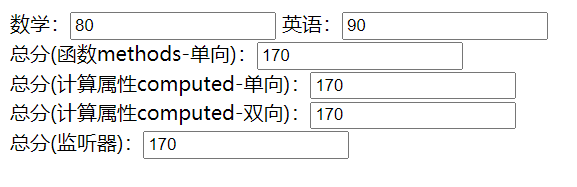
- 函数(methods):没有缓存,每次都会进行计算
- 计算属性(computed):有缓存,只有当计算机内的属性值被更改之后才会被调用,反之不
![]()
- 函数只支持单向
- 计算属性默认只有getter函数,而没有setter函数,如需之,则自定义setter
当更改sumScore1时报错
![]()


- 监听
-
通过 watch 选项 监听数学分数, 当数学更新后回调函数中重新计算总分sumScore3
-
通过 vm.$watch() 选项 监听英语分数, 当英语更新后回调函数中重新计算总分sumScore3

 浙公网安备 33010602011771号