

微信小程序——组件(二)
在上篇文章组件(一)里已经讲解了如何创建一个项目,现在继续。。。讲解一个页面布局以及各个组件的使用。在学习过程中,发现小程序支持flex布局,这对于学习过react native的人来说太好了,布局方面不用担心了。下面来看tab的创建
在使用微信小程序编译代码的工具时,快捷键的使用必不可少,所有快捷键在这里有讲解:小程序编译器快捷键
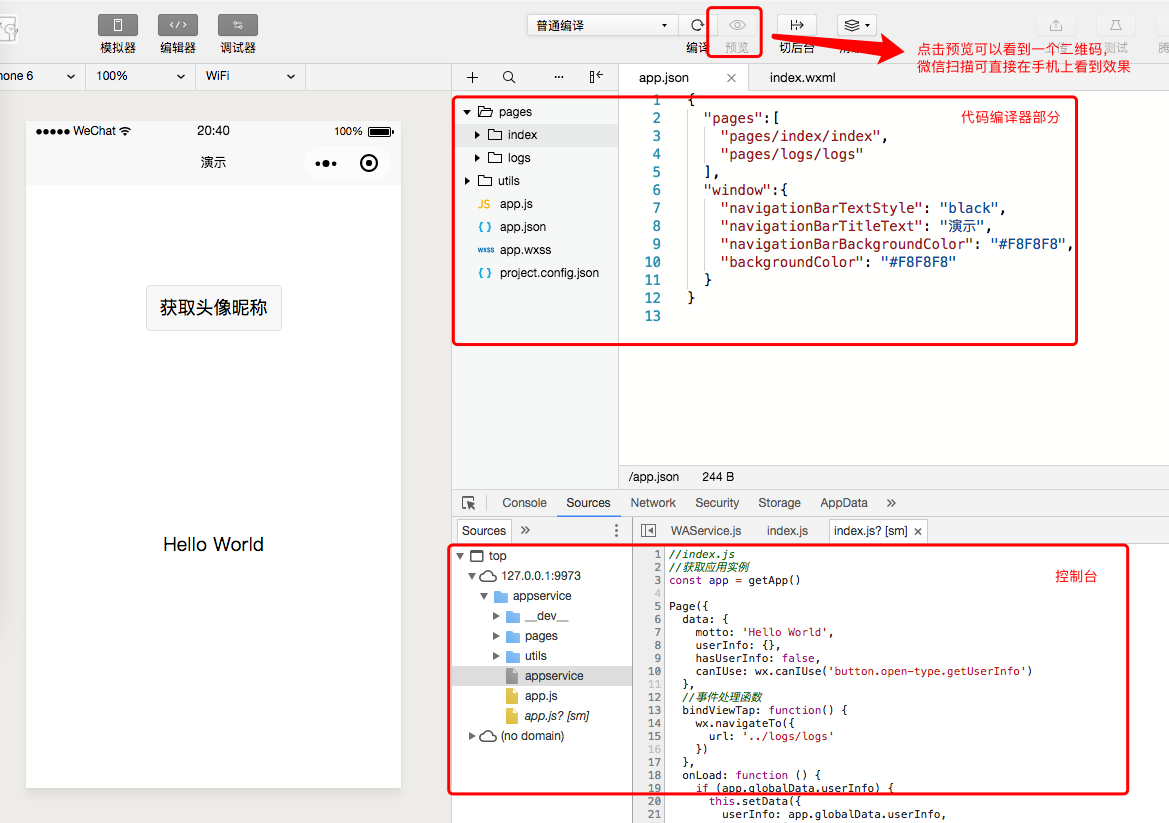
1.根据我上篇文章介绍,有讲如何创建一个小程序项目,效果如图所示:
2.之前讲解过app.json里是定义全局的一些东西,包括整体颜色风格,路由等等,详细配置讲解见官网。下面是app.json里的代码,调整了背景颜色以及创建了两个tab模块。
{
  "pages": [
    "pages/component/index/index",
    "pages/component/logs/logs"
  ],
  "window": {
    "navigationBarBackgroundColor": "#F8F8F8",
    "navigationBarTitleText": "wxTestOne",
    "navigationBarTextStyle": "black",
    "backgroundColor": "#F8F8F8"
  },
  "tabBar": {
    "color": "#7A7E83",
    "selectedColor": "#3cc51f",
    "borderStyle": "black",
    "backgroundColor": "#ffffff",
    "list": [
      {
        "pagePath": "pages/component/index/index",
        "iconPath": "images/icon_component.png",
        "selectedIconPath": "images/icon_component_HL.png",
        "text": "组件"
      },
      {
        "pagePath": "pages/component/logs/logs",
        "iconPath": "images/icon_API.png",
        "selectedIconPath": "images/icon_API_HL.png",
        "text": "组件"
      }
    ]
  }
}
注意看红色圈出的部分是新添加的模块,这里只要在app.json添加正确页面路由的代码,左侧边栏项目文件里就会多出相对应的页面文件(.js .json .wxml .wxss),当然也可以鼠标右键来添加想要的文件。效果如图:

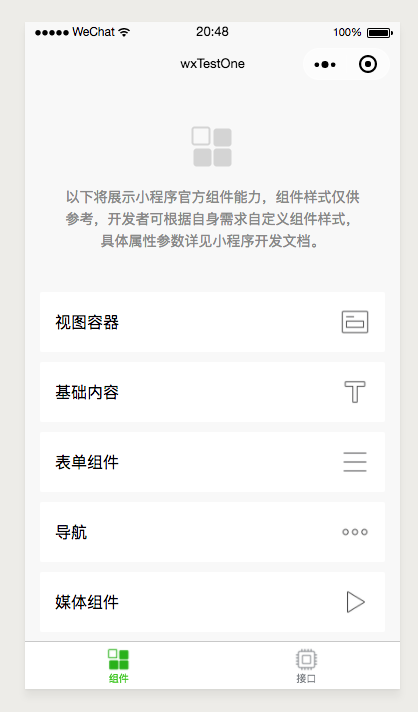
3.“组件”这个tab模块对应的是“index”,“接口”tab对应的模块是logs(上图右边tab名字应该是“接口”)。接下来在 组件 页面显示列表,代码如下:
index.wxml代码:
<!--pages/component/index/index.wxml-->
<view class="index">
  <view class="index-hd">
    <image class="index-logo" src="../../resources/kind/logo.png"></image>
    <view class="index-desc">以下将展示小程序官方组件能力,组件样式仅供参考,开发者可根据自身需求自定义组件样式,具体属性参数详见小程序开发文档。</view>
  </view>
  <view class="index-bd">
    <view class="kind-list">
      <block wx:for-items="{{list}}" wx:key="{{item.id}}">
        <view class="kind-list-item">
          <view id="{{item.id}}" class="kind-list-item-hd {{item.open ? 'kind-list-item-hd-show' : ''}}" bindtap="kindToggle">
            <view class="kind-list-text">{{item.name}}</view>
            <image class="kind-list-img" src="../../resources/kind/{{item.id}}.png"></image>
          </view>
          <view class="kind-list-item-bd {{item.open ? 'kind-list-item-bd-show' : ''}}">
            <view class="navigator-box {{item.open ? 'navigator-box-show' : ''}}">
              <block wx:for-items="{{item.pages}}" wx:for-item="page" wx:key="*item">
                <navigator url="pages/{{page}}/{{page}}" class="navigator">
                  <view class="navigator-text">{{page}}</view>
                  <view class="navigator-arrow"></view>
                </navigator>
              </block>
            </view>
          </view>
        </view>
      </block>
    </view>
  </view>
</view>
index.js代码:
Page({

  /**
   * 页面的初始数据
   */
  data: {
    list: [
      {
        id: 'view',
        name: '视图容器',
        open: false,
        pages: ['view', 'scroll-view', 'swiper']
      }, {
        id: 'content',
        name: '基础内容',
        open: false,
        pages: ['text', 'icon', 'progress']
      }, {
        id: 'form',
        name: '表单组件',
        open: false,
        pages: ['button', 'checkbox', 'form', 'input', 'label', 'picker', 'radio', 'slider', 'switch', 'textarea']
      }, {
        id: 'nav',
        name: '导航',
        open: false,
        pages: ['navigator']
      }, {
        id: 'media',
        name: '媒体组件',
        open: false,
        pages: ['image', 'audio', 'video']
      }, {
        id: 'map',
        name: '地图',
        pages: ['map']
      }, {
        id: 'canvas',
        name: '画布',
        pages: ['canvas']
      }
    ]
},

  kindToggle: function (e) {
    var id = e.currentTarget.id, list = this.data.list;
    for (var i = 0, len = list.length; i < len; ++i) {
      if (list[i].id == id) {
        list[i].open = !list[i].open
      } else {
        list[i].open = false
      }
    }
    this.setData({
      list: list
    });
  },

  /**
   * 生命周期函数--监听页面加载
   */
  onLoad: function (options) {

  },

  /**
   * 生命周期函数--监听页面初次渲染完成
   */
  onReady: function () {

  },

  /**
   * 生命周期函数--监听页面显示
   */
  onShow: function () {

  },

  /**
   * 生命周期函数--监听页面隐藏
   */
  onHide: function () {

  },

  /**
   * 生命周期函数--监听页面卸载
   */
  onUnload: function () {

  },

  /**
   * 页面相关事件处理函数--监听用户下拉动作
   */
  onPullDownRefresh: function () {

  },

  /**
   * 页面上拉触底事件的处理函数
   */
  onReachBottom: function () {

  },

  /**
   * 用户点击右上角分享
   */
  onShareAppMessage: function () {

  }
})
index.wxss代码:
.index-hd {
  padding: 80rpx;
  text-align: center;
}

.index-bd {
  padding: 0 30rpx 40rpx;
}

.index-ft {
  padding-bottom: 20rpx;
  text-align: center;
}

.index-logo {
  width: 86rpx;
  height: 86rpx;
}

.index-desc {
  margin-top: 20rpx;
  color: #888;
  font-size: 28rpx;
}

.navigator-box {
  opacity: 0;
  position: relative;
  background-color: #fff;
  line-height: 1.41176471;
  font-size: 34rpx;
  transform: translateY(-50%);
  transition: 0.3s;
}

.navigator-box-show {
  opacity: 1;
  transform: translateY(0);
}

.navigator {
  padding: 20rpx 30rpx;
  position: relative;
  display: flex;
  align-items: center;
}

.navigator:before {
  content: " ";
  position: absolute;
  left: 30rpx;
  top: 0;
  right: 30rpx;
  height: 1px;
  border-top: 1rpx solid #d8d8d8;
  color: #d8d8d8;
}

.navigator:first-child:before {
  display: none;
}

.navigator-text {
  flex: 1;
}

.navigator-arrow {
  padding-right: 26rpx;
  position: relative;
}

.navigator-arrow:after {
  content: " ";
  display: inline-block;
  height: 18rpx;
  width: 18rpx;
  border-width: 2rpx 2rpx 0 0;
  border-color: #888;
  border-style: solid;
  transform: matrix(0.71, 0.71, -0.71, 0.71, 0, 0);
  position: absolute;
  top: 50%;
  margin-top: -8rpx;
  right: 28rpx;
}

.kind-list-item {
  margin: 20rpx 0;
  background-color: #fff;
  border-radius: 4rpx;
  overflow: hidden;
}

.kind-list-item:first-child {
  margin-top: 0;
}

.kind-list-text {
  flex: 1;
}

.kind-list-img {
  width: 60rpx;
  height: 60rpx;
}

.kind-list-item-hd {
  padding: 30rpx;
  display: flex;
  align-items: center;
  transition: opacity 0.3s;
}

.kind-list-item-hd-show {
  opacity: 0.2;
}

.kind-list-item-bd {
  height: 0;
  overflow: hidden;
}

.kind-list-item-bd-show {
  height: auto;
}
app.wxss代码:
/**app.wxss**/
/* reset */
page {
  background-color: #F8F8F8;
  height: 100%;
  font-size: 32rpx;
  line-height: 1.6;
}
checkbox, radio{
  margin-right: 10rpx;
}
button{
  margin-top: 20rpx;
  margin-bottom: 20rpx;
}
form{
  width: 100%;
}

/* lib */
.strong{
  font-weight: bold;
}
.tc{
  text-align: center;
}

/* page */
.container {
  display: flex;
  flex-direction: column;
  min-height: 100%;
  justify-content: space-between;
  font-size: 32rpx;
  font-family: -apple-system-font,Helvetica Neue,Helvetica,sans-serif;
}
.page-head{
  padding: 60rpx 50rpx 80rpx;
  text-align: center;
}
.page-head-title{
  display: inline-block;
  padding: 0 40rpx 20rpx 40rpx;
  font-size: 32rpx;
  color: #BEBEBE;
}
.page-head-line{
  margin: 0 auto;
  width: 150rpx;
  height: 2rpx;
  background-color: #D8D8D8;
}
.page-head-desc{
  padding-top: 20rpx;
  color: #9B9B9B;
  font-size: 32rpx;
}

.page-body {
  width: 100%;
  flex-grow: 1;
  overflow-x: hidden;
}
.page-body-wrapper {
  display: flex;
  flex-direction: column;
  align-items: center;
  width: 100%;
}
.page-body-wording {
  text-align: center;
  padding: 200rpx 100rpx;
}
.page-body-info {
  display: flex;
  flex-direction: column;
  align-items: center;
  background-color: #fff;
  width: 100%;
  padding: 50rpx 0 150rpx 0;
}
.page-body-title {
  margin-bottom: 100rpx;
  font-size: 32rpx;
}
.page-body-text {
  font-size: 30rpx;
  line-height: 26px;
  color: #ccc;
}
.page-body-text-small {
  font-size: 24rpx;
  color: #000;
  margin-bottom: 100rpx;
}

.page-foot{
  margin: 100rpx 0 30rpx 0;
  text-align: center;
  color: #1aad19;
  font-size: 0;
}
.icon-foot{
  width: 152rpx;
  height: 23rpx;
}

.page-section{
  width: 100%;
  margin-bottom: 60rpx;
}
.page-section_center{
  display: flex;
  flex-direction: column;
  align-items: center;
}
.page-section:last-child{
  margin-bottom: 0;
}
.page-section-gap{
  box-sizing: border-box;
  padding: 0 30rpx;
}
.page-section-spacing{
  box-sizing: border-box;
  padding: 0 80rpx;
}
.page-section-title{
  font-size: 28rpx;
  color: #999999;
  margin-bottom: 10rpx;
  padding-left: 30rpx;
  padding-right: 30rpx;
}
.page-section-gap .page-section-title{
  padding-left: 0;
  padding-right: 0;
}
.page-section-ctn{

}

/* widget */
.btn-area{
  margin-top: 60rpx;
  box-sizing: border-box;
  width: 100%;
  padding: 0 30rpx;
}

.image-plus {
  width: 150rpx;
  height: 150rpx;
  border: 2rpx solid #D9D9D9;
  position: relative;
}
.image-plus-nb{
  border: 0;
}
.image-plus-text{
  color: #888888;
  font-size: 28rpx;
}
.image-plus-horizontal {
  position: absolute;
  top: 50%;
  left: 50%;
  background-color: #d9d9d9;
  width: 4rpx;
  height: 80rpx;
  transform: translate(-50%, -50%);
}
.image-plus-vertical {
  position: absolute;
  top: 50%;
  left: 50%;
  background-color: #d9d9d9;
  width: 80rpx;
  height: 4rpx;
  transform: translate(-50%, -50%);
}

.demo-text-1{
  position: relative;
  align-items: center;
  justify-content: center;
  background-color: #1AAD19;
  color: #FFFFFF;
  font-size: 36rpx;
}
.demo-text-1:before{
  content: 'A';
  position: absolute;
  top: 50%;
  left: 50%;
  transform: translate(-50%, -50%);
}
.demo-text-2{
  position: relative;
  align-items: center;
  justify-content: center;
  background-color: #2782D7;
  color: #FFFFFF;
  font-size: 36rpx;
}
.demo-text-2:before{
  content: 'B';
  position: absolute;
  top: 50%;
  left: 50%;
  transform: translate(-50%, -50%);
}
.demo-text-3{
  position: relative;
  align-items: center;
  justify-content: center;
  background-color: #F1F1F1;
  color: #353535;
  font-size: 36rpx;
}
.demo-text-3:before{
  content: 'C';
  position: absolute;
  top: 50%;
  left: 50%;
  transform: translate(-50%, -50%);
}
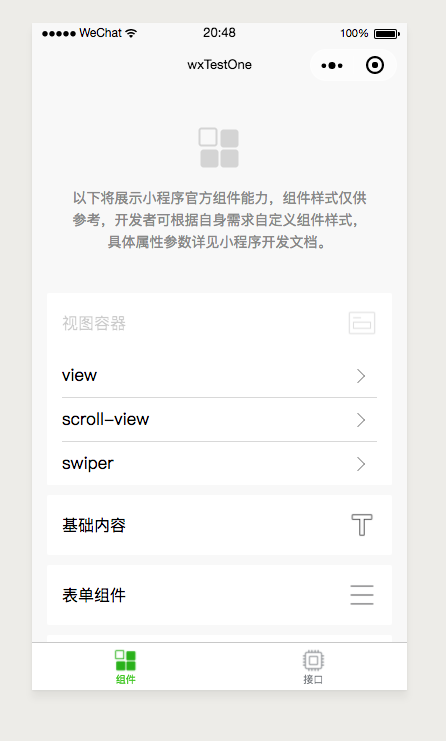
效果如图:

 浙公网安备 33010602011771号