
java_String类
大部分编程语言都能够处理字符串(String)。字符串是有序的字符集合,比如"Hello World!"。在Java中,字符串被存储为String类对象。调用字符串对象的方法,可以实现字符串相关的操作。
String类包含在java.lang包中。这个包会在Java启动的时候自动import,所以可以当做一个内置类(built-in class)。我们不需要显式的使用import引入String类。
创建字符串
我们之前使用类来创建对象。需要注意的时候,创建String类对象不需要new关键字。比如:

public class Test
{
    public static void main(String[] args)
    {
        String s = "Hello World!";
        System.out.println(s);
    }
}
实际上,当你写出一个"Hello World"表达式时,内存中就已经创建了该对象。如果使用new String("Hello World!"),会重复创建出一个字符串对象。
String类是唯一一个不需要new关键字来创建对象的类。使用的时候需要注意。
字符串操作
可以用+实现字符串的连接(concatenate),比如:
"abc" + s
字符串的操作大都通过字符串的相应方法实现,比如下面的方法:
方法 效果
s.length() 返回s字符串长度
s.charAt(2) 返回s字符串中下标为2的字符
s.substring(0, 4) 返回s字符串中下标0到4的子字符串
s.indexOf("Hello") 返回子字符串"Hello"的下标
s.startsWith(" ") 判断s是否以空格开始
s.endsWith("oo") 判断s是否以"oo"结束
s.equals("Good World!") 判断s是否等于"Good World!"
==只能判断字符串是否保存在同一位置。需要使用equals()判断字符串的内容是否相同。
s.compareTo("Hello Nerd!") 比较s字符串与"Hello Nerd!"在词典中的顺序,
返回一个整数,如果<0,说明s在"Hello Nerd!"之前;
如果>0,说明s在"Hello Nerd!"之后;
如果==0,说明s与"Hello Nerd!"相等。
s.trim() 去掉s前后的空格字符串,并返回新的字符串
s.toUpperCase() 将s转换为大写字母,并返回新的字符串
s.toLowerCase() 将s转换为小写,并返回新的字符串
s.replace("World", "Universe") 将"World"替换为"Universe",并返回新的字符串
不可变对象
String类对象是不可变对象(immutable object)。程序员不能对已有的不可变对象进行修改。我们自己也可以创建不可变对象,只要在接口中不提供修改数据的方法就可以。
然而,String类对象确实有编辑字符串的功能,比如replace()。这些编辑功能是通过创建一个新的对象来实现的,而不是对原有对象进行修改。比如:
s = s.replace("World", "Universe");
右边对s.replace()的调用将创建一个新的字符串"Hello Universe!",并返回该对象(的引用)。通过赋值,引用s将指向该新的字符串。如果没有其他引用指向原有字符串"Hello World!",原字符串对象将被垃圾回收。
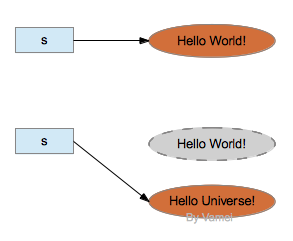
不可变对象
【知识汇总】
- String类的定义:String在java中是一个比较特殊的类,因为其自己可以做一种数据类型直接定义变量,如下:
- String str = "hello";
- String str = new String ("hello");
- String两种不同定义地理解:
- String str = "hello"; //可以把str理解为一个char*,str指向数据段中的字符串"hello"。
- String str = new String ("hello");//是new了一个对象,堆空间分配了一块内存,把对象放在里面,str 指向这个对象
- 上面两者的区别:
- String str 1= "hello";
- String str 2= "hello";
//当定义str2的时候,系统会先检测数据段里是否已经有了“hello”,如果有了那么str2直接指向这个“hello”,这是系统的优化。也就是说不会单独再在数据段中存储“hello”,str1和str2指向的是同一个数据段,也就是str1和str2代表的数据段地址也是一样的。
//改正哈,下面1楼指出了这里有误哈:可以参见1楼。
- String str 3= new String ("hello");
- String str 4= new String ("hello");
//str4是重新new的一个对象,是在堆空间又单独存储的,也就是说str3和str4的地址是不一样的,但是存储内容是一样的。读者可以运行一下下面的代码:
代码:
String s1="hello";
String s2="hello";
System.out.println(s1==s2);
String s3=new String("hello");
String s4=new String("hello");
System.out.println(s3==s4);
System.out.println(s3.equals(s4));
运行结果:
true
false
true
- 对于String类对象是不可变字符的理解:
- String str1="hello";
- str1=str1.substring(0, 3)+” p!”;
//首先substring(0, 3)表示提取字符串第一个到第三个的字母。
//对于不可变的理解就是说,存储“hello”的地方永远存储的是“hello”,除非系统自动收回,是永远不会变的。对于str1提取子串,只是让str1再次指向“hello”的引用,对于这个引用再进行改变,而原来存储“hello”的地方是不变的。读者可以运行一下下面的代码:
代码:
String str1="hello";
String str2=str1;
str1=str1.substring(0, 3)+"p!";
System.out.println(str1);
System.out.println(str2);
运行结果:
help!
hello
//因为第2行代码是让str1和str2指向了同一个地址段,后面改变了str1的指向,而str2指向的东西是没有改变的。
【java代码】
public class Text {
    public static void main(String[] args){
//说明了s1和s2指向的同一个地址段,s3和s4指向的是不同的地址段,而存储内容是一样的
        String s1="hello";
        String s2="hello";
        System.out.println(s1==s2);
        String s3=new String("hello");
        String s4=new String("hello");
        System.out.println(s3==s4);
        System.out.println(s3.equals(s4));
//说明了str1和str2指向同一个地址段,而后面改变的str1只是对"hello"的一个引用的改变
        String str1="hello";
        String str2=str1;
        str1=str1.substring(0, 3)+"p!";
        System.out.println(str1);
        System.out.println(str2);
    }
}
【运行结果】
true
false
true
help!
hello

 浙公网安备 33010602011771号