
2018教程之mvc+ef之四:用户管理实现分页和搜索
因为新建的用户很多,为了显示方便,可以按部门进行排序,也可以点真名进行搜索,也可以分页显示,这节先讲分页。
一、安装分布控件
数据查询免不了要分页。这里我们用一个名为PagedList的插件来实现这个功能。
如下所示,在菜单栏里选择工具->库程序包管理->程序包管理控制台。

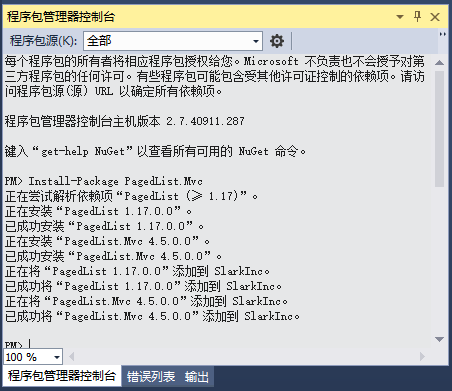
之后会在Visual Studio窗口的下面看到一个程序包管理控制台窗口。在其中输入Install-Package PagedList.Mvc。PagedList就会自动安装到项目中。窗口如下所示。
二,新建一个用户列表的模型,便于只读出该 字段
项目下新建文件夹ViewModels
在下面新建模型ViewUserList.cs
using System;
using System.Collections.Generic;
using System.ComponentModel.DataAnnotations;
using System.Linq;
using System.Web;

namespace MYtest2018.ViewModels
{
	public class ViewUserList
	{


		public string Id { get; set; }
		[Display(Name = "真实姓名")]
		public string RealName { get; set; }

		[Display(Name = "登录名")]
		public string UserName { get; set; }

		[Display(Name = "电话")]
		public virtual string PhoneNumber{ get; set; }

		[Display(Name = "部门名称")]
		public string DepartmentName { get; set; }

		[Display(Name = "头像")]
		public string HeaderPic { get; set; }
		public string DepartmentId { get; set; }


	}
}
三、分页代码
然后后台写
[AllowAnonymous]
		[HttpGet]
		public ActionResult ListUsers(int? page=1)
		{
			///读出所有的部门
			ViewBag.drolistmenu = db.Departments.OrderBy(x=>x.Sort);
			///将用户列表读出来,不过按部门ID排序
			var users1 = (UserManager.Users.OrderBy(m => m.DepartmentId)).ToList();
			////将部门表和用户列表组成一张表,主要将部门名称替换部门ID
			var users = from m in users1
						join mr in db.Departments.ToList() on m.DepartmentId equals mr.Id
						select new ViewUserList
						{
							Id = m.Id,
							UserName = m.UserName,
							RealName = m.RealName,
							DepartmentName = mr.DepartmentName,
							PhoneNumber=m.PhoneNumber,
							HeaderPic = m.HeaderPic,
							DepartmentId = m.DepartmentId
						};

			int pageNumber = page ?? 1;     //定义第几页
			int pageSize = 3;    //每页显几条
								 //通过ToPagedList扩展方法进行分页
			return View(users.ToPagedList(pageNumber, pageSize));   //用topagelist显示


		}
前台代码
@*@model IEnumerable<MYtest2018.Models.ApplicationUser>*@
@model PagedList.IPagedList<MYtest2018.ViewModels.ViewUserList>
@using PagedList.Mvc;


@{
	ViewBag.Title = "List"; Layout = "~/Views/Shared/_Layoutadmin.cshtml";
}


<div class="wrapper wrapper-content">
	<div class="ibox float-e-margins">
		<div class="ibox-title">
			<h2>用户管理</h2>
			<div class="ibox-tools">
				<a class="collapse-link">
					<i class="fa fa-chevron-up"></i>
				</a>
			</div>
		</div>

		<div class="ibox-content">
			<div class="form-group">
				<a class="btn btn-primary" href="/User/Add">添加</a>
				<button id="btnEdit" type="button" class="btn btn-info " onclick="editModel()"><i class="fa fa-pencil"></i> 编辑</button>
				<button id="btnDel" type="button" class="btn btn-danger " onclick="delData()">
					<i class="fa fa-remove"></i>  <span class="bold">删除</span>
				</button>
				<button id="btnSetRole" type="button" class="btn btn-info "><i class="fa fa-user"></i> 角色授权</button>
				<button id="btnResetPwd" class="btn btn-warning"><i class="fa fa-undo"></i> 重置密码</button>
			</div>
			<div class="form-group">
				<div class="input-group">
					<input id="txtSearchKey" type="text" class="input form-control" placeholder="搜索关键字" />
					<span class="input-group-btn">
						<button id="btnSearch" class="btn btn btn-primary" type="button"> <i class="fa fa-search"></i> 搜索</button>
					</span>
				</div>
			</div>
			<table class="table table-hover margin bottom">
				<thead>
					<tr>
						<th style="width: 1%" class="text-center">No.</th>
						<th>部室</th>
						<th class="text-center">用户名</th>
						<th class="text-center">真实名</th>
						<th class="text-center">Tel.</th>
						<th></th>
					</tr>
				</thead>
				<tbody>
@foreach (var user in Model)
{
					<tr>
						<td class="text-center">  <img src=@Html.DisplayFor(m => user.HeaderPic) alt="头像" class="img-circle" height="42">     </td>
						<td>
							@Html.DisplayFor(m => user.DepartmentId)
						</td>
						<td class="text-center small">@Html.DisplayFor(m => user.UserName) </td>
						<td class="text-center">@Html.DisplayFor(m => user.RealName)</td>
						<td class="text-center">  @Html.DisplayFor(m => user.PhoneNumber) </td>
						<td>@Html.ActionLink("详情", "DetailsList", new { id = user.Id }, new { @class = "btn btn-info" })
						@Html.ActionLink("编辑", "Edit", new { id = user.Id }, new { @class = "btn btn-success" })
						@Html.ActionLink("删除", "Del", new { id = user.Id }, new { @class = "btn btn-warning" })
						@Html.ActionLink("重置", "ResetPassword", new { id = user.Id }, new { @class = "btn btn-success" })
						@Html.ActionLink("头像", "UploadHeaderPic", new { id = user.Id }, new { @class = "btn btn-warning", target = "_blank" })
						</td>
					</tr>
}

				</tbody>
			</table>
			Page @(Model.PageCount < Model.PageNumber ? 0 : Model.PageNumber) of @Model.PageCount
			@Html.PagedListPager(Model, page => Url.Action("ListUsers",  new { page }))
		</div>
	</div>
</div>
效果

测试成功,我们还是改成8个为一页。
四、加上部门的标索和搜索
1.后台
[HttpGet]
		public ActionResult ListUsers(string SeachColumnString, string SearchString, int? page)
		{
			///读出所有的部门
			ViewBag.drolistmenu = db.Departments.OrderBy(x=>x.Sort);
			///当搜索和部门变量都 不 为空的时间,给page弄一个1值
			if (!string.IsNullOrEmpty(SeachColumnString) || !string.IsNullOrEmpty(SearchString))    //当二个变量都不为空时,page=1
			{
				page = 1;
			}

			///分而要求的二个变量送前台
			ViewBag.SeachColumnString = SeachColumnString;    //将二个搜索变量存为viewbag送到前台
			ViewBag.SearchString = SearchString;
			///将用户列表读出来,不过按部门ID排序
			var users1 = (UserManager.Users.OrderBy(m => m.DepartmentId)).ToList();
			////将部门表和用户列表组成一张表,主要将部门名称替换部门ID
			var users = from m in users1
						join mr in db.Departments.ToList() on m.DepartmentId equals mr.Id
						select new ViewUserList
						{
							Id = m.Id,
							UserName = m.UserName,
							RealName = m.RealName,
							DepartmentName = mr.DepartmentName,
							PhoneNumber=m.PhoneNumber,
							HeaderPic = m.HeaderPic,
							DepartmentId = m.DepartmentId
						};


			///当有索搜真实名称的时候
			if (!string.IsNullOrEmpty(SearchString))
			{
				users = users.Where(x => x.RealName.Contains(SearchString));
			}
			///当部门索引选择有的时候
			if (!string.IsNullOrEmpty(SeachColumnString))
			{
				users = users.Where(x => x.DepartmentId== SeachColumnString);
			}

			int pageNumber = page ?? 1;     //定义第几页
			int pageSize = 8;    //每页显几条
								 //通过ToPagedList扩展方法进行分页
			return View(users.ToPagedList(pageNumber, pageSize));   //用topagelist显示


		}
2,前台
@*@model IEnumerable<MYtest2018.Models.ApplicationUser>*@
@model PagedList.IPagedList<MYtest2018.ViewModels.ViewUserList>
@using PagedList.Mvc;


@{
	ViewBag.Title = "List"; Layout = "~/Views/Shared/_Layoutadmin.cshtml";
}


<div class="wrapper wrapper-content">
	<div class="ibox float-e-margins">
		<div class="ibox-title">
			<h2>用户管理</h2>
			<div class="ibox-tools">
				<a class="collapse-link">
					<i class="fa fa-chevron-up"></i>
				</a>
			</div>
		</div>

		<div class="ibox-content">
			<div class="form-group">
				<div class="col-lg-2"><a href="~/ Account/" class="btn btn-danger " onclick="delData()"><i class="fa fa-remove"></i>  <span class="bold">批量删除</span></a> </div>
				<div class="col-lg-10">
					@using (Html.BeginForm("ListUsers", "Account", null, FormMethod.Get, new { @class = "form-inline" }))
					{

						<div class="form-inline">

							<div class="form-group">
								<div class="input-group">

									@Html.TextBox("SearchString", "", new { @class = "form-control", @Style = "display:inline" })
									<span class="input-group-btn">

										<input id="btnSearch" class="btn btn btn-primary" type="submit" value="搜索">
									</span>
								</div>
							</div>
						</div>
					}

				</div>


			</div>

			<div class="form-group">
				<div class="input-group">
					<ul class="nav nav-pills nav-stacked" style="float:left;">

						@foreach (MYtest2018.Models.Department data1 in (ViewBag.drolistmenu as IEnumerable<MYtest2018.Models.Department>))
						{

							<li class="titlesize" style="float:left;">
								<a href="~/Account/ListUsers?SeachColumnString=@data1.Id"><span class="glyphicon glyphicon glyphicon-th-large" aria-hidden="true"></span> @data1.DepartmentName</a>

							</li>
						}

					</ul>
				</div>
			</div>


			<table class="table table-hover margin bottom">
				<thead>
					<tr>
						<th style="width: 1%" class="text-center">No.</th>
						<th>部室</th>
						<th class="text-center">用户名</th>
						<th class="text-center">真实名</th>
						<th class="text-center">Tel.</th>
						<th></th>
					</tr>
				</thead>
				<tbody>
					@foreach (var user in Model)
					{
						<tr>
							<td class="text-center">  <img src=@Html.DisplayFor(m => user.HeaderPic) alt="头像" class="img-circle" height="42">     </td>
							<td>
								@Html.DisplayFor(m => user.DepartmentName)
							</td>
							<td class="text-center small">@Html.DisplayFor(m => user.UserName) </td>
							<td class="text-center">@Html.DisplayFor(m => user.RealName)</td>
							<td class="text-center">  @Html.DisplayFor(m => user.PhoneNumber) </td>
							<td>
								@Html.ActionLink("详情", "DetailsList", new { id = user.Id }, new { @class = "btn btn-info" })
							@Html.ActionLink("编辑", "Edit", new { id = user.Id }, new { @class = "btn btn-success" })
							@Html.ActionLink("删除", "Del", new { id = user.Id }, new { @class = "btn btn-warning" })
							@Html.ActionLink("重置", "ResetPassword", new { id = user.Id }, new { @class = "btn btn-success" })
							@Html.ActionLink("头像", "UploadHeaderPic", new { id = user.Id }, new { @class = "btn btn-warning", target = "_blank" })
						</td>
					</tr>
					}

				</tbody>
			</table>
			Page @(Model.PageCount < Model.PageNumber ? 0 : Model.PageNumber) of @Model.PageCount
			@Html.PagedListPager(Model, page => Url.Action("ListUsers", new { page, SeachColumnString = ViewBag.SeachColumnString, SearchString = ViewBag.SearchString }))
		</div>
	</div>
</div>

五、更改为图片列表
前台
@*@model IEnumerable<MYtest2018.Models.ApplicationUser>*@
@model PagedList.IPagedList<MYtest2018.ViewModels.ViewUserList>
@using PagedList.Mvc;


@{
	ViewBag.Title = "List"; Layout = "~/Views/Shared/_Layoutadmin.cshtml";
}


<div class="wrapper wrapper-content">
	<div class="ibox float-e-margins">
		<div class="ibox-title">
			<h2>用户管理</h2>
			<div class="ibox-tools">
				<a class="collapse-link">
					<i class="fa fa-chevron-up"></i>
				</a>
			</div>
		</div>

		<div class="ibox-content">
			<div class="form-group">
				<div class="col-lg-2"><a href="~/ Account/" class="btn btn-danger " onclick="delData()"><i class="fa fa-remove"></i>  <span class="bold">批量删除</span></a> </div>
				<div class="col-lg-10">
					@using (Html.BeginForm("ListUsers", "Account", null, FormMethod.Get, new { @class = "form-inline" }))
					{

						<div class="form-inline">

							<div class="form-group">
								<div class="input-group">

									@Html.TextBox("SearchString", "", new { @class = "form-control", @Style = "display:inline" })
									<span class="input-group-btn">

										<input id="btnSearch" class="btn btn btn-primary" type="submit" value="搜索">
									</span>
								</div>
							</div>
						</div>
					}

				</div>


			</div>

			<div class="form-group">
				<div class="input-group">
					<ul class="nav nav-pills nav-stacked" style="float:left;">

						@foreach (MYtest2018.Models.Department data1 in (ViewBag.drolistmenu as IEnumerable<MYtest2018.Models.Department>))
						{

							<li class="titlesize" style="float:left;">
								<a href="~/Account/ListUsers?SeachColumnString=@data1.Id"><span class="glyphicon glyphicon glyphicon-th-large" aria-hidden="true"></span> @data1.DepartmentName</a>

							</li>
						}

					</ul>
				</div>
			</div>

		</div>
	</div>


	<div class="wrapper wrapper-content animated fadeInRight">
		<div class="row">
			@foreach (var user in Model)
			{
				<div class="col-lg-4">
					<div class="contact-box">

						<div class="col-sm-4">
							<div class="text-center">
								<img alt="image" class="img-circle m-t-xs img-responsive" src=@Html.DisplayFor(m => user.HeaderPic)>
								<div class="m-t-xs font-bold">@Html.DisplayFor(m => user.UserName)</div>
								<div>  @Html.DisplayFor(m => user.PhoneNumber)  </div>
							</div>
						</div>
						<div class="col-sm-8">
							<h3><strong>@Html.DisplayFor(m => user.RealName)</strong></h3>
							<p><i class="fa fa-map-marker"></i>@Html.DisplayFor(m => user.DepartmentName)</p>
							<address>
								<strong>地址:@Html.DisplayFor(m => user.Address)</strong><br>
								qq:@Html.DisplayFor(m => user.QQ)<br>
								wx:@Html.DisplayFor(m => user.WX)<br>
								生日 @Html.DisplayFor(m => user.BirthDate)<br>
								by于 @Html.DisplayFor(m => user.CreateTime)<br>

							</address>
						</div>
						<div class="clearfix"></div>
						<div class="contact-box-footer">
							<div class="m-t-xs btn-group">
								<a class="btn btn-xs btn-white"><i class="fa fa-phone"></i> 删除 </a>
								<a class="btn btn-xs btn-white"><i class="fa fa-envelope"></i> 编辑</a>
								<a class="btn btn-xs btn-white"><i class="fa fa-user-plus"></i> 重置</a>
								<a class="btn btn-xs btn-white"><i class="fa fa-user-plus"></i> 头像</a>
							</div>
						</div>
					</div>
				</div>
			}
		</div>
	</div>

	Page @(Model.PageCount < Model.PageNumber ? 0 : Model.PageNumber) of @Model.PageCount
	@Html.PagedListPager(Model, page => Url.Action("ListUsers", new { page, SeachColumnString = ViewBag.SeachColumnString, SearchString = ViewBag.SearchString }))
</div>


 浙公网安备 33010602011771号