
【ASP.NET Identity系列教程 2】运用ASP.NET Identity
本系列教程详细、完整、深入地介绍了微软的ASP.NET Identity技术,描述了如何运用ASP.NET Identity实现应用程序的用户管理,以及实现应用程序的认证与授权等相关技术,译者希望本系列教程能成为掌握ASP.NET Identity技术的一份完整而有价值的资料。读者若是能够按照文章的描述,一边阅读、一边实践、一边理解,定能有意想不到的巨大收获!希望本系列博文能够得到广大园友的高度推荐。
14.2.1 理解认证/授权过程
系统集成到了ASP.NET平台,这意味着你可以使用标准的MVC框架技术来控制对动作方法的访问,例如使用Authorize注解属性。在本小节中,我打算在Home控制中的Index动作方法上运用基本的限制,然后实现让用户对自己进行标识,以使他们能够访问。清单14-1演示了如何将Authorize注解属性运用于Home控制器。
Listing 14-1. Securing the Home Controller
清单14-1. 实施Home控制器的安全

using System.Web.Mvc;
using System.Collections.Generic;

namespace Users.Controllers {

    public class HomeController : Controller {

        [Authorize]
        public ActionResult Index() {
            Dictionary<string, object> data
                = new Dictionary<string, object>();
            data.Add("Placeholder", "Placeholder");
            return View(data);
        }
    }
}
这种方式使用Authorize注解属性是授权的最一般形式,它限制了对Index动作方法的访问,由用户发送给该动作方法的请求必须是应用程序已认证的用户。
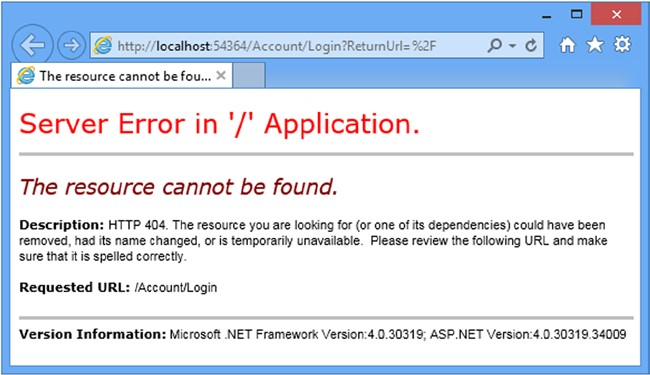
如果启动应用程序,并请求以Home控制器中Index动作为目标的URL(/Home/Index、/Home或/),将会看到如图14-1所示的错误。
| Name 名称 | Description 描述 |
|---|---|
| Identity | Returns an implementation of the IIdentity interface that describes the user associated with the request. 返回IIdentity接口的实现,它描述了与请求相关联的用户 |
| IsInRole(role) | Returns true if the user is a member of the specified role. See the “Authorizing Users with Roles” section for details of managing authorizations with roles. 如果用户是指定角色的成员,则返回true。参见“以角色授权用户”小节,其中描述了以角色进行授权管理的细节 |
The implementation of IIdentity interface returned by the IPrincipal.Identity property provides some basic, but useful, information about the current user through the
由IPrincipal.Identity属性返回的IIdentity接口实现通过一些属性提供了有关当前用户的一些基本却有用的信息,表14-4描述了这些属性。
由IPrincipal.Identity属性返回的IIdentity接口实现通过一些属性提供了有关当前用户的一些基本却有用的信息,表14-4描述了这些属性。
| Name 名称 | Description 描述 |
|---|---|
| AuthenticationType | Returns a string that describes the mechanism used to authenticate the user 返回一个字符串,描述了用于认证用户的机制 |
| IsAuthenticated | Returns true if the user has been authenticated 如果用户已被认证,返回true。 |
| Name | Returns the name of the current user 返回当前用户的用户名 |
Tip In Chapter 15 I describe the implementation class that ASP.NET Identity uses for the IIdentity interface, which is called ClaimsIdentity.
提示:第15章会描述ASP.NET Identity用于IIdentity接口的实现类,其名称为ClaimsIdentity。
using Microsoft.AspNet.Identity;
using Microsoft.Owin;
using Microsoft.Owin.Security.Cookies;
using Owin;
using Users.Infrastructure;

namespace Users {
    public class IdentityConfig {
        public void Configuration(IAppBuilder app) {

            app.CreatePerOwinContext<AppUserManager>(AppUserManager.Create);
            app.UseCookieAuthentication(new CookieAuthenticationOptions {
                AuthenticationType = DefaultAuthenticationTypes.ApplicationCookie,
                LoginPath = new PathString("/Account/Login"),
            });
        }
    }
}
浏览器请求/Account/Login时,但因为示例项目中没有相应的控制器或动作,于服务器返回了“404 – 未找到”响应,从而导致了如图14-1所示的错误消息。
14.2.2 Preparing to Implement Authentication
14.2.2 实现认证的准备
虽然请求终止于一条错误消息,但上一小节的请求已勾画出ASP.NET Identity系统是如何切入标准的ASP.NET请求生命周期的。下一个步骤是实现一个控制器,用它来接收对/Account/Login URL的请求,并认证用户。我首先在UserViewModels.cs文件中添加了一个模型类,如清单14-2所示。
using System.ComponentModel.DataAnnotations;

namespace Users.Models {

    public class CreateModel {
        [Required]
        public string Name { get; set; }
        [Required]
        public string Email { get; set; }
        [Required]
        public string Password { get; set; }
    }

     public class LoginModel {
        [Required]
        public string Name { get; set; }
        [Required]
        public string Password { get; set; }
    }
}
我在项目中添加了一个Account控制器,如清单14-3所示,其中带有Login动作方法,用以收集和处理用户的凭据。该清单尚未实现认证逻辑,因为我打算先定义视图,然后再实现验证用户凭据的过程,并让用户签入应用程序。
Listing 14-3. The Contents of the AccountController.cs File
清单14-3. AccountController.cs文件的内容

using System.Threading.Tasks;
using System.Web.Mvc;
using Users.Models;

namespace Users.Controllers {

    [Authorize]
    public class AccountController : Controller {

        [AllowAnonymous]
        public ActionResult Login(string returnUrl) {
            if (ModelState.IsValid) {
            }
            ViewBag.returnUrl = returnUrl;
            return View();
        }

        [HttpPost]
        [AllowAnonymous]
        [ValidateAntiForgeryToken]
        public async Task<ActionResult> Login(LoginModel details, string returnUrl) {
            return View(details);
        }
    }
}
尽管它此刻尚未认证用户,但Account控制器已包含了一些有用的基础结构,我想通过ASP.NET Identity代码对这些结构分别加以解释,很快就会在Login动作方法中添加这些代码。
首先要注意Login动作方法有两个版本,它们都有一个名称为returnUrl的参数。当用户请求一个受限的URL时,他们被重定向到/Account/Login URL上,并带有查询字符串,该字符串指定了一旦用户得到认证后将用户返回的URL,如下所示:
/Account/Login?ReturnUrl=%2FHome%2FIndex
ReturnUrl查询字符串参数的值可让我能够对用户进行重定向,使应用程序公开和保密部分之间的导航成为一个平滑无缝的过程。
一个要注意的是运用于Account控制器的注解属性。管理用户账号的控制器含有只能由已认证用户才能使用的功能,例如口令重置。为此,我在控制器类上运用了Authorize注解属性,然后又在个别动作方法上运用了AllowAnonymous注解属性。这会将这些动作方法默认限制到已认证用户,但又能允许未认证用户登录到应用程序。
最后要注意的是,我运用了ValidateAntiForgeryToken注解属性,该属性与视图中的Html.AntiForgeryToken辅助器方法联合工作,防止Cross-Site Request Forgery(CSRF,跨网站请求伪造)的攻击。CSRF会利用应用程序对用户的信任,因此使用这个辅助器和注解属性对于认证请求是特别重要的。
14.2.4 Testing Authentication
14.2.4 测试认证
为了测试用户认证,启动应用程序,并请求/Home/Index URL。当被重定向到/Account/Login URL时,输入本章开始时列出的一个用户的细节(例如,姓名为joe,口令为MySecret)。点击“Log In(登录)”按钮,你的浏览器将被重定向,回到/Home/Index URL,但这次它将递交认证Cookie,被准予访问该动作方法,如图14-3所示。
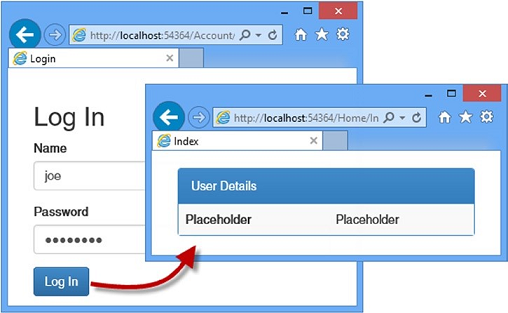
Figure 14-3. Authenticating a user
图14-3. 认证用户
Tip You can use the browser F12 tools to see the cookies that are used to identify authenticated requests.
提示:可以用浏览器的F12工具,看到用来标识已认证请求的Cookie。
14.3 Authorizing Users with Roles
14.3 以角色授权用户
上一小节以最基本的形式运用了Authorize注解属性,这允许任何已认证用户执行动作方法。在本小节中,将展示如何精炼授权,以便在用户能够执行的动作上有更细粒度的控制。表14-6描述了授权的情形。
| Question 问题 | Answer 答案 |
|---|---|
| What is it? 什么是授权? |
Authorization is the process of granting access to controllers and action methods to certain users, generally based on role membership. 授权是将控制器和动作的准许访问限制到特定用户,通常是基于角色的成员 |
| Why should I care? 为何要关心它? |
Without roles, you can differentiate only between users who are authenticated and those who are not. Most applications will have different types of users, such as customers and administrators. 没有角色,你只能在已认证用户和未认证用户之间加以区分。大多数应用程序均有不同类型的用户,例如客户和管理员等 |
| How is it used by the MVC framework? 如何在MVC框架中使用它? |
Roles are used to enforce authorization through the Authorize attribute, which is applied to controllers and action methods. 角色通过Authorize注解属性可用于强制授权,Authorize可用于控制器和动作方法 |
提示:第15章将使用Claims(声明)来演示不同的授权办法,Claims是一种高级的ASP.NET Identity特性。
14.3.1 Adding Support for Roles
14.3.1 添加角色支持
ASP.NET Identity为访问和管理角色提供了一个强类型的基类,叫做RoleManager<T> ,其中T是IRole接口的实现,该实现得到了用来表示角色的存储机制的支持。Entity Framework实现了IRole接口,使用的是一个名称为IdentityRole的类,它定义了如表14-7所示的属性。
| Name 名称 | Description 描述 |
|---|---|
| Id | Defines the unique identifier for the role 定义角色的唯一标识符 |
| Name | Defines the name of the role 定义角色名称 |
| Users | Returns a collection of IdentityUserRole objects that represents the members of the role 返回一个代表角色成员的IdentityUserRole对象集合 |
我不希望在整个应用程序中都暴露对IdentityRole类的引用,因为它为了存储角色数据,将我绑定到了Entity Framework。为此,我首先创建了一个应用程序专用的角色类,它派生于IdentityRole。我在Models文件夹中添加了一个类文件,名称为AppRole.cs,并用它定义了这个类,如清单14-6所示。
using Microsoft.AspNet.Identity.EntityFramework;

namespace Users.Models {
    public class AppRole : IdentityRole {

        public AppRole() : base() {}

        public AppRole(string name) : base(name) { }
    }
}
RoleManager<T> 类通过表14-8所示的方法和属性对IRole实现类的实例进行操作。
| Name 名称 | Description 描述 |
|---|---|
| CreateAsync(role) | Creates a new role 创建一个新角色 |
| DeleteAsync(role) | Deletes the specified role 删除指定角色 |
| FindByIdAsync(id) | Finds a role by its ID 找到指定ID的角色 |
| FindByNameAsync(name) | Finds a role by its name 找到指定名称的角色 |
| RoleExistsAsync(name) | Returns true if a role with the specified name exists 如果存在指定名称的角色,返回true |
| UpdateAsync(role) | Stores changes to the specified role 将修改存储到指定角色 |
| Roles | Returns an enumeration of the roles that have been defined 返回已被定义的角色枚举 |
这些方法与第13章描述的UserManager<T> 类有同样的基本模式。按照对管理用户所采用的模式,我在Infrastructure文件夹中添加了一个类文件,名称为AppRoleManager.cs,用它定义了如清单14-7所示的类。
Listing 14-7. The Contents of the AppRoleManager.cs File
清单14-7. AppRoleManager.cs文件的内容

using System;
using Microsoft.AspNet.Identity;
using Microsoft.AspNet.Identity.EntityFramework;
using Microsoft.AspNet.Identity.Owin;
using Microsoft.Owin; using Users.Models;

namespace Users.Infrastructure {

    public class AppRoleManager : RoleManager<AppRole>, IDisposable {

        public AppRoleManager(RoleStore<AppRole> store) : base(store) { }

        public static AppRoleManager Create(
                IdentityFactoryOptions<AppRoleManager> options,
                IOwinContext context) {
            return new AppRoleManager(new
                    RoleStore<AppRole>(context.Get<AppIdentityDbContext>()));
        }
    }
}

 浙公网安备 33010602011771号