
Elasticsearch7.10.1版本单节点部署集群
一、下载ES和kibana的安装包
- ES下载地址:https://www.elastic.co/downloads/past-releases/elasticsearch-7-10-1
- kibana下载地址:https://www.elastic.co/downloads/past-releases/kibana-7-10-1
二、模拟多节点
-
解压包
在/opt目录下解压ES和kibana的安装压缩包 -
创建elasticsearch用户
执行:
useradd elasticsearch
cd /opt
chown -R elasticsearch:elasticsearch elasticsearch-7.10.1 kibana-7.10.1-linux-x86_64
此后的步骤,全部切换到elasticsearch用户来执行。
- 创建多节点
在/opt目录下生成es_node1、es_node2和es_node3三个目录,模拟3节点。
将解压出来的elasticsearch-7.10.1目录分别拷贝到三个目录下。
![]()
![]()


三、生成CA证书
在任意虚拟节点(比如es_node1)的elasticsearch-7.10.1目录下执行:
bin/elasticsearch-certutil cert -out config/escluster-certificates.p12 -pass ""
执行后,会在config目录下生成escluster-certificates.p12文件,将此文件拷贝到es_node2和es_node3的config目录下。
四、配置ES
修改每个节点的elasticsearch.yml配置,配置分别如下:
es_node1:
cluster.name: DM
node.name: node-1
node.attr.box_type: hot
node.master: true
node.data: true
network.host: 192.168.20.236
http.port: 9200
transport.port: 9300
path.data: /opt/es_node1/elasticsearch-7.10.1/data
path.logs: /opt/es_node1/elasticsearch-7.10.1/logs
discovery.seed_hosts: ["192.168.20.236:9300", "192.168.20.236:9301", "192.168.20.236:9302"]
cluster.initial_master_nodes: ["node-1", "node-2", "node-3"]
xpack.security.enabled: true
xpack.security.transport.ssl.enabled: true
xpack.security.transport.ssl.verification_mode: certificate
xpack.security.transport.ssl.keystore.path: escluster-certificates.p12
xpack.security.transport.ssl.truststore.path: escluster-certificates.p12
es_node2:
cluster.name: DM
node.name: node-2
node.attr.box_type: hot
node.master: true
node.data: true
network.host: 192.168.20.236
http.port: 9201
transport.port: 9301
path.data: /opt/es_node2/elasticsearch-7.10.1/data
path.logs: /opt/es_node2/elasticsearch-7.10.1/logs
discovery.seed_hosts: ["192.168.20.236:9300", "192.168.20.236:9301", "192.168.20.236:9302"]
cluster.initial_master_nodes: ["node-1", "node-2", "node-3"]
xpack.security.enabled: true
xpack.security.transport.ssl.enabled: true
xpack.security.transport.ssl.verification_mode: certificate
xpack.security.transport.ssl.keystore.path: escluster-certificates.p12
xpack.security.transport.ssl.truststore.path: escluster-certificates.p12
es_node3:
cluster.name: DM
node.name: node-3
node.attr.box_type: hot
node.master: true
node.data: true
network.host: 192.168.20.236
http.port: 9202
transport.port: 9302
path.data: /opt/es_node3/elasticsearch-7.10.1/data
path.logs: /opt/es_node3/elasticsearch-7.10.1/logs
discovery.seed_hosts: ["192.168.20.236:9300", "192.168.20.236:9301", "192.168.20.236:9302"]
cluster.initial_master_nodes: ["node-1", "node-2", "node-3"]
xpack.security.enabled: true
xpack.security.transport.ssl.enabled: true
xpack.security.transport.ssl.verification_mode: certificate
xpack.security.transport.ssl.keystore.path: escluster-certificates.p12
xpack.security.transport.ssl.truststore.path: escluster-certificates.p12
五、启动ES
分别启动三个节点:
cd /opt
./es_node1/elasticsearch-7.10.1/bin/elasticsearch -d
./es_node2/elasticsearch-7.10.1/bin/elasticsearch -d
./es_node3/elasticsearch-7.10.1/bin/elasticsearch -d
六、创建ES用户
- 验证ES是否启动成功
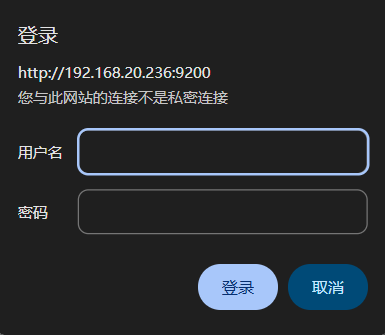
ES启动成功后,就可以通过浏览器访问 http://192.168.20.236:9200/ ,提示需要用户名和密码,但是此时还没有创建用户。
![]()
- 创建用户
在任务节点(比如es_node1)的elasticsearch-7.10.1目录下执行:
./bin/elasticsearch-setup-passwords interactive
按提示操作,输入密码即可,用户名无需修改。
修改成功后,即可刚配置的elastic用户和密码登录访问 http://192.168.20.236:9200/ 。
七、配置kibana
修改kibana的配置文件kibana.yml,配置如下:
server.host: "192.168.20.236"
elasticsearch.hosts: ["http://192.168.20.236:9200","http://192.168.20.236:9201","http://192.168.20.236:9202"]
elasticsearch.username: "kibana_system"
elasticsearch.password: "elastic"
八、启动kibana
执行:
cd /opt/kibana-7.10.1-linux-x86_64
nohup ./bin/kibana &
注意:此密码配置方式适用于集群部署模式,如果是单节点部署模式,有更加简单的配置方式,后面找时间再补上。

 浙公网安备 33010602011771号