


Visual Studio 各版本(MFC >= 9.0)
官方
(当前)在官网可下:
VS2008 - ENU
http://download.microsoft.com/download/8/1/d/81d3f35e-fa03-485b-953b-ff952e402520/VS2008ProEdition90dayTrialENUX1435622.iso
SP1:
https://download.microsoft.com/download/a/3/7/a371b6d1-fc5e-44f7-914c-cb452b4043a9/VS2008SP1ENUX1512962.iso
side-by-side
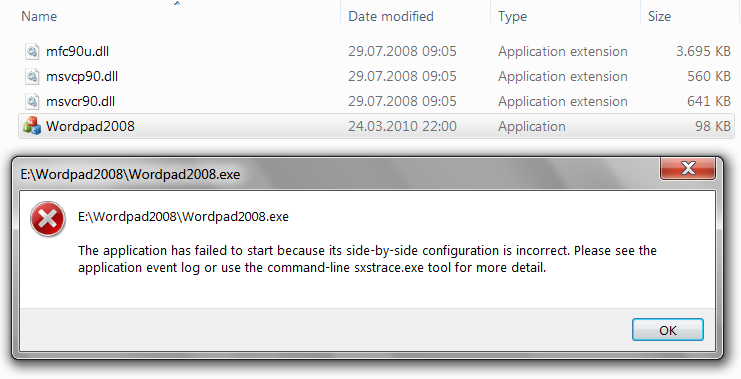
When you deploy an application built with Visual Studio 2005 or 2008 a manifest file that describes the dependencies, whether you deployed these VC++ DLLs in the local folder or they where installed in the WinSxS folder. If the manifest is missing you get an error. The next image shows the error received when running an MFC application (called Wordpad2008) build with VC++ 2008 on another machine without a manifest.
2012
Full Update 5
VS2013
VS 2010 is slower than ever, 2012 is less slow, 2013 is even less slow.
I would go with the last one just to have more recent C++ features and excellent debugging experience.
You might want to read about the issues and good sides of recent VS versions in this blog article
from dark_sylink who is the main contributor for Ogre 2.0 : https://www.yosoygames.com.ar/wp/2013/12/microsoft-we-need-to-talk-about-visual-studio
- MFC MBCS DLL Add-on
Support for MFC and its multibyte character set (MBCS) libraries requires
an additional step during Visual Studio installation in Visual Studio 2013 and later.
Download the DLL at Multibyte MFC Library for Visual Studio 2013.
VS2017 以上版本
unknown attribute "no init all"
This bug is fixed in VS 2019, but as per this answer, it still exists in VS 2017.

 浙公网安备 33010602011771号