
在使用v-for指令遇到的一个问题
遇到的报错
[Vue warn]: Property or method “l” is not defined on the instance but referenced during render. Make sure that this property is reactive, either in the data option, or for class-based components, by initializing the property. See: https://vuejs.org/v2/guide/reactivity.html#Declaring-Reactive-Properties.
(found in < Root>)
代码
.html文件上的代码
<!DOCTYPE html>
<html lang="en">
<head>
    <meta charset="UTF-8">
    <meta name="viewport" content="width=device-width, initial-scale=1.0">
    <meta http-equiv="X-UA-Compatible" content="ie=edge">
    <title>Document</title>
</head>
<body>
    <div id="app">
        <table class="table table-bordered table-hover table-striped">
            <thead>
                <tr>
                    <th>id</th>
                    <th>name</th>
                    <th>ctime</th>
                    <th>Operation</th>
                </tr>
            </thead>
            <tbody>
                <tr v-for="l in list">
                   {{l}}
                    <!--我是想在这里先将数据打印出来看看行不行-->
                </tr>
             </tbody>
        </table>
    </div>
</body>
</html>
.js文件上的代码
import Vue from 'vue/dist/vue'
import 'bootstrap/dist/css/bootstrap.css'
var vm=new Vue({
    el:'#app',
    data:{
        list:[
           {id : 1, name : '奔驰',ctime : new Date()},
            {id : 2, name : '宝马',ctime : new Date()}
        ]
    }
})
分析
看报错的意思是,没有定义这个数据,于是我重新看了一下v-for的使用方法,我的使用方法没错,跟网上看到的一模一样。经过我的不断试错,原来这个是格式问题。wdnm
重新修改后的.html文件代码
<!DOCTYPE html>
<html lang="en">
<head>
    <meta charset="UTF-8">
    <meta name="viewport" content="width=device-width, initial-scale=1.0">
    <meta http-equiv="X-UA-Compatible" content="ie=edge">
    <title>Document</title>
</head>
<body>
    <div id="app">
        <table class="table table-bordered table-hover table-striped">
            <thead>
                <tr>
                    <th>id</th>
                    <th>name</th>
                    <th>ctime</th>
                    <th>Operation</th>
                </tr>
            </thead>
            <tbody>
                <tr v-for="l in list">
                    <td>{{l}}</td>
                    <td></td>
                    <td></td>
                    <td></td>
                    <!--修改的部分-->
                </tr>
             </tbody>
        </table>
    </div>
</body>
</html>
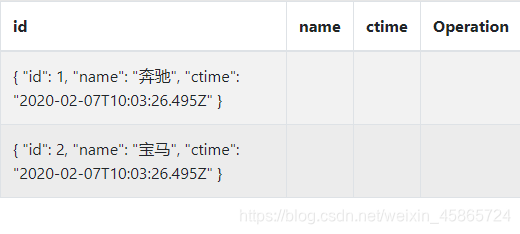
结果
浏览器上不再报错
数据也出来了
我不想秃头 算了,好好学吧。
|你知道的越多,不知道的越多。 |如果本文章内容有问题,请直接评论或者私信我。如果觉得写的还不错的话,点个赞也是对我的支持哦。 |未经允许,不得转载!|微信搜【程序员徐小白】,关注即可第一时间阅读最新文章。回复【面试题】有我准备的50道高频校招面试题,以及各种学习资料。

 浙公网安备 33010602011771号