


spring boot——参数传递——URL后面接参数——@PathVariable注解——示例:/param/geturl/{name}/{age}/{score}
通过URL传递参数与上面的URL不同,上面的URL中均需写明参数名和对应参数值,这里的URL传递参数,仅需要在地址栏输入参数值,然后后台自动匹配到对应的参数名。
springMVC通过使用处理器映射和@PathVariable注解的组合来获取URL参数。
首先通过处理器映射可以定位参数的位置和名称,而@PathVariable则可以通过名称来获取参数。
|
1
2
3
4
5
6
7
8
9
10
11
12
13
14
15
16
17
18
19
20
21
22
23
24
25
|
package com.awaimai.web;import org.springframework.web.bind.annotation.*;import java.util.HashMap;import java.util.Map;@RestControllerpublic class kzq{ @RequestMapping("/param/geturl/{name}/{age}/{score}") @ResponseBody public Map<String, Object> getUrlParam( @PathVariable("name") String name, @PathVariable("age") Integer age, @PathVariable("score") Double score) { Map<String, Object> paramMap = new HashMap<String, Object>(); paramMap.put("name", name); paramMap.put("age", age); paramMap.put("score", score); return paramMap; }} |

方法中,我们使用了3个{ },分别代表变量name、age和score,方法变量中使用@PathVariable来接收变量,并映射为方法的变量
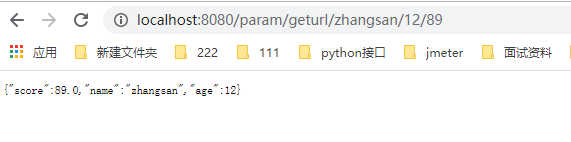
=====================================================================================================
如果中间某个参数可能为空呢,查了下@PathVariable注解有required属性,但是经测试,发现这个属性无法单独使用。
如果中间某个参数为空,还得借用@RequestMapping 支持多URL的属性进行处理
假如,age属性可能为空,那么修改代码为
|
1
2
3
4
5
6
7
8
9
10
11
12
13
14
15
16
17
18
19
20
21
22
23
24
25
26
27
28
|
package com.awaimai.web;import org.springframework.web.bind.annotation.*;import java.util.HashMap;import java.util.Map;@RestControllerpublic class kzq{ @RequestMapping(value = {"/param/geturl/{name}/{age}/{score}", "/param/geturl/{name}/{score}"}) @ResponseBody public Map<String, Object> getUrlParam( @PathVariable("name") String name, @PathVariable(value = "age", required = false) Integer age, @PathVariable("score") Double score) { Map<String, Object> paramMap = new HashMap<String, Object>(); paramMap.put("name", name); paramMap.put("age", age); paramMap.put("score", score); return paramMap; }} |
其中,后面的URL中没有了age参数,这里,视有无age的请求为不同的请求
使用URL http://localhost:8080/param/geturl/zhangsan//89 做测试,可以正常跳转
web访问:

========================================================================================
    //  http://localhost:8080/param/geturl/zhangsan/112/89

    //  http://localhost:8080/param/geturl/zhangsan//89

    @RequestMapping(value = {"/param/geturl/{name}/{age}/{score}", "/param/geturl/{name}/{score}"})
    @ResponseBody
    public Map<String, Object> getUrlParam(@PathVariable("name") String name, @PathVariable(value = "age", required = false) Integer age, @PathVariable("score") Double score)
    {
        Map<String, Object> paramMap = new HashMap<String, Object>();
        paramMap.put("name", name);
        paramMap.put("age", age);
        paramMap.put("score", score);
        return paramMap;
    }
http://localhost:8080/param/geturl/zhangsan/112/89

-------------------------------------------------------------------------------------------------------------------
http://localhost:8080/param/geturl/zhangsan//89

-----------------------------------------------------------------------------------------------------------------------

 浙公网安备 33010602011771号