
CP作业(六)
今天我跟好朋友们去动物园,看到了好多动物,累死了。。。
回来后剽窃CP的智慧:
首先就是你要导入5.1.49jar包驱动,别的不行,别问我,我才过坑,试了试,
再有就是改权限,mysql要支撑远程访问,
(一)改表法
在localhost登入mysql后,更改 “mysql” 数据库里的 “user” 表里的 “host” 项,将"localhost"改称"%"
update user set host = '%' where user = 'root';

select host, user from user;
FLUSH PRIVILEGES;
(二)授权法
myuser是你的那个用户,mypassword是你密码。
mysql> GRANT ALL PRIVILEGES ON *.* TO 'myuser'@'%' IDENTIFIED BY 'mypassword' WITH GRANT OPTION;
mysql>FLUSH PRIVILEGES;
,代码:
DBOpenHelper类:

package com.example.lsm;

import java.sql.Connection;
import java.sql.DriverManager;
import java.sql.ResultSet;
import java.sql.SQLException;
import java.sql.Statement;

public class DBOpenHelper {
        private final static String driver = "com.mysql.jdbc.Driver";
        private final static String url = "jdbc:mysql://10.99.117.52/xinwe?useUnicode=true&characterEncoding=UTF-8";
        private final static String username = "root";
        private final static String password = "hzl02096";

        Connection conn=null;
        Statement st=null;
        ResultSet rs=null;

        static {
            try {
                Class.forName(driver);
            } catch (ClassNotFoundException e) {
                System.out.println("加载驱动错误");
            }
        }


        //2. 获取连接
        public static Connection getConnect() throws Exception {
            return DriverManager.getConnection(url, username, password);
        }

        //3. 释放连接资源

        public static void release(Connection conn, Statement st, ResultSet rs) throws Exception {
            if (rs != null) {
                rs.close();
            }
            if (st != null) {
                st.close();
            }
            if (conn != null) {
                conn.close();
            }

        }
/*private static String diver = "com.mysql.jdbc.Driver";
    //加入utf-8是为了后面往表中输入中文,表中不会出现乱码的情况
    private static String url = "jdbc:mysql://10.99.117.52/xinwe?characterEncoding=utf-8";
    private static String user = "root";//用户名
    private static String password = "hzl02096";//密码
    *//*
     * 连接数据库
     * *//*
    public static Connection getConn(){
        Connection conn = null;
        try {
            Class.forName(diver);
            conn = (Connection) DriverManager.getConnection(url,user,password);//获取连接
        } catch (ClassNotFoundException e) {
            e.printStackTrace();
        } catch (SQLException e) {
            e.printStackTrace();
        }
        return conn;
    }*/

    }
UserDao类:
package com.example.lsm;

import java.sql.Connection;
import java.sql.ResultSet;
import java.sql.Statement;
import java.util.ArrayList;
import java.util.List;

public class UserDao {

    //查询用户的方法
    public boolean select(String table) throws Exception {
        Connection conn = null;
        Statement state = null;
        ResultSet rs = null;
        try {
            conn = DBOpenHelper.getConnect();
            state = conn.createStatement();
            String sql = "select * from " + table;
            rs = state.executeQuery(sql);
            while (rs.next()) {
                System.out.println(rs.getString(1) + " " + rs.getString(2));//就是输出第一列和第二列的值

            }


        } catch (Exception e) {
            e.printStackTrace();
        } finally {
            DBOpenHelper.release(conn, state, rs);
        }
        return true;
    }

}
MainActivity类:
package com.example.lsm;

import androidx.appcompat.app.AppCompatActivity;

import android.os.Bundle;
import android.view.View;
import android.widget.TextView;

import java.util.List;

public class MainActivity extends AppCompatActivity implements View.OnClickListener {
private TextView textView;
private String a="";
    @Override
    protected void onCreate(Bundle savedInstanceState) {
        super.onCreate(savedInstanceState);
        setContentView(R.layout.activity_main);
        findViewById(R.id.bt_send).setOnClickListener(this);
        textView=findViewById(R.id.tv_response);
    }

    @Override
    public void onClick(View view) {
        // Android 4.0 之后不能在主线程中请求HTTP请求
        new Thread(new Runnable(){
            @Override
            public void run() {
                UserDao userDao = new UserDao();
                try {
                  userDao.select("user");

                } catch (Exception e) {
                    e.printStackTrace();
                }

            }
        }).start();

    }
}
xml
<?xml version="1.0" encoding="utf-8"?>
<manifest xmlns:android="http://schemas.android.com/apk/res/android">
    <uses-permission android:name="android.permission.READ_EXTERNAL_STORAGE"/>
    <uses-permission android:name="android.permission.WRITE_EXTERNAL_STORAGE"/>
    <uses-permission android:name="android.permission.INTERNET"/>
    <uses-permission android:name="android.permission.ACCESS_NETWORK_STATE" />
    <application
        android:allowBackup="true"
        android:icon="@mipmap/ic_launcher"
        android:label="@string/app_name"
        android:supportsRtl="true"
        android:theme="@style/Theme.Lianxi">
        <activity
            android:name=".MainActivity"
            android:exported="true">
            <intent-filter>
                <action android:name="android.intent.action.MAIN" />

                <category android:name="android.intent.category.LAUNCHER" />
            </intent-filter>
        </activity>
    </application>

</manifest>
地铁系统录入困难,写个代码录入,
这是整个石家庄路线
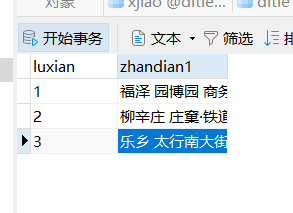
通过下面这个servlet逻辑代码实现
  public void select(HttpServletRequest request, HttpServletResponse response) throws ServletException, IOException {
        List<zhandian> select = ditieServices.select();
        for(zhandian u:select)
        {
            String[] s = u.getZhandian1().split(" ");
            int b=s.length;
            for(int i=0;i<b;i++)
            {
                ditiepojo ditiepojo=new ditiepojo(null,null,null,null);
                ditiepojo.setXianlu(u.getXianlu());
                ditiepojo.setZhandian(s[i]);
                ditieServices.add(ditiepojo);

            }
        }


    }
最后成功:
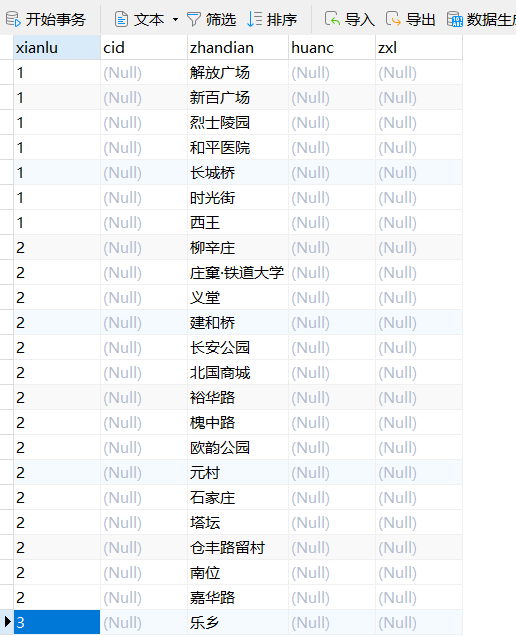
最后cp照:


 浙公网安备 33010602011771号