
JAVA流程控制
1、用户交互Scanner
-
我们可以通过Scanner类来获取用户的输入
-
基本语法:
Scanner s = new Scanner(System.in); -
通过Scaner类的next()和nextLine()方法获取输入的字符串,在读取我们一般需要使用hasNext()与hasNextLine()判断是否还有输入数据
1.1、字符
-
next():
-
一定要读取有效字符才可以结束输入。
-
对输入字符之前遇到的空白,next()方法会自动将其去掉
-
只有输入有效字符后才将后面输入的空白作为分隔符或者结束符
-
next()不能得到带有空格的字符串
  //创建一个扫描器对象,用于接收键盘数据
        Scanner scanner = new Scanner(System.in);

        System.out.println("使用next方式接收");

        //判断用户有没有输入字符串
        if (scanner.hasNext()){
            //使用next方式接收
            String str =scanner.next();
            System.out.println("输入的内容为:"+str);
        }
        //凡是使用IO流的类如果不关闭会一直占用资源,要养成良好习惯用完就关掉
        scanner.close();
-
-
nextLine():
-
以Enter为结束符,也就是说next Line()方法返回的是输入回车之前的所有字符
-
可以获得空白
 //创建一个扫描器对象,用于接收键盘数据
        Scanner scanner =new Scanner(System.in);
        System.out.println("使用NextLine接收");
        if(scanner.hasNextLine())
        {
            String str = scanner.nextLine();
            System.out.println("获取的字符是"+str);
        }
        scanner.close();
-
1.2、整数与小数
     Scanner scanner = new Scanner(System.in);

        //从键盘接收数据
        int i = 0;
        float f = 0.0f;

        System.out.println("请输入整数:");

        if(scanner.hasNextInt()){
            i = scanner.nextInt();
            System.out.println("整数数据"+i);
        }else {
            System.out.println("输入的不是整数!");
        }
        /////////////////////////////
        System.out.println("请输入小数:");
        if(scanner.hasNextFloat()){
            f = scanner.nextFloat();
            System.out.println("小数数据:"+f);
        }else {
            System.out.println("输入的不是小数数据!");
        }
        scanner.close();
1.3、训练
- 输入多个数字,并求其总和与平均数,没输入一个数字用回车确认,通过输入非数字来结束输入并输出执行结果
Scanner scanner = new Scanner(System.in);
//定义总和与计数
double sum = 0;
int conut = 0;

//输入提示
System.out.println("请输入多个数字:");
//通过循环判断是否还有输入,在其循环内进行求和和统计


while (scanner.hasNextDouble()) {
    double x = scanner.nextDouble();
    sum += x;
    conut += 1;
}
System.out.println("总和:"+sum);
System.out.println("平均数:"+(sum/conut);
scanner.close();
2、顺序结构
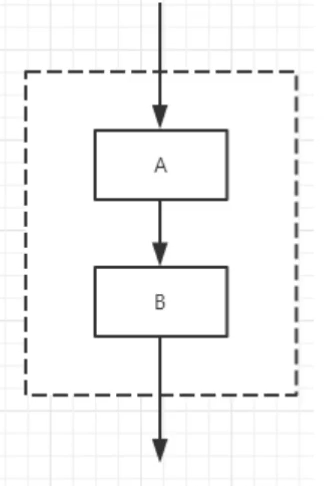
-
从上到下依次执行
-
public static void main(String[] args) {
    System.out.println("顺序1");
    System.out.println("顺序2");
    System.out.println("顺序3");
    System.out.println("顺序4");
}
Run: 顺序1
顺序2
顺序3
顺序4
3、选择结构
3.1、if单选则结构
-
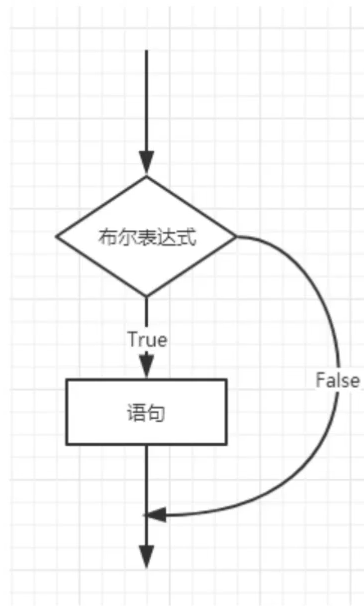
判断一个东西是否可行,然后才去执行
-
语法:
if(布尔表达式){
	true的语句:
}
-
Scanner scanner = new Scanner(System.in);

System.out.println("请输入类容:");
String s = scanner.nextLine();


//equals:判断字符串是否相等
if(s.equals("Hello")){
    System.out.println(s);
}
//System.out.println("End");
scanner.close();
3.2、if双选则结构
-
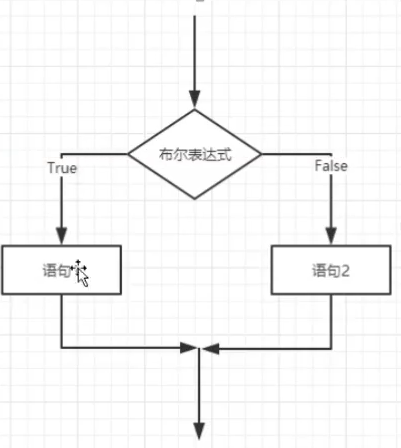
语法
if(布尔表达式){
    true的语句
}else{
    false的语句
}
public static void main(String[] args) {
    Scanner scanner = new Scanner(System.in);

    System.out.println("请输入成绩:");

    int score = scanner.nextInt();

    if(score >= 60){
        System.out.println("及格");
    }else{
        System.out.println("不及格");
    }
    scanner.close();
}
3.3、if多选则结构
-
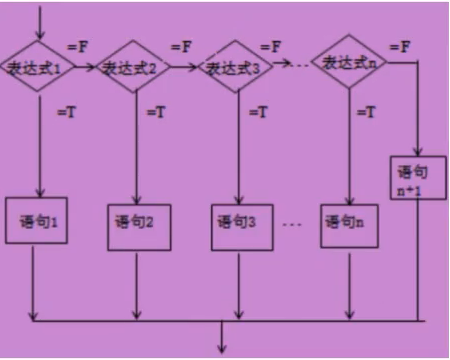
语法
if(布尔表达式1){
    1:true
}else if(布尔表达式2){
    2:true
}else if(布尔表达式3){
    3:true
}else{
    false
}
Scanner scanner = new Scanner(System.in);

System.out.println("请输入成绩:");
int score = scanner.nextInt();

if(score == 100){
    System.out.println("满分");
}else if(score < 100 && score >= 80 ){
    System.out.println("优秀");
}else if(score < 80 && score >= 60 ){
    System.out.println("及格");
}else if(score < 60 && score >= 00 ){
    System.out.println("不及格");
}else{
    System.out.println("输入不合法");
}
scanner.close();
3.4、嵌套的if结构
- 在IF语句或者if else语言中可以嵌套if语句
3.5、switch多选择结构
-
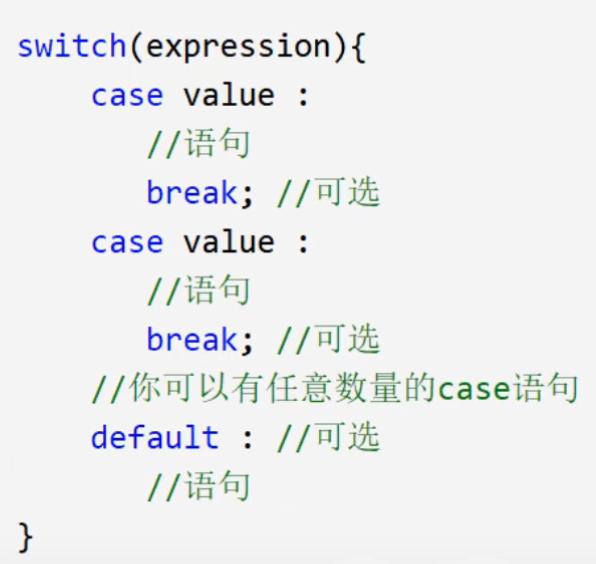
多选择结构还有一个实现方式就是switch case 语句
-
switch case 语句判断一个变量与一系列值中某个值是否相等,每个值称为一个分支
-
switch语句中的变量类型可以是:
- byte、short、int或者char
- 从Java SE7开始
- switch支持字符串String类型
- 同时case标签必须为字符串常量或字面量
-
    char grade = 'C';
    switch (grade){
        case 'A':
            System.out.println("优秀");
            break;
        case 'B':
            System.out.println("良好");
            break;
        case 'C':
            System.out.println("一般");
            break;
        case 'D':
            System.out.println("及格");
            break;
        case 'F':
            System.out.println("不及格");
            break;
        default:
            System.out.println("非法字符:“ABCD”");
            break;
4、循环结构
4.1、while循环
-
语法
whilie(布尔表达式){ true; } -
只要布尔表达式为true,循环就一直执行下去。
-
多数情况我们会让循环停下来,需要一个让循环失效的表达式来结束循环.
-
多部份情况会一直执行,比如服务器的监听
 //求1-100的和

        int i = 1;
        //定义sum为和
        int sum = 0;

        //超过一百为false
        while (i <= 100){
            sum += i;
            i++;
        }
        //输出sum的值
        System.out.println(sum);
4.2、do……while循环
-
和while循环一样,但至少会执行一次
do{
    true;
}while(布尔表达式);
public static void main(String[] args) { int a = 0; while (a < 0){ System.out.println("执行while语句"); } do { System.out.println("执行do...while语句"); }while (a<0); } 结果:执行do...while语句
4.3、for循环
-
for循环语句是支持迭代的一种通用结构,是最有效,最灵活的循环结构
-
for循环执行的次数是在执行前就确定的。语法格式如下:
for(初始化;布尔表达式;更新){
    代码语句;
}
int i,sum = 0; for(i = 1;i <= 100;i++){ sum += i; System.out.println("当前的运算的值为:"+i); System.out.println("当前的运算累计的和为::"+sum); } System.out.println("========================="); System.out.println(sum); -
九九乘法表
int i,j; for(j = 1;j <=9;j++){ for (i = 1; i <= j; i++) { System.out.print(i+"*"+j+"="+i*j+"\t"); } System.out.println(); } 输出: 1*1=1 1*2=2 2*2=4 1*3=3 2*3=6 3*3=9 1*4=4 2*4=8 3*4=12 4*4=16 1*5=5 2*5=10 3*5=15 4*5=20 5*5=25 1*6=6 2*6=12 3*6=18 4*6=24 5*6=30 6*6=36 1*7=7 2*7=14 3*7=21 4*7=28 5*7=35 6*7=42 7*7=49 1*8=8 2*8=16 3*8=24 4*8=32 5*8=40 6*8=48 7*8=56 8*8=64 1*9=9 2*9=18 3*9=27 4*9=36 5*9=45 6*9=54 7*9=63 8*9=72 9*9=81 -
增强for循环
-
语法:
for(声明语句:表达式){
    代码语句
}
public static void main(String[] args) { //定义数组 int[] number = {10,20,30,40,50}; //遍历数组的元素 for(int x:number){ System.out.println(x); } }
5、break&coutinue
-
break:用于强行退出循环
int i = 0; while (i < 100){ i++; System.out.println(i); if(i == 30){ break; } } 输出: 1~30 -
coutinue:跳出当前循环,接着下次循环
//输出1~100中不被10整除的数 int i = 0; while (i < 100){ i++; if(i % 10 == 0 ){ System.out.println(); continue; } System.out.print(i); System.out.print('\t'); -
带标签的break和coutinue(类似于goto)
public static void main(String[] args) {
        //打印101-150之前的所有质数;
        int count = 0;

       outer: for(int i = 101;i < 150;i++){
            for(int j = 2; j < i/2;j++){
                if(i%j == 0){
                    continue  outer;
                }
            }
           System.out.println(i+"  ");
        }
    }
6、练习
-
打印三角形
//打印三角形
        for (int i = 1; i <=  5; i++) {
            for (int j = 5; j > i; j--) {
                System.out.print(" ");
            }
            for (int m = 0; m < i; m++) {
                System.out.print("*");
            }
            for (int m = 1; m < i; m++) {
                System.out.print("*");
            }
            System.out.println();
        }
输出:
    *
   ***
  *****
 *******
*********

 浙公网安备 33010602011771号