

el-date-picker日期选择器默认值,时间跨度90天
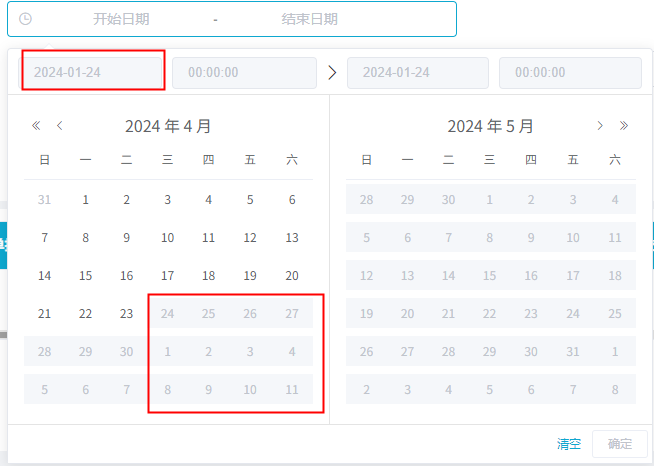
1.时间范围选择器,默认加载30天,输入开始时间,结束时间只能选90天内的,90天外的禁用不能选。


 1                  <el-date-picker
 2                     v-model="value"
 3                     clearable
 4                     style="width: 100%"
 5                     type="datetimerange"
 6                     value-format="yyyy-MM-dd HH:mm:ss"
 7                     format="yyyy-MM-dd HH:mm:ss"
 8                     range-separator="-"
 9                     :start-placeholder="开始时间"
10                     :end-placeholder="结束时间"
11                     :picker-options="pickerOptions"
12                     @change="dateChange($event)"
13                   >
14                   </el-date-picker>
15
16 data() {
17      // 时间选择
18       value:"",
19       pickDate:"",
20       pickerOptions:{
21         onPick: this.getPickDate,
22         disabledDate: this.disabledDate
23       },
24 }
25 created() {
26     // 默认时间7天
27     let end = new Date();
28     let start = new Date();
29     start.setTime(start.getTime() - 3600 * 1000 * 24 * 7);
30     this.value = [this.formatDate(start), this.formatDate(end)];
31     this.dateChange(this.value);
32   },
33 methods: {
34     // 时间只能选择3个月内的
35     getPickDate(pick){
36       this.pickDate = pick;
37     },
38     // 90 天外的时间禁用
39     disabledDate(date){
40       const {minDate, maxDate} = this.pickDate;
41       if(minDate && !maxDate){
42         const diff= Math.abs(minDate.valueOf() - date.valueOf());
43         if(diff > 1000 * 3600 * 24 * 90) {
44           return true;
45         }
46       }
47     },
48     formatDate(date) {
49       const year = date.getFullYear();
50       const month = date.getMonth() + 1;
51       const day = date.getDate();
52       return year + '-' + month + '-' + day + ' 00:00:00';
53     },
54 }
2.效果
对于编程的技术和问题,需要熟练技术,需要总结问题,更需要举一反三的思索。哈哈,Me是一个元气满满的妹子~~

 浙公网安备 33010602011771号