
C++游戏开发之旅 5
问题背景
现在我们已经可以渲染出画面了,截止目前,我们有Config类用于灵活的设置游戏参数解决硬编码带来的不便性,Time类控制游戏的帧率,ResourceManager资源管理类作为中转,让其中三个小弟TextureManager、AudioManager、FontManager分别管理资源,Camera类充当相机(画布)显示,Renderer类用作画笔渲染图像,接下来我们需要进行交互,让我们可以与这个世界进行对话。这一节完成输入管理模块InputManager。
设计目标
我们在配置json文件中设置了一些按键映射:
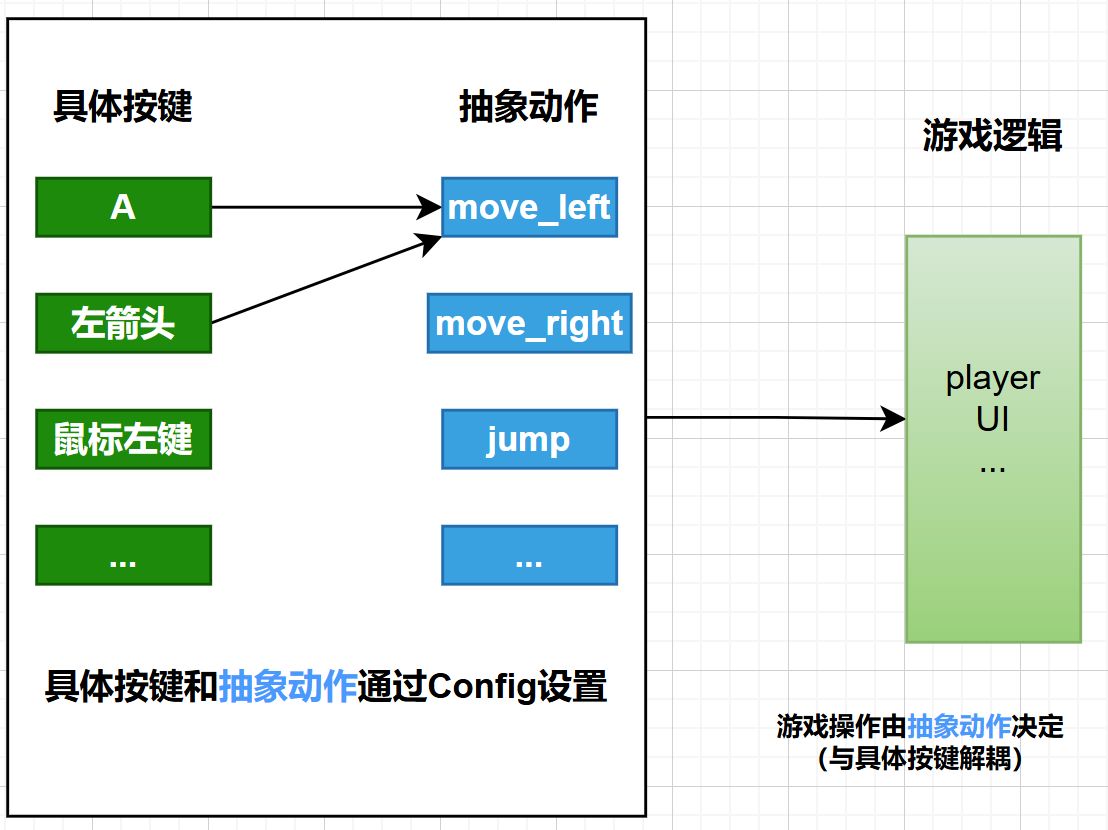
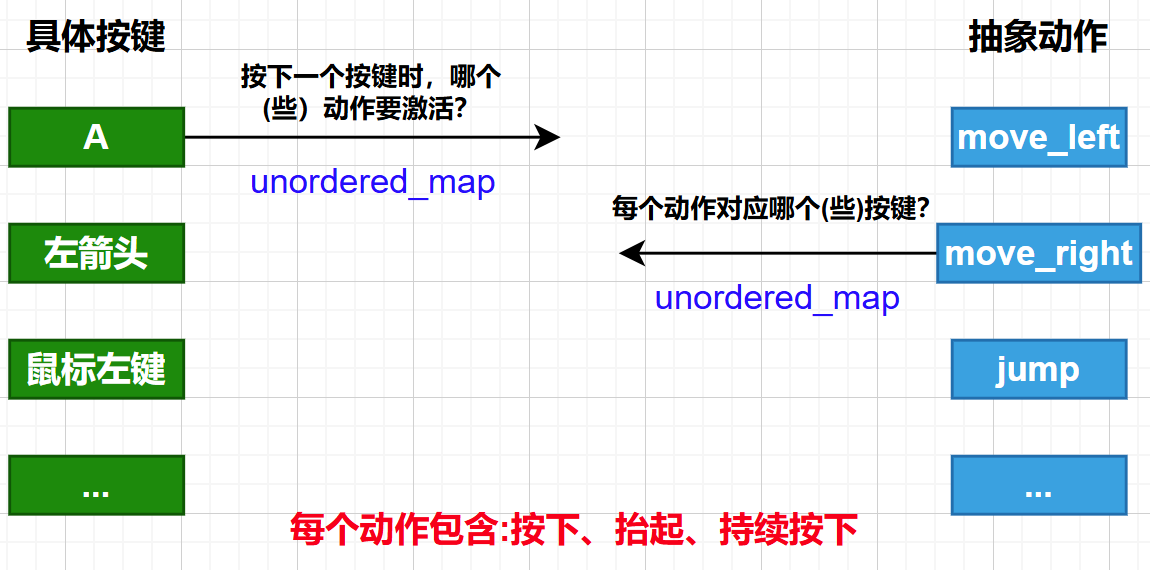
我们需要建立一个系统,可以:
- 抽象化输入:游戏逻辑不应该关心物理层面的按键(比如W键或是上箭头),而是关心抽象动作(向上移动)。我们需要把具体的物理按键(键盘、鼠标、手柄)映射到抽象动作上
- 易于配置:所有的按键映射都将定义在我们的
config.json文件中,玩家可以很容易的修改键位,无需改动代码 - 精确的状态管理:区分"刚刚按下"、"持续按住"、"刚刚释放"这三种状态对于实现某些游戏机制(如跳跃、蓄力、攻击)至关重要。
第一步:构建功能完备的InputManager
1.架构设计
InputManager将是所有输入的唯一入口,需要完成的工作流程为:
| 阶段 | 说明 |
|---|---|
| 初始化 | 构造时,需要从Config模块读取input_mappings,然后两个建立映射表:一个是从SDL_Scancode(键盘按键)到动作列表,一个是从Uint32(鼠标按钮)到动作列表 |
| 每帧更新 | 在游戏主循环的最开始被调用,处理SDL事件队列中的事件(SDL_EVENT_KEY_DOWN),并据此更新内部所有动作的状态 |
| 状态查询 | 提供isActionDown(),isActionPressed(),isActionReleased()等接口,供游戏逻辑的其他部分查询特定动作的当前状态 |
2.动作状态机 ActionState
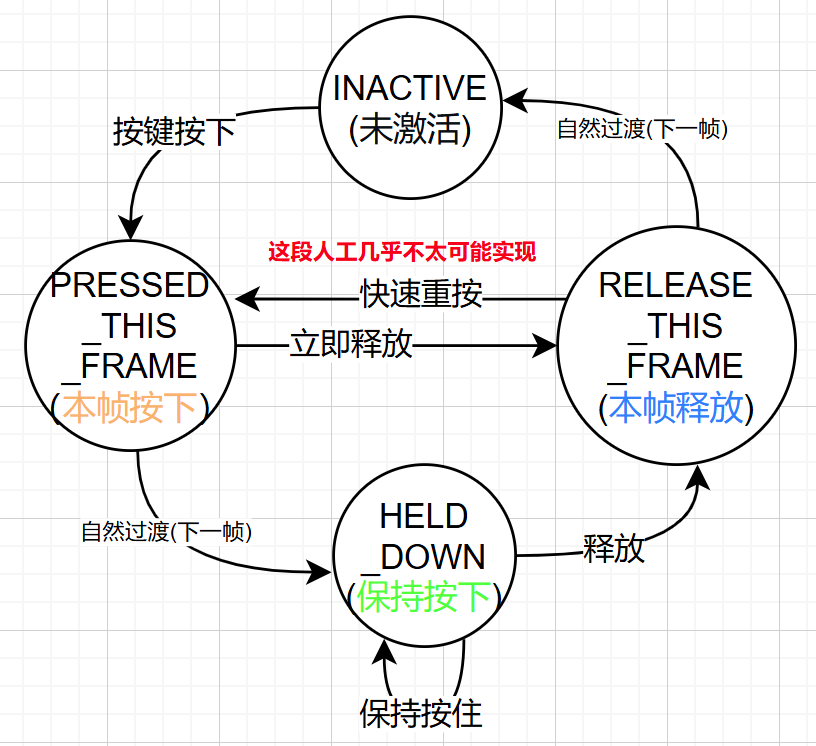
为了精确捕捉按键的每一个瞬间,定义了一个枚举类ActionState:
enum class ActionState{
	INACTIVE,
	PRESSED_THIS_FRAME,
	HELD_DOWN,
	RELEASED_THIS_FRAME
}
状态转换说明
InputManager::update()方法会负责在这个状态机之间进行正确的转换,前一帧是PRESSED_THIS_FRAME的动作状态,如果本帧没有收到"释放"事件,它的状态就会自动变为HELD_DOWN。
类似的就有:
3.实现InputManager
在src/engine下创建input目录,并添加input_manager.h和input_manager.cpp。
input_manager.h
#pragma once
#include <unordered_map>
#include <SDL3/SDL_render.h>
#include <string>
#include <vector>
#include <glm/vec2.hpp>

namespace engine::core {
class Config;
}

namespace engine::input {

enum class ActionState{
    INAVTIVE,  // 动作未激活
    PRESSED_THIS_FRAME, // 动作本帧被按下
    HOLD_DOWN, // 动作被持续按下
    RELEASED_THIS_FRAME // 动作本帧被释放
};

class InputManager final {
private:
    SDL_Renderer* sdl_renderer_; // SDL渲染器
    // 抽象动作对于具体按键的映射关系
    std::unordered_map<std::string, std::vector<std::string>> actions_to_keyname_map_; // 从Config配置文件中读取的输入映射关系
    // 需要两个映射列表, 按键到动作的映射, 鼠标按钮到动作的映射
    std::unordered_map<SDL_Scancode, std::vector<std::string>> scancode_to_actions_map_; // 按键到动作的映射
    std::unordered_map<Uint32, std::vector<std::string>> mouse_button_to_actions_map_; // 鼠标按钮到动作的映射

    std::unordered_map<std::string, ActionState> action_states_map_; // 动作状态映射

    bool should_quit_ = false; // 退出标志
    glm::vec2 mouse_position_; // 鼠标位置

public:
    /**
     * @brief 构造函数
     * @params sdl_renderer SDL渲染器 获得logicalposition
     * @params config 配置文件 读取输入映射关系
     * throws std::runtime_error 如果有空
     */
    InputManager(SDL_Renderer* sdl_renderer, const engine::core::Config* config);

    void update(); // 更新输入状态,循环开始先调用

    // 动作状态查询
    bool isActionDown(const std::string& action_name) const;
    bool isActionPressed(const std::string& action_name) const;
    bool isActionReleased(const std::string& action_name) const;

    bool shouldQuit() const; // 检查是否需要退出
    void setShouldQuit(bool should_quit); // 设置退出标志

    glm::vec2 getMousePosition() const; // 获取鼠标位置 --- 屏幕坐标
    glm::vec2 getLogicalMousePosition() const; // 获取鼠标逻辑位置 --- 逻辑坐标

private:
    void processEvent(const SDL_Event& e); // 处理事件
    void initializeMappings(const engine::core::Config* config); // 初始化映射关系

    void updateActionState(const std::string& action_name, bool is_input_active, bool is_repeat_event); // 更新动作状态
    SDL_Scancode scancodeFromString(const std::string& key_name);
    Uint32 mouseButtonFromString(const std::string& button_name);
};
}
定义了InputManager的接口,包括状态查询和私有的映射表。
input_manager.cpp
#include "input_manager.h"
#include "../core/config.h"
#include <spdlog/spdlog.h>
#include <stdexcept>

namespace engine::input {
    InputManager::InputManager(SDL_Renderer *sdl_renderer, const engine::core::Config *config)
    : sdl_renderer_(sdl_renderer)
    {
        if(!sdl_renderer_){
            spdlog::error("输入管理器:SDL_Renderer为空指针");
            throw std::runtime_error("输入管理器:SDL_Renderer为空指针");
        }
        initializeMappings(config);
        // 获取鼠标初始位置
        float x,y;
        SDL_GetMouseState(&x,&y);
        mouse_position_ = {x,y};
        spdlog::trace("输入管理器初始化完成,鼠标位置:({},{})", mouse_position_.x, mouse_position_.y);
    }

    // --- 更新和事件处理 ---
    void InputManager::update()
    {
        // 1.根据上一帧更新默认的动作状态
        for(auto& [action, state] : action_states_map_){
            if(state == ActionState::PRESSED_THIS_FRAME){
                state = ActionState::HOLD_DOWN;
            } else if(state == ActionState::RELEASED_THIS_FRAME){
                state = ActionState::INAVTIVE;
            }
        }
        // 2.根据SDL_Event更新动作状态  这里需要注意如果某个键按下不动时,并不会生成SDL_Event
        SDL_Event event;
        while(SDL_PollEvent(&event)){
            processEvent(event);
        }

    }


    void InputManager::processEvent(const SDL_Event &e)
    {
        switch(e.type){
            case SDL_EVENT_KEY_DOWN:
            case SDL_EVENT_KEY_UP:{
                SDL_Scancode scancode = e.key.scancode;
                bool is_down = e.key.down;
                bool is_repeat = e.key.repeat;

                auto it = scancode_to_actions_map_.find(scancode);
                if(it != scancode_to_actions_map_.end()){ // 找到对应的按键响应
                    const std::vector<std::string>& actions = it->second;
                    for(const std::string& action : actions){
                        updateActionState(action,is_down,is_repeat);
                    }
                }
                break;
            }
            case SDL_EVENT_MOUSE_BUTTON_DOWN:
            case SDL_EVENT_MOUSE_BUTTON_UP:{
                Uint8 mouse_button = e.button.button;
                bool is_down = e.button.down;

                auto it = mouse_button_to_actions_map_.find(mouse_button);
                if(it != mouse_button_to_actions_map_.end()){
                    const std::vector<std::string>& actions = it->second;
                    for(const std::string& action : actions){
                        updateActionState(action,is_down,false);
                    }
                }
                // 更新鼠标位置
                mouse_position_ = {e.button.x,e.button.y};
                break;
            }
            case SDL_EVENT_MOUSE_MOTION:{
                mouse_position_ = {e.motion.x,e.motion.y};
                break;
            }
            case SDL_EVENT_QUIT:{
                spdlog::trace("输入管理器:收到退出事件");
                should_quit_ = true;
                break;
            }
            default:
                break;
        }
    }

    // --- 状态查询方法 ---
    bool InputManager::isActionDown(const std::string &action_name) const
    {
        auto it = action_states_map_.find(action_name);
        if(it == action_states_map_.end()){
            spdlog::warn("输入管理器:无效的动作名:{}",action_name);
            return false;
        }
        ActionState state = it->second;
        if(state == ActionState::PRESSED_THIS_FRAME || state == ActionState::HOLD_DOWN){
            return true;
        }
        return false;
    }

    bool InputManager::isActionPressed(const std::string &action_name) const
    {
        if(auto it = action_states_map_.find(action_name); it != action_states_map_.end()){
            return it->second == ActionState::PRESSED_THIS_FRAME;
        }
        return false;
    }

    bool InputManager::isActionReleased(const std::string &action_name) const
    {
        if(auto it = action_states_map_.find(action_name); it != action_states_map_.end()){
            return it->second == ActionState::RELEASED_THIS_FRAME;
        }
        return false;
    }

    bool InputManager::shouldQuit() const
    {
        return should_quit_;
    }

    void InputManager::setShouldQuit(bool should_quit)
    {
        should_quit_ = should_quit;
    }

    glm::vec2 InputManager::getMousePosition() const
    {
        return mouse_position_;
    }

    glm::vec2 InputManager::getLogicalMousePosition() const
    {
        glm::vec2 logical_pos;
        // TODO:实现鼠标逻辑坐标转换
        SDL_RenderCoordinatesFromWindow(sdl_renderer_, mouse_position_.x, mouse_position_.y, &logical_pos.x, &logical_pos.y);
        return logical_pos;
    }


    // --- 初始化输入映射 ---
    void InputManager::initializeMappings(const engine::core::Config *config)
    {
        if(!config){
            spdlog::error("输入管理器:配置为空指针");
            throw std::runtime_error("输入管理器:配置为空指针");
        }
        // 将config中的输入映射关系存储到map中
        actions_to_keyname_map_ = config->input_mappings_;
        // 先清空映射表
        scancode_to_actions_map_.clear();
        mouse_button_to_actions_map_.clear();
        action_states_map_.clear();

        // 由于配置文件中没有鼠标按钮动作,需要定义默认映射
        if(actions_to_keyname_map_.find("MouseLeftClick") == actions_to_keyname_map_.end()){
            actions_to_keyname_map_["MouseLeftClick"] = {"MouseLeft"};
        }
        if(actions_to_keyname_map_.find("MouseRightClick") == actions_to_keyname_map_.end()){
            actions_to_keyname_map_["MouseRightClick"] = {"MouseRight"};
        }

        // 遍历 动作 -> 按键 映射表
        for(const auto& [action,keynames] : actions_to_keyname_map_){
            // 添加 动作状态
            action_states_map_[action] = ActionState::INAVTIVE;

            // 遍历 按键名
            for(const auto& keyname : keynames){
                // 添加 按键 -> 动作 映射
                SDL_Scancode scancode = scancodeFromString(keyname);
                Uint32 mouse_button = mouseButtonFromString(keyname);

                if(scancode != SDL_SCANCODE_UNKNOWN){
                    scancode_to_actions_map_[scancode].push_back(action);
                } else if(mouse_button != 0){
                    mouse_button_to_actions_map_[mouse_button].push_back(action);
                } else {
                    spdlog::warn("输入管理器:无效的按键名:{}",keyname);
                }
            }
        }
        spdlog::trace("输入映射初始化完成");
    }

    // --- 工具函数 ---
    void InputManager::updateActionState(const std::string &action_name, bool is_input_active, bool is_repeat_event)
    {
        auto it = action_states_map_.find(action_name);
        if(it == action_states_map_.end()){
            spdlog::warn("输入管理器:无效的动作名:{}",action_name);
            return;
        }
        if(is_input_active){
            if(is_repeat_event){
                return;
            }
            if(it->second == ActionState::INAVTIVE){
                it->second = ActionState::PRESSED_THIS_FRAME;
            }
        }
        else {
            if(it->second == ActionState::HOLD_DOWN || it->second == ActionState::PRESSED_THIS_FRAME){
                it->second = ActionState::RELEASED_THIS_FRAME;
            }
        }
    }

    SDL_Scancode InputManager::scancodeFromString(const std::string &key_name)
    {
        return SDL_GetScancodeFromName(key_name.c_str());
    }

    Uint32 InputManager::mouseButtonFromString(const std::string &button_name)
    {
        if(button_name == "MouseLeft") return SDL_BUTTON_LEFT;
        if(button_name == "MouseMiddle") return SDL_BUTTON_MIDDLE;
        if(button_name == "MouseRight") return SDL_BUTTON_RIGHT;
        return 0;
    }
}
关键功能
-
initializeMappings() - 初始化映射表,我们需要从config配置文件中读取到输入映射将其保存下来,然后分别将按键对应抽象动作({SDL_Scancode,std::string}),鼠标按钮对应抽象动作保存下来({Uint32,std::string})。之后需要将抽象动作
action_states_map和其动作状态进行设置。类似{"A(SDL中Scancode类型)":["move_left"],...}; -
update() - 更新状态这部分采用状态判断,可以根据上一帧来更新当前的帧的状态,比如上一帧是动作状态是
PRESSED_THIS_FRAME那么接下来就是HOLD_DOWN,如果是RELEASED_THIS_FRAME就自然过渡到INACTiVE。然后进行事件队列判断,分别对按键和鼠标按钮的DOWN和UP进行状态更新。
switch(e.type){
    case SDL_EVENT_KEY_DOWN:
    case SDL_EVENT_KEY_UP:{
        SDL_Scancode scancode = e.key.scancode;  //获取按键
        bool is_down = e.key.down; // 是否按下?
        bool is_repeat = e.key.repeat;

        auto it = scancode_to_actions_map_.find(scancode);
        if(it != scancode_to_actions_map_.end()){ // 找到对应的按键响应
            const std::vector<std::string>& actions = it->second;
            for(const std::string& action : actions){ // 遍历对应的抽象动作更新状态
                updateActionState(action,is_down,is_repeat);
            }
        }
        break;
    }
我们应该注意的是如果按键按住的话,并不会生成SDL_Event,但是一直按住的话,可能会触发操作系统周期性的KEY_DOWN,这个时候就又进入到事件判断了,repeat就为true了。在更新的时候需要考虑这一点
- 由于使用了逻辑分辨率,鼠标的物理窗口坐标需要通过
SDL_RenderCoordinatesFromWindow转换成游戏世界中的逻辑坐标,这对于UI交互很重要
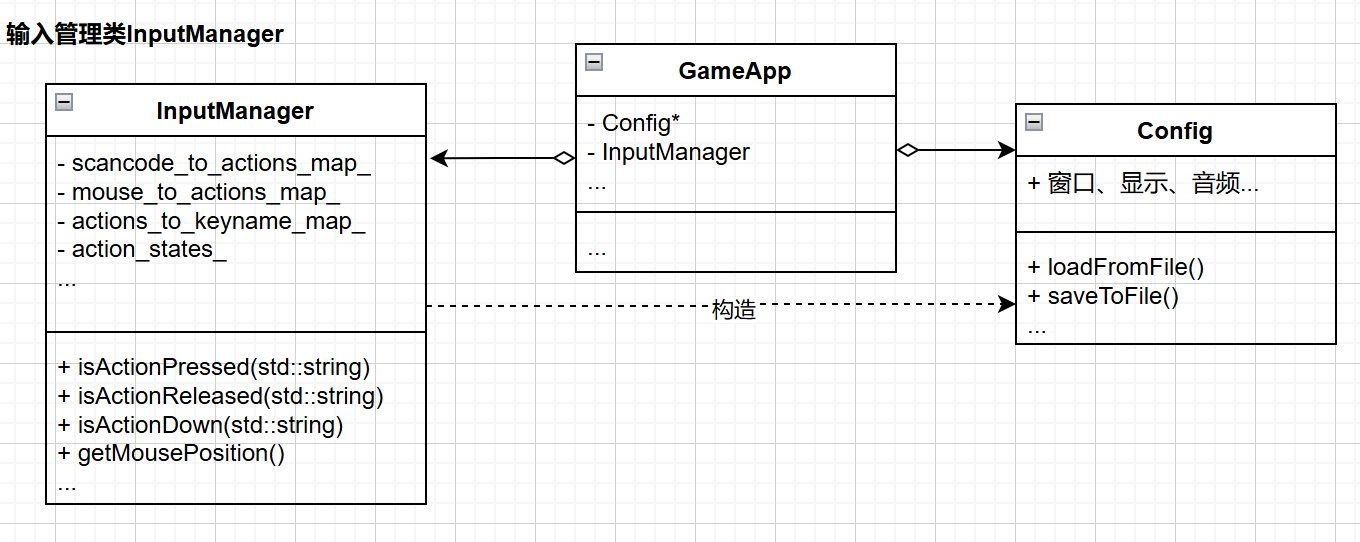
4.集成到GameApp
初始化
//game_app.h
class InputManager;
class GameApp final {
private:
	std::unique_ptr<engine::input::InputManager> input_manager_;
    [[nodiscard]] bool initInputManager();
    void testInputManager();
};

// game_app.cpp

bool GameApp::initInputManager()
{
    try {
        input_manager_ = std::make_unique<engine::input::InputManager>(sdl_renderer_, config_.get());
    } catch (const std::exception& e){
        spdlog::error("初始化InputManager失败: {}", e.what());
        return false;
    }
    return true;
}
bool GameApp::init()
{
    if(!initConfig()) return false;
    if(!initSDL()) return false;
    if(!initTime()) return false;
    if(!initResourceManager()) return false;
    if(!initCamera()) return false;
    if(!initRenderer()) return false;
    if(!initInputManager()) return false;

    testResource();

    spdlog::info("GameApp初始化成功");
    is_running_ = true;
    return true;
}

void GameApp::handleEvents()
{
    if(input_manager_->getShouldQuit())
    {
        spdlog::trace("收到退出请求");
        is_running_ = false;
        return;
    }
    testInputManager();
}

// 更新部分
void GameApp::run()
{
    if(!init()){
        spdlog::error("GameApp初始化失败,无法进行游戏");
        return;
    }

    // 游戏循环
    while(is_running_){
        time_->update();
        float delta_time = time_->getDeltaTime();
        input_manager_->update(); // 更新输入管理器

        handleEvents();
        update(delta_time);
        render();

        //pdlog::info("delta_time: {}", delta_time);
    }
    close();
}

void GameApp::testInputManager()
{
    std::vector<std::string> actions = {
        "move_up",
        "move_down",
        "move_left",
        "move_right",
        "jump",
        "attack",
        "pause",
        "MouseLeftClick",
        "MouseRightClick",
    };

    for(auto& action : actions){
        if(input_manager_->isActionPressed(action)){
            spdlog::info("按下: {}", action);
        }
        if(input_manager_->isActionReleased(action)){
            spdlog::info("释放: {}", action);
        }
        if(input_manager_->isActionDown(action)){
            spdlog::info("持续: {}", action);
        }
    }
}
在GameApp中添加initInputManager(),创建InputManager的实例。GameApp::run()的主循环中handleEvents()时需要先进行input_manager_->update()更新管理器。
事件处理方面,handleEvents()中判断是否退出,现在不需要进行SDL_PollEvent循环,而是直接向InputManager查询。
编译与运行
可以清楚的看到对应动作(按下,持续,释放)。
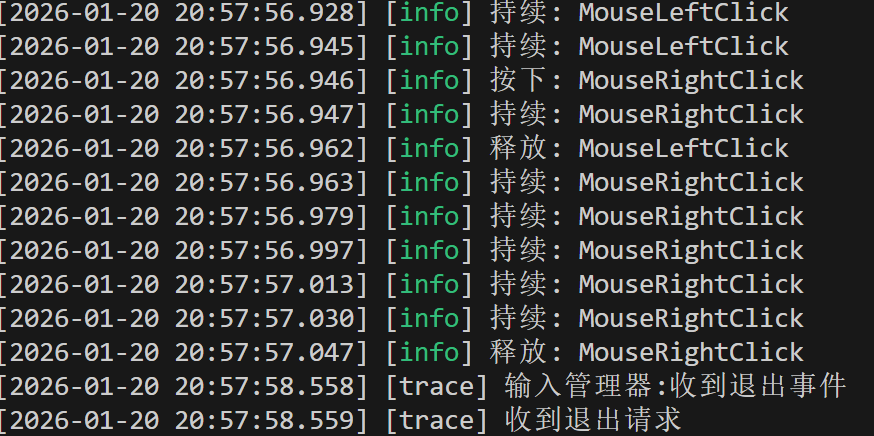
第二步:使用std::variant进行重构
之前我们是采用分别对于按键和鼠标两个不同类型对应抽象动作,这样就有两个独立的映射表处理按键和鼠标输入。
// 需要两个映射列表, 按键到动作的映射, 鼠标按钮到动作的映射
    std::unordered_map<SDL_Scancode, std::vector<std::string>> scancode_to_actions_map_; // 按键到动作的映射
    std::unordered_map<Uint32, std::vector<std::string>> mouse_button_to_actions_map_; // 鼠标按钮到动作的映射
有没有这样的数据类型,可以存多种不同类型的值,来创建一个统一的映射表?
我们可以使用std::variant来实现
#include <variant>
namespace InputManager final {
private:
    std::unordered_map<std::variant<SDL_Scancode,Uint32>, std::vector<std::string>> input_to_actions_map_;
}
关键改动
- 使用
std::variant<SDL_Scancode,Uint32>定义统一的键类型 - 将两个旧的映射表合并为一个
input_to_actions_map_
之后将input_manager.cpp中的旧的映射进行修改
重构后就更灵活易于扩展了,如果需要添加新类型秩序在variant中加就可以,还统一了处理逻辑。
遇到的问题
对于输入管理类中repeat的疑问,本来以为这个变量是多余的,因为第一次按下:KEY_DOWN,is_down=true,repeat=false,而一直按住,有可能操作系统会触发KEY_DOWN,此时 is_down=true,repeat=true,松开:KEY_UP,is_down=false(repeat一般也没意义)。
这个时候updateActionState()函数应该考虑这些,所以传入action、is_down、repeat,我不太希望HOLD_DOWN靠repeat=true来决定,而是通过状态机持续保持,按住不一定会产生 repeat 事件(不同系统/设置/窗口焦点等都可能影响),而 HOLD_DOWN 应该是“你引擎每帧都能稳定得到的状态”。所以在更新的时候遇到repeat = true就return。

 浙公网安备 33010602011771号