
C++游戏开发之旅 2
资源管理模块的创建
需要解决的问题:
- 同一张图片或是音效可能会被多次使用,我们不希望每次都要从硬盘中载入,这会严重影响性能。---避免重复加载
- 手动管理加载到内存中的每一个资源(
SDL_Texture,Mix_Chunk等)既繁琐又容易出错,容易造成内存泄漏,我们需要一个自动释放资源的系统。 ---自动化内存管理 - 引擎的其他部分不关心资源是如何被加载和存储的,只需要一个简单的接口,通过文件名就能获取到所需资。我们现在手头已经搭建了主循环和时间控制。现在,是时候给骨架添加“血肉”了。任何游戏都离不开各种资源:图片、音效、音乐、字体等。一个好的游戏引擎必须要有一个高效、健壮的资源管理系统。---统一接口访问
架构设计:外观模式(Facade)
我们采用外观模式(Facade Pattern)。我们将创建一个ResourceManager类,它为整个资源模块的唯一公共入口。其本身不直接处理加载逻辑,而是将任务委托给内部的三个专业子管理器:
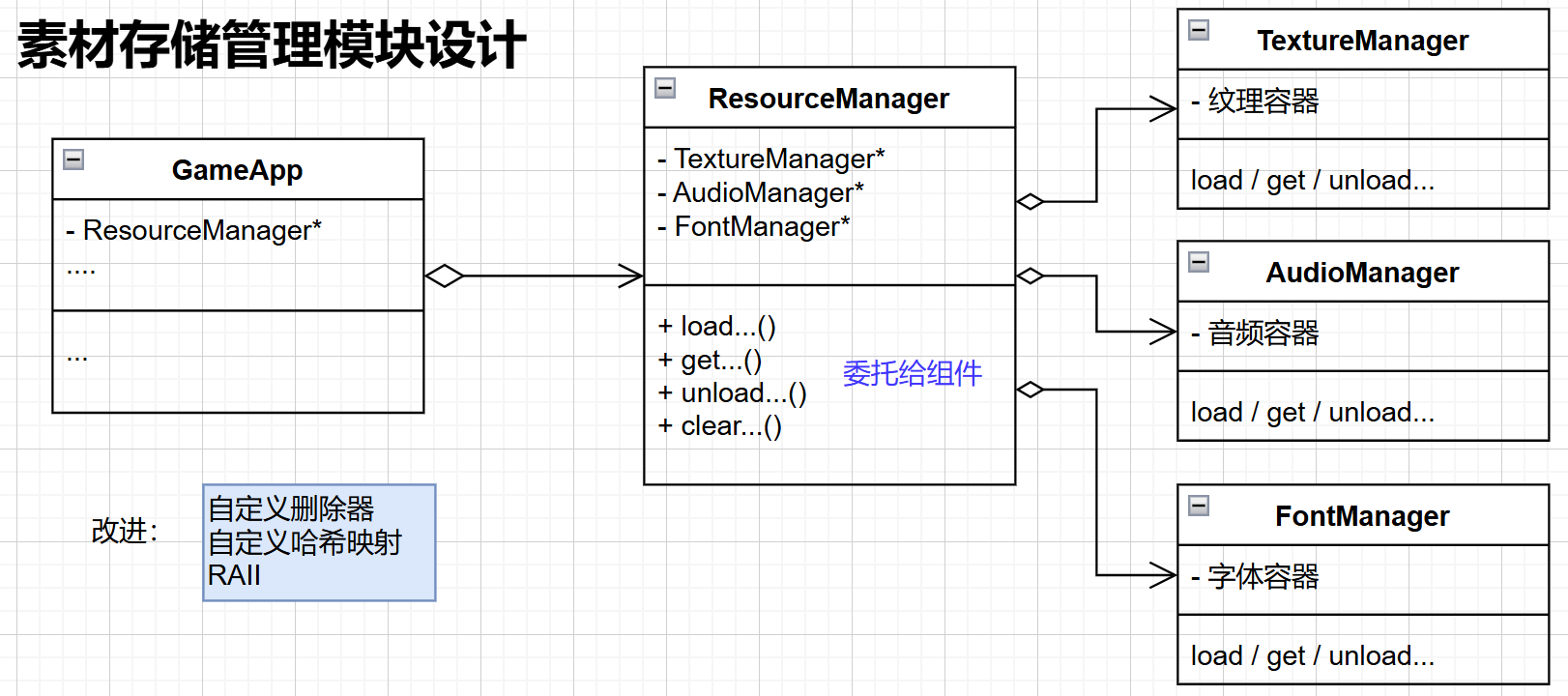
子管理器分工
TextureManager- 负责管理图片纹理(SDL_Texture)AudioManager- 负责管理音效(Mix_Chunk)和背景音乐(Mix_Music)FontManager- 负责管理字体(TTF_Font)
设计优势
客户端代码(如未来的SpriteComponent)只需要与ResourceManager打交道,而无需关心背后复杂的细节实现,从而实现了高度解耦。
项目构建
在src/engine/目录下新建一个resource文件夹,用于存放所有与资源管理相关的代码
核心重点技术:RAII与智能指针自定义删除器
在所有子管理器中,我们使用一个统一且强大的C++特性来自动化内存管理:std::unique_ptr配合自定义删除器(Custom Deleter)。为什么要这样使用?因为智能指针的默认清理delete满足不了需求,所以在析构时,不调用默认的delete,而是执行我们自己的清理逻辑
- 技术原理
SDL库提供的资源(如SDL_Texture*)是C风格的裸指针,需要手动调用对应的销毁函数(如SDL_DestroyTexture)来释放。为了将其纳入C++的RAII(资源获取即初始化)体系,我们这样做:
- 实现步骤
- 为每种SDL资源类型创建一个结构体,其中重载
operator() - 这个操作符接收一个对应类型的裸指针,并在内部调用SDL的销毁函数
- 在
std::unique_ptr的模板参数中,将这个删除器结构体作为第二个参数传入
- 为每种SDL资源类型创建一个结构体,其中重载
e.g
//Texture为例
struct SDLTextureDeleter {
	void operator()(SDL_Texture* texture) const {
		if(texture){
			SDL_DestroyTexture(texture);
		}
	}
};
// 使用
std::unique_ptr<SDL_Texture, SDLTextureDeleter> texture_ptr(raw_sdl_texture);
当texture_ptr离开作用域或被reset()时,它所管理的SDL_Texture就会被自动、安全的销毁。
各个管理器的实现
所有子管理器都遵循一个共同的设计模式:
通用设计模式
- 缓存机制-内部使用
std::unordered_map作为缓存,将资源的文件路径映射到管理该资源的std::unique_ptr。 - 统一接口-提供
get...()方法,该方法首先检查缓存。如果资源已经加载,则直接返回指针;如果未加载,则调用load...()方法从硬盘加载,存入缓存,然后返回指针 - 生命周期管理-构造函数负责初始化对应的SDL子系统(如SDL_mixer,SDL_ttf),并在失败时抛出
std::runtime_error异常。析构函数负责清理资源并关闭子系统。
具体管理器
ResourceManager(外观类)
这个类是所有管理器的“boss”。持有指向各个子管理器的unique_ptr,并将所有外部请求(如getTexture)转发给正确的小弟。
// resourceManager.h
#pragma once
#include <memory> // std::unique_ptr
#include <string> // std::string
#include <glm/glm.hpp>

struct SDL_Texture;
struct SDL_Renderer;
struct Mix_Chunk;
struct Mix_Music;
struct TTF_Font;

namespace engine::resource {

// 向前声明内部管理器
class TextureManager;
class AudioManager;
class FontManager;

class ResourceManager {
private:
    // 使用智能指针管理
    std::unique_ptr<TextureManager> texture_manager_;
    std::unique_ptr<AudioManager> audio_manager_;
    std::unique_ptr<FontManager> font_manager_;

public:
    /**
     * @brief 构造函数,执行初始化
     * @param renderer SDL_Renderer 的指针,传递给需要它的子管理器。不可为nullptr
     */
    explicit ResourceManager(SDL_Renderer* renderer); // 加上explicit防止隐式转换

    ~ResourceManager();  // 前边定义了智能指针,然而使用的却是前向声明的class,智能指针需要知道完整的定义,所以这里需要显式定义

    void clear();  // 清空所有资源

    // 删除拷贝和移动
    ResourceManager(const ResourceManager&) = delete;
    ResourceManager& operator=(const ResourceManager&) = delete;
    ResourceManager(ResourceManager&&) = delete;
    ResourceManager& operator=(ResourceManager&&) = delete;

    // 统一访问接口
    // Texture
    SDL_Texture* loadTexture(const std::string& file_path);  //@brief 载入纹理资源
    SDL_Texture* getTexture(const std::string& file_path);   //@brief 获取纹理资源
    glm::vec2 getTextureSize(const std::string& file_path);  //@brief 获取纹理资源的大小
    void unloadTexture(const std::string& file_path);        //@brief 卸载纹理资源
    void clearTextures();                                   //@brief 清空所有纹理资源

    // Audio - Sound
    Mix_Chunk* loadSound(const std::string& file_path);      //@brief 载入音频资源
    Mix_Chunk* getSound(const std::string& file_path);       //@brief 获取音频资源
    void unloadSound(const std::string& file_path);          //@brief 卸载音频资源
    void clearSounds();                                     //@brief 清空所有音频资源

    // Audio - Music
    Mix_Music* loadMusic(const std::string& file_path);      //@brief 载入音乐资源
    Mix_Music* getMusic(const std::string& file_path);       //@brief 获取音乐资源
    void unloadMusic(const std::string& file_path);          //@brief 卸载音乐资源
    void clearMusic();                                      //@brief 清空所有音乐资源

    // Font
    TTF_Font* loadFont(const std::string& file_path, int size); //@brief 载入字体资源
    TTF_Font* getFont(const std::string& file_path, int size);  //@brief 获取字体资源
    void unloadFont(const std::string& file_path, int size);    //@brief 卸载字体资源
    void clearFonts();                                        //@brief 清空所有字体资源

};

}

// resourceManager.cpp
#include "resource_manager.h"
#include "texture_manager.h"
#include "audio_manager.h"
#include "font_manager.h"
#include "spdlog/spdlog.h"

namespace engine::resource {
    ResourceManager::ResourceManager(SDL_Renderer *renderer)
    {
        texture_manager_ = std::make_unique<TextureManager>(renderer);
        audio_manager_ = std::make_unique<AudioManager>();
        font_manager_ = std::make_unique<FontManager>();

        spdlog::trace("ResourceManager initialized");
        // RAII: 构造成功表示资源管理器可以正常工作,无需再进行初始化,无需检查指针是否为空
    }
    ResourceManager::~ResourceManager() = default;

    void ResourceManager::clear()
    {
        texture_manager_->clearTextures();
        audio_manager_->clearAudio();
        font_manager_->clearFonts();
    }

    // --- TextureManager ---
    SDL_Texture *ResourceManager::loadTexture(const std::string &file_path)
    {
        return texture_manager_->loadTexture(file_path);
    }

    SDL_Texture *ResourceManager::getTexture(const std::string &file_path)
    {
        return texture_manager_->getTexture(file_path);
    }

    glm::vec2 ResourceManager::getTextureSize(const std::string &file_path)
    {
        return texture_manager_->getTextureSize(file_path);
    }

    void ResourceManager::unloadTexture(const std::string &file_path)
    {
        texture_manager_->unloadTexture(file_path);
    }

    void ResourceManager::clearTextures()
    {
        texture_manager_->clearTextures();
    }

    // --- AudioManager - Sound ---
    Mix_Chunk *ResourceManager::loadSound(const std::string &file_path)
    {
        return audio_manager_->loadSound(file_path);
    }

    Mix_Chunk *ResourceManager::getSound(const std::string &file_path)
    {
        return audio_manager_->getSound(file_path);
    }

    void ResourceManager::unloadSound(const std::string &file_path)
    {
        audio_manager_->unloadSound(file_path);
    }

    void ResourceManager::clearSounds()
    {
        audio_manager_->clearSounds();
    }

    // --- AudioManager - Music ---
    Mix_Music *ResourceManager::loadMusic(const std::string &file_path)
    {
        return audio_manager_->loadMusic(file_path);
    }

    Mix_Music *ResourceManager::getMusic(const std::string &file_path)
    {
        return audio_manager_->getMusic(file_path);
    }

    void ResourceManager::unloadMusic(const std::string &file_path)
    {
        audio_manager_->unloadMusic(file_path);
    }

    void ResourceManager::clearMusic()
    {
        audio_manager_->clearMusic();
    }

    // --- Font ---
    TTF_Font *ResourceManager::loadFont(const std::string &file_path, int size)
    {
        return font_manager_->loadFont(file_path, size);
    }

    TTF_Font *ResourceManager::getFont(const std::string &file_path, int size)
    {
        return font_manager_->getFont(file_path, size);
    }

    void ResourceManager::unloadFont(const std::string &file_path, int size)
    {
        font_manager_->unloadFont(file_path, size);
    }

    void ResourceManager::clearFonts()
    {
        font_manager_->clearFonts();
    }
}
TextureManager
最基础的管理器,负责加载SDL_Texture。它需要一个SDL_Renderer指针来创建纹理。
// texture_manager.h
#pragma once
#include <unordered_map>  // std::unordered_map
#include <memory>         // std::unique_ptr
#include <string>         // std::string
#include <glm/glm.hpp>    // glm::vec2
#include <SDL3/SDL_render.h>  // SDL_Texture SDL_Renderer


namespace engine::resource {

class TextureManager final {
    friend class ResourceManager;
private:
    struct SDLTextureDeleter {
        void operator()(SDL_Texture* texture) const {
            if (texture) {
                SDL_DestroyTexture(texture);
            }
        }
    };

    SDL_Renderer* sdl_renderer_ = nullptr;

    std::unordered_map<std::string, std::unique_ptr<SDL_Texture,SDLTextureDeleter>> textures_;

public:
    /**
     * @brief 构造函数,执行初始化
     * @param sdl_renderer SDL渲染器
     * @throws std::runtime_error 如果SDL渲染器为空,则抛出异常
     */
    explicit TextureManager(SDL_Renderer* sdl_renderer);

    // 当前设计,只要一个TextureManager,所以不需要拷贝构造和赋值操作
    TextureManager(const TextureManager&) = delete;
    TextureManager& operator=(const TextureManager&) = delete;
    TextureManager(TextureManager&&) = delete;
    TextureManager& operator=(TextureManager&&) = delete;

private:  // 我们通过设置友元,让ResourceManager可以访问TextureManager的私有成员
    SDL_Texture* loadTexture(const std::string& file_path);  // 加载纹理,如果已经加载过,则直接返回
    SDL_Texture* getTexture(const std::string& file_path);   // 获取纹理,如果未加载过,则先加载
    glm::vec2 getTextureSize(const std::string& file_path); // 获取纹理尺寸
    void unloadTexture(const std::string& file_path);      // 卸载纹理,如果未加载过,则忽略
    void clearTextures(); // 清空所有纹理

};

}

// texture_manager.cpp
#include "texture_manager.h"
#include <SDL3_image/SDL_image.h> // IMG_LoadTexture, IMG_Init, IMG_Quit
#include <spdlog/spdlog.h>
#include <stdexcept>

namespace engine::resource {
    TextureManager::TextureManager(SDL_Renderer *sdl_renderer)
    : sdl_renderer_(sdl_renderer)
    {
        if(!sdl_renderer_){
            throw std::runtime_error("TextureManager 构造失败: sdl_renderer_ 为空");
        }
        // 新版sdl3不需要调用IMG_Init/IMG_Quit
        spdlog::trace("TextureManager 构造成功");
    }

    SDL_Texture *TextureManager::loadTexture(const std::string &file_path)
    {
        // 首先检查是否已经加载过
        auto it = textures_.find(file_path);
        if(it != textures_.end()){
            return it->second.get();
        }
        // 没有加载过,则加载
        auto raw_texture = IMG_LoadTexture(sdl_renderer_, file_path.c_str());
        if(!raw_texture){
            spdlog::error("TextureManager 加载纹理失败->文件路径 {} 异常", file_path);
            return nullptr;
        }
        // 将纹理放入缓存
        textures_.emplace(file_path, std::unique_ptr<SDL_Texture, SDLTextureDeleter>(raw_texture));
        spdlog::debug("TextureManager 加载纹理成功->文件路径 {}", file_path);
        return raw_texture;
    }

    SDL_Texture *TextureManager::getTexture(const std::string &file_path)
    {
        auto it = textures_.find(file_path);
        if(it != textures_.end()){
            return it->second.get();
        }
        // 如果没有找到,则尝试加载
        spdlog::warn("未找到纹理缓存{},尝试加载", file_path);
        return loadTexture(file_path);
    }

    glm::vec2 TextureManager::getTextureSize(const std::string &file_path)
    {
        SDL_Texture* texture = getTexture(file_path);
        if(!texture){
            spdlog::error("获取纹理尺寸失败->文件路径 {} 异常", file_path);
            return glm::vec2(0);
        }
        glm::vec2 size;
        if(!SDL_GetTextureSize(texture, &size.x, &size.y)){
            spdlog::error("虽然获取了,但是不知道为什么获取失败了->文件路径 {} 异常", file_path);
            return glm::vec2(0);
        }
        return size;
    }

    void TextureManager::unloadTexture(const std::string &file_path)
    {
        auto it = textures_.find(file_path);
        if(it != textures_.end()){
            spdlog::debug("卸载纹理{}",file_path);
            textures_.erase(it); // unique_ptr 通过自定义删除器处理删除
        } else {
            spdlog::warn("尝试删除不存在的纹理{}",file_path);
        }
    }

    void TextureManager::clearTextures()
    {
        if(!textures_.empty()){
            spdlog::debug("TextureManager 清空纹理缓存,共{}个",textures_.size());
            textures_.clear();
        }
    }
}
AudioManager
负责初始化SDL_mixer,并分别管理Mix_Chunk(短音效)和Mix_Music(长音乐)两种资源。
//audio_manager.h
#pragma once
#include <memory> // for std::unique_ptr
#include <string> // for std::string
#include <unordered_map> // for std::unordered_map

#include <SDL3_mixer/SDL_mixer.h> // 使用到两种音效,Mix_Chunk(短音效)和Mix_Music(长音乐)


namespace engine::resource {

/**
 * @brief 音频管理器
 * 提供音频资源的加载和缓存。构造失败抛出异常
 * 仅提供 ResourceManager 内部使用
 */
class AudioManager final{
friend class ResourceManager;
private:
    // Mix_Chunk 的自定义删除器
    struct SDLMixChunkDeleter {
        void operator()(Mix_Chunk* chunk) const{
            if(chunk){
                Mix_FreeChunk(chunk);
            }
        }
    };
    // Mix_Music 的自定义删除器
    struct SDLMixMusicDeleter {
        void operator()(Mix_Music* music) const{
            if(music){
                Mix_FreeMusic(music);
            }
        }
    };

    // 音频资源缓存 path + unique_ptr()
    std::unordered_map<std::string, std::unique_ptr<Mix_Chunk, SDLMixChunkDeleter>> sounds_;
    std::unordered_map<std::string, std::unique_ptr<Mix_Music, SDLMixMusicDeleter>> music_;


public:
    /**
     * @brief 构造函数。初始化 SDL_mixer 并打开音频设备
     * @throw std::runtime_error SDL_mixer 初始化失败
     */
    AudioManager();

    ~AudioManager(); // 清理资源并关闭 SDL_mixer  TextureManager 不需要是因为没有IMG_QUIT等需要清理的

    // 禁止拷贝构造和赋值 当前的设计只需要一个 AudioManager
    AudioManager(const AudioManager&) = delete;
    AudioManager& operator=(const AudioManager&) = delete;
    AudioManager(AudioManager&&) = delete;
    AudioManager& operator=(AudioManager&&) = delete;

private: // 仅供 ResourceManager 内部使用
    Mix_Chunk* loadSound(const std::string& path); // 加载音效
    Mix_Chunk* getSound(const std::string& path); // 获取音效
    void unloadSound(const std::string& path); // 卸载音效
    void clearSounds(); // 清理所有音效

    Mix_Music* loadMusic(const std::string& path); // 加载音乐
    Mix_Music* getMusic(const std::string& path); // 获取音乐
    void unloadMusic(const std::string& path); // 卸载音乐
    void clearMusic(); // 清理所有音乐

    void clearAudio(); // 清理所有音频资源
};

}
// audio_manager.cpp
#include "audio_manager.h"
#include <stdexcept>
#include <spdlog/spdlog.h>

namespace engine::resource {
    AudioManager::AudioManager()
    {
        // 使用所需的格式初始化SDL_mixer(OGG、MP3)
        MIX_InitFlags flags = MIX_INIT_OGG | MIX_INIT_MP3;
        if((Mix_Init(flags) & flags) != flags){
            throw std::runtime_error("Failed to initialize audio");
        }

        if(!Mix_OpenAudio(0,nullptr)){
            Mix_Quit(); // 如果打开音频失败,先清理Mix_Init,再给异常
            throw std::runtime_error("Failed to initialize audio");
        }
        spdlog::trace("AduioManager 构造成功");
    }

    AudioManager::~AudioManager()
    {
        // 关闭的时候一般是先停止所有音乐,再清理缓存
        Mix_HaltChannel(-1); //-1 to halt all channels. 音效停止
        Mix_HaltMusic(); // 音乐停止

        // 清理资源映射 (我们使用了智能指针进行了管理, 会调用删除器)
        clearSounds();
        clearMusic();

        // 关闭音频设备
        Mix_CloseAudio();

        // 退出SDL_mixer
        Mix_Quit();
        spdlog::trace("AduioManager 析构成功");
    }

    // --- 音效 ---
    Mix_Chunk *AudioManager::loadSound(const std::string &path)
    {
        // 先检查缓存是否有这个音频
        auto it = sounds_.find(path);
        if(it != sounds_.end()){
            return it->second.get();
        }

        // 如果缓存没有,则加载音频
        spdlog::debug("加载音效: {}", path);
        Mix_Chunk* raw_chunk = Mix_LoadWAV(path.c_str());
        if(!raw_chunk){
            spdlog::error("加载音频失败了{},这是否是个音频文件呢?",path);
            return nullptr;
        }
        // 加载成功
        sounds_.emplace(path, std::unique_ptr<Mix_Chunk, SDLMixChunkDeleter>(raw_chunk));
        spdlog::debug("AudioManager 加载音频成功->文件路径: {}", path);
        return raw_chunk;
    }

    Mix_Chunk *AudioManager::getSound(const std::string &path)
    {
        // 先检查缓存是否有这个音频
        auto it = sounds_.find(path);
        if(it != sounds_.end()){
            return it->second.get();
        }
        // 如果缓存没有,则进行载入
        spdlog::warn("AudioManager 缓存中没有找到音频,尝试加载: {}", path);
        return loadSound(path);
    }

    void AudioManager::unloadSound(const std::string &path)
    {
        auto it = sounds_.find(path);
        if(it != sounds_.end()){
            spdlog::debug("卸载音频: {}", path);
            sounds_.erase(it);
        } else{
            spdlog::warn("尝试删除不存在的音频{}", path);
        }
    }

    void AudioManager::clearSounds()
    {
        if(!sounds_.empty()){
            spdlog::debug("AudioManager 清除共计{}个音频", sounds_.size());
            sounds_.clear();
        }
    }

    // --- 音乐 ---
    Mix_Music *AudioManager::loadMusic(const std::string &path)
    {
        // 先检查缓存是否有这个音频
        auto it = music_.find(path);
        if(it != music_.end()){
            return it->second.get();
        }

        // 如果缓存没有,则加载音频
        spdlog::debug("加载音乐: {}", path);
        Mix_Music* raw_music = Mix_LoadMUS(path.c_str());
        if(!raw_music){
            spdlog::error("加载音乐失败了{},这是否是个音频文件呢?",path);
            return nullptr;
        }
        // 加载成功
        music_.emplace(path, std::unique_ptr<Mix_Music, SDLMixMusicDeleter>(raw_music));
        spdlog::debug("AudioManager 加载音乐成功->文件路径: {}", path);
        return raw_music;
    }

    Mix_Music *AudioManager::getMusic(const std::string &path)
    {
        // 先检查缓存是否有这个音频
        auto it = music_.find(path);
        if(it != music_.end()){
            return it->second.get();
        }
        // 如果缓存没有,则进行载入
        spdlog::warn("AudioManager 缓存中没有找到音乐,尝试加载: {}", path);
        return loadMusic(path);
    }

    void AudioManager::unloadMusic(const std::string &path)
    {
        auto it = music_.find(path);
        if(it != music_.end()){
            spdlog::debug("卸载音乐: {}", path);
            music_.erase(it);
        } else{
            spdlog::warn("尝试删除不存在的音乐{}", path);
        }
    }

    void AudioManager::clearMusic()
    {
        if(!music_.empty()){
            spdlog::debug("AudioManager 清除共计{}个音乐", music_.size());
            music_.clear();
        }
    }

    void AudioManager::clearAudio()
    {
        clearSounds();
        clearMusic();
    }
}
FontManager
负责初始化SDL_ttf。它缓存键(FontKey)比较特别,是一个std::pair<std::string, int>,因为同一个字体文件可以以不同的字号加载,它们是不同资源。由于std::unorder_map不知道如何哈希一个std::pair,我们要提供一个自定义的哈希函数FontkeyHash。
// font_manager.h
#pragma once
#include <memory> // std::unique_ptr
#include <string> // std::string
#include <unordered_map> // std::unordered_map
#include <utility> // std::pair
#include <functional>   // std::hash

#include <SDL3_ttf/SDL_ttf.h>

namespace engine::resource{
// 定义字体键类型(路径+大小) 因为字体路径+大小对应的是不同的资源, 那么怎么存放就成了一个问题
using FontKey = std::pair<std::string, int>;  // std::pair 是标准库中的一个类模板,用于将两个值组合成一个单元

// FontKey 的自定义哈希函数 std::pair<string, int>,用于 std::unordered_map
struct FontKeyHash {
    std::size_t operator()(const FontKey& key) const {
        std::hash<std::string> string_hasher; // 使用 std::hash 对 string 进行哈希
        std::hash<int> int_hasher; // 使用 std::hash 对 int 进行哈希
        return string_hasher(key.first) ^ int_hasher(key.second); // 使用异或运算组合两个哈希值
    }
};

/**
 * @brief 管理 SDL_ttf 字体资源(TTF_Font)。
 *
 * 提供字体的加载和缓存功能,通过文件路径和大小标识
 * 构造失败抛出异常。仅供 ResourceManager 使用。
 */
class FontManager final{
    friend class ResourceManager;
private:
    // TTF_Font 自定义删除器
    struct SDLFontDeleter {
        void operator()(TTF_Font* font) const {
            if(font){
                TTF_CloseFont(font);
            }
        }
    };
    // 字体资源缓存
    // 字体存储(FontKey->TTF_Font)
    // unordered_map 的键需要能转换为哈希值,对于基础数据类型,系统会自动转换
    // 但对于自定义类型(系统无法自动转换),需要自定义哈希函数
    std::unordered_map<FontKey, std::unique_ptr<TTF_Font, SDLFontDeleter>, FontKeyHash> fonts_;
public:
    /**
     * @brief 构造函数,初始化字体管理器。需要SDL_ttf
     * @throws std::runtime_error 如果 SDL_ttf 初始化失败
     */
    FontManager();
    ~FontManager(); // 析构函数,释放所有字体资源 SDL_ttf

    // 当前设计只要一个FontManager,所以不提供拷贝构造和赋值操作符
    FontManager(const FontManager&) = delete;
    FontManager& operator=(const FontManager&) = delete;
    FontManager(FontManager&&) = delete;
    FontManager& operator=(FontManager&&) = delete;

private: // 供 ResourceManager 使用
    TTF_Font* loadFont(const std::string& path, int size); // 加载字体资源 (路径+大小)
    TTF_Font* getFont(const std::string& path, int size); // 获取字体资源 (路径+大小)
    void unloadFont(const std::string& path, int size); // 卸载字体资源 (路径+大小)
    void clearFonts(); // 清空所有字体资源

};


}
// font_manager.cpp
#include "font_manager.h"
#include <spdlog/spdlog.h>
#include <stdexcept>

namespace engine::resource {
    FontManager::FontManager()
    {
        if(!TTF_WasInit() && !TTF_Init()){
            throw std::runtime_error("Failed to initialize SDL_ttf");
        }
        spdlog::trace("FontManager 构造成功");
    }

    FontManager::~FontManager()
    {
        clearFonts();

        TTF_Quit();
        spdlog::trace("FontManager 析构成功");
    }

    TTF_Font *FontManager::loadFont(const std::string &path, int size)
    {
        // 大小检查
        if (size <= 0) {
            spdlog::error("字体无法加载{}, 无效的点大小{}", path, size);
            return nullptr;
        }

        // 先检查是否已经加载过该字体
        FontKey key = {path, size};
        auto it = fonts_.find(key);
        if (it != fonts_.end()) {
            return it->second.get();
        }

        // 如果没有加载过,则加载字体
        spdlog::debug("加载字体: {}, {}",path,size);
        TTF_Font* raw_font = TTF_OpenFont(path.c_str(), size);
        if (!raw_font) {
            spdlog::error("Failed to load font: {}", path);
            return nullptr;
        }

        // 将字体添加到字体映射中
        fonts_.emplace(key, std::unique_ptr<TTF_Font, SDLFontDeleter>(raw_font));
        spdlog::debug("字体加载成功: {}, {}",path,size);
        return raw_font;
    }

    TTF_Font *FontManager::getFont(const std::string &path, int size)
    {
        FontKey key = {path, size};
        auto it = fonts_.find(key);
        if (it != fonts_.end()) {
            return it->second.get();
        }

        spdlog::error("字体未加载: {}, {}, 尝试加载", path, size);
        return loadFont(path, size);
    }

    void FontManager::unloadFont(const std::string &path, int size)
    {
        FontKey key = {path, size};
        if(fonts_.find(key) != fonts_.end()){
            spdlog::debug("卸载字体: {}, {}", path, size);
            fonts_.erase(key);
        } else {
            spdlog::warn("尝试卸载了一个没有加载过的字体: {}, {}", path, size);
        }
    }

    void FontManager::clearFonts()
    {
        if(!fonts_.empty()){
            spdlog::debug("卸载所有字体,共{}个", fonts_.size());
            fonts_.clear();
        }
    }
}
集成到GameApp
现在我们给这个ResourceManager集成到GameApp中。
// game_app.h
// ...
namespace engine::resource {
class ResourceManager;
}

class GameApp final {
    //...
    std::unique_ptr<engine::resource::ResourceManager> resource_manager_;
private:
    // 分各个模块初始化,在 init()中调用
    [[nodiscard]] bool init();

    [[nodiscard]] bool initSDL();
    [[nodiscard]] bool initTime();
    [[nodiscard]] bool initResourceManager();
}
// game_app.cpp
//...
bool GameApp::init()
    {
        if(!initSDL()) return false;
        if(!initTime()) return false;
        if(!initResourceManager()) return false;

        spdlog::info("GameApp初始化成功");
        is_running_ = true;
        return true;
    }

    bool GameApp::initSDL()
    {
        // SDL初始化
        if(!SDL_Init(SDL_INIT_VIDEO | SDL_INIT_AUDIO)){
            spdlog::error("SDL初始化失败");
            return false;
        }
        window_ = SDL_CreateWindow("SunnyLand", 1280, 720, SDL_WINDOW_RESIZABLE);
        if(!window_){
            spdlog::error("SDL窗口创建失败");
            return false;
        }
        sdl_renderer_ = SDL_CreateRenderer(window_, nullptr);
        if(!sdl_renderer_){
            spdlog::error("SDL渲染器创建失败");
            return false;
        }

        spdlog::trace("SDL初始化成功");
        return true;
    }

    bool GameApp::initTime()
    {
        try {
            time_ = std::make_unique<Time>();
        }catch (const std::exception& e){
            spdlog::error("初始化Time失败: {}", e.what());
            return false;
        }
        spdlog::trace("初始化Time成功");
        return true;
    }

    bool GameApp::initResourceManager()
    {
        try {
            resource_manager_ = std::make_unique<engine::resource::ResourceManager>(sdl_renderer_);
        } catch (const std::exception& e){
            spdlog::error("初始化ResourceManager失败: {}", e.what());
            return false;
        }
        return true;
    }

	void GameApp::close()
    {
        // 手动提前清空资源
        resource_manager_.reset();

        if(sdl_renderer_){
            SDL_DestroyRenderer(sdl_renderer_);
            sdl_renderer_ = nullptr;
        }
        if(window_){
            SDL_DestroyWindow(window_);
            window_ = nullptr;
        }
        SDL_Quit();
        is_running_ = false;

    }
重构init()
原init()函数较为臃肿,我们将其拆分为initSDL(),initTime(),initResourceManager等多个独立的初始化函数,使逻辑更加清晰。
创建ResourceManager实例
在GameApp中增加一个std::unique_ptr<ResourceManager>成员,并在initResourceManager()中创建它的实例。创建过程在try-catch块中,以捕获任何可能在初始化过程中抛出异常。
确保正确的销毁顺序
在GameApp::close()中,我们必须在关闭SDL子系统之前先销毁资源管理器。因此,我们手动调用resource_manager_.reset()来确保所有unique_ptr管理的资源(纹理、音频等)被正确释放。
添加测试代码
在GameApp中加一个testResource()函数,并在初始化成功后调用,这个函数会尝试加载和卸载各种类型资源,以验证新模块是否正常工作。
void GameApp::testResource()
    {
        resource_manager_->getTexture("assets/textures/Items/gem.png");
        resource_manager_->getFont("assets/fonts/VonwaonBitmap-16px.ttf", 16);
        resource_manager_->getSound("assets/audio/button_click.wav");

        resource_manager_->unloadTexture("assets/textures/Items/gem.png");
        resource_manager_->unloadFont("assets/fonts/VonwaonBitmap-16px.ttf", 16);
        resource_manager_->unloadSound("assets/audio/button_click.wav");

    }
遇到的问题
这里在编完代码后发现了一个问题,就是无法载入资源,最后发现是我cmake设置的问题

build后生成的exe文件在根目录下,这样可以确保相对路径访问到的assets正确,点需要注意。

 浙公网安备 33010602011771号