

IValueConverter转换器
定义转换器需要实现IValueConverter接口,例如我们根据数字(3,2,1)返回不同的爵位(公,侯,伯)
public class MyConverter : IValueConverter
{
    public object Convert(object value, Type targetType, object parameter, CultureInfo culture)
    {
        if (value is int level)
        {
            if (level == 1)
                return "伯爵";
            if (level == 2)
                return "侯爵";
            if (level == 3)
                return "公爵";
        }
        return "未知等级";
    }

    public object ConvertBack(object value, Type targetType, object parameter, CultureInfo culture)
    {
        throw new NotImplementedException();
    }
}
在 App.xaml 中注册为资源,打开 App.xaml,在 <Application.Resources> 中添加:
<Application x:Class="WpfApp1.App"
             xmlns="http://schemas.microsoft.com/winfx/2006/xaml/presentation"
             xmlns:x="http://schemas.microsoft.com/winfx/2006/xaml"
             xmlns:local="clr-namespace:WpfApp1"
             StartupUri="MainWindow.xaml">
    <Application.Resources>
        <local:MyConverter x:Key="MyConverter" />
    </Application.Resources>
</Application>
在代码中获取资源,你可以在任何地方通过 Application.Current.Resources 获取它:
MyConverter cvt = (MyConverter)Application.Current.FindResource("MyConverter");
string lvStr = (string)cvt.Convert(2, typeof(int), null, null);
Debug.WriteLine(lvStr);//输出侯爵,因为传入level为2
使用转换器
ConvertView.xaml
<Window x:Class="WpfApp1.ConvetView"
        xmlns="http://schemas.microsoft.com/winfx/2006/xaml/presentation"
        xmlns:x="http://schemas.microsoft.com/winfx/2006/xaml"
        xmlns:d="http://schemas.microsoft.com/expression/blend/2008"
        xmlns:mc="http://schemas.openxmlformats.org/markup-compatibility/2006"
        xmlns:local="clr-namespace:WpfApp1"
        mc:Ignorable="d"
        Title="ConvetView" Height="450" Width="800">
    <Grid>
        <TextBlock Text="{Binding Level,Converter={StaticResource MyConverter}}"></TextBlock>
    </Grid>
</Window>
ConvertView.xaml.cs
using System;
using System.Collections.Generic;
using System.Linq;
using System.Text;
using System.Threading.Tasks;
using System.Windows;
using System.Windows.Controls;
using System.Windows.Data;
using System.Windows.Documents;
using System.Windows.Input;
using System.Windows.Media;
using System.Windows.Media.Imaging;
using System.Windows.Shapes;

namespace WpfApp1
{
    /// <summary>
    /// ConvetView.xaml 的交互逻辑
    /// </summary>
    public partial class ConvetView : Window
    {
        public ConvetView()
        {
            InitializeComponent();
            DataContext = new ConvertViewModel();
        }
    }
}
ConvertViewModel.cs
using System;
using System.Collections.Generic;
using System.ComponentModel;
using System.Linq;
using System.Runtime.CompilerServices;
using System.Text;
using System.Threading.Tasks;
using System.Windows.Data;

namespace WpfApp1
{
    public class ConvertViewModel : INotifyPropertyChanged
    {
        public event PropertyChangedEventHandler? PropertyChanged;
        public void OnPropertyChanged([CallerMemberName] string propertyName = "")
        {
            PropertyChanged?.Invoke(this, new PropertyChangedEventArgs(propertyName));
        }
        public ConvertViewModel()
        {
            Level = 3;
        }
        private int _level;
        public int Level
        {
            get => _level;
            set
            {
                if (_level != value)
                {
                    _level = value;
                    OnPropertyChanged();
                }
            }
        }

    }
}
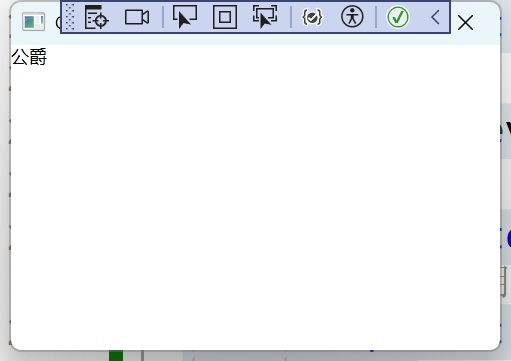
效果,level为3,显示公爵

 浙公网安备 33010602011771号