

12.IO详解-狂神
待更新。。。
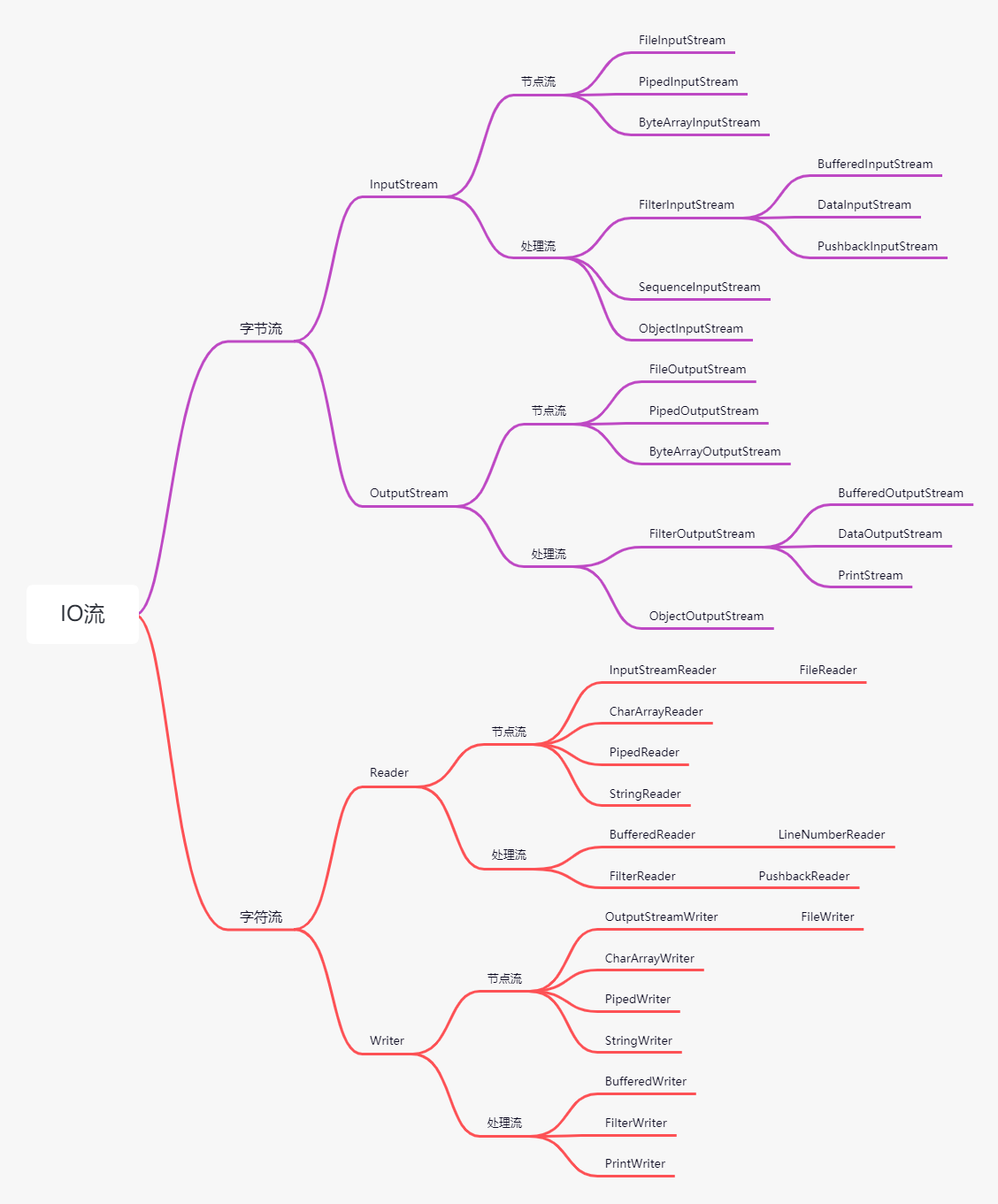
流的分类
- 按照方向
- 输入流(将存储设备中的内容读入到内存中)
- 输出流(将内存中的内容写入到存储设备中)
- 按单位
- 字节流(以字节为单位,可以读写所有数据)
- 字符流(以字符为单位,只能读写文本数据)
- 按功能
- 节点流(具有实际传输数据的读写功能)
- 过滤流(在节点流的基础上增强功能)
字节流
InputStream
public abstract class InputStream implements Closeable{
    //...
    public abstract int read() throws IOException;
    //...
    public int read(byte b[]) throws IOException {
        return read(b, 0, b.length);
    }
    //...
    public int read(byte b[], int off, int len) throws IOException {
        //...
    }
    public void close() throws IOException {}
    //...
}
OutputStream
public abstract class OutputStream implements Closeable, Flushable {
    //...
    public abstract void write(int b) throws IOException;
    //...
    public void write(byte b[]) throws IOException {
        write(b, 0, b.length);
    }
    public void write(byte b[], int off, int len) throws IOException {
        //...
    }
    //...
    public void flush() throws IOException {
    }
    //...
    public void close() throws IOException {
    }
    //...
}
FileInputStream
//看jdk文档  https://www.matools.com/api/java8
public class FileInputStream extends InputStream {
}
public static void main(String[] args) {
    //try-with-resources 关闭流
    try(InputStream in = new FileInputStream("C:\\Users\\ZHAYUYAO\\Desktop\\test.txt")) {
        byte[] buffer = new byte[1024];
        int count;
        StringBuilder sb = new StringBuilder();
        //可能存在中文乱码的问题
        while ((count = in.read(buffer)) != -1) {
            sb.append(new String(buffer,0, count));
        }
        System.out.println(sb.toString());
    } catch (FileNotFoundException e) {
        e.printStackTrace();
    } catch (IOException e) {
        e.printStackTrace();
    }
}
FileOutputStream
//看jdk文档  https://www.matools.com/api/java8
public class FileOutputStream extends OutputStream {
}
public static void main(String[] args) {
    try(FileOutputStream fileOutputStream = new FileOutputStream("C:\\Users\\ZHAYUYAO\\Desktop\\out.txt")) {
        String str = "Hello FileOutputStream...";
        fileOutputStream.write(str.getBytes());
        System.out.println("写文件成功!");
    } catch (FileNotFoundException e) {
        e.printStackTrace();
    } catch (IOException e) {
        e.printStackTrace();
    }
}
复制文件
public static void main(String[] args) {
    try (InputStream in = new FileInputStream("C:\\Users\\ZHAYUYAO\\Desktop\\一点没浪费全接住了.gif");
         OutputStream out = new FileOutputStream("C:\\Users\\ZHAYUYAO\\Desktop\\copy.gif")
        ) {
        byte[] buffer = new byte[1024];
        int count;
        while ((count = in.read(buffer)) != -1) {
            out.write(buffer, 0, count);
        }
        out.flush();
        System.out.println("复制成功");
    } catch (FileNotFoundException e) {
        e.printStackTrace();
    } catch (IOException e) {
        e.printStackTrace();
    }
}
BufferedInputStream
public static void main(String[] args) {
    try (BufferedInputStream bis = new BufferedInputStream(new FileInputStream("C:\\Users\\ZHAYUYAO\\Desktop\\test.txt"))) {
        byte[] buf = new byte[1024];
        int count = 0;
        StringBuilder sb = new StringBuilder();
        while ((count = bis.read(buf)) != -1) {
            sb.append(new String(buf, 0, count));
        }
        System.out.println(sb.toString());
    } catch (FileNotFoundException e) {
        e.printStackTrace();
    } catch (IOException e) {
        e.printStackTrace();
    }
}
BufferedOutputStream
public static void main(String[] args) {
    try(BufferedOutputStream bos = new BufferedOutputStream(new FileOutputStream("C:\\Users\\ZHAYUYAO\\Desktop\\buf.txt"))) {
        String str = "hello\n";
        for (int i = 0; i < 10; i++) {
            bos.write(str.getBytes());
        }
        bos.flush();
        System.out.println("文件已生成!");
    } catch (FileNotFoundException e) {
        e.printStackTrace();
    } catch (IOException e) {
        e.printStackTrace();
    }
}
对象流
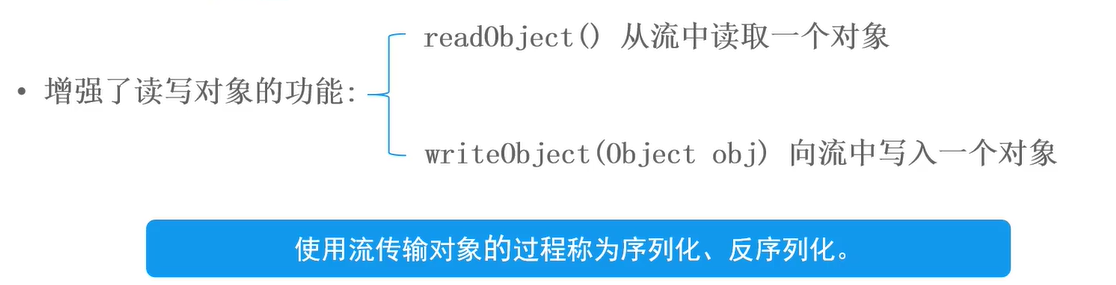
ObjectOutputStream
public class Student implements Serializable {
    private static final long serialVersionUID = 1L;
    private String name;
    private int age;
    private Address address;
    /**
     * transient修饰,不会被序列化
     */
    private transient String birthday;

    /**
     * 静态属性也不能被序列化
     */
    private static String country = "China";

    public Student(String name, int age, Address address, String birthday) {
        this.name = name;
        this.age = age;
        this.address = address;
        this.birthday = birthday;
    }

    public String getName() {
        return name;
    }

    public void setName(String name) {
        this.name = name;
    }

    public int getAge() {
        return age;
    }

    public void setAge(int age) {
        this.age = age;
    }

    public Address getAddress() {
        return address;
    }

    public void setAddress(Address address) {
        this.address = address;
    }

    public String getBirthday() {
        return birthday;
    }

    public void setBirthday(String birthday) {
        this.birthday = birthday;
    }

    @Override
    public String toString() {
        return "Student{" +
                "name='" + name + '\'' +
                ", age=" + age +
                ", address=" + address +
                ", birthday='" + birthday + '\'' +
                '}';
    }
}
public class Address implements Serializable {
    private static final long serialVersionUID = 1L;
    private String province;
    private String city;

    public Address(String province, String city) {
        this.province = province;
        this.city = city;
    }

    public String getProvince() {
        return province;
    }

    public void setProvince(String province) {
        this.province = province;
    }

    public String getCity() {
        return city;
    }

    public void setCity(String city) {
        this.city = city;
    }

    @Override
    public String toString() {
        return "Address{" +
                "province='" + province + '\'' +
                ", city='" + city + '\'' +
                '}';
    }
}
public static void main(String[] args) {
    try (ObjectOutputStream oos = new ObjectOutputStream(new FileOutputStream("C:\\Users\\ZHAYUYAO\\Desktop\\stu.bin"))) {
        Student zhangsan = new Student("zhangsan", 12, new Address("广东省", "深圳市"), "1993-12-12");
        oos.writeObject(zhangsan);
        oos.flush();
        System.out.println("文件生成成功");
    } catch (IOException e) {
        e.printStackTrace();
    }
}
ObjectInputStream
public static void main(String[] args) {
    try(ObjectInputStream ois = new ObjectInputStream(new FileInputStream("C:\\Users\\ZHAYUYAO\\Desktop\\stu.bin"))) {
        Student student = (Student) ois.readObject();
        System.out.println(student.toString());
    } catch (IOException e) {
        e.printStackTrace();
    } catch (ClassNotFoundException e) {
        e.printStackTrace();
    }
}
注意事项
- 序列化类必须要实现Serializable接口
- 序列化类中对象属性也要求实现Serializable接口
- 序列化版本号serialVersionUID,保证序列化的类和反序列化的类是同一个类
- 使用transient(瞬间的)修饰属性,这个属性就不能被序列化
- 静态属性也不能被序列化
- 序列化多个对象,可以借助集合(ArrayList)实现
字符流
FileReader
public static void main(String[] args) {
    try (FileReader fileReader = new FileReader("C:\\Users\\ZHAYUYAO\\Desktop\\test.txt")) {
        char[] buf = new char[1024];
        int count = 0;
        StringBuilder sb = new StringBuilder();
        while ((count = fileReader.read(buf)) != -1) {
            sb.append(new String(buf, 0, count));
        }
        System.out.println(sb.toString());
    } catch (FileNotFoundException e) {
        e.printStackTrace();
    } catch (IOException e) {
        e.printStackTrace();
    }
}
FileWrite
public static void main(String[] args) {
    try (FileReader fileReader = new FileReader("C:\\Users\\ZHAYUYAO\\Desktop\\test.txt");
         FileWriter fileWriter = new FileWriter("C:\\Users\\ZHAYUYAO\\Desktop\\write.txt")) {
        char[] buf = new char[1024];
        int count = 0;
        while ((count = fileReader.read(buf)) != -1) {
            fileWriter.write(buf, 0, count);
        }
        System.out.println("复制完毕!");
    } catch (FileNotFoundException e) {
        e.printStackTrace();
    } catch (IOException e) {
        e.printStackTrace();
    }
}
字符缓冲流
BufferedReader
BufferedWrite
public static void main(String[] args) {
    //先写一个文件
    try(BufferedWriter bufferedWriter = new BufferedWriter(new FileWriter("C:\\Users\\ZHAYUYAO\\Desktop\\zyyBuf.txt"))) {
        String str = "好好学习,天天向上";
        for (int i = 0; i < 10; i++) {
            bufferedWriter.write(str.toCharArray());
            bufferedWriter.newLine();
        }
        bufferedWriter.flush();
    } catch (IOException e) {
        e.printStackTrace();
    }
    System.out.println("文件生成成功!");
    //将文件的内容打印到控制台上
    try(BufferedReader bufferedReader = new BufferedReader(new FileReader("C:\\Users\\ZHAYUYAO\\Desktop\\zyyBuf.txt"))) {
        StringBuilder sb = new StringBuilder();
        String str = null;
        while((str = bufferedReader.readLine())!= null) {
            sb.append(str);
            sb.append("\r\n");
        }
        System.out.println(sb.toString());
    } catch (FileNotFoundException e) {
        e.printStackTrace();
    } catch (IOException e) {
        e.printStackTrace();
    }
}
打印流
PrintWriter
public static void main(String[] args) {
    try(PrintWriter writer = new PrintWriter("C:\\Users\\ZHAYUYAO\\Desktop\\test.txt")) {
        writer.println(97);
        writer.println(true);
        writer.println(3.14);
        writer.println("啊哈哈");
        writer.println('a');
        writer.flush();
        System.out.println("打印完毕!");
    } catch (FileNotFoundException e) {
        e.printStackTrace();
    }
}
转换流
InputStreamReader
OutputStreamWriter
public static void main(String[] args) {
    //先写一个文件
    try (OutputStreamWriter osw = new OutputStreamWriter(new FileOutputStream("C:\\Users\\ZHAYUYAO\\Desktop\\zyy.txt"), "UTF-8")) {
        String str = "我爱学习!\r\n";
        for (int i = 0; i < 10; i++) {
            osw.write(str);
        }
        osw.flush();
    } catch (UnsupportedEncodingException e) {
        e.printStackTrace();
    } catch (FileNotFoundException e) {
        e.printStackTrace();
    } catch (IOException e) {
        e.printStackTrace();
    }
    System.out.println("文件生成成功!");
    //然后读取这个文件的内容
    try (InputStreamReader osw = new InputStreamReader(new FileInputStream("C:\\Users\\ZHAYUYAO\\Desktop\\zyy.txt"), "UTF-8")) {
        char[] chars = new char[1024];
        int count = 0;
        StringBuilder sb = new StringBuilder();
        while ((count = osw.read(chars)) != -1) {
            sb.append(new String(chars, 0, count));
        }
        System.out.println(sb.toString());
    } catch (FileNotFoundException e) {
        e.printStackTrace();
    } catch (IOException e) {
        e.printStackTrace();
    }

}

 浙公网安备 33010602011771号